

Descripción
🏆 Highly rated WooCommerce coupon plugin for BOGO deals, store credit, URL coupons & smart coupon rules.
Trusted by 20,000+ store owners with 180+ reviews. It’s the free plugin that makes your WooCommerce coupons better.
The best WooCommerce Coupons plugin for BOGO, store credit, url coupons + more!
Every store owner deserves to have the best coupon features – it’s the key to marketing your store better!
That’s why we built this 100% free Advanced Coupons plugin so you can get features like BOGO coupons, url coupons, cart conditions, coupon role restrictions, store credit, and more totally free.
ADVANCED COUPONS – EL PLUGIN GRATUITO DE CUPONES PARA WOOCOMMERCE
Advanced Coupons for WooCommerce (Free Version) gives you extra features on your WooCommerce coupons so they can market your store better.
FREE SMART WOOCOMMERCE COUPON FEATURES
Mejoramos los cupones de WooCommerce para que puedas:
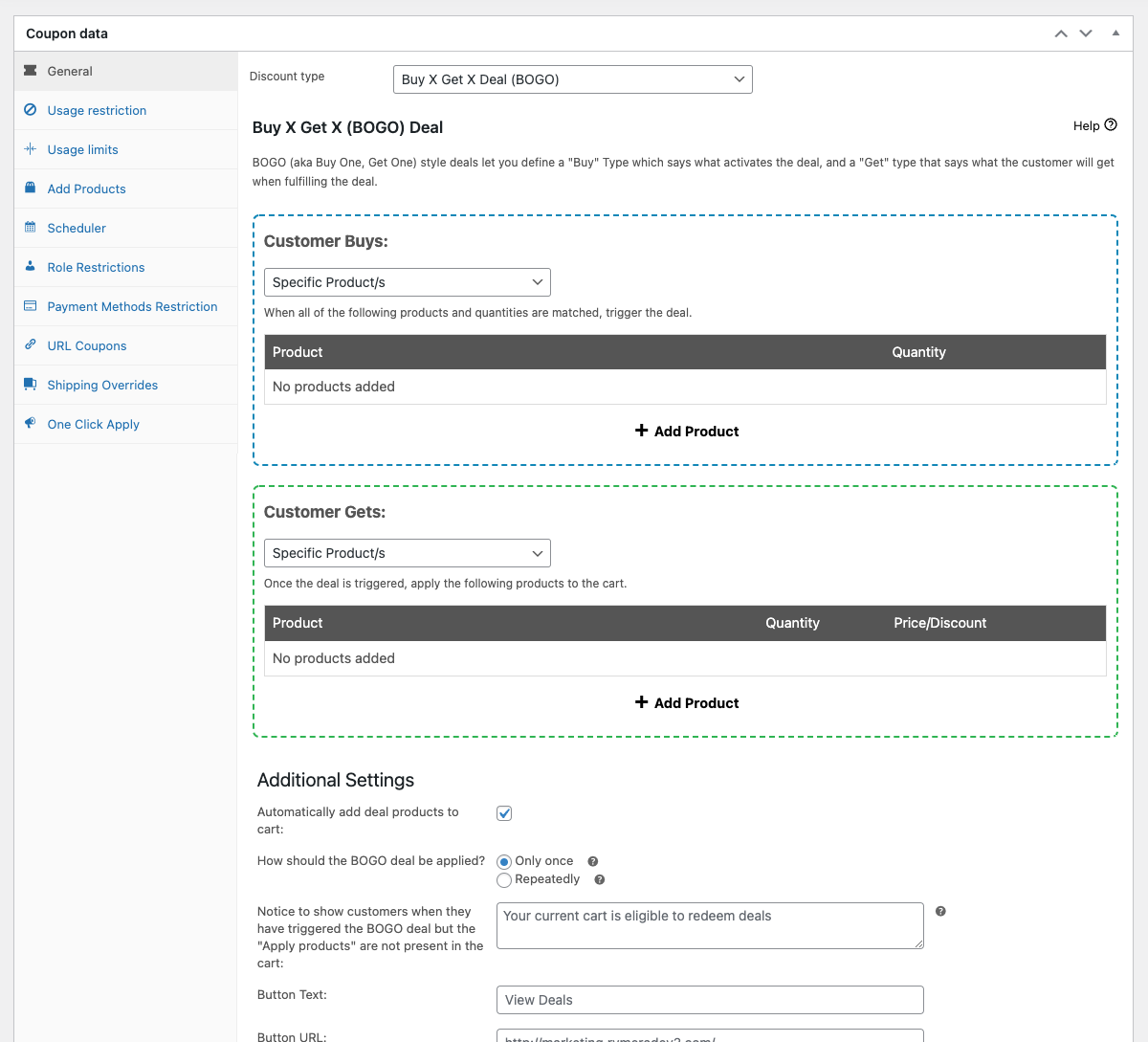
- Run WooCommerce BOGO deals (adds a new BOGO coupon type)
- Protect against accidental discounts via Cart Conditions (coupon rules)
- Grant customers WooCommerce store credit to use for future purchases
- Create coupons quickly with 100’s of coupon templates
- Reembolsar pedidos a crédito de tienda para ayudar a retener clientes
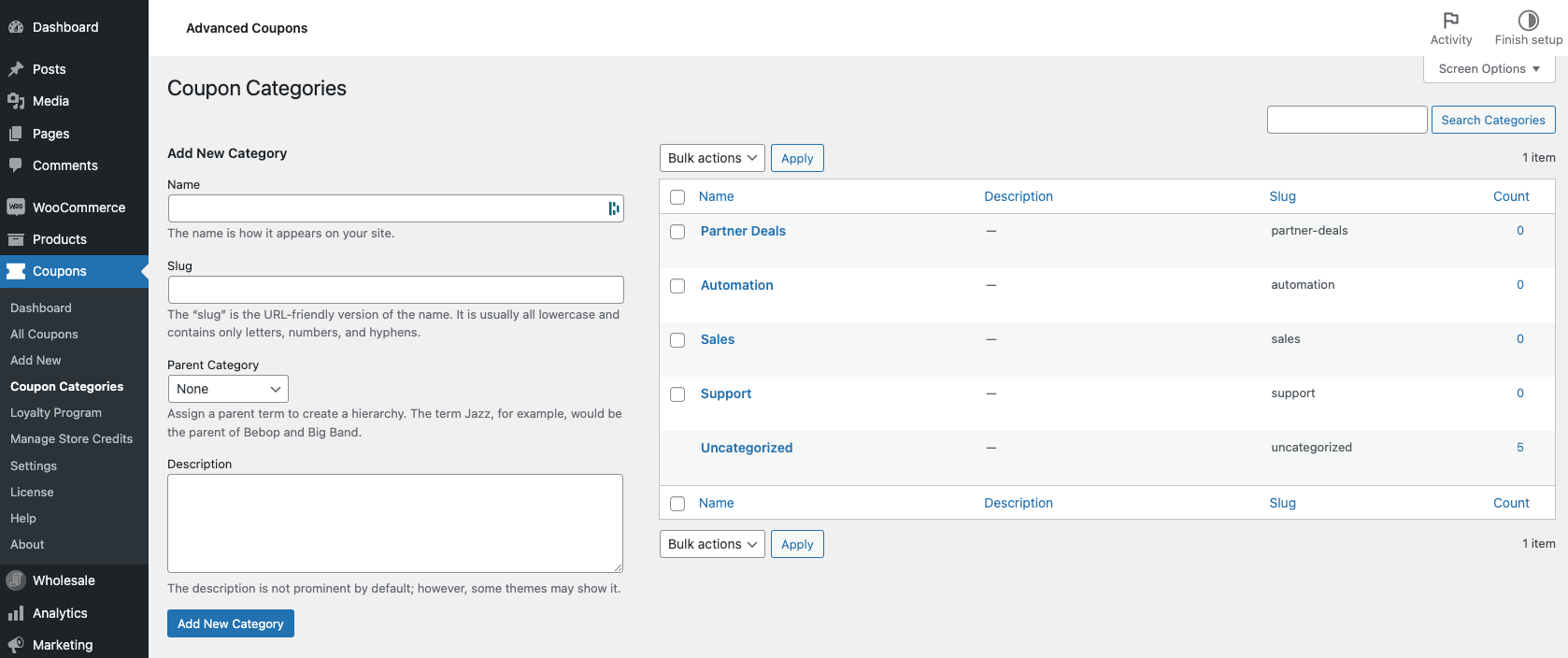
- Organiza tus cupones de WooCommerce con categorías de cupones
- Apply WooCommerce coupons with a URL easily (adds coupon URL capabilities)
- Restrict WooCommerce coupons by user role
- Mostrar cupones de WooCommerce en el cuadro de vista previa rápida del pedido
- Send coupons quickly via email or push notifications
EXTENSIÓN PREMIUM DE ADVANCED COUPONS
Este plugin es la versión gratuita del plugin Advanced Coupons Premium, que tiene muy buenas valoraciones. Si quieres funciones de cupones más completas, ¡la versión premium añade AÚN MÁS a tus cupones de WooCommerce!Haz clic aquí para comparar características y comprar el Extensión Advanced Coupons for WooCommerce Premium.
Learn more about our FREE VERSION coupon features:
Ofertas de cupones BOGO de WooCommerce
Cupones BOGO de WooCommerce, otherwise known as Buy One Get One coupon deals, are VERY common in the offline world. So why can’t you run those kinds of deals on your WooCommerce store as well?!
Now you can – Advanced Coupons WooCommerce BOGO coupon type let you easily run a Buy One Get One deal on your store.
Es un tipo de cupón de WooCommerce mucho más flexible en comparación con los descuentos directos y a tus clientes les encantará. También es mucho más rentable para tu tienda en comparación con los cupones de descuento estándar (sigue leyendo).
Protect Your Profits With Cart Conditions (Smart Coupon Rules)
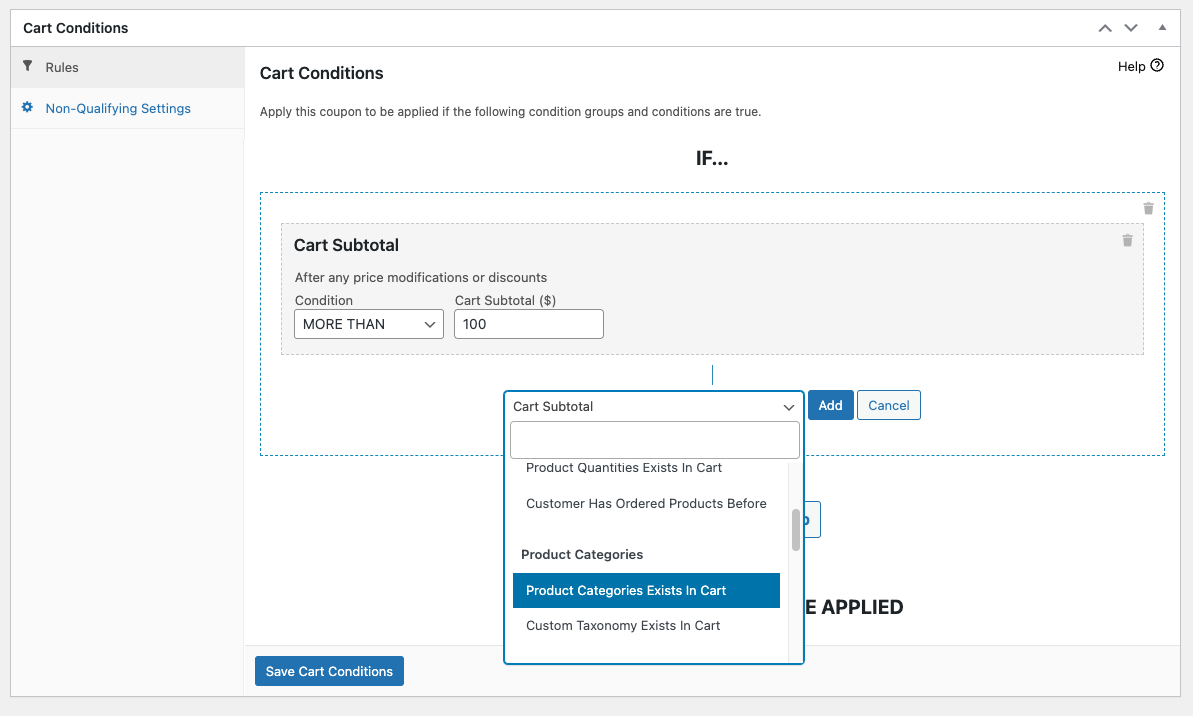
WooCommerce coupon misuse is a huge problem for store owners worldwide. Smart store owners are using coupon rules, what we call «Cart Conditions», to reduce this significantly. By setting the right conditions on your WooCommerce coupons you can control exactly when they are allowed to be used.
Por ejemplo:
* Aplicar un cupón solo cuando haya productos de una categoría específica en el carrito
* Aplicar un cupón solo después de haber alcanzado un subtotal
* Aplicar un cupón solo cuando un producto específico esté en el carrito en una cantidad específica
* Aplicar un cupón solo en su primer uso (¡verificar que su gasto total sea cero!)
And there’s dozens more! You can also combine and mix and match cart conditions to create more specific coupon rules.
WooCommerce Store Credit
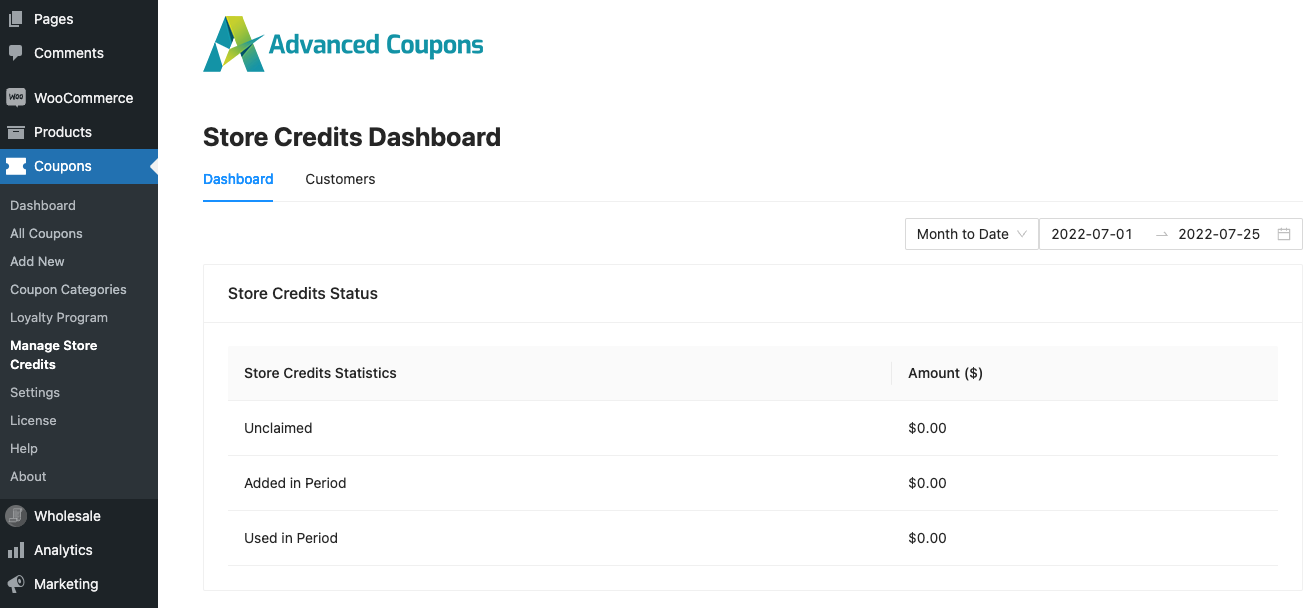
Store Credit can be given to any customer on your store via Coupons->Store Credit menu and in this free version of Advanced Coupons we support multiple ways to use this:
- Mantener un saldo de crédito de tienda por cliente
- Reembolsar pedidos a crédito de tienda en lugar de tener que reembolsar dinero
- Grant store credit manually to a customer via an «admin ajustment»
- Permitir a los clientes usar crédito de tienda en el pago
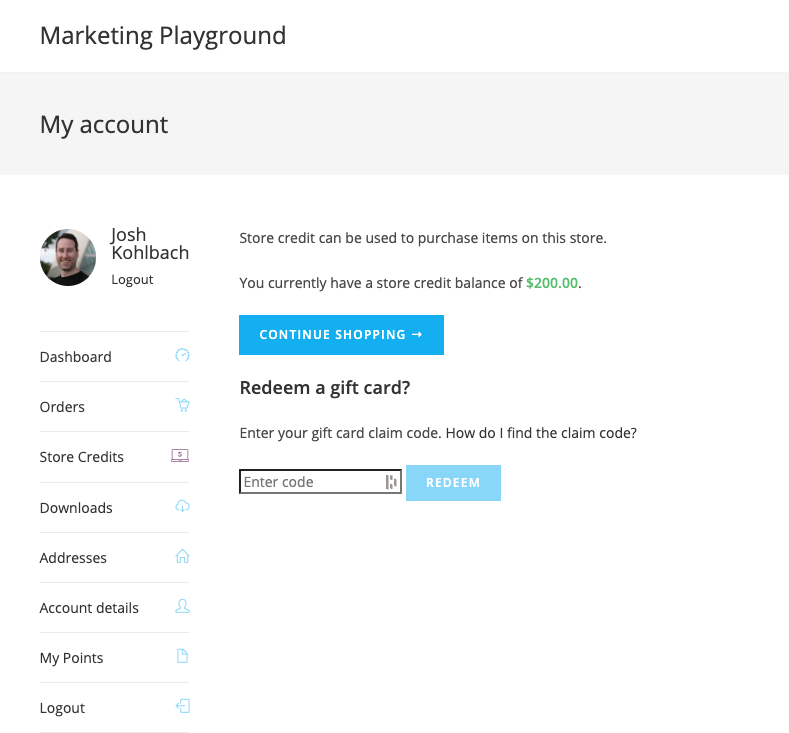
- Customers can view their store credit balance on their My Account page
Manually granting store credit is easy! Under Coupons->Store Credit you’ll see a full dashboard showing the store credit in the system. Under Customers you can lookup a particular customer account and grant store credit to them with an «Admin Adjustment». This is excellent to use in customer service situations where you might want to grant some extra credit to keep customers happy.
Refunding orders to store credit is a great way to grant a refund without having to part with actual money. They can then use the store credit towards future orders which almost guarantees you will be able to retain the customer going forward.
Finally, logged in customers will see an option on the checkout to utilize the store credit toward their order, this appears on the checkout totals box with an easy to use interface that works well with any theme and even support the legacy cart/checkout or the new WooCommerce blocks cart & checkout experience.
We’re building a smarter store credit system for WooCommerce with Advanced Coupons and there will be many new free and premium features that will utilize store credit going into the future.
ADVANCED GIFT CARDS
Are you looking to sell WooCommerce gift cards? We have a sister plugin called Advanced Gift Cards plugin which integrates perfectly with this free Advanced Coupons plugin. Customers redeem gift cards directly to this free plugin’s store credit feature.Click here to view the features and purchase the Advanced Gift Cards plugin.
ADVANCED LOYALTY PROGRAM
Want to run a loyalty program for your WooCommerce store? Our Advanced Loyalty Program add-on lets customers earn points for their orders and redeem them for coupons on future orders.Click here to view the features and purchase the Advanced Loyalty Program.
WooCommerce Discount Rules & Coupon Rules (Cart Conditions)
Have you ever wanted to apply rules to your coupons? That’s where Cart Conditions come in. Cart Conditions are like giving coupons rules to follow before it will let your customers apply them.
You can test for all sorts of coupon rules with Cart Conditions:
Artículos del carrito
* Cantidad del carrito
* Subtotal del carrito
* Peso del carrito (Premium)
Productos
* Las cantidades de productos existen en el carrito (Premium)
* La disponibilidad de existencias de productos existe en el carrito (Premium)
* El cliente ha pedido productos anteriormente (Premium)
Categorías de productos
* Las categorías de productos existen en el carrito
* Gasto total del cliente en una determinada categoría de producto (Premium)
* Ha pedido categorías de productos anteriormente (Premium)
* Existe una taxonomía personalizada en el carrito (Premium)
Clientes
* Estado de conexión del cliente
* Perfiles de usuario permitidos para clientes
* Periles de usuario no permitidos para clientes
* Dentro de las horas después de que el cliente se registró (Premium)
* Dentro de las horas después del último pedido del cliente (Premium)
* Gasto total del cliente (Premium)
* Zona de envío y región (Premium)
Avanzado
* Metadatos de usuario personalizados (Premium)
* Metadatos de artículo de carrito personalizados (Premium)
And the great thing is that you can chain coupon rules together to create complex Cart Conditions groups.
Advanced Coupons tiene el motor de reglas de cupones más poderoso para WooCommerce.
Cupones por URL de WooCommerce (Aplica fácilmente cupones de WooCommerce con un enlace)
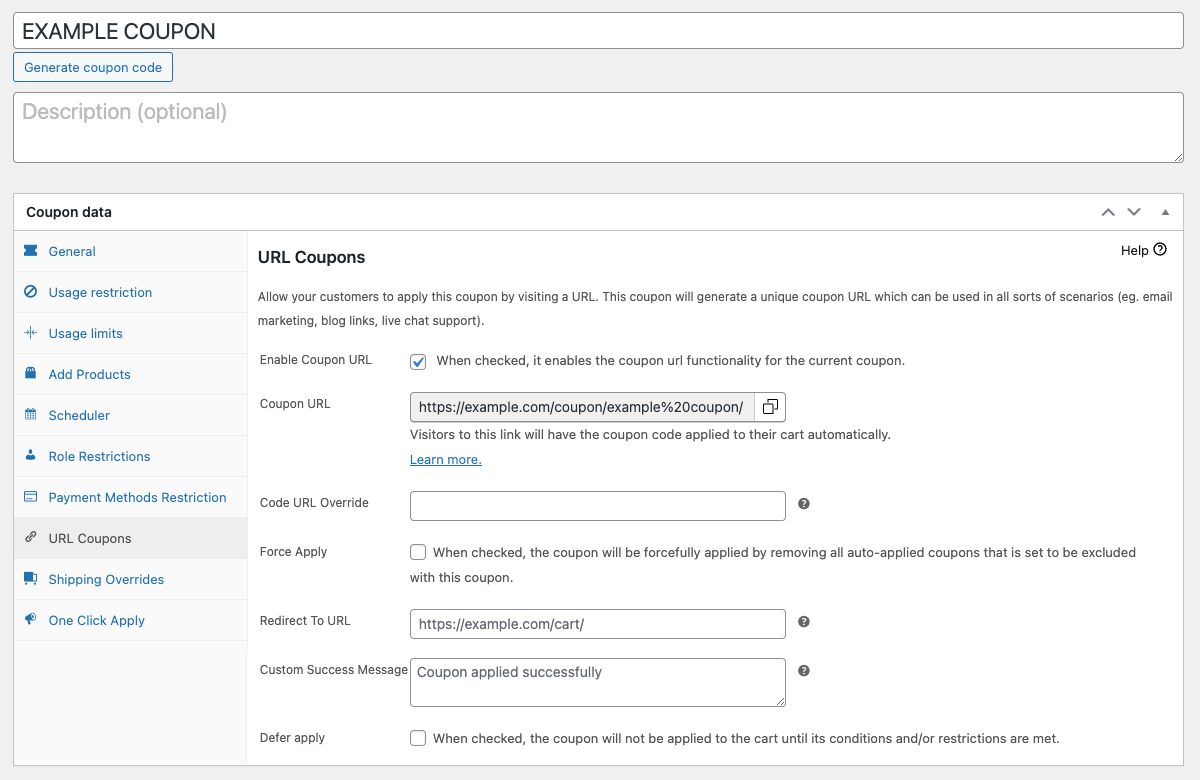
The Cupones de URL feature lets you give your customers a coupon link to apply a coupon.
Cuando hacen clic en la URL del cupón, se aplicará el cupón al carro para que no tengan que escribirlo.
Usa cupones por URL de WooCommerce en botones, imágenes y texto. Muéstralos en tu barra lateral, anuncios, marketing por correo electrónico, publicaciones en blogs, básicamente donde puedas poner un enlace, puedes poner un cupón por URL.
WooCommerce Discount Codes & Promo Codes
WooCommerce coupons are your store’s discount codes and promo codes. Advanced Coupons extends every WooCommerce coupon code with cart conditions, BOGO deals, URL coupons, store credit and coupon categories.
Run your WooCommerce promotions with confidence. Set exactly when a discount code applies, who can use it, and what happens when the customer’s cart no longer qualifies.
In the Premium version you can also auto apply promo codes so customers never have to type a coupon code at all.
Need bulk coupons? Premium also lets you bulk generate 100’s or 1000’s of unique coupon codes for a single coupon (Virtual Coupons), ideal for welcome emails and abandoned cart sequences.
Smart Coupons Categories
If you’ve been running a store for a while chances are you have dozens, if not hundreds or thousands, of WooCommerce coupons!
Advanced Coupons lets you get smart about how you organise your coupons by giving you the ability to put them into coupon categories.
You can name categories anything, such as «Support Coupons», «Site wide coupon deals», «BOGO coupons», «Affiliate Coupons», «Partner Coupons», «Black Friday Coupons», «Cyber Monday Coupons», «Christmas Coupons» and more.
Restrict WooCommerce Coupons By Role
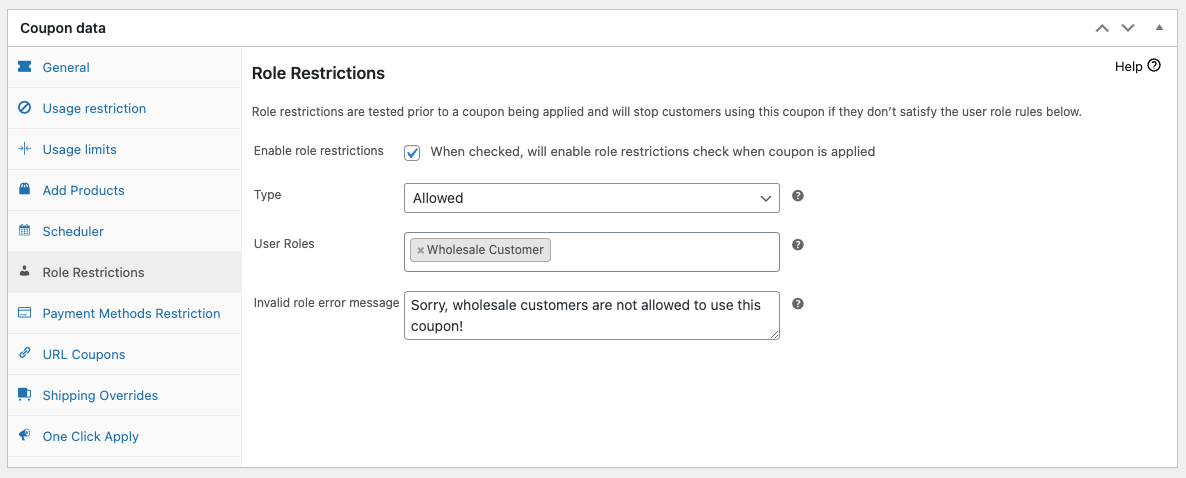
If you run a store with multiple user roles, (for example if you’re using WooCommerce Wholesale Prices and have wholesale customers to worry about, you can now create coupons that are just for those users.
Likewise, you can also exclude certain user roles from being able to use WooCommerce coupons. It’s very flexible!
Mostrar cupones de WooCommerce en el popup de vista previa del pedido
The quick order preview button on the Orders List in WooCommerce is great, but it doesn’t show coupons that were used on the order.
Advanced Coupons adds a list of the WooCommerce coupons that were used on that order so you can quickly see without having to go into the Order edit screen.
Estas pequeñas pero útiles mejoras aceleran tus procesos de manera drástica. Siempre buscamos formas de mejorar el flujo de trabajo de las personas.
Send Coupons Quickly & Easily
It’s now easy to send coupons to your customer quickly via the Send Coupon button at the top of each coupon’s edit screen.
Choose to send coupons via email (complete with a preview option so you can see what this looks like) or send coupons via push notification via our first-party PushEngage integration.
Advanced Coupons es compatible con otros plugins
Not only is Advanced Coupons compatible with standard WooCommerce coupons, it’s also compatible with lots of complementary plugins. Hundreds of shipping and payment gateways, WooCommerce Currency Switcher by Aelia (even with our free Advanced Coupons plugin!), Wholesale Suite, WPML, WooCommerce Subscriptions coupons, PushEngage push notifications, plus loads more.
Si deseas cupones de WooCommerce que sean avanzados Y compatibles con todas las herramientas existentes que estás utilizando, entonces Advanced Coupons es la herramienta para ti.
The Best WooCommerce Coupon Plugin (2 Reasons)
Cuando se trata de marketing para tu tienda, los cupones estándar de WooCommerce son demasiado débiles para ser útiles. Por eso necesitas características adicionales de cupones de WooCommerce.
The mission of Advanced Coupons is to be the undisputed BEST WooCommerce coupons features extender on the market. Here are 2 top reasons you need Advanced Coupons:
Razón #1: Los cupones BOGO de WooCommerce son más RENTABLES (¡Es simple matemática!)
Let me illustrate why WooCommerce BOGO coupons make more profit by comparing a “30% off deal” offer vs. a “Buy 2 get 1 free” offer.
Oferta estándar con cupón de descuento del 30 %
– 1 par de jeans de 100€ (con descuento a 70€ después del 30 % de descuento)
– Menos 30€ del precio de coste
– Margen de ganancia de 40€
Standard WooCommerce coupons for a “30% off deal” would take 30% off the revenue meaning its $70 profit margin would get reduced to $40 profit margin.
Oferta BOGO (compra 2 y obten 1 gratis) de WooCommerce
– 3 pares de jeans cuestan 300€
– Menos 90€ del precio de coste (30€ del precio de coste cada uno)
– Menos 100€ ya que 1 producto es gratis por la oferta
– Margen de ganancia de 110€
Each time the customer takes the WooCommerce BOGO deal you make $110 profit. I’ll take that any day of the week.
Reason #2: Cart Conditions save you money by adding smart restrictions on coupon deals
¿Alguna vez has tenido un cliente que usó un cupón que no debía? ¿Obtuvo más descuento del que debía?
Las condiciones del carrito son como un conjunto de reglas que tu cliente debe cumplir antes de poder aplicar un cupón. Y si aplican el cupón y luego dejan de ser elegibles, las condiciones del carrito eliminarán ese cupón.
Gone are the days of losing out by having to put up with customers looking to scrape something extra. You can set up complex rules for your WooCommerce Coupons to abide by which, over time, will save you bucket loads.
Otros grandes usos para Advanced Coupons
Hemos tenido algunas personas preguntando qué tipos de ofertas y descuentos puedes usar con Advanced Coupons, ¡aquí tienes algunas ideas!
- Ofertas de bienvenida
- Ofertas BOGO
- Cupones de Black Friday
- Cupones de Cyber Monday
- Cupones de Navidad
- Cupones de influencers
- Cupones de Pascua
- Cupones de San Valentín
- Cupones de regalo gratis
- Cupones de artículos de bonificación
- Cupones de muestra
- Las opciones son infinitas, aquí tienes otra 21 formas de utilizar los cupones para conseguir más ventas!
Black Friday, Cyber Monday
Advanced Coupons es tu arma secreta cuando se trata de ejecutar campañas de Black Friday/Cyber Monday (¡o cualquier otro período festivo especial!).
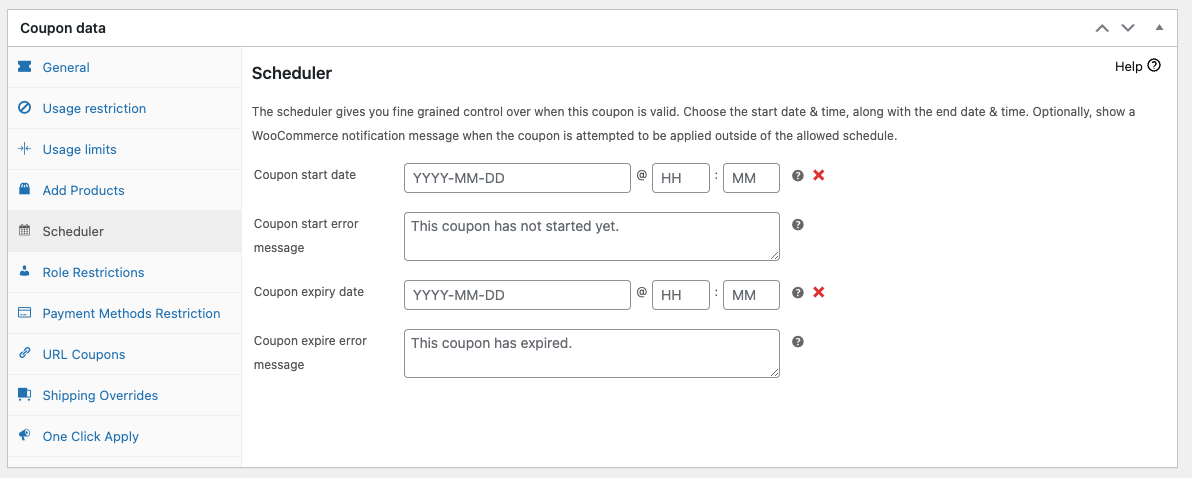
La programación de la fecha de inicio y fin puede controlarse hasta la hora, permitiendo cosas como ventas flash, ofertas especiales por tiempo limitado y más.
Puedes controlar exactamente quién puede obtener estas ofertas con muchas condiciones de carrito, permitiéndote crear reglas de cupones para un enfoque extremo.
Finalmente, en la versión Premium, puedes aplicar automáticamente tus ofertas, haciendo que sea muy fácil para tus clientes pulsar ese botón de compra.
More Plugins From Our Team
We build tools to help store owners succeed. Check out our other free plugins on WordPress.org:
- Wholesale Suite – The #1 wholesale pricing plugin for WooCommerce.
- SaveTo Wishlist – A fast, lightweight wishlist plugin to boost your store’s conversions.
- StoreAgent – A powerful WooCommerce AI toolkit featuring an AI Chatbot and automated content tools.
- Product Feed Pro by AdTribes – Generate optimized product feeds for Google Shopping, Facebook, Bing, and more.
- WC Vendors Marketplace – The easiest way to create your own thriving multivendor marketplace and earn commissions.
Notas
Advanced Coupons is absolutely, positively the best WooCommerce coupons plugin on the market. It is both easy and powerful.
We took the pain out of creating advanced WooCommerce coupon deals and made it easy to achieve your marketing goals. Check out all Advanced Coupons features.
Also, I’m the founder of Wholesale Suite, the biggest wholesale solution for WooCommerce. I’m obsessed with helping store owners grow their stores and I hope you enjoy using Advanced Coupons.
Gracias,
Josh Kohlbach (director ejecutivo de Rymera Web Co)
Capturas
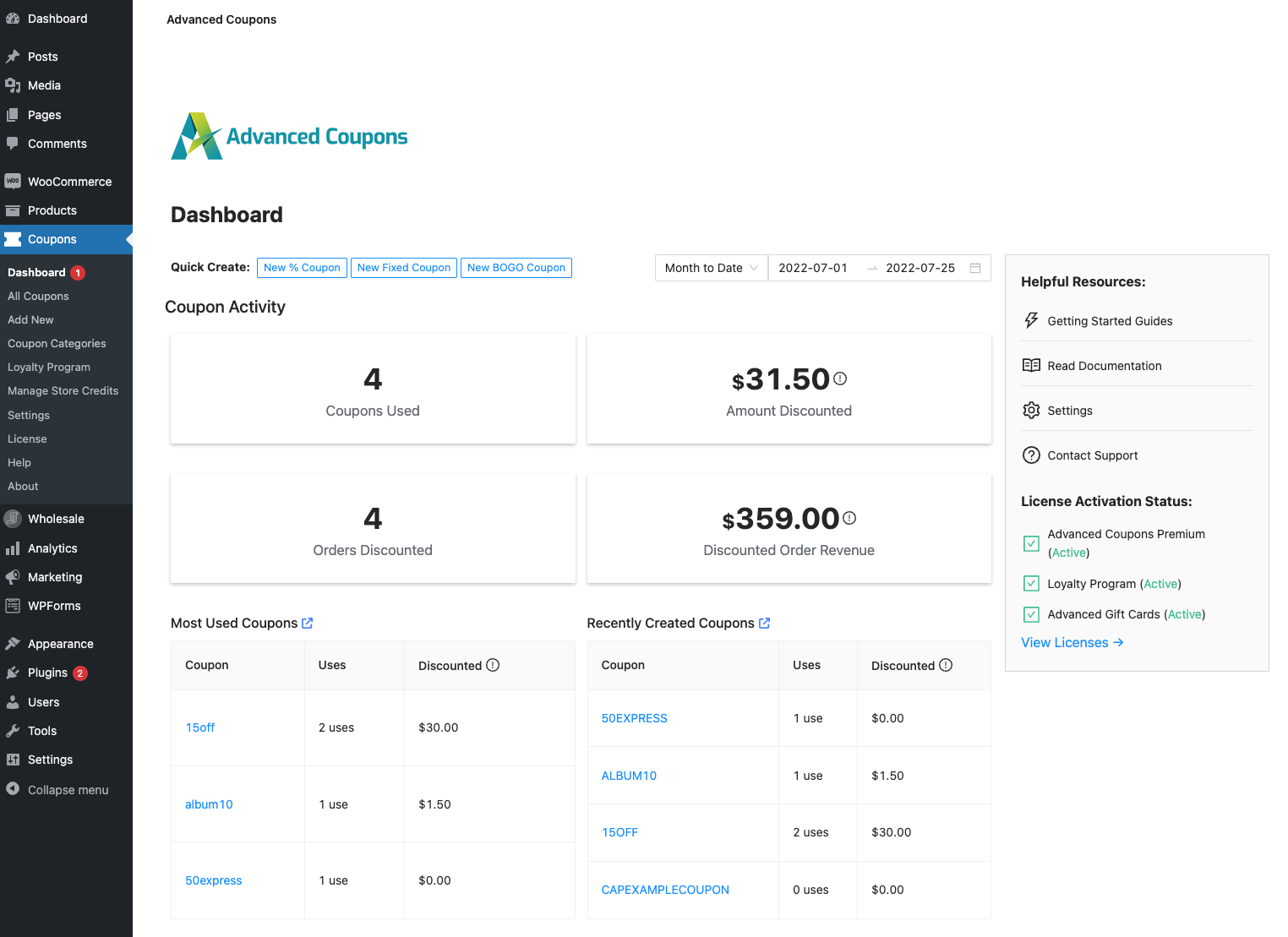
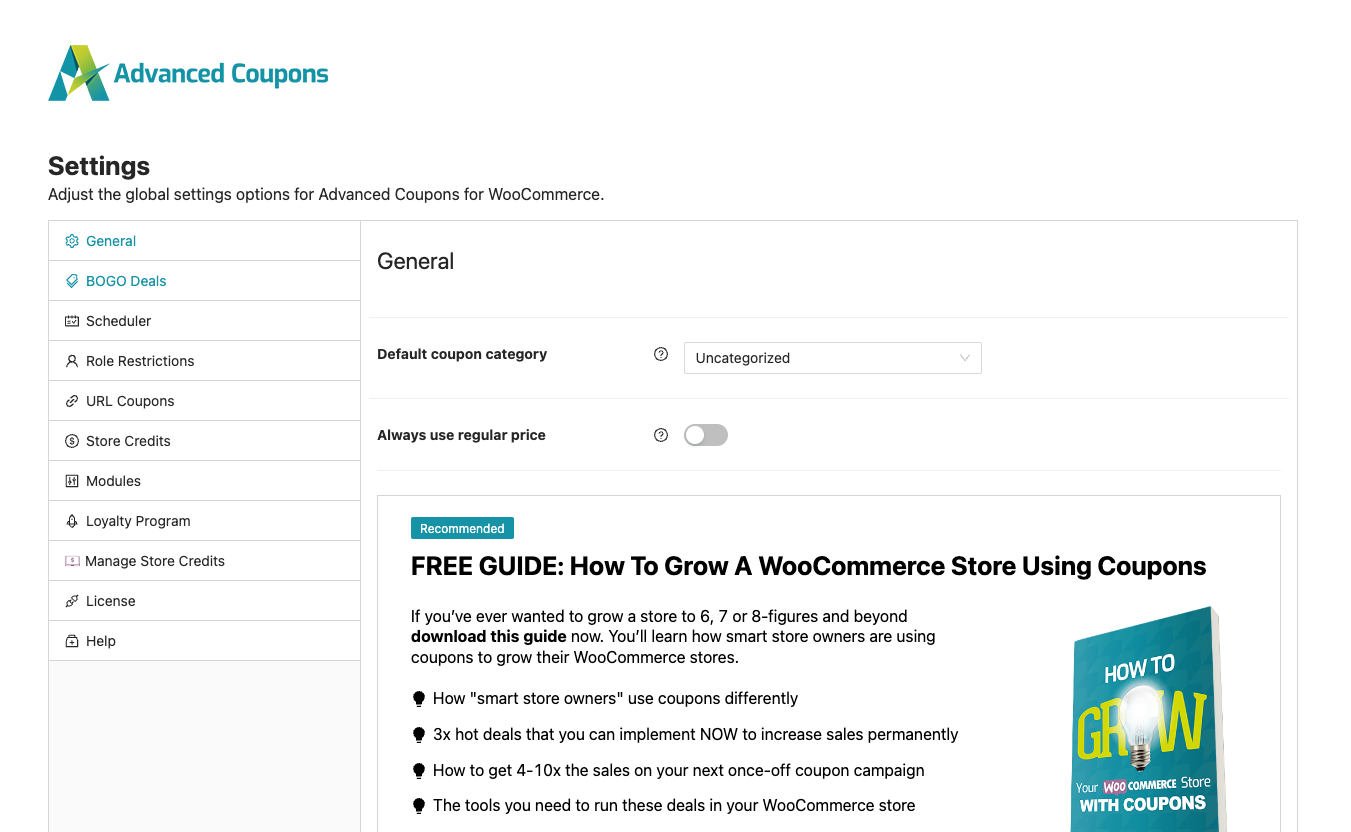
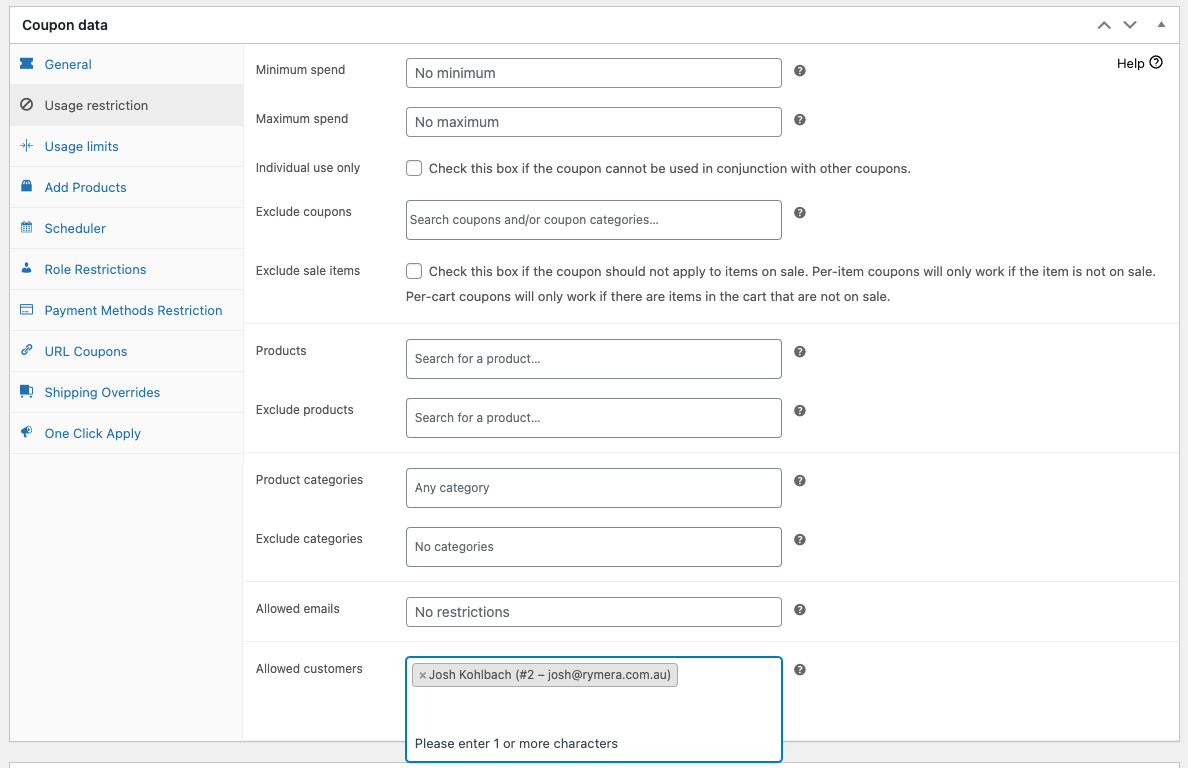
Bloques
Este plugin proporciona 3 bloques.
- Acfw Coupons Category
- Acfw Single Coupon
- Acfw Coupons Customer
Instalación
- Sube la carpeta
advanced-coupons-for-woocommerce-free/al directorio/wp-content/plugins/ - Activa el plugin a través del menú ‘Plugins’ en WordPress
- Visit our getting started guide to help you get up to speed
FAQ
We have hundreds of guides and frequently asked questions answered in our online knowledge base.
-
¿Quién debería usar Advanced Coupons?
-
Advanced Coupons is perfect for store owners using WooCommerce that want more advanced features on their WooCommerce coupons. If you need to run more interesting deals like BOGO deals and you want features like being able to restrict when and how a coupon is applied then Advanced Coupons is for you.
-
Do I need to have coding skills to use Advanced Coupons?
-
Absolutely not. You can create WooCommerce coupons easily through the normal interface and there is nothing complex about the plugin that would require you to have coding skills.
That said, there are a few features that are designed specifically to help developers and web designers deliver complex coupons for their store owner clients. But you still don’t need heaps of extra knowledge to make them work. We’re dedicated to being the friendliest and best WooCommerce coupons plugin.
-
¿Qué cosas adicionales puedo hacer con mis cupones de WooCommerce con Advanced Coupons?
-
Advanced Coupons lets you create lots of new and interesting WooCommerce deals. Here are some extra features you can expect on your WooCommerce coupons with our full range of tools:
- Cupones BOGO de WooCommerce
- Añadir productos al aplicar
- Condiciones del carrito (reglas avanzadas de cupones)
- WooCommerce Store Credits
- Programar cupones de WooCommerce
- Aplicar automáticamente cupones de WooCommerce
- Cupones de URL
- Cupones de envío
- Ejecutar un programa de lealtad
- Vender tarjetas de regalo de WooCommerce
-
What Cart Conditions or Coupon Rules can I add to my WooCommerce coupons?
-
You can use Cart Conditions to test the current customer’s shopping cart, their past interactions with your store and things about their user account. All of this happens as the customer attempts to apply the WooCommerce coupons to their cart.
Cart Conditions are also compatible with our Premium features for auto applying coupons and showing 1-click apply notices.
- Cart Condition: Product Category Exists In Cart
- Cart Condition: Customer Logged In Status
- Cart Condition: Allowed Customer User Role
- Cart Condition: Disallowed Customer User Role
- Cart Condition: Cart Quantity
- Cart Condition: Cart Subtotal
- Cart Condition: Product Quantity In The Cart
- Cart Condition: Custom Taxonomy Exists In The Cart
- Cart Condition: Within Hours After Customer Registered
- Cart Condition: Within Hours After Customer Last Order
- Cart Condition: Custom User Meta
- Cart Condition: Custom Cart Item Meta
- Cart Condition: Total Customer Spend
- Cart Condition: Has Ordered Before
- Cart Condition: Shipping Zone And Region
Some of these are only available in the premium version, but many are included in the free version.
-
¿Puedo ejecutar ofertas BOGO de WooCommerce en múltiples productos o categorías de productos?
-
In the free version you can only run WooCommerce BOGO deals with a single product as the trigger and a single product as the apply product. They don’t have to be the same product.
In the premium version you get much more advanced WooCommerce BOGO functionality with the ability to apply BOGO deals across multiple products as the trigger and apply type and even whole product categories.
- WooCommerce BOGO usando un producto específico
- WooCommerce BOGO usando cualquier combinación de productos
- WooCommerce BOGO usando categorías de productos
- WooCommerce BOGO usando cualquier producto
Combined, these different BOGO features can make running WooCommerce BOGO deals across large amounts of products a breeze.
-
¿Puedo personalizar el mensaje que ve un usuario si un cupón no se aplica?
-
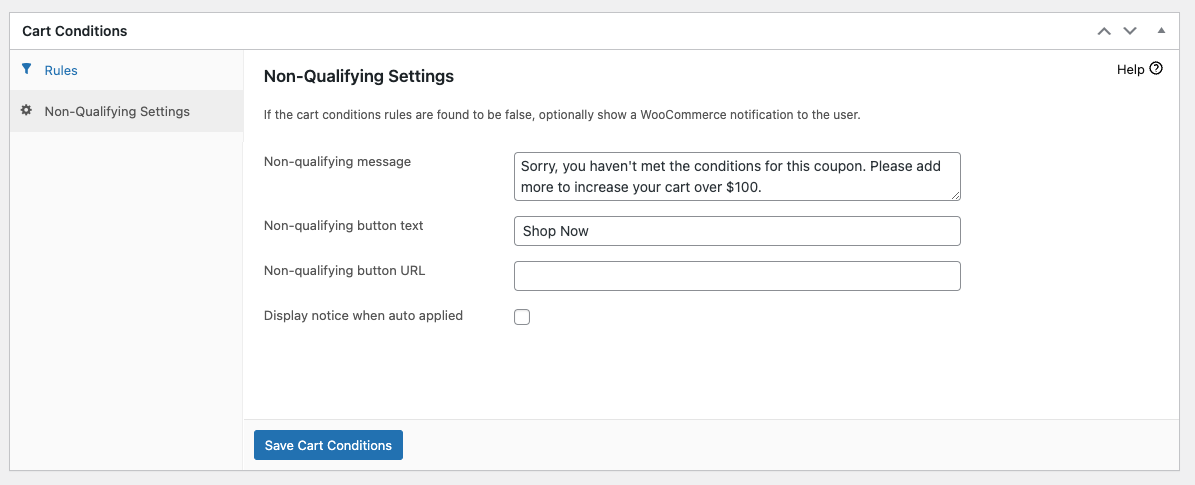
Yes, in Advanced Coupons you can set what we call a Custom Non-Qualifying Message. This is shown to the customer when a coupon is not applied. You’ll find it under the Advanced Settings on Cart Conditions when you edit a coupon.
-
¿Puedo organizar mis cupones de WooCommerce en categorías?
-
Sí, las categorías de cupones te permiten organizar tus cupones en categorías distintas, lo que hace que sea mucho más sencillo gestionar tus cupones cuando has estado operando tu tienda por un largo período.
Sugerimos crear tantas categorías de cupones de WooCommerce como necesites para separar los diferentes tipos de cupones que tú y tu equipo crean.
-
¿Cómo doy crédito de tienda a un cliente?
-
Store credits are extremely easy to grant from an admin perspective. Simply visit Coupons->Store Credits, then click on the Customers tab. You’ll see an option there to search for your customer.
Once you have the customer, you can adjust their store credit balance. This is called an «Admin Adjustment» and is just one way to give store credits to your customers.
En este plugin gratuito, también puedes conceder crédito de tienda a un cliente a través de reembolsos.
Simply choose the «Refund to Store Credit» option when on the Order Edit screen as you’re refunding an order. The customer will then be able to utilize this store credit on their next order with you.
-
¿Está Advanced Coupons listo para la traducción?
-
Sí, Advanced Coupons for WooCommerce es completamente compatible con i18n y está listo para la traducción. Tenemos una serie de traducciones incluidas con el plugin. También estamos completamente integrados con el plugin multilingüe WPML.
-
I’d like access to all features, how can I get them?
-
Purchasing an Advanced Coupons Premium license gives you access to the full feature set of Advanced Coupons. This includes automatic updates, priority support, and more!
También puedes explorar nuestras otras extensiones compatibles:
-
Where can I find more help and business advice?
-
For expert advice, tutorials, and strategies specifically for store marketing, coupon campaigns, and conversion optimization, visit our resource hub at Store Owner Tips.
-
How can I report security bugs?
-
You can report security bugs through the Patchstack Vulnerability Disclosure Program. The Patchstack team helps validate, triage and handle any security vulnerabilities. Report a security vulnerability.
Reseñas


Colaboradores y desarrolladores
«Advanced Coupons for WooCommerce – BOGO, Store Credit & WooCommerce Coupons» es un software de código abierto. Las siguientes personas han colaborado con este plugin.
Colaboradores


«Advanced Coupons for WooCommerce – BOGO, Store Credit & WooCommerce Coupons» está traducido en 4 idiomas. Gracias a los traductores por sus contribuciones.
Traduce «Advanced Coupons for WooCommerce – BOGO, Store Credit & WooCommerce Coupons» a tu idioma.
¿Interesado en el desarrollo?
Revisa el código , echa un vistazo al repositorio SVN o suscríbete al registro de desarrollo por RSS.
Registro de cambios
4.7.7
- Bug Fix: A BOGO deal that adds its reward to the cart could count that reward as a purchase and keep earning itself another one
- Bug Fix: BOGO breakdown row and order BOGO meta stayed empty for priced-individually bundles
- Bug Fix: BOGO discount amount shown on the coupon in the order editor and counted in the coupon usage report was understated for deals covering more than one unit
- Bug Fix: BOGO discount amount was not shown on the coupon in the order editor on stores using High-Performance Order Storage
- Bug Fix: Orders placed through the block checkout saved no BOGO discount data
- Bug Fix: Undefined array key notice on PHP 8 when a BOGO deal matched a cart line with no recorded price
4.7.6.1
- Bug Fix: Store credit (after tax) lets a resumed failed order complete without payment or without deducting credit
View changelog.txt for previous versions.