
Descripción
-
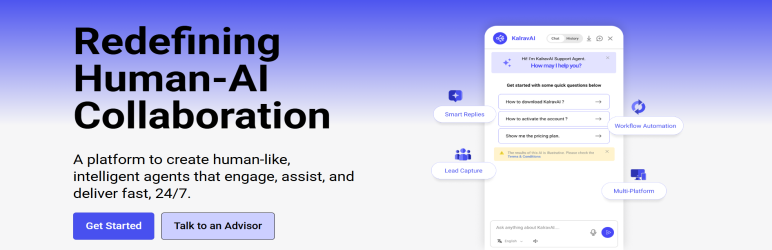
Interactive Chat Interface – A modern, fully customizable chat window that integrates beautifully with your website’s layout and style.
-
Quick & Easy Setup – Simply install, activate, and start chatting — your AI assistant is ready within minutes, no coding needed.
-
Intelligent Conversations – Engage visitors with fast, natural, and context-aware responses powered by advanced AI technology.
-
Flexible Customization – Personalize Common questions, icons, and greetings to perfectly reflect Kalrav AI identity.
-
Smart Engagement Triggers – Automatically welcome visitors, collect leads, or reply to common questions with ease.
-
Lightweight & Secure – Built for speed, stability, and privacy, ensuring smooth performance across all devices.
External Services
The external service used:
- Service Name: Kalrav.ai
- Purpose: To process and respond to user messages in the chat widget.
- Data Sent: User message, session ID (anonymous), and site identifier.
-
Data Received: AI-generated response content.
Please check our privacy policy and terms of services:Privacy policy : https://kalrav.ai/privacy-policy/
Terms Of service : https://kalrav.ai/terms-of-services/
No personal data is stored or shared with third parties.
License
GPLv2 or later. See license.txt.
Capturas


Instalación
Install using the WordPress built-in plugin installer, or manually extract the ZIP file and upload the contents to the /wp-content/plugins/ directory of your WordPress installation.
- Log in to WordPress admin.
- Go to Plugins Add New Upload Plugin in your WordPress dashboard. or Find KalravAI Plugin and click to Install.
- After installation, click Activate.
You will find KalravAI settings in your WordPress admin screen.
For basic usage, have a look at the plugin’s website.
FAQ
-
What is KalravAI Agent?
-
KalravAI Agent is a powerful, customizable AI plugin that adds a floating chat widget to your WordPress site, enabling real-time AI-powered conversations to help visitors get quick answers and engage with your services.
-
Is KalravAI Agent is free to use?
-
Yes, we offer a free plan with core features. Premium plans with additional Features.
-
Can I customize the chat widget’s appearance?
-
Yes, you can customize the chat widget’s look and feel by overriding the default CSS in the settings.
-
Is KalravAI Agent compatible with all WordPress themes?
-
KalravAI Agent is designed to work smoothly with most WordPress themes. However, some themes with custom scripts or styles may require minor adjustments for optimal display.
-
Does KalravAI Agent collect user data?
-
KalravAI Agent processes user interactions in real-time to provide responses but does not store personal data unless explicitly enabled through plugin settings.
Reseñas


Colaboradores y desarrolladores
«KalravAI Agent» es un software de código abierto. Las siguientes personas han colaborado con este plugin.
Colaboradores
Traduce «KalravAI Agent» a tu idioma.
¿Interesado en el desarrollo?
Revisa el código , echa un vistazo al repositorio SVN o suscríbete al registro de desarrollo por RSS.
Registro de cambios
3.0.13
- Fixed minor UI issues.
3.0.12
- Introduced Agent Expiry Information in the Settings page.
- Enhanced the E-commerce interface and improved overall UI.
3.0.10
- Made minor UI improvements.
3.0.8
- Added Quick Links to the E-commerce section.
- Improved overall UI and security.
3.0.6
- Updated plugin screenshots.
- Improved UI.
3.0.5
- Fixed security-related issues.
- Improved the E-commerce product display with a better-structured UI.
3.0.4
- Fixed security-related issues.
- Improved the E-commerce product display UI.
3.0.0 – 3.0.3
- Fixed various issues.
- Improved overall performance and stability.
2.8.0 – 2.9.6
- Added support for plugin versions from 2.8.0 to 2.9.6.
- Introduced Central System Settings for improved configuration management.
- Added a customizable disclaimer to the footer.
- Made all text in the Kalrav window fully customizable.
- Improved the overall user interface and user experience.
2.7.0
- Added drag-and-drop widget functionality.
2.5.0 – 2.6.0
- Improved language transition when switching between selected languages.
2.4.4
- Resolved chat history issues.
2.4.0
- Added Lead Email functionality.
- Added the Product Menu.
2.3.6 – 2.3.8
- Added WooCommerce product integration.
- Added Zoho integration.
- Added the Product Menu.
- Fixed various UI issues.
2.2.0
- Resolved speaker-related issues.
- Improved the user interface.
2.1.0
- Resolved the language selection issue.
- Added the attachment button for the upcoming attachment feature.
2.0.0
- Fixed known UI issues.
- Resolved send button issues.
1.9.0
- Improved the overall UI, including font sizes and colors.
- Added multi-language support.
1.8.0
- Introduced session usage for continuous conversations.
- Further improved the feedback UI.
1.7.0
- Added voice input and voice output for chat.
- Updated the feedback UI design.
1.5.0
- Introduced new feature enhancements.
- Added feedback functionality.
- Improved the UI.
1.4.0
- Added a logo icon.
1.3.0
- Introduced new feature enhancements.
- Added the option to download conversation history.
- Updated the UI for improved usability.
1.2.0
- Enhanced the user interface.
1.1.0
- Added basic features.
- Improved message response performance.
- Fixed minor styling issues.
1.0.0
- Initial release.