Descripción
Developed by PowerfulWP | Premium | Documents
Order picking is the process of selecting and gathering items from a warehouse or storage location to fulfill an order.
It is a critical step in the order fulfillment process and involves verifying that the correct items are being picked,
packing them in the appropriate packaging, and preparing them for shipping or delivery.
Effective order picking is important for ensuring that orders are filled accurately and efficiently,
and that customers receive the correct items in a timely manner.
It is also a key factor in maintaining good inventory management and keeping track of stock levels.
The Order Picking For WooCommerce plugin allow you to choose orders for picking and mark them as fulfilled or unfulfilled.
Order fulfillment management:
-
The plugin allows store owners to manage the process of fulfilling orders placed on their store. There are four fulfillment statuses available: «Partially Fulfilled,» «Fulfilled,» «Awaiting fulfillment,» and «Unfulfilled.» These statuses can be filtered on the order list in the admin panel.
-
The plugin also includes a bulk action feature in the order list on the admin panel, which allows the store owner to quickly and easily update the fulfillment status of multiple orders at once. They can mark orders as «Awaiting fulfillment» or cancel the fulfillment process for those orders.
-
The Store owners can also mark individual orders as «fulfilled,» «not fulfilled,» or «Partially Fulfilled» from the order list on the admin panel or from the order page.
* PREMIUM FEATURES
Check out the Order Picking For Woocommerce premium plugin.
The premium plugin includes the following additional features:
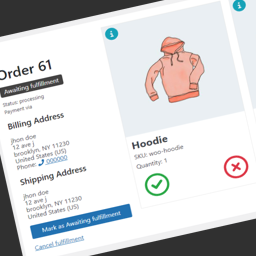
Staff frontend order fulfillment panel.
Staff members can access the fulfillment panel from their work stations and use it to track and fulfill orders in real-time.
The panel will stay open and automatically load new orders as they are marked as “waiting for fulfillment,”
making it easy for staff members to stay organized and efficiently process orders.
New WooCommerce Status for Fulfillment
We’ve introduced a new status in WooCommerce specifically for fulfillment. This status will help keep track of orders that are in the fulfillment phase, thereby providing more transparency and accuracy in the order processing lifecycle. This feature is a significant improvement for businesses that want to optimize their fulfillment operations, providing a clear, real-time view of order status.
Automating the Order Picking Processes
- You can set an order status that will automatically mark an order as “awaiting fulfillment”
when the order status changes. - You can set certain order statuses to be automatically selected when certain fulfillment actions are taken.
Reports
This premium feature provides a comprehensive reports display.
Included are:
* Order Fulfillment Report.
* Product Fulfillment Report.
* Order and Product Fulfillment Report.
* Missing Order and Product Report
* Missing Order Items Report
* Missing Items Report
With these, you can easily track and analyze how well your orders and products are being fulfilled.
It gives a clear snapshot of your business’s fulfillment processes, and you can print these reports for further use.
Picklist
This premium feature provides a comprehensive printable picklist Display.
Included are:
* Picklist by Order
* Picklist by Product
* Picklist by Category
This makes managing your picklists easier and more efficient.
Capturas

Fulfillment process by the store owner. 
Fulfillment bulk actions.
Instalación
- Make a backup of your website and database
- Download the plugin
- Upload the plugin to the wp-content/plugins directory,
- Go to «plugins» in your WordPress admin, then click activate.
- Go to the plugin settings and choose order statuses for picking.
- Go to the WooCommerce orders list on the admin panel and choose orders for picking.
- Mark orders as fulfilled or unfulfilled.
Reseñas


Colaboradores y desarrolladores
«Order Picking For WooCommerce» es un software de código abierto. Las siguientes personas han colaborado con este plugin.
Colaboradores
Traduce «Order Picking For WooCommerce» a tu idioma.
¿Interesado en el desarrollo?
Revisa el código , echa un vistazo al repositorio SVN o suscríbete al registro de desarrollo por RSS.
Registro de cambios
1.0.0
- Initial
1.0.2
- Tweak: Premium – Reports screen ( Order Fulfillment Report, Product Fulfillment Report , Order and Product Fulfillment Report )
- Tweak: Premium – Picklist screen ( Picklist by Orderת Picklist by Productת Picklist by Category )
- Tweak: Premium – Staff Frontend Fulfillment Panel
- Tweak: Premium – New WooCommerce status for fulfillment.
1.0.3
- Fix fulfillment orders query.
- Fix settings style.
1.0.4
- Update: Integrated Freemius SDK version 2.6.2.
- Fix: Fix bug in Order_Picking_For_Woocommerce_Order_Picklist class.