Title: WPApps Table Collapser
Author: Hefin Dsouza
Published: 4 de julio de 2024
Last modified: 5 de octubre de 2024
---
Buscar plugins

Este plugin **no se ha probado con las últimas 3 versiones mayores de WordPress**.
Puede que ya no tenga soporte ni lo mantenga nadie, o puede que tenga problemas
de compatibilidad cuando se usa con las versiones más recientes de WordPress.
# WPApps Table Collapser
Por [Hefin Dsouza](https://profiles.wordpress.org/hefind/)
[Descargar](https://downloads.wordpress.org/plugin/wpapps-table-collapser.1.1.0.zip)
* [Detalles](https://es.wordpress.org/plugins/wpapps-table-collapser/#description)
* [Valoraciones](https://es.wordpress.org/plugins/wpapps-table-collapser/#reviews)
* [Instalación](https://es.wordpress.org/plugins/wpapps-table-collapser/#installation)
* [Desarrollo](https://es.wordpress.org/plugins/wpapps-table-collapser/#developers)
[Soporte](https://wordpress.org/support/plugin/wpapps-table-collapser/)
## Descripción
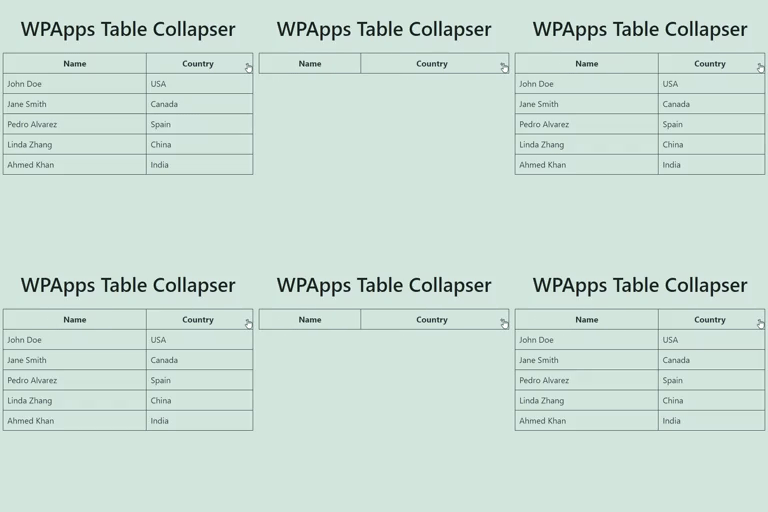
WPApps Table Collapser is a lightweight plugin that makes your tables collapsible.
By adding a `collapsible-table` class to your tables, you enable users to toggle
the visibility of the table body by simply clicking on the table header.
### Features
* **Collapsible Tables:** Make any table collapsible by adding a simple class.
* **Toggle Indicator:** Automatically adds a `+/-` indicator to the last column
of the table header.
* **Customizable:** Style the toggle indicator and table appearance with your own
CSS.
* **Block Editor Support:** Includes a Gutenberg block for easy table creation
and collapsing functionality.
* **Mobile Friendly:** Works seamlessly on mobile devices with responsive design.
**Usage:**
1. Ensure that your table has a `` tag for the table header, though it’s not
mandatory if you enable the «Allow Table Without ``» option in settings.
2. Add the class `collapsible-table` to your table.
3. Optionally, add a `data-title` attribute to your table to set a custom title for
the mobile compact view.
4. The last column in the table header will have a toggle indicator (`+/-`) added
to it. Clicking anywhere in the header will show or hide the table body.
## Capturas
* [[
* **Example of a Collapsible Table:**
* [[
* **Settings Page:**
* [[
* **Detailed Guidelines on CSS Customization:**
* [[
* **Responsive Table View:**
* [[
* **Block Support:**
## Bloques
Este plugin proporciona 1 bloque.
* Table Collapser A block that makes tables collapsible.
## Instalación
1. Upload the `wpapps-table-collapser` folder to the `/wp-content/plugins/` directory.
2. Activate the plugin through the ‘Plugins’ menu in WordPress.
3. Add the `collapsible-table` class to any table you want to make collapsible.
## FAQ
### Does the table require any specific structure?
For optimal functionality, the table should have a `` tag defining the header.
The collapsing functionality is primarily activated by clicking on this header.
However, if you enable the «Allow Table Without ``» option in the settings,
the plugin will also work without a ``.
### Can I style the toggle indicator?
Yes, you can style the toggle indicator by targeting the `.toggle-indicator` class
in your CSS.
### How do I set a custom title for the mobile view?
You can add a `data-title` attribute to your table element to set a custom title
that will be displayed in the mobile compact view.
### Is the plugin compatible with the Gutenberg block editor?
Yes, the plugin includes a Gutenberg block for easy creation and management of collapsible
tables.
## Reseñas
No hay valoraciones para este plugin.
## Colaboradores y desarrolladores
«WPApps Table Collapser» es un software de código abierto. Las siguientes personas
han colaborado con este plugin.
Colaboradores
* [ Hefin Dsouza ](https://profiles.wordpress.org/hefind/)
[Traduce «WPApps Table Collapser» a tu idioma.](https://translate.wordpress.org/projects/wp-plugins/wpapps-table-collapser)
### ¿Interesado en el desarrollo?
[Revisa el código](https://plugins.trac.wordpress.org/browser/wpapps-table-collapser/),
echa un vistazo al [repositorio SVN](https://plugins.svn.wordpress.org/wpapps-table-collapser/)
o suscríbete al [registro de desarrollo](https://plugins.trac.wordpress.org/log/wpapps-table-collapser/)
por [RSS](https://plugins.trac.wordpress.org/log/wpapps-table-collapser/?limit=100&mode=stop_on_copy&format=rss).
## Registro de cambios
#### 1.1.0
* Fixed a bug where the block editor css gets loaded in the front-end.
#### 1.0.0
* Initial release.
## Meta
* Versión **1.1.0**
* Última actualización **hace 2 años**
* Instalaciones activas **10+**
* Versión de WordPress ** 4.0 o superior **
* Probado hasta **6.6.5**
* Versión de PHP ** 5.6 o superior **
* Idioma
* [English (US)](https://wordpress.org/plugins/wpapps-table-collapser/)
* Etiquetas:
* [block](https://es.wordpress.org/plugins/tags/block/)[responsive table](https://es.wordpress.org/plugins/tags/responsive-table/)
[table](https://es.wordpress.org/plugins/tags/table/)[toggle](https://es.wordpress.org/plugins/tags/toggle/)
* [Vista avanzada](https://es.wordpress.org/plugins/wpapps-table-collapser/advanced/)
## Valoraciones
Aún no se han enviado valoraciones.
[Your review](https://wordpress.org/support/plugin/wpapps-table-collapser/reviews/#new-post)
[Ver todas las valoraciones](https://wordpress.org/support/plugin/wpapps-table-collapser/reviews/)
## Colaboradores
* [ Hefin Dsouza ](https://profiles.wordpress.org/hefind/)
## Soporte
¿Tienes algo que decir? ¿Necesitas ayuda?
[Ver el foro de soporte](https://wordpress.org/support/plugin/wpapps-table-collapser/)