

Descripción
Jinkosoft brings embeddable business widgets into WordPress with a lightweight integration flow.
From one admin page you can connect your Jinkosoft account, activate the widgets available for your workspace, and choose how each widget should appear on your website.
Current widgets included in this bundle:
- Slotflow: an embeddable booking widget for appointments and calls
- Lead Capture Widget: an embeddable popup widget for collecting leads and contact requests
- Review Widget: an embeddable social proof widget for collecting and displaying reviews
- Locate My Store: an embeddable store locator that points visitors to the right location
Slotflow
Slotflow helps you turn a normal page into a booking page.
Visitors can:
- pick an available date
- choose a time slot
- submit their details
- confirm a booking directly from your website
Slotflow is designed for appointments, discovery calls, consultations, demos, and similar booking flows. Depending on your Jinkosoft workspace setup, it can also work with availability rules, form-specific booking flows, and Google Calendar integration managed from the external Jinkosoft dashboard.
For more information, visit:
- https://jinkosoft.com/en/embeddable-widgets/slotflow
Lead Capture Widget
Lead Capture Widget helps you collect leads directly from your website with a lightweight popup experience.
Visitors can:
- open or receive a popup form on the page
- submit contact details or a short message
- complete a lead capture flow without leaving the website
Lead Capture Widget is designed for contact requests, sales inquiries, newsletter interest, early-access lists, and similar lead generation flows. Depending on your Jinkosoft workspace setup, it can also support configurable popup timing, branding rules, field selection, and form-specific embed flows managed from the external Jinkosoft dashboard.
For more information, visit:
- https://jinkosoft.com/en/embeddable-widgets/lead-capture
Review Widget
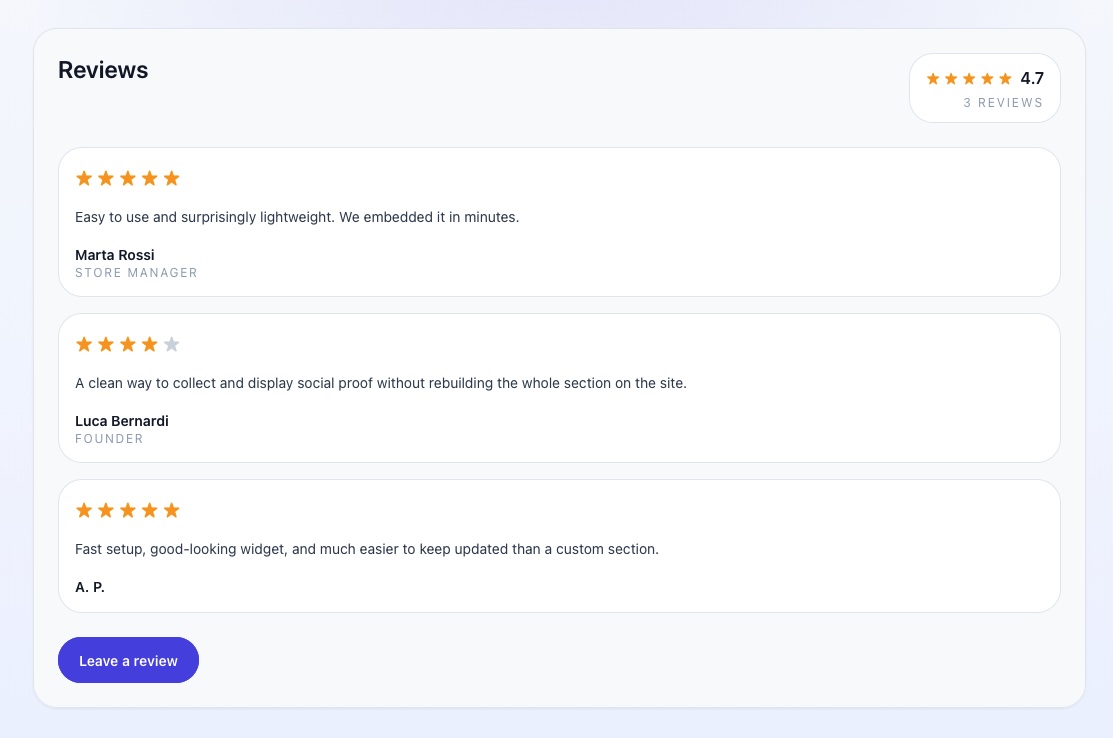
Review Widget helps you collect reviews directly from your website and display them as embeddable social proof.
Visitors can:
- open a lightweight review form from the widget
- submit a star rating and written review without leaving the page
- add native reviews that you can moderate from the Jinkosoft dashboard
Review Widget is designed for testimonials, customer feedback, reputation building, and trust-focused landing pages. Depending on your Jinkosoft workspace setup, it can also support external review sync from sources such as Google Reviews, together with native review moderation managed from the external Jinkosoft dashboard.
For more information, visit:
- https://jinkosoft.com/en/embeddable-widgets/review-widget
Locate My Store
Locate My Store helps visitors reach the right physical location without forcing them to search through long lists.
The widget is designed to:
- point visitors to the most relevant store
- show key details such as address, distance, and opening status
- make it easy to start directions
- reduce friction for businesses with multiple locations
It works especially well for retail brands, local businesses, chains, showrooms, and any business that wants a lightweight store locator experience on WordPress while keeping the heavier business logic on the Jinkosoft side.
For more information, visit:
- https://jinkosoft.com/en/embeddable-widgets/locatemystore
Why site owners use Jinkosoft
- Connect or create your Jinkosoft account directly from WordPress
- Enable the widgets you need from one plugin page
- Insert widgets with shortcode exactly where you want them
- Manage widget-specific settings such as form slug selection for Slotflow, Lead Capture Widget, and Review Widget
- Open the related Jinkosoft dashboard directly from WordPress
Typical use cases
- Add a booking form to a sales page or contact page
- Use different Slotflow forms on different pages with shortcode attributes
- Add a popup lead capture form to landing pages or campaign pages
- Show testimonials and collect new reviews from the same embeddable review widget
- Show a store locator on location or visit-us pages
Third Party Services
Jinkosoft API
The plugin communicates with the Jinkosoft API to create or log in administrator accounts, load active workspaces, provision widget workspaces, and serve widget data to the embeddable components.
- Service: https://server.jinkosoft.com
- Data sent: administrator name, email, password, workspace configuration requests, and visitor-submitted booking, lead capture, review, or store locator data when the widgets are used
- Terms of Service: https://jinkosoft.com/en/terms-and-conditions
- Privacy Policy: https://jinkosoft.com/en/privacy-policy
Jinkosoft Widget CDN
The plugin loads the widget scripts from the Jinkosoft CDN when the widgets are used on the website.
- Service: https://cdn-widgets.jinkosoft.com
- Used for: delivering the embeddable widget scripts to visitors’ browsers
- Script loaded: https://cdn-widgets.jinkosoft.com/widgets.iife.js
- Terms of Service: https://jinkosoft.com/en/terms-and-conditions
- Privacy Policy: https://jinkosoft.com/en/privacy-policy
Capturas
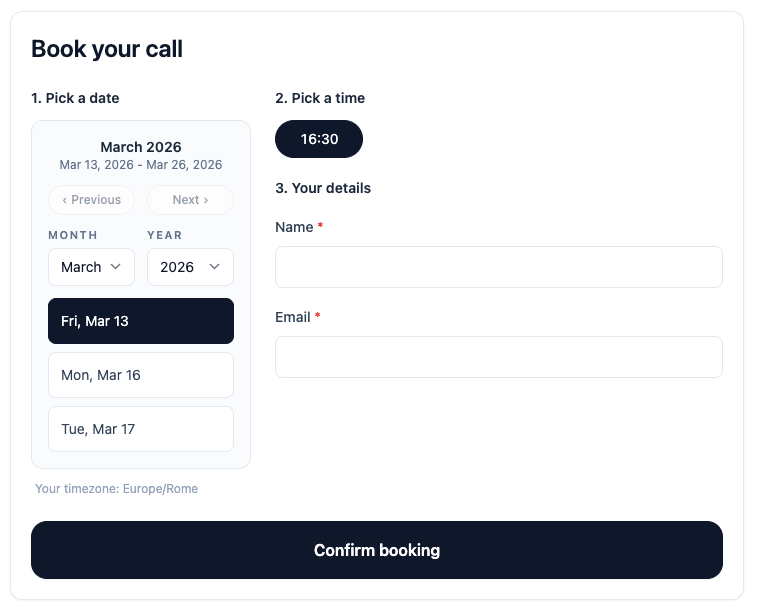
The Slotflow embeddable booking widget. 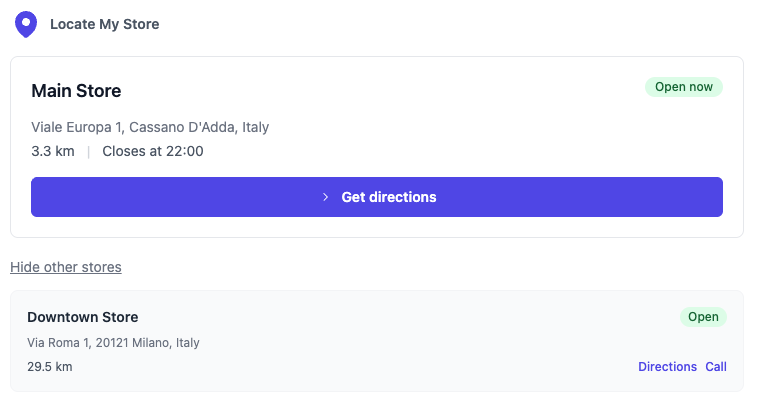
The Locate My Store embeddable locator widget. 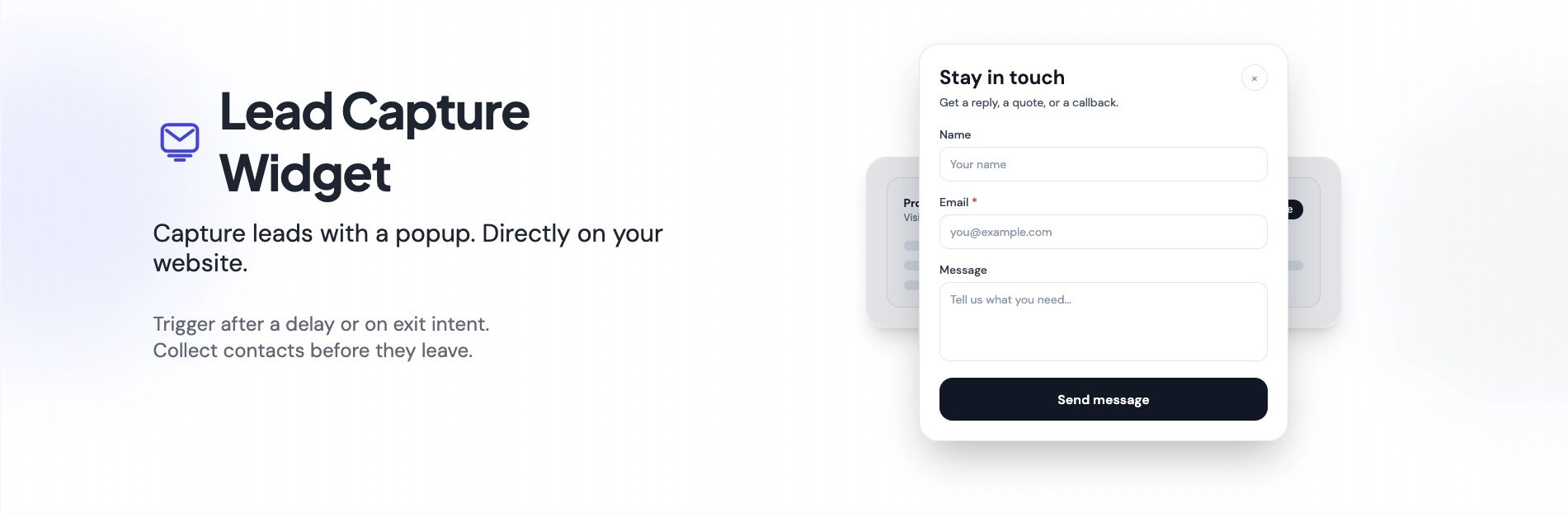
Instalación
- Upload the
yps-bundlefolder to/wp-content/plugins/ - Activate the plugin through the Plugins menu in WordPress
- Open
Jinkosoftfrom the WordPress admin menu - Create an account or log in with your existing Jinkosoft account
- Click
TryorConfigureon the widget you want to use - Copy the shortcode and place it in the page, post, or block where the widget should appear
- For Slotflow, Lead Capture Widget, and Review Widget, select the form you want to display
FAQ
-
Do I need a Jinkosoft account?
-
Yes. The plugin connects to Jinkosoft services, so you need a Jinkosoft administrator account to activate and configure the available widgets.
-
How do I display a widget?
-
You can:
- insert it with shortcode
- choose the exact page position where the widget should appear
For Slotflow, Lead Capture Widget, and Review Widget, you can also use different forms on different pages with shortcode attributes such as:
[jinkosoft-slotflow form="demo-booking"] [jinkosoft-lead-capture form="newsletter-popup"] [jinkosoft-review-widget form="homepage-reviews"] -
Will this plugin slow down my WordPress site?
-
The plugin is designed to stay lightweight on the WordPress side. It does not ship a large internal booking, lead capture, review, or locator application inside WordPress. Instead, it relies on the external Jinkosoft services and only loads the required embeddable widget scripts when the widget is actually used.
-
Does this plugin use third-party services?
-
Yes. This plugin relies on external services provided by Jinkosoft.
Reseñas
No hay valoraciones para este plugin.
Colaboradores y desarrolladores
«Jinkosoft» es un software de código abierto. Las siguientes personas han colaborado con este plugin.
Colaboradores
Traduce «Jinkosoft» a tu idioma.
¿Interesado en el desarrollo?
Revisa el código , echa un vistazo al repositorio SVN o suscríbete al registro de desarrollo por RSS.
Registro de cambios
1.2.0
- Add Review Widget
1.0.1
- Add Lead Capture Widget
1.0.0
- Initial release: Locate My Store, Slotflow