

Descripción
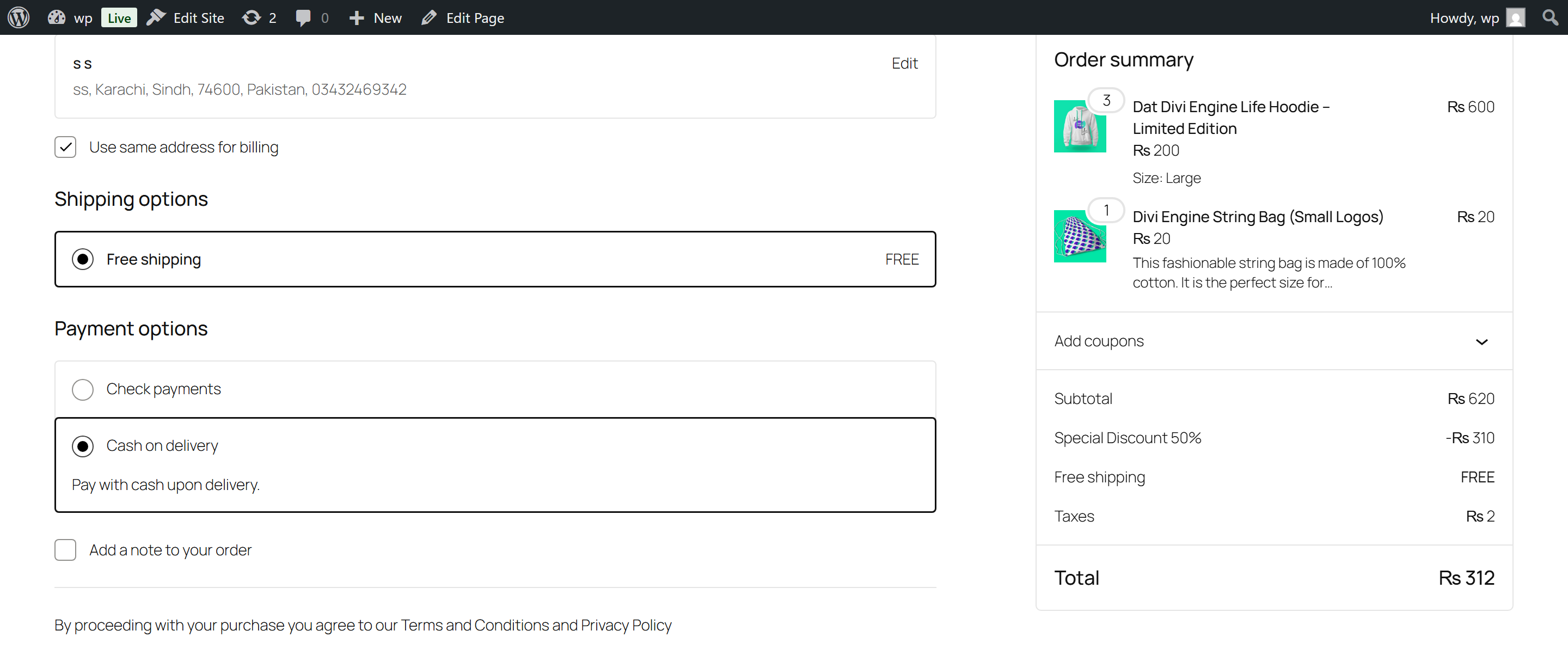
Murls Discounts gives WooCommerce store owners a simple, powerful way to incentivise customers to pay the way you prefer — bank transfer, cash on delivery, or any other gateway — by automatically applying a discount the moment they select it at checkout.
No coupon codes. No manual steps. The discount just appears, the customer is happy, and you save on payment fees.
👉 Learn more and see it in action: murls.co/murls-discounts
Why shop owners love it
Running a WooCommerce store means balancing payment processing fees against customer experience. Credit card and PayPal transactions eat into your margins. Bank transfers and cash payments cost you almost nothing — but customers won’t choose them unless there’s a reason to.
Murls Discounts gives them that reason automatically. Set a 2% discount for bank transfer, and customers see it the moment they hit checkout. They switch. You save. Everyone wins.
No developer needed. No coupon codes to manage. Set it up in under 2 minutes.
What you can do
Per-gateway discounts
Set a different discount rule for every payment method in your store. 5% off for bank transfer, 3% for cash on delivery, nothing for credit card — entirely your choice.
Percentage or fixed amount
Choose between a percentage of the cart total (e.g. 10% off) or a flat fixed amount (e.g. $5 off). Works correctly in any currency.
Cap how big a discount can get
Offering 10% off is great — until someone orders $5,000 worth of stock. Set a maximum discount amount and the percentage stops growing once it hits your ceiling. 10% off with a $50 cap means a $200 order saves $20, and a $2,000 order still only saves $50. Your margin stays protected on large orders.
Limit to specific product categories
Only want to discount Electronics but not Clothing? Enable category scope, pick your categories, and the discount applies only to those items. Sub-categories are covered automatically — selecting «Electronics» covers «Laptops», «Phones», and every child category beneath it.
Include or exclude mode
Two ways to scope your discount: apply it to selected categories only, or apply it to everything except selected categories. Great for protecting high-margin products.
Exclude specific products by SKU
Need to keep one particular product out of the deal? Add its SKU to the exclusion list and it is never discounted, even if it sits in an eligible category.
Minimum order amount
Set a minimum spend before the discount kicks in. You also choose what counts toward that minimum — the customer’s full cart, or only the products that qualify for the discount.
Date range scheduling
Running a Christmas promotion? Set a start and end date/time on any gateway rule. The discount turns itself on and off automatically. No need to remember to disable it.
Promotional messages
Show a friendly message in the cart and at checkout telling customers about the available discount. Nudge them toward your preferred payment method before they reach the payment selection screen.
30-day analytics dashboard
See at a glance how much you have saved in payment fees over the past 30 days, how many orders used a discount, and which rules are currently active.
Live checkout preview
The admin panel shows a real-time preview of exactly what your customer will see at checkout as you type — the discount line, the label, the amount — before you save anything.
Built for everyone
Whether you are a solo shop owner, an e-commerce manager running multiple stores, or a developer setting things up for a client — Murls Discounts is designed to be understood and used without reading documentation.
Every field has a plain-English label. Every section has a one-line explanation of what it does. The live preview removes all guesswork. And because all settings are per-gateway and stored independently, you can have as many rules as you have payment methods.
Works everywhere WooCommerce does
- Classic Checkout — full support for the traditional WooCommerce checkout page
- Block Checkout — full support for the modern Gutenberg block-based checkout
- Classic Cart — discount fee appears in cart totals
- Block Cart — discount fee appears in block cart totals
- Mini Cart — compatible
- HPOS (High-Performance Order Storage) — fully declared compatible
- All payment gateways — works with any gateway registered in WooCommerce, including Stripe, PayPal, bank transfer, cash on delivery, cheque, and any third-party gateway plugin
Full feature list
- Per-gateway percentage discounts
- Per-gateway fixed amount discounts
- Custom fee label at checkout with [percent] and [amount] placeholders
- Maximum discount cap on percentage rules (optional)
- Minimum order amount condition (optional)
- Minimum counted against full cart or eligible products only
- Category scope — include or exclude specific product categories
- Automatic ancestor category matching (parent covers all children)
- SKU-level product exclusions
- Date range scheduling with start and end date/time
- Promotional customer messages (cart + checkout)
- Live checkout preview in the admin as you configure
- 30-day analytics: total saved, orders with discount, active rules
- Classic Checkout + Block Checkout support
- HPOS compatible
- Translation-ready (.pot file included)
- Clean uninstall — removes all data on deletion
- No external services, no phone-home, no subscription required
Privacy & Data
Murls Discounts does not collect, transmit, or share any data externally. All discount rules and analytics are stored in your own WordPress database. No third-party services are used. The plugin does not make any outbound HTTP requests.
Support & Documentation
Full documentation, setup guides, and support are available at murls.co/murls-discounts.
Capturas




Instalación
Automatic installation (recommended)
- In your WordPress admin, go to Plugins Add New
- Search for Murls Discounts
- Click Install Now, then Activate
- Go to WooCommerce Murls Discounts to configure your rules
Manual installation
- Download the plugin ZIP from murls.co/murls-discounts or wordpress.org
- In your WordPress admin, go to Plugins Add New Upload Plugin
- Upload the ZIP file and click Install Now
- Activate the plugin
- Go to WooCommerce Murls Discounts to configure your rules
Requirements
- WordPress 6.3 or higher
- WooCommerce 7.0.0 or higher
- PHP 7.4 or higher
FAQ
-
Do customers need a coupon code to get the discount?
-
No. The discount is applied automatically the moment a customer selects the qualifying payment method at checkout. There are no codes to share or manage.
-
Does this work with the new Block Checkout?
-
Yes. Murls Discounts fully supports both the classic WooCommerce checkout page and the modern Gutenberg block-based checkout introduced in WooCommerce 8.x. Discounts apply, animate, and recalculate in real time on both.
-
Does it work with all payment gateways?
-
Yes. Any payment gateway that is registered and enabled in WooCommerce is automatically detected and available to configure — Stripe, PayPal, bank transfer, cash on delivery, cheque, Mollie, and any other third-party gateway plugin.
-
Can I set different discounts for different payment methods?
-
Yes. Each payment method has its own completely independent rule. You can give 5% off for bank transfer, $3 off for cash on delivery, and nothing for credit card — all at the same time.
-
Can I limit the discount to specific product categories?
-
Yes. Enable the category scope option on any gateway rule, choose your categories, and only products in those categories will be discounted. If you select a parent category, all its child categories are automatically included — you do not need to select them individually.
-
Can I exclude certain products from the discount even if they are in a discounted category?
-
Yes. Add the product’s SKU to the exclusion list in the scope settings. That product will never receive the discount, regardless of which category it belongs to.
-
Can I stop a percentage discount from getting too large on big orders?
-
Yes. Set a maximum discount amount on the gateway rule. For example, 10% off with a $50 cap means a $200 order gets $20 off, but a $2,000 order still only gets $50 off. Leave the field at 0 for no limit. The cap applies to percentage discounts only — a fixed amount discount is already a fixed amount.
-
Can I set a minimum order amount?
-
Yes. Each gateway rule has an optional minimum order amount field. You can choose whether that minimum is measured against the customer’s full cart total or only the total of products that qualify for the discount.
-
Can I run the discount only during a sale period, like Christmas or Black Friday?
-
Yes. Enable the schedule option on any gateway rule and set a start date/time and an end date/time. The discount will activate and deactivate automatically — no manual intervention needed.
-
Will this conflict with WooCommerce coupons?
-
No. The discount is applied as a separate negative fee line item on the order. It does not interact with WooCommerce coupon logic, stacking rules, or order total calculations in any unexpected way.
-
Will it conflict with other discount plugins?
-
Murls Discounts adds a fee to the cart using WooCommerce’s native cart fee API. It is compatible with any plugin that uses the same standard approach. If you experience a conflict, please open a support ticket at murls.co/murls-discounts.
-
Does it work with subscription products?
-
The discount is applied at the cart/checkout fee level. Compatibility with WooCommerce Subscriptions depends on how your subscription plugin handles cart fees on renewal orders. For initial checkout it works correctly.
-
Is it compatible with HPOS (High-Performance Order Storage)?
-
Yes. HPOS compatibility is explicitly declared and the plugin uses WooCommerce’s order abstraction layer throughout.
-
Does the plugin collect any data or phone home?
-
No. Murls Discounts stores all data in your own WordPress database only. No data is sent to external servers. No analytics services, no licence checks, no phone-home of any kind.
-
Where can I get support?
-
Full documentation and support are available at murls.co/murls-discounts.
Reseñas
No hay valoraciones para este plugin.
Colaboradores y desarrolladores
«Murls Discounts – Flexible Discounts for WooCommerce» es un software de código abierto. Las siguientes personas han colaborado con este plugin.
Colaboradores

Traduce «Murls Discounts – Flexible Discounts for WooCommerce» a tu idioma.
¿Interesado en el desarrollo?
Revisa el código , echa un vistazo al repositorio SVN o suscríbete al registro de desarrollo por RSS.
Registro de cambios
2.1.0
- New: Maximum discount cap — limit how large a percentage discount can grow, e.g. 10% off but never more than $50. Optional per gateway, leave at 0 for no limit.
- Fix: Analytics dashboard showed zero for bank transfer and cheque orders — those sit in «on-hold» status, which the 30-day query was excluding. Now counted, and the status list is filterable.
- Fix: Analytics cache is now also cleared when an order is placed, not only when its status changes — a new order could previously be missing from the dashboard for up to six hours.
2.0.0
- New: Category scope — limit the discount to selected product categories (include or exclude mode)
- New: Automatic ancestor matching — selecting a parent category covers all its child categories
- New: SKU exclusions — exclude specific products from the discount even within eligible categories
- New: Minimum order scope — choose whether the minimum applies to the full cart or eligible products only
- New: Live checkout preview in the admin — see exactly what the customer will see as you type
- New: Welcome banner for first-time setup with plain-English walkthrough
- New: Conditions intro strip explaining that all conditions are optional
- New: Redesigned admin UI — gateway cards, dark topbar, live badge updates, toggle switches, inset panels
- New: 30-day analytics dashboard — total discounts given, orders with discount, active rule count
- New: Discount events logged to order meta for analytics and reporting
- New: Shared calculator class — single source of truth for all discount logic (DRY architecture)
- New: Static settings cache — one database read per request regardless of how many components need settings
- New: Schedule condition — start and end date/time per gateway
- New: Minimum cart total condition per gateway
- New: HPOS (High-Performance Order Storage) compatibility declared
- Fix: FILTER_SANITIZE_STRING deprecation on PHP 8.1+ replaced with correct sanitization
- Fix: Nonce duplication removed — settings_fields() handles it; no redundant manual nonce_field
- Fix: Float comparison in order validation uses monetary epsilon (0.01) instead of strict ===
- Fix: Removed console.log() debug output from production JavaScript
- Fix: wp.data.subscribe() properly scoped to avoid memory leaks in Block Checkout
- Fix: Percentage discount now preserves decimal precision (e.g. 2.5% stored and applied correctly)
- Improvement: Zero-fee cleanup only triggers recalculation when items were actually removed
1.3.1
- Fixed: Block checkout discount incorrectly applied in some configurations
- Tested: WordPress 6.3–6.9.1, WooCommerce 7.0.0–10.5.2
1.3.0
- Compatibility improvements and internal code improvements
1.2.0
- New: Promotional messages for cart and checkout pages per payment gateway
1.1.0
- New: Fixed amount discount type
- New: Custom fee label with placeholders
1.0.0
- Initial release