

Descripción
RestockRadar turns sold-out WooCommerce products into waitlists and automatically emails every subscriber when items are back in stock – while giving store admins low stock warnings and out-of-stock alerts with sales velocity analysis, so you never miss a restock opportunity.
Key Features
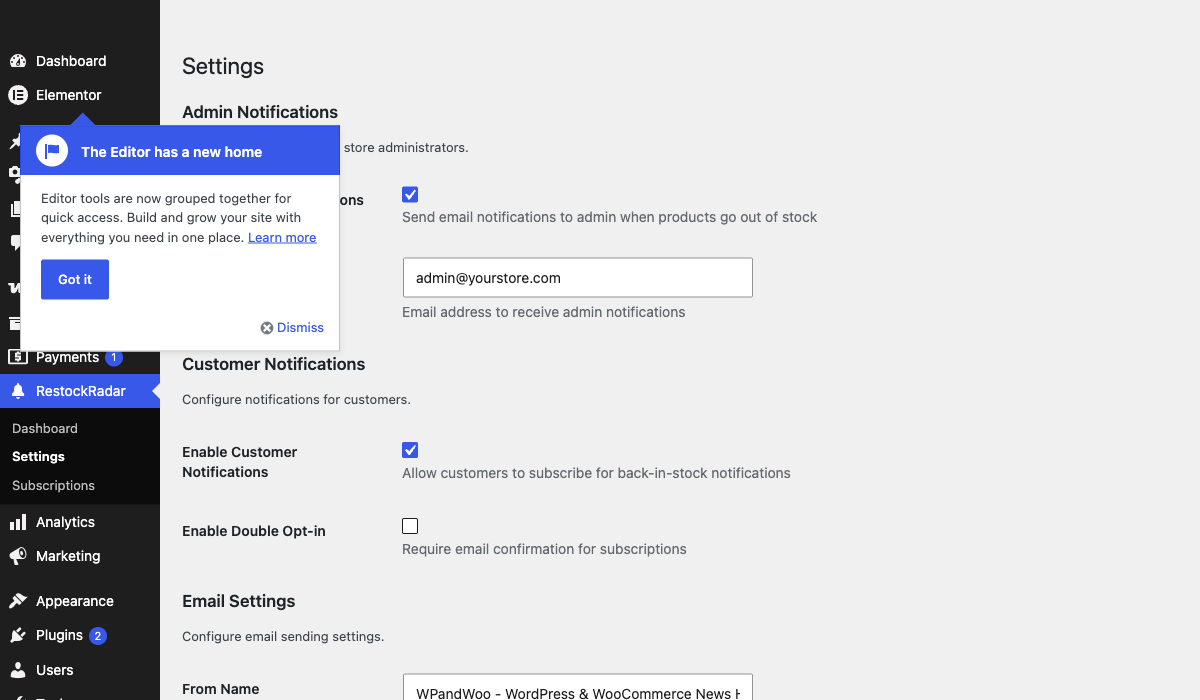
- Admin Out-of-Stock Alerts: Automatically notifies store administrators when products go out of stock
- Low Stock Warnings: Get notified when products fall below your specified threshold with sales velocity analysis
- Customer Back-in-Stock Notifications: Allows customers to subscribe for notifications when out-of-stock products become available again
- Customizable Messages: Fully customize all notification text, email subjects, and form messages
- Rich Product Information: Detailed product data in notifications including sales history, categories, pricing, and stock analysis
- Smart Duplicate Prevention: Prevents sending duplicate notifications with intelligent tracking
- Clean Email Templates: Professional HTML email templates with product images and actionable insights
- Secure Subscription Forms: AJAX-powered forms with nonce verification and rate limiting
- Variable Product Support: Works with both simple and variable products
How It Works
- When a product’s stock falls below your threshold, admins receive a low stock warning with sales velocity analysis
- When a product goes completely out of stock, admins receive a detailed notification with full product information
- Customers see a customizable subscription form on out-of-stock product pages with pricing information
- When products are restocked, all subscribed customers receive notification emails automatically
- The plugin intelligently tracks notification status to prevent duplicate emails while allowing re-notifications for significant changes
Capturas

Instalación
- Upload the
restockradar-stock-waitlist-alertsfolder to the/wp-content/plugins/directory - Activate the plugin through the ‘Plugins’ menu in WordPress
- Ensure WooCommerce is installed and activated
- The plugin will start working automatically – no configuration needed!
FAQ
-
How do I notify customers when a product is back in stock in WooCommerce?
-
Install RestockRadar and it adds a «Notify me when back in stock» form to every out-of-stock product page. Customers subscribe with their email address, and when you restock the product, everyone on the waitlist receives an automatic back-in-stock email with a link to buy.
-
Can I create a waitlist for out-of-stock products?
-
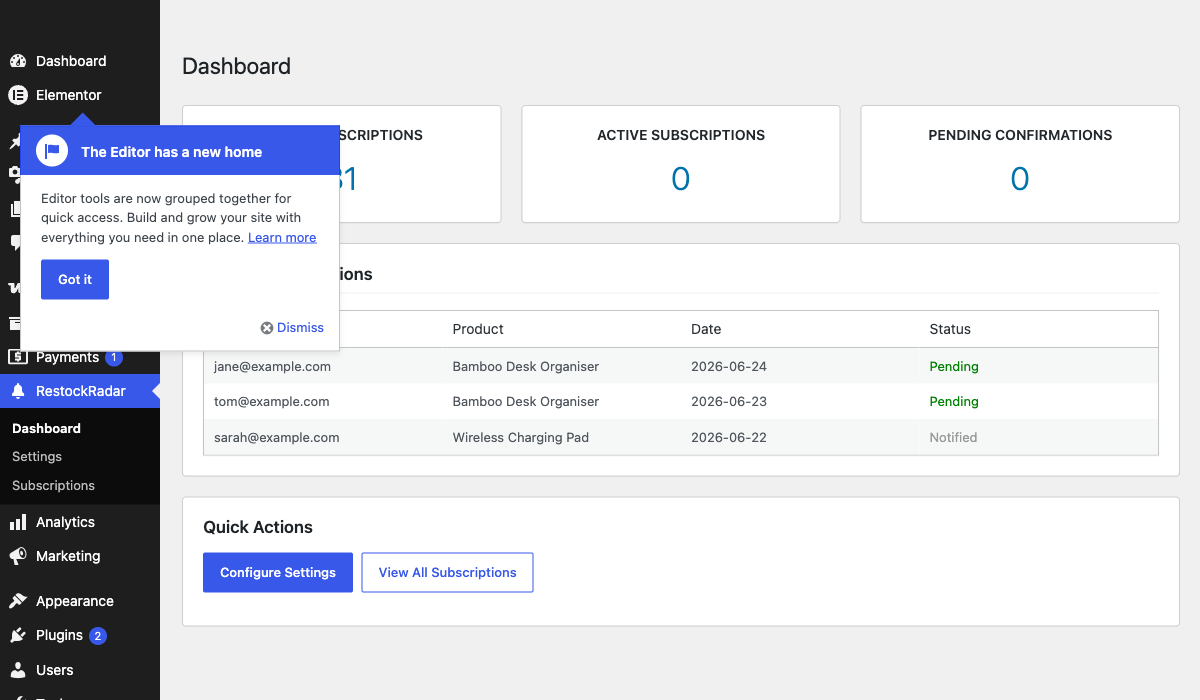
Yes. Every sold-out product becomes a waitlist automatically – no setup required. The RestockRadar dashboard shows total and active subscribers per product, and subscribed customers are notified the moment stock returns.
-
Does RestockRadar send low stock alerts to admins?
-
Yes. When stock falls below your threshold, admins receive an email warning that includes 30-day sales history, daily sales velocity, and estimated days until the product runs out.
-
Does this plugin require any configuration?
-
No, RestockRadar works out of the box with sensible defaults. However, you can extensively customize the plugin through WP Admin RestockRadar Settings, including notification text, thresholds, and email preferences.
-
Can I customize the notification messages?
-
Yes! Navigate to WP Admin RestockRadar Settings Text Customization. You can customize:
* Email subject lines for all notification types
* Email headings and body text
* Customer form headings and descriptions
* Low stock warning messages -
How do I set up low stock warnings?
-
Go to WP Admin RestockRadar Settings Low Stock Notifications:
1. Enable «Low Stock Notifications»
2. Set your desired threshold (e.g., 5 units)
3. Customize the warning message if desired
The plugin will analyze sales velocity and estimate days until out of stock. -
Can customers subscribe to variable product notifications?
-
Currently, the plugin supports notifications at the product level. Variation-level notifications are planned for a future release.
-
How are duplicate notifications prevented?
-
The plugin intelligently tracks notifications:
* Out of stock: Only sends once per stock-out event
* Low stock: Re-sends only if stock drops by more than 50% from last notification
* Automatically resets tracking when products are restocked above thresholds -
What information is included in admin notifications?
-
Admin emails include comprehensive product data:
* Product image and description
* Current stock levels and thresholds
* Sales history (last 30 days)
* Daily average sales velocity
* Estimated days until out of stock
* Categories, tags, pricing, and SKU
* Direct links to edit or view the product -
Is the plugin GDPR compliant?
-
The plugin stores only email addresses and product preferences. Consider adding appropriate privacy policy disclosures about email collection and usage.
-
Can I have multiple admin email recipients?
-
Currently, notifications are sent to a single admin email address. You can configure this in Settings Admin Notifications. Multiple recipients are planned for a future release.
Reseñas
No hay valoraciones para este plugin.
Colaboradores y desarrolladores
«RestockRadar – Back in Stock Notifications & Waitlist for WooCommerce» es un software de código abierto. Las siguientes personas han colaborado con este plugin.
Colaboradores
Traduce «RestockRadar – Back in Stock Notifications & Waitlist for WooCommerce» a tu idioma.
¿Interesado en el desarrollo?
Revisa el código , echa un vistazo al repositorio SVN o suscríbete al registro de desarrollo por RSS.
Registro de cambios
1.0.1
- Improved listing title, tags, and description for clearer search discovery
- Added FAQs on back-in-stock notifications, waitlists, and low stock alerts
- Confirmed compatibility with WordPress 7.1
- No functional changes
1.0.0
- Initial release
- Admin out-of-stock email notifications
- Customer back-in-stock subscription system
- AJAX-powered subscription forms
- Rate limiting for security
- HTML email templates