

Descripción
Tlloancy Step Configurator for WooCommerce lets customers assemble a customizable product through a mobile-first wizard, with live pricing and WooCommerce cart integration.
- Reusable generic engine (steps, options, variants)
- Data-driven flows (config.flow, step.applies_to, option.unlock_flow, limit_rules)
- CSV / XML nomenclature import and export
- Sequential wizard with slide-in menu, progress bar, and photos on cards when you attach them
- Optional accordion layout (Settings) — all sections on one page, product-page style
- Numeric steps (min / max / unit) and an optional base-price formula on the variant
- Base price plus supplements, with mandatory server-side revalidation
- WooCommerce integration via cart_item_data
- Gutenberg block
tlsc/wizard - Shortcode
[tlsc_wizard] - Demo seed isolated in
/seed-data
Capturas
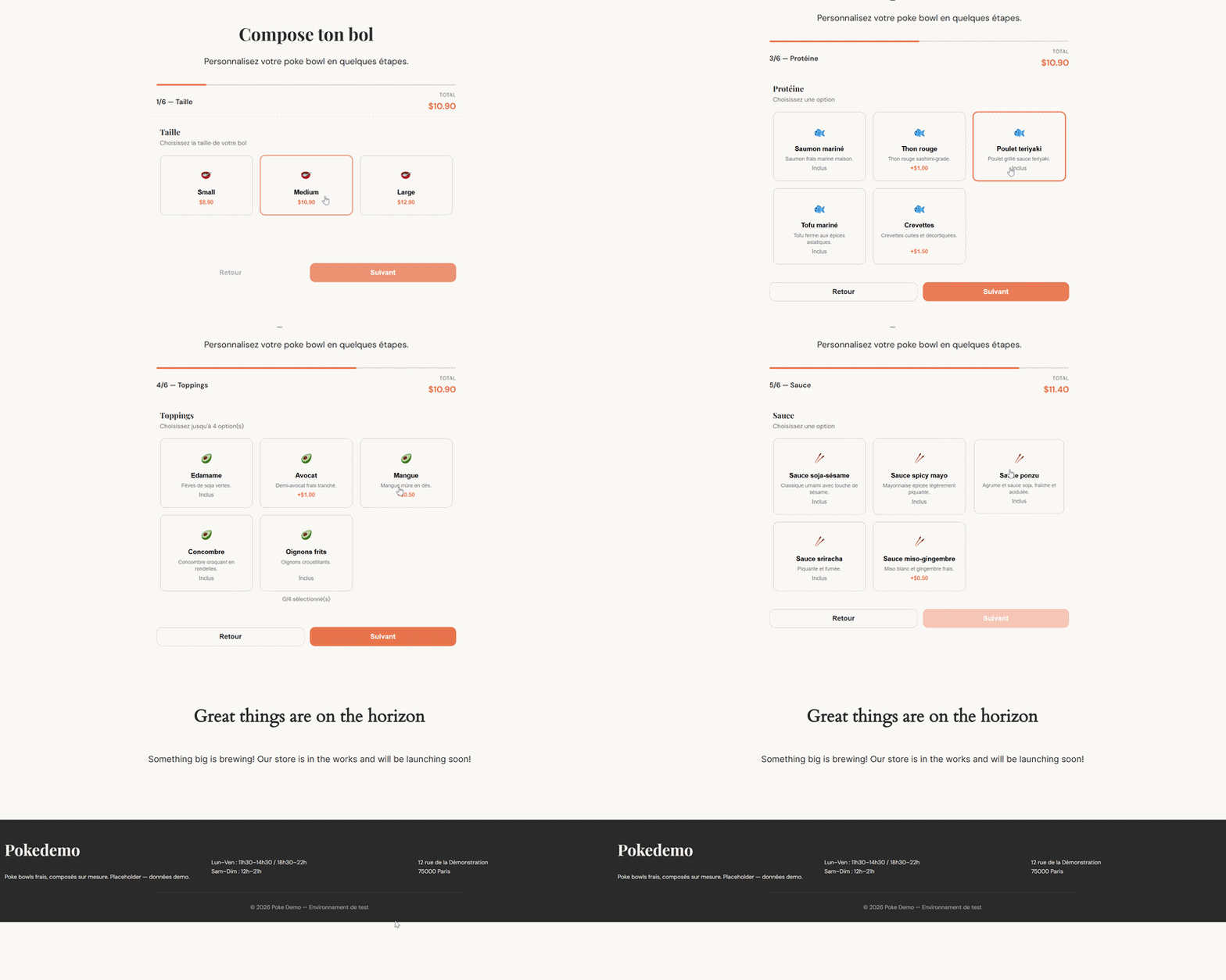
Bloques
Este plugin proporciona 1 bloque.
- Tlloancy Step Configurator Wizard Interactive step-by-step product configurator.
Instalación
- Copy the
tlloancy-step-configurator-for-woocommercefolder towp-content/plugins/ - Activate the plugin
- WooCommerce must be installed and active
- Insert the Tlloancy Step Configurator Wizard block or shortcode on a page
FAQ
-
How do I customize the steps?
-
Use Tlloancy Configurator > Steps, Options and Configs in the WordPress admin.
-
How do I import a BOM / nomenclature?
-
BOM means Bill of Materials. Use Tlloancy Configurator > Import CSV / XML, or see
docs/USER-GUIDE.md(English),docs/MODE-DEMPLOI.md(French), andseed-data/examples/. -
Where is the documentation?
-
- English:
docs/USER-GUIDE.md - French:
docs/MODE-DEMPLOI.md
- English:
-
Can customers buy the configurable product from the product page?
-
No. The shell product is only sold through the wizard. Native Add to cart and express-pay buttons on that product are blocked.
-
How do photos work in the wizard?
-
Configurations with an image show a full-width photo on the card. Options with an image show a small rounded thumbnail. No image means a pictogram only. Next, Back and the steps menu scroll the page back to the top of the wizard.
-
Where does the customer see the configuration?
-
Cart, checkout, the thank-you page, My Account Orders, and the customer order emails. The merchant “New order” email stays short; the full breakdown is on the WooCommerce order screen.
-
Will updating break an existing configurator (e.g. a salad bar)?
-
No. Numeric steps, price formulas and the accordion layout are opt-in. Existing steps stay single/multiple, an empty formula keeps base price + supplements, and the layout defaults to step-by-step.
-
How do I price a product from width × height?
-
Add numeric steps whose slugs are the formula variables (e.g. largeur, hauteur). On the variant, set an optional base-price formula such as max({base}, {largeur} * {hauteur} / 10000 * 89). Leave the formula empty to keep classic pricing. See docs/USER-GUIDE.md.
-
What is the accordion layout?
-
Settings Wizard layout. Step by step is the original wizard (one screen, Next / Back). Accordion lists every section on one page — better for measured products on a product page. Only one section stays open; click the open heading to fold it. Switching layout does not change saved data.
-
Can the customer unselect a variant?
-
Yes. Click the selected configuration card again to clear it. Later steps hide until they pick another. Add to cart stays disabled until a variant is chosen. Rename the first step under Settings First-step label (e.g. Type de confection, Model).
Reseñas
No hay valoraciones para este plugin.
Colaboradores y desarrolladores
«Tlloancy Step Configurator for WooCommerce» es un software de código abierto. Las siguientes personas han colaborado con este plugin.
Colaboradores
Traduce «Tlloancy Step Configurator for WooCommerce» a tu idioma.
¿Interesado en el desarrollo?
Revisa el código , echa un vistazo al repositorio SVN o suscríbete al registro de desarrollo por RSS.
Registro de cambios
1.5.2
- Variant cards: click the selected configuration again to deselect it. Dependent steps leave the wizard until another variant is chosen.
- fr_FR catalogue for 1.5 wizard/admin strings (Personalize your product, Done, formulas, numeric fields) plus a compiled .mo so the front end is no longer mixed EN/FR.
- Docs (USER-GUIDE / MODE-DEMPLOI) cover deselecting a variant and the first-step label.
1.5.1
- Accordion: only one section open at a time; click the open heading (including the first variant step) to fold it. Choosing a variant no longer jumps to the next section by itself.
- Accordion Add to cart: full-width control on a quiet bar — no coral strip under a faded button.
- Settings: layout and palette cards deselect immediately when you pick another (no leftover highlight before Save).
- Demo seed and steel palette renamed Maison Thomas (
seed-data/maison-thomas.php). An existingmukapalette option still loads that steel theme. - Docs (USER-GUIDE / MODE-DEMPLOI) cover accordion folding, the cart button, and the Maison Thomas seed.
1.5.0
- Numeric step type (min / max / increment / unit / default). The step slug is the formula variable. Existing single/multiple steps are unchanged.
- Optional variant base-price formula ({slug} tokens, + − × ÷, min/max/round/ceil/floor). Empty formula = previous pricing (base + supplements + overage).
- Optional option effect: add a delta to a numeric step before the formula (e.g. a breaking hem adds 2 cm to height).
- Settings: wizard layout — Step by step (default) or Accordion. Missing option keeps the original wizard.
- Admin screens stacked full-width (form then list) so fields no longer overflow the list. Step type toggles choice limits vs numeric bounds.
- Sample import seed-data/examples/nomenclature-dimensions-sample.xml. Docs (USER-GUIDE / MODE-DEMPLOI) cover dimensions, formulas and layout.
- CSV/XML import/export: extra optional columns/attributes (backward compatible).
1.4.1
- Wizard: a configuration with an image uses a full-width photo band; an option with an image uses a 72×72 rounded thumbnail; no image still shows a pictogram (never an empty band)
- Next / Back / the steps menu scroll the page back to the top of the wizard; the page itself still scrolls with the mouse
- Admin: variant/option image previews use the same rounded rectangle crop as the wizard, not a circle
- Docs and FAQ updated for card photos and step-change scroll
1.4.0
- Steps admin: per-variant min/max/included/required is a table (tick a variant to override) instead of a JSON textarea — limit_rules is built from that POST array, not from typed JSON
- Fixed: ticking a variant did not enable the Min/Max/Included/Required inputs (the row stayed greyed out)
- Max on a step shows how many options currently exist for that step
- tlsc_configs.image_url (dbDelta); image picker on Variants (media enqueued on configurator admin screens); URL stored on the cart config payload; wizard formula cards, cart / order / admin thumbnails and customer-email images use it; XML import/export adds an image attribute (CSV schema unchanged)
- Native add-to-cart validation, Store API add-to-cart/cart-item, and cart check reject or remove the shell product without tlsc_selections; product-page add-to-cart (classic + blocks CSS) and the loop add-to-cart link are hidden; Stripe / PayPal / WooPayments product express buttons are disabled
- Order-item recap (formula + steps) on the thank-you page, My Account and customer emails; merchant “New order” emails skip it
- Plugin Check: recap thumbnail output goes through wp_kses; Store API exception messages are escaped
- Fixed: with overage_price set, the wizard hint used max (e.g. 2/13) instead of included (2/2); option cards kept saying Included after the included quota was full
- Last wizard step shows “Adding…” while the cart request runs
- Gutenberg block editor strings go through wp.i18n (wp_set_script_translations); admin Error / Network error alerts are translated
- Docs (USER-GUIDE / MODE-DEMPLOI) and readme FAQ updated for wizard-only purchase, customer recap, and the included-quota counter
- fr_FR .po/.mo and .pot updated for the new strings
1.3.0
- Steps can now define an «included» selection count (per variant, in limit_rules) plus a flat overage_price — selections beyond the included count are charged instead of being blocked outright, up to the (now separately raised) max
- Wizard: live price and selection hint reflect the overage as soon as the client crosses the included threshold, not just at checkout
- Fixed: the front-end wizard didn’t split a multi-value unlock_flow (added in 1.2.7) on comma, so a combo option unlocking two flows at once showed neither of them client-side despite the server accepting it
- Maison Thomas seed: Ingrédients bruts/nobles now allow selecting beyond the included amount (2 for Petite, 3 for Grande) at +1,50€ each
1.2.7
- Option unlock_flow now accepts several comma-separated flows (e.g. dessert,boisson), so one option (e.g. a combo) can unlock more than one extra sub-flow at once
- Fixed: CSV/XML import used to sanitize unlock_flow as a single slug directly at insert time, silently mangling multi-value input — now shares the same sanitizer as the admin form
1.2.6
- Order admin screen: configurator selections now shown as a formatted breakdown (grouped by step) instead of raw JSON meta
- CSV / XML nomenclature export (Import / Export screen), mirroring the existing import format — usable as a backup or as a template for another install
1.2.5
- Wizard palette setting: Default (coral), Salade (herb green), Maison Thomas (concrete & steel)
- Presets inject CSS variables on the wizard only; factory coral remains the default
1.2.4
- Same screen: group steps that share a same_screen code on one wizard screen
- Optional steps: clearer hints + Next becomes Skip when nothing is selected
- Safer required casting from DB (string «0» no longer treated as true)
- Optional single-select: re-click to deselect
- Updated fr_FR translations; wizard CSS cache-bust via filemtime
1.2.3
- Plugin Check: drop load_plugin_textdomain, WP 6.0-safe list check, prefixed view variables
- Import notices via user transient (no unsanitized error query args)
1.2.2
- Extensibility hooks for addons: tlsc_cart_item_data, tlsc_pre_add_to_cart, tlsc_add_to_cart_request
- JS events tlsc:beforeAddToCart and tlsc:stepShown
1.2.1
- Configurable first-step label (Settings Formula / Pack / Configuration…)
- Dynamic step hints from effective min/max/required (including limit_rules)
1.2.0
- Data-driven flows: config.flow, step.applies_to (comma-separated), option.unlock_flow
- Per-config limit_rules JSON on steps
- CSV / XML nomenclature import (admin + TLSC_Importer + tlsc_import_payload filter)
- Generic demo seed (no client branding)
- English UI source strings + languages/*.pot and fr_FR translation
- Bilingual docs: USER-GUIDE.md (EN) + MODE-DEMPLOI.md (FR)
- Sample industrial-style CSV/XML under seed-data/examples/
1.1.0
- Step scope applies_to
- Wizard + pricing filter applicable steps
- TLSC_Activator::reseed()
1.0.0
- Initial release