Etiqueta del plugin: developer-tools
-

Advanced Post Manager
Turbo charge your posts admin for any custom post type with sortable filters and columns, and auto-registration of metaboxes.
-

Debug Log Viewer
Visualiza, busca y gestiona sin esfuerzo tu debug.log de WordPress en escritorio del administrador. Supervisión en tiempo real, alertas por correo electrónico y filtrado
-
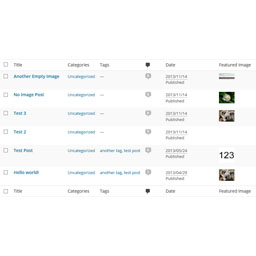
Post List Featured Image
A plugin that adds the "Featured Image" column in admin posts and pages list.
-

Easy Symlinks
Manage symbolic links from the WordPress admin. Create and delete symlinks without CLI access, ideal for Pantheon environments.
-
-
PostMeta Viewer – Custom Fields Inspector
A powerful debugging tool for WordPress developers to inspect and analyze post meta (custom fields) across posts, pages, custom post types, taxonomy t …
-

SniffPress
A powerful search tool that helps developers quickly find text strings within theme and plugin files.
-

Developer Debug Mode
Toggle WordPress debug mode instantly. No wp-config.php editing needed. Features auto-save, admin bar quick toggle, and debug log viewer.
-

Admin Code Search
Search code across active plugins, themes, and MU plugins directly from the WordPress admin.
-

REST API Route Tester
A WordPress admin tool to quickly test REST API routes, path params, headers, body payloads, and copy requests as cURL.
-

Featured Image Column Display
A plugin that adds the "Featured Image" column in admin posts and pages list.
-

widgetIQ for Elementor
See exactly which pages and posts use any Elementor widget — perfect for developers, designers, and agencies doing audits or migrations.
-

Query All The Post Types
A developer tool displaying all registered post types w/ the benefit of exposing CPT's to AI tools and admin clients via the WordPress Abilities API.
-

ThemePackager
Export any installed WordPress theme (active or inactive) as a ZIP file directly from Appearance → Themes.
-
-

Project Management, Bug and Issue Tracking Plugin – Software Issue Manager
Best issue tracking, bug tracking and project management plugin. Easily manage tasks, stay organized, and track progress in WordPress.
-

Ganziq
Inspect, edit, validate, preview, import and export Elementor JSON in a safe workspace without replacing the original page.
-

Responsive Checker & Device Preview – Mobile Responsive Testing, Simulator & Developer Tools
Test mobile responsive layouts with instant device previews, multi-screen sync scroll, CSS breakpoint scanner, visual regression, and developer tools.
-

LogIQ – Intelligent Debug Log Viewer
Stop digging through raw log files. LogIQ gives WordPress developers a smart, searchable, and beautiful debug log viewer — right inside the admin.
-