

Descripción
Recupera los ingresos publicitarios que los bloqueadores de anuncios le quitan a tu sitio
A growing share of your visitors browse with an ad blocker. They read your content, but your ads never load, so every one of those page views earns you nothing. AntiAdBlockCore detects ad blockers on your WordPress site and shows those visitors a customizable anti-adblock message asking them to allow ads. Visitors who whitelist your site start seeing ads again, and you get that revenue back.
Free plan, no payment method needed. Works with any theme and with WP Rocket, LiteSpeed Cache and W3 Total Cache: the script is kept out of their JavaScript optimization and their page cache is purged for you when something changes.
Está pensado para editores, blogueros y medios que viven de la publicidad: noticias, recetas, tutoriales, descargas, streaming, foros o cualquier sitio monetizado con Google AdSense, Google Ad Manager u otra red de anuncios.
Up and running in minutes, no code to paste
- Instala y activa el plugin.
- In Settings > AntiAdBlock Core, click Click here to connect your AntiAdBlock Core account. Sign in or create your free account (no payment method needed), check the security code and approve.
- The plugin verifies your domain and the detection script goes live on every page once the CNAME record of your subdomain is active.
- Optional: turn on Maximum detection in Configuration, with one click and nothing to upload.
Sin fragmentos de código que copiar ni archivos del tema que editar. El plugin añade el script a todas las páginas sea cual sea tu tema, y una comprobación de la instalación integrada confirma que de verdad está ahí.
Una detección de bloqueadores que sigue funcionando
- Detecta los bloqueadores que usan de verdad tus visitantes: extensiones del navegador como uBlock Origin, AdBlock, AdBlock Plus y AdGuard, navegadores con bloqueo integrado como Brave, y bloqueadores a nivel de red.
- Pensado para evitar falsos positivos: a los visitantes sin bloqueador de anuncios no se les molesta.
- Siempre al día: la detección se mantiene desde el servicio, así que se adapta cuando cambian los bloqueadores de anuncios, sin actualizar el plugin.
- First-party delivery: the script is served from a subdomain of your own site with a single CNAME record, so it stays first-party. The plugin walks you through the record step by step (on Cloudflare, keep the orange cloud on) and switches over by itself when it is active.
- Maximum detection: one click adds a second way in through your own domain. When a visitor cannot reach your subdomain, the script loads through a short list of addresses on your domain that change every day, answered by the plugin itself. Nothing to upload and no file to edit; turn it off at any time.
An anti-adblock message that converts
- A clear notice that explains why ads matter to your site. By default it works as an adblock wall: visitors allow ads on your site to keep reading, with step-by-step instructions for their ad blocker and a button that checks again right away.
- The built-in text is in English or Spanish, following the visitor’s browser.
- Customize the message, colors, logo and look from your dashboard, depending on your plan, and preview it without installing an ad blocker.
- Muestra el mensaje (recuperación) o, en los planes que lo incluyen, funciona en modo solo detección, y excluye cualquier página o ruta, como las de pago o privacidad.
Mide lo que recuperas
- Porcentaje de visitas con bloqueador, detecciones y recuperaciones, por sitio.
- Pages, countries, browsers and ad blocker types in the dashboard (detailed analytics on the Max and Business plans).
- Un resumen mensual en la propia página de ajustes del plugin.
Todo bajo control desde WordPress
- Overview: site, account, delivery and status at a glance, with a Check button and a link to the step-by-step guide.
- Protection level: Standard or Maximum detection, with a check that confirms from outside that it works and plain-language help when something on your server needs a change.
- Your account inside WordPress: account name, plan, usage of the current cycle, a monthly chart and your latest notifications from AntiAdBlock Core.
- Protection switch: turn ad block protection on or off on this WordPress.
- Comprobación de la instalación: abre tu portada y tus últimas entradas y páginas como un visitante anónimo y confirma que el script está en cada una, y que no está en las páginas que has excluido.
- Logged-in users who can edit posts are skipped by default (contributors, authors, editors and administrators), so your team never sees the message and their visits stay out of the stats.
- Opción de código manual para front ends headless o maquetadores que sirven su propio HTML.
Funciona con tus herramientas
- Cualquier tema, incluidos los que no llaman a wp_head().
- Caching and optimization plugins: WP Rocket, LiteSpeed Cache, Autoptimize, SiteGround Optimizer, Perfmatters, Flying Press and W3 Total Cache. The script is excluded from their JavaScript optimization (minification, deferral or delay). When something changes, the plugin purges the page cache of WP Rocket, LiteSpeed Cache, W3 Total Cache, WP Super Cache, SiteGround Optimizer and WP Engine.
- Cloudflare, incluido Rocket Loader.
- Las páginas AMP y los feeds se omiten automáticamente.
- Multisite: each site connects on its own.
Planes
The free plan includes 5,000 detections per month (a detection is a page view where an ad blocker is detected; page views without one never count), no payment method required. Paid plans add more detections and sites; Max and Business also add full customization of the message and detailed analytics. Plans are managed in your AntiAdBlock Core dashboard, never inside WordPress: the plugin code is complete and the same for every plan.
Servicio de terceros
This plugin relies on the AntiAdBlock Core service (https://antiadblockcore.com), a software-as-a-service run by the plugin authors. It is required for the plugin to work.
- Al conectar: no se envía nada hasta que haces clic en el botón de conectar. Entonces el plugin envía a https://antiadblockcore.com la dirección y el nombre de tu sitio, las versiones de WordPress, PHP y del plugin, el idioma del administrador y si el sitio es una multisite, una instalación en subcarpeta o un entorno que no es de producción. Recibe un token limitado a este sitio, que sirve para consultar el estado, el uso y el plan del sitio y para verificar tu dominio. Nunca se envían cuentas de usuario, correos electrónicos ni contenido de tu sitio.
- En segundo plano: mientras está conectado, el plugin consulta ese estado una vez por hora para que la dirección del script, el estado de verificación y tu cuota estén al día. Se detiene cuando lo desconectas.
- On your pages: once the domain is verified, your pages load the detection script from a subdomain of your own domain that points to the service (you create that DNS record yourself; nothing is changed for you). Sites that connected before 1.2.0 with the older third-party delivery keep loading it from antiadblockcore.com until they switch.
- Maximum detection (only if you turn it on): the plugin receives a key for this site from the service and answers a short list of daily addresses on your domain. For a visitor who cannot reach your subdomain, it forwards that request (the script, and the same reports the script sends) to the service (https://antiadblockcore.com), signed with the key, together with the visitor’s IP address and country (from Cloudflare when your site is behind it) and the same request headers a browser sends to the subdomain (user agent, language, accepted content types, origin, the page address without its query string, and the script’s own signed report headers), so the service can protect itself and count the visit as it would through the subdomain. It does not pass on cookies and does not set any. The service can also send this WordPress signed requests to check that it works. Turning it off, disconnecting or uninstalling removes the key. For each page view the script reports whether an ad blocker was detected and which kind, the page path, the browser type and the country derived from the visitor’s IP address. The IP address is used in transit to derive the country and to protect the service; it is not stored in the statistics and is deleted from the service’s server access logs after 14 days. To count recoveries correctly, the script keeps a few small first-party entries on your own domain: in the browser’s local or session storage and, when your site spans several subdomains, in a first-party cookie on your domain. They hold when an ad blocker was last seen and which kind, a few flags for the current visit (such as the page and whether the message was closed) and, for up to 24 hours, reports that could not be sent yet. They contain no identifier of the visitor, are not used for advertising, profiling or tracking across sites, and are ignored after 30 days; the cookie expires then. Describe them in your privacy or cookie policy and decide, under the rules that apply to you, whether your consent tool should cover them.
- Credit: the message shown to visitors who have an ad blocker carries a small «powered by AntiAdBlock Core» link. It appears only inside that message, only for visitors with an ad blocker, and higher plans can switch it off.
- Condiciones del servicio: https://antiadblockcore.com/terms
- Política de privacidad: https://antiadblockcore.com/privacy
El script de detección se carga desde el servicio y no viene incluido en este plugin; el código del plugin es completamente legible.
Capturas


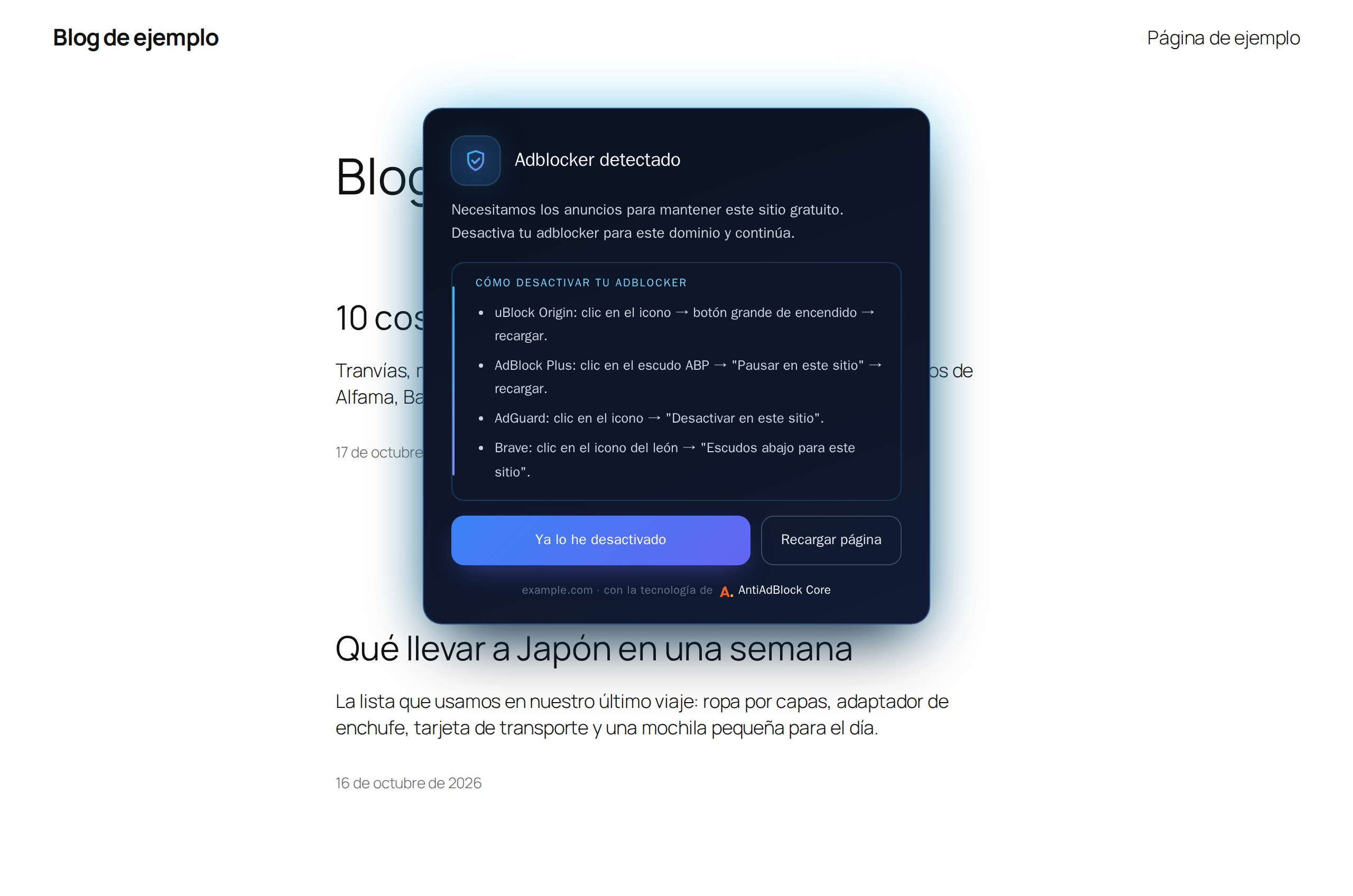


Instalación
- Install the plugin from the Plugins screen (search for AntiAdBlockCore) or upload it to
/wp-content/plugins/antiadblockcore. - Actívalo.
- Go to Settings > AntiAdBlock Core and click Click here to connect your AntiAdBlock Core account. AntiAdBlock Core opens in a new tab.
- Sign in or create your free account, check that the security code matches and click Connect.
- Back in WordPress, create the DNS record shown in the setup steps; the plugin verifies your domain and the script goes live once the record is active.
- Optional: in Configuration > Protection level, turn on Maximum detection.
If your WordPress lives in a subfolder of the domain (for example example.com/blog), the settings page shows a one-time manual verification step. First-party delivery covers that case too: the DNS record verifies the domain without touching any file.
FAQ
-
¿Es gratis?
-
Yes, there is a free plan for one site with 5,000 detections per month and no payment method required. A detection is a page view where an ad blocker is detected; page views without one never count. Paid plans add detections and sites; Max and Business also add full message customization and detailed analytics.
-
What is Maximum detection?
-
An optional second way in for the detection script, through your own domain. With it on, a visitor who cannot reach your subdomain still gets the script, through a few addresses on your domain that change every day and that the plugin answers. Turn it on in Configuration > Protection level: it takes up to a minute while the service checks from outside that it works. If your server serves .js addresses itself (some Nginx setups), the plugin shows the block to add. If a firewall or security plugin (Wordfence, ModSecurity, Cloudflare WAF) blocks the check, allow POST requests to your home page with
?aabc_max. A page cache or CDN set to cache everything regardless of headers must not cache those daily addresses; they answer withCache-Control: no-store. -
¿Tengo que pegar algún código?
-
No. The plugin adds the script to every page for you, whatever your theme. A Get code option is there only for setups that bypass WordPress, such as headless front ends.
-
¿Ralentizará mi sitio?
-
The script loads asynchronously, so it never blocks your page from rendering, and it is excluded from the common caching and optimization plugins so they do not break it.
-
¿Por qué no veo el mensaje en mi propio sitio?
-
Logged-in users who can edit posts (contributors, authors, editors and administrators) are skipped by default. Log out or open your site in a private window with an ad blocker on. You can change this in the plugin settings.
-
¿Qué es la entrega first-party y tengo que usarla?
-
It serves the script from a subdomain of your own site, which keeps it first-party for ad blockers. It takes one DNS record, shown with copy buttons and step-by-step status. It is how every new site works since 1.2.0; sites still on the older third-party delivery see a button to switch. If the record is not created in time, the reserved subdomain is released and the plugin offers to reserve it again.
-
He creado el registro DNS. ¿Y ahora qué?
-
Nothing else. Press Check to verify it right away, or leave it: the plugin checks every hour and switches over by itself. On Cloudflare, leave the orange cloud on (Proxied).
-
¿Cómo sé que el script está en mis páginas?
-
Use Check pages in the Ad block protection section. It opens your home page and your latest posts and pages as an anonymous visitor and tells you, page by page, whether the script is there. If a page misses it, purge your page cache and check again.
-
¿Funciona con mi plugin de caché?
-
Yes. The script is excluded from the JavaScript optimization of WP Rocket, LiteSpeed Cache, Autoptimize, SiteGround Optimizer, Perfmatters, Flying Press and W3 Total Cache. When you connect or change settings, the plugin purges the page cache of WP Rocket, LiteSpeed Cache, W3 Total Cache, WP Super Cache, SiteGround Optimizer and WP Engine. With any other cache, such as Flying Press or a CDN, purge it yourself after changes.
-
¿Qué pasa si mi plan no tiene hueco para otro sitio?
-
Tanto la página de aprobación como el plugin te avisan de que has alcanzado el límite de sitios de tu cuenta, con un botón para mejorar el plan o gestionar tus sitios. La solicitud de conexión sigue siendo válida durante 30 minutos.
-
¿Puedo pausarlo o excluir páginas?
-
Yes. Turn off the Ad block protection switch to stop the script on this WordPress, or list the paths and page slugs to exclude in the settings. AMP pages and feeds are always skipped.
-
¿Qué datos envía el plugin?
-
Only what is described under «Third-party service»: your site address and name, software versions, admin language and basic install details when you connect, and afterwards the site status. The detection script does not read personal data from your pages; see «Third-party service» for what it reports and for the small entries it keeps in the visitor’s browser, with no identifier and for 30 days at most.
-
¿Puedo desconectarlo?
-
Yes. Disconnect in the plugin settings and the script stops right away. If you disconnect this WordPress from your AntiAdBlock Core dashboard instead, it stops at the plugin’s next hourly check, or when its settings page is opened. Either way the site and its statistics stay in your account, and a tag pasted into your theme by hand has to be removed there.
Reseñas
No hay valoraciones para este plugin.
Colaboradores y desarrolladores
«AntiAdBlockCore – AdBlock Recovery» es un software de código abierto. Las siguientes personas han colaborado con este plugin.
Colaboradores
«AntiAdBlockCore – AdBlock Recovery» está traducido en 2 idiomas. Gracias a los traductores por sus contribuciones.
Traduce «AntiAdBlockCore – AdBlock Recovery» a tu idioma.
¿Interesado en el desarrollo?
Revisa el código , echa un vistazo al repositorio SVN o suscríbete al registro de desarrollo por RSS.
Registro de cambios
1.2.6
- Domains that cannot have a first-party subdomain can now be protected: turn on Maximum detection and the script loads through your own domain, served by this plugin, with no DNS record to create.
- On those sites the plugin explains what to do instead of asking you to contact support, and «Check pages» recognises the new tag.
1.2.5
- Maximum detection: when an ad blocker answers the script with an empty file instead of blocking it, the plugin now notices and loads it through the daily addresses on your domain, as it already did when the script was blocked.
1.2.4
- Third-party delivery ended on November 15, 2026. A site that still used it now says so clearly and connects its domain with one button, then follows the usual DNS steps.
- Clear message when the domain is already verified on another account.
1.2.3
- The two protection levels are now called Standard and Maximum detection, as in your AntiAdBlock Core dashboard.
1.2.2
- Maximum detection: the plugin now forwards to a fixed address of the service instead of your subdomain, so your own Cloudflare firewall or bot protection can no longer block it, and it keeps working if your subdomain is renewed. Nothing to do: it switches over by itself.
1.2.1
- Maximum detection: if every address on your domain fails for a visitor (for example, the service is down), that browser stops trying them for 10 minutes, so your server never gets extra load from it. The plugin also gives up sooner and waits longer before trying the service again.
- Maximum detection: the visitor’s address is read correctly when Cloudflare and a local proxy are both in front of WordPress.
- Clearer messages when a firewall blocks the check, when Maximum detection was set up with a file from the dashboard, and when you go back to Standard with the tag pasted by hand.
1.2.0
- New look: the settings page now has the same design as your AntiAdBlock Core dashboard, in four tabs (Home, Configuration, Account and usage, Statistics), with the monthly chart, cycle usage and your latest notifications.
- New: Maximum detection. One click adds a second way in through your own domain, answered by the plugin, with nothing to upload. A check confirms from outside that it works.
- First-party delivery is now the only option for new connections; sites still on third-party delivery can switch with one button. The DNS step now tells Cloudflare users to keep the orange cloud on.
- The plugin bundles the Inter, Space Grotesk and JetBrains Mono fonts (SIL Open Font License) for its settings page.
1.1.5
- Settings page: the caching note now separates the plugins that keep the script out of their JavaScript optimization from the page caches the plugin purges for you. Purge any other cache, such as Flying Press or a CDN, yourself after changes.
- Removed a call to an Autoptimize function that no longer exists. The script is still excluded from Autoptimize’s JavaScript optimization.
- Clearer wording on who is skipped by default: every logged-in user who can edit posts (contributors, authors, editors and administrators), as the plugin already did.
1.1.4
- Disconnecting this WordPress from your AntiAdBlock Core dashboard now stops the script and the verification tag on your pages at the plugin’s next hourly check (or when its settings page is opened), until you reconnect, and purges the page caches it supports. A tag pasted into the theme by hand has to be removed there. Disconnecting a copy of the site, such as a staging site, or changing your password does not stop it.
- Clearer wording on the connect screen (no payment method needed), in the suggested privacy policy text and in this readme.
1.1.3
- El resumen del mes en la página de ajustes muestra ahora las recuperaciones, la misma cifra que tu panel de AntiAdBlock Core.
- First-party setup: the DNS step appears once the service has sent the record to create.
- Textos del readme actualizados.
1.1.2
- Fix: with first-party delivery, the exclusion entries the plugin adds to caching and optimization plugins now match your whole first-party subdomain. The first-party script address changed and the previous entry no longer matched it.
1.1.1
- Primera versión pública en WordPress.org.
- Conexión en un clic: el botón abre la página de aprobación en una pestaña nueva, con pasos numerados, un código de seguridad para comprobar y un aviso claro (con enlace para mejorar el plan) cuando el plan no tiene hueco para otro sitio.
- Settings page in sections: overview (site, account, delivery, status), first-party setup steps, protection switch, installation check, monthly summary, shortcuts and settings.
- First-party or third-party delivery, switchable from the plugin; guided DNS steps with a Check button.
- Comprobación de la instalación en la portada, las últimas entradas y páginas y las páginas excluidas.
- El script se añade a todas las páginas sea cual sea el tema, incluidos los temas sin wp_head().
- Compatibilidad con plugins de caché y optimización. Preparado para traducción.
- A clear notice when the first-party subdomain reserved for the site expires, with a button to reserve it again.
- The readme and the suggested privacy policy text describe the small first-party entry the script keeps in the visitor’s browser.