
Descripción
This plugin lets you send Contact Form 7 messages to Telegram chats via a bot. Setup takes just a few steps:
- Create a Telegram bot (how to).
- Create a bot in the plugin UI.
- Paste the bot token into the bot form (PHP constants also available).
- Create a bridge in the plugin UI. A bridge links Contact Form 7 forms, a Telegram bot, and one or more Telegram recipients.
- Add users to the subscriber list by sending the
/cf7tg_startcommand to your bot. To add a group, first add the bot to the group, then send/cf7tg_startin that group. - Approve or decline subscription requests on the Contact Form 7 CF7 Telegram settings page.
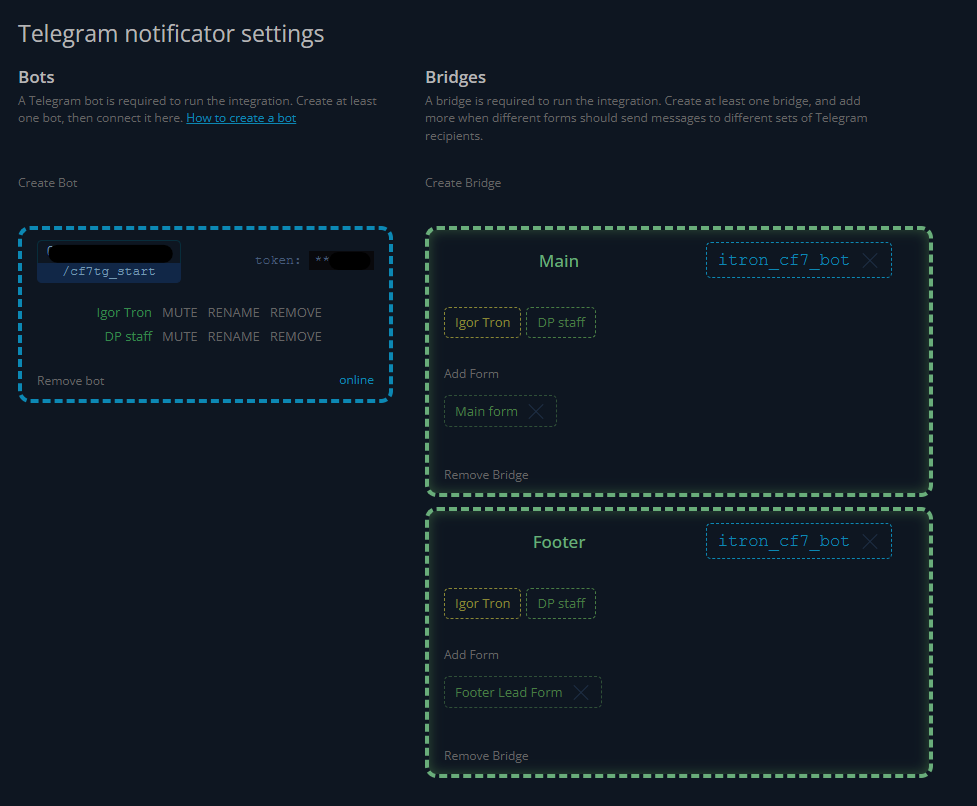
- Configure the bridge: choose which forms it handles and which Telegram recipients should receive those messages. Create at least one bridge to run the integration, and add more when different forms should send messages to different sets of Telegram recipients.
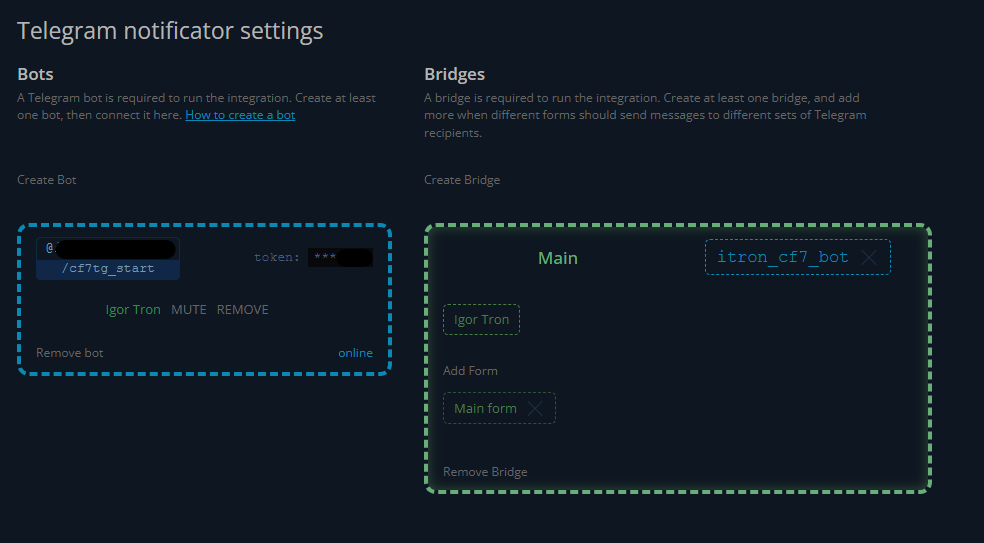
The integration is configured correctly when the bot panel is highlighted in blue and the bridge panel is highlighted in green.
Ganchos y constantes
Filter wpcf7tg_skip_tg
Use it to skip sending a Telegram message.
Filter wpcf7tg_markdown
Use it to customize the allowed Markdown tags.
Filter wpcf7tg_sendMessage( $args, $chat_id, $mode )
Use it to customize Telegram sendMessage arguments for each recipient and message chunk.
Action wpcf7tg_message_sent( $args, $submission )
Runs after each Telegram delivery attempt. A Telegram failure does not abort the Contact Form 7 submission.
Action wpcf7tg_messages_sent( $list, $output, $mode, $submission )
Runs after all configured recipients have been attempted.
Constant WPCF7TG_LOG_RETENTION_DAYS and filter cf7tg/logRetentionDays
Set the log retention period in days. The default is 30; set it to 0 to disable age-based pruning.
Constant WPCF7TG_LOG_MAX_ROWS and filter cf7tg/logMaxRows
Set the maximum number of newest log rows to retain. The default is 10000.
Constants WPCF7TG_PING_INTERVAL and WPCF7TG_UPDATES_INTERVAL
Set the offline bot status retry interval and the online Telegram update polling interval in milliseconds. The defaults are 5000 and 12000 respectively.
Este plugin usa la API de Telegram y envía solicitudes remotas de HTTP a los servidores de Telegram para enviar avisos.
Capturas
Reseñas


Colaboradores y desarrolladores
«Message Bridge for Contact Form 7 and Telegram» es un software de código abierto. Las siguientes personas han colaborado con este plugin.
Colaboradores

«Message Bridge for Contact Form 7 and Telegram» está traducido en 8 idiomas. Gracias a los traductores por sus contribuciones.
Traduce «Message Bridge for Contact Form 7 and Telegram» a tu idioma.
¿Interesado en el desarrollo?
Revisa el código , echa un vistazo al repositorio SVN o suscríbete al registro de desarrollo por RSS.
Registro de cambios
1.1.0
- Add fake Telegram browser E2E coverage for form delivery, admin setup, partial delivery failures, and CI evidence collection.
- Rename user-facing Channel terminology to Bridge across the admin UI and guide, with bridge and bot setup guidance.
- Add chat display-name controls so administrators can set custom names and restore Telegram-provided names.
1.0.13
- Make Telegram bot actions POST-first and harden the administration interface against partial loading, pagination, and retry failures.
- Restore the full-page administration background, hide unrelated WordPress notices on the plugin screen, and improve diagnostics without exposing bot tokens or contact details.
- Ignore transient Telegram polling timeouts in the interface and use a 12-second default update polling interval.
- Add automatic 30-day and 10,000-row log retention with configurable limits.
- Verify the release ZIP across supported WordPress, PHP, and Contact Form 7 versions, including install, upgrade, uninstall, and rollback workflows.
- Add reproducible build, Plugin Check, dependency audit, artifact hygiene, browser canary, and manually approved WordPress.org promotion gates.
1.0.12
- Replace the Telegram SDK with a smaller WordPress HTTP integration and safer error handling.
- Validate bot tokens before saving them and preserve existing chat connections when the bot identity is unchanged.
- Make update polling webhook-aware and prevent failed updates from being skipped.
- Load every page of Telegram chats in the administration interface.
- Improve Unicode message chunking, plaintext fallback, multi-recipient delivery, and legacy hook compatibility.
1.0.11
- Make legacy migrations self-healing, retryable, and safe to run repeatedly.
- Preserve Contact Form 7 content while migrating bots, chats, channels, and form connections without duplicates.
- Keep bot tokens defined through PHP constants out of stored plugin data.
- Replace destructive load-time cleanup with conservative repair and recovery controls.
1.0.10
- Add maintenance cleanup for orphan chats and broken relations.
- Fix fatal error on CF7 submission when a channel has chats but no connected bot (#56).
1.0.9
- Remove external update controls.
1.0.8
- Harden Telegram chat sanitization and update polling.
1.0.7
- Prevent duplicate chat subscriptions when bot updates are fetched concurrently.
1.0.6
- Fix truncated bot name copy.
1.0.5
- Race condition in chats loading fixed.
1.0.4
- Minor fixes.
1.0.3
- Fix translation loading issue.
1.0.2
- Manual migration button added.
- Migration process improved.
1.0.1
- Fix react template.
1.0.0
- New UI for managing channels and bot token.
- New plugin name was chosen to comply with new WordPress guidelines.
0.10.0
- Beta testing is available for everyone.
0.9.3
- Preparing for beta testing.
0.9.2
- Loading textdomain fixed – moved to init hook.
- Array undefined key fixed.
0.9.1
- Version never released.
0.9
- Preparing to v1.0 seamless transition.
0.8.7
- API Telegram errors logging added.
0.8.6
- Security issue CVE-2024-9629 got fixed.
0.8.5
- PHP 7.2 compatibility fixed.
0.8.4
- Markdown symbols escaping got added in order to fix an issue.
0.8.3
- Blueprint got added.
0.8.2
- Donation link got changed.
- tested up to WP 6.5
0.8.1
- Actualiza la fecha de oferta de la extensión.
0.8
- Extensiones disponibles
0.7.10
- Preparado para el envío de archivos adjuntos
- Algunas correcciones
0.7.9
- Problema con el formato Markdown para HTML
0.7.7
- Compatibilidad con funciones de versiones anteriores a WordPress 5.3
0.7
- Nueva interfaz de gestión de destinatarios
- Es compatible con grupos
- `WPCF7_ContactForm::prop( ‘mail’ )` en lugar de `WPCF7_ContactForm::$mail`
- CORREGIDO: Dependencia `parce_mode` por la propiedad `use_html`
0.6.2
- Añadido ajuste para los elementos del campo `CHAT_ID`
0.6.1
- Corregido un fallo con Markdown
0.6
- Ahora, el mensaje a Telegram se envía a través del gancho
wpcf7_before_send_mailen lugar dewpcf7_mail_sent. Es una forma más fiable. - Añadido el filtro
wpcf7tg_skip_tg. - Añadido el filtro
wpcf7tg_markdown. - Añadida la constante
WPFC7TG_BOT_TOKEN. - corrección de errores
0.5
- Añadido marcaje