Descripción
Find broken links, 404 errors & broken images. Internal link optimizer, rank tracking, AI visibility, SEO audits and uptime monitoring in one plugin.
Broken Link Checker para WordPress: encuentra y corrige enlaces rotos rápido
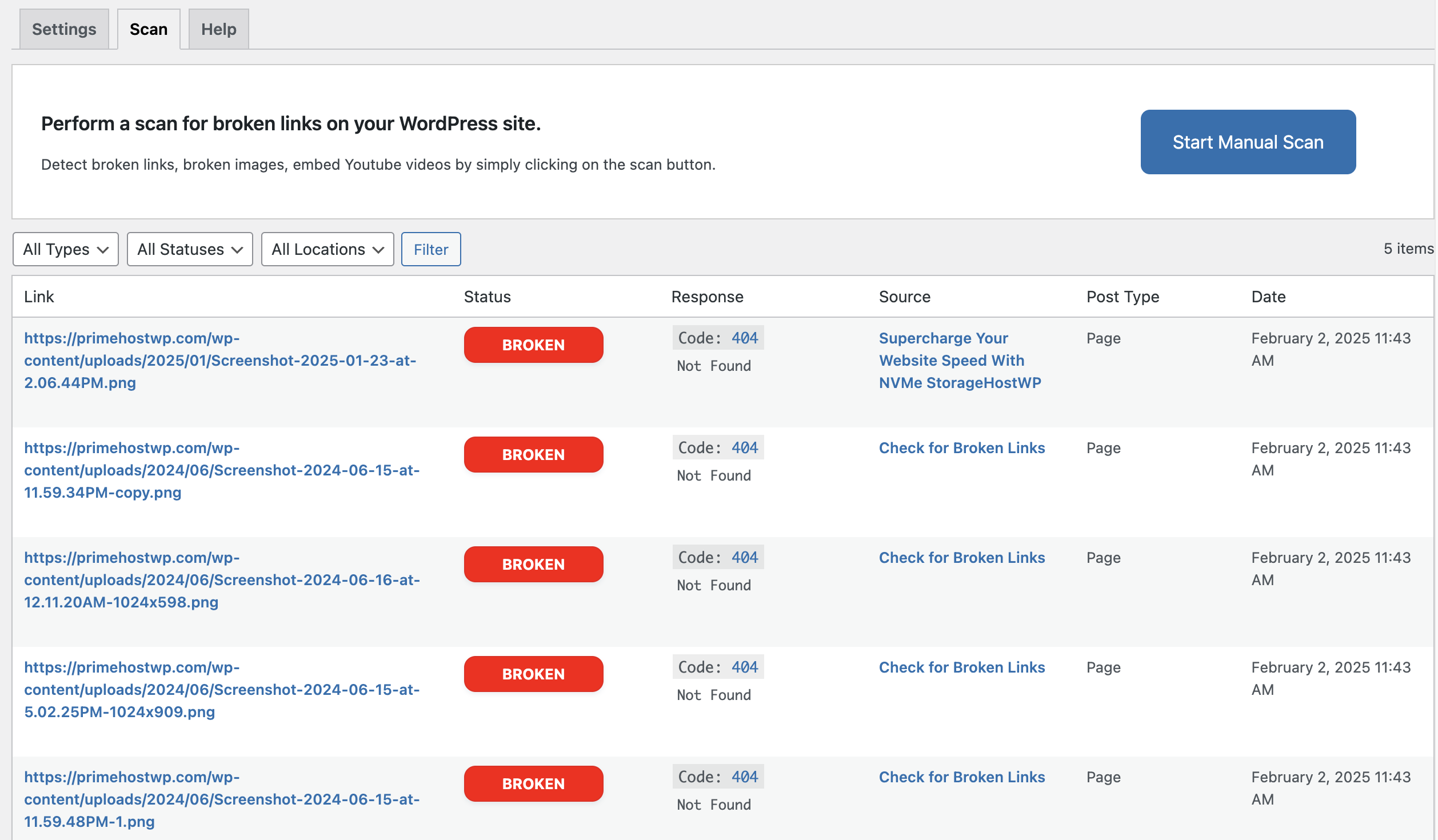
Check for Broken Links escanea todo tu sitio WordPress en busca de enlaces rotos, enlaces muertos, errores 404 e imágenes rotas. Te muestra exactamente dónde se encontró cada enlace roto para que lo corrijas rápido.
Tu sitio se rompe en silencio mientras estás ocupado. Se borran páginas, se abandonan plugins, se caen sitios externos. Google encuentra los errores 404 antes que tú, y tu posicionamiento lo paga. Este plugin encuentra cada enlace roto en tus entradas, páginas, tipos de contenido personalizados y contenido de sliders, y Pro amplía el escaneo a comentarios y campos personalizados.
A diferencia de las herramientas externas de comprobación de enlaces, el plugin funciona dentro de WordPress. Escanea contenido privado, borradores y páginas tras el inicio de sesión que ningún rastreador externo puede alcanzar.
Version 3 adds five more tools to the same plugin. You can now track your keyword positions, watch how AI assistants mention your brand, repair your internal linking, audit your site for SEO and AEO, and monitor uptime. All of it runs in wp-admin. See the section below.
Cómo funciona
- Instala y escanea. Ejecuta tu primer escaneo manual en segundos y ve cada enlace roto de tu sitio.
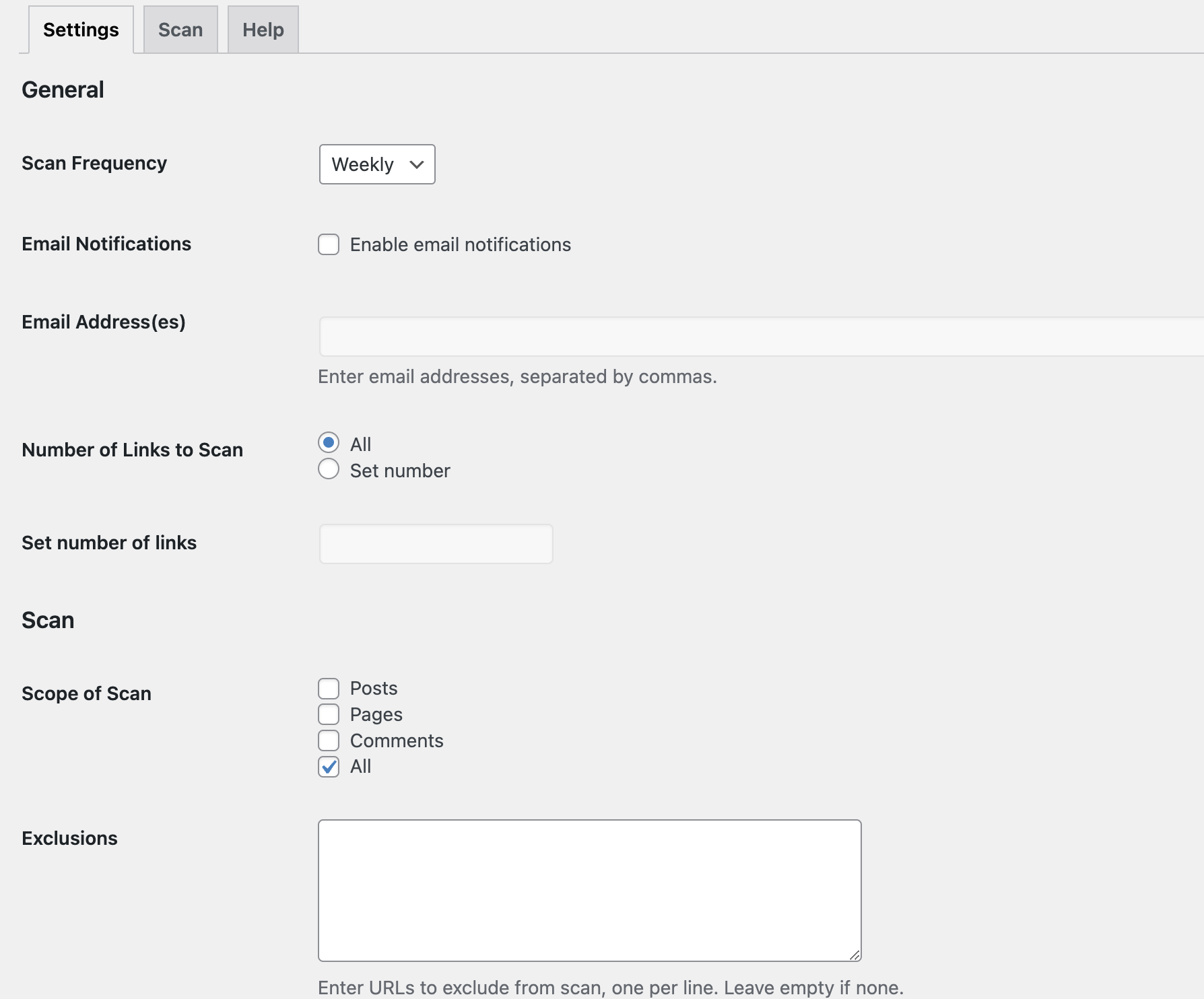
- Programa tus escaneos (Pro). Elige escaneos diarios, semanales o mensuales. Elige la hora del escaneo y la zona horaria.
- Recibe avisos (Pro). En cuanto se rompe un enlace, recibes un informe por correo que muestra el enlace, su código de estado y dónde aparece.
Versión gratuita
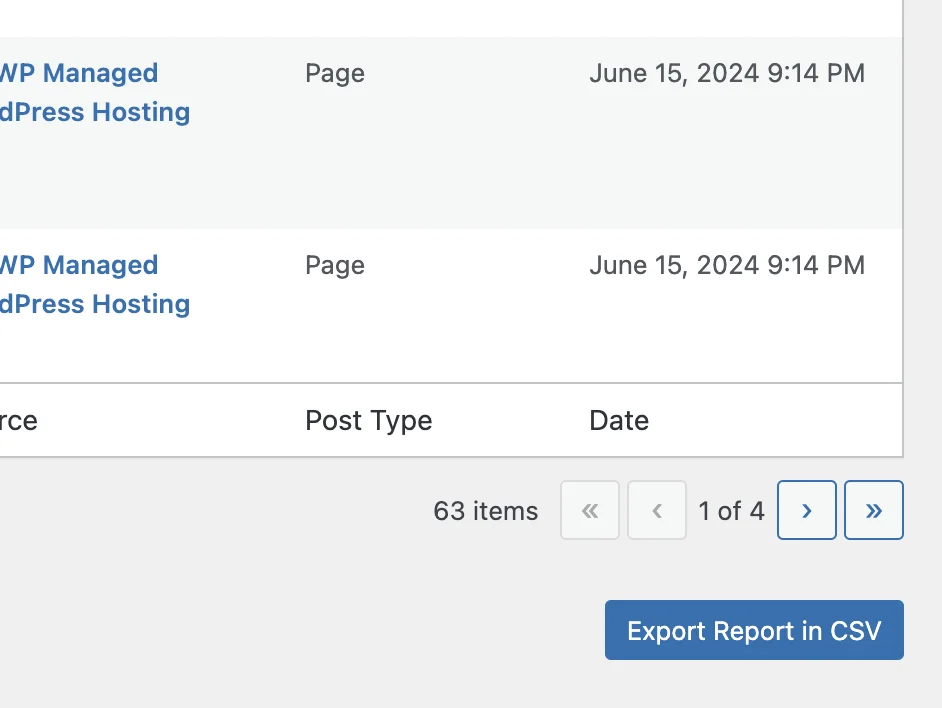
Ejecuta escaneos manuales cuando quieras y obtén una tabla de resultados completa. Ves cada enlace roto, su código de estado HTTP y la página exacta donde se encontró. Filtra los resultados por tipo de enlace, tipo de contenido y estado de error como 404, 403 o 500. Exporta todo a CSV. El plugin nunca cambia tu contenido de forma automática, así que mantienes el control total.
Características gratuitas
- Escanea entradas y páginas en busca de enlaces rotos
- Detecta enlaces muertos y errores 404
- Detecta imágenes rotas
- Escanea tipos de contenido personalizados
- Detecta enlaces dentro del contenido de sliders
- Escanea enlaces internos y externos incrustados
- Tabla de resultados que muestra dónde se encontró cada enlace roto
- Filtra los resultados por tipo de enlace, tipo de contenido y estado de error
- Exporta los resultados a CSV
- Track 10 keywords in the Rank Tracker
- Run one SEO / AEO audit a month
- Escaneo ligero y rápido
- Sin cambios automáticos en tu contenido
- Gratis para siempre, sin tarjeta de crédito
The SEO Suite: Five More Tools in wp-admin
Every tool below connects to your brokenlinkchecker.io account. One account covers all of them, on the web and in WordPress. Connecting is free and takes one click from the Settings page.
Keyword Rank Tracker
Track your Google and Bing positions for the keywords you choose, without leaving WordPress. Each keyword shows its current position, its change since the last check, its best position, search volume, CPC and search intent. You pick the market, device and search engine when you add a keyword.
Add or remove keywords at any time, refresh on demand and export the table to CSV. Rankings update weekly on every plan, and daily updates are available as an add-on. The free plan tracks 10 keywords. Paid plans start at 50 and go up to 1,000.
More about the Keyword Rank Tracker and the dedicated Bing Rank Tracker.
AI Visibility Tracker
People now ask ChatGPT, Perplexity and Google AI Overviews the questions they used to type into Google. This tracker shows you the answers. You add the prompts your customers actually use, and the tracker checks them weekly to see whether your site gets mentioned or cited.
One credit tracks one prompt. Business and Agency plans include 10 credits, and larger packs are available for any plan. The plugin opens your project’s prompt tracking straight from the sidebar.
More about the AI Visibility Tracker
Internal Link Optimizer
Some of your pages have no internal links pointing to them. Search engines rarely find those orphan pages, and they almost never rank. This tool maps the links between your own pages, lists the orphans and suggests which posts should link to which, with anchor text written by AI.
Internal links pass ranking value between your pages. Fix the gaps and your strongest pages start lifting the weaker ones.
More about the Internal Link Optimizer
SEO / AEO Audit
Run a full audit of your site and get a fix list sorted by impact. The audit covers technical SEO, on-page factors and how well your content answers questions in Google and Bing.
AEO means Answer Engine Optimization. It covers the parts that decide whether AI assistants quote your content: clear headings, structured data, direct answers and clean markup. The audit scores both sides and tells you what to fix first. Every plan includes monthly audits, from one on Free up to 25 on Agency.
More about the SEO / AEO Audit
Uptime Monitor
A site that is down earns nothing and ranks worse. The Uptime Monitor checks your site from outside and reports incidents and response times inside wp-admin. One click adds a monitor for your connected site. Email alerts go out the moment your site stops responding, and you set the alert address and sensitivity in the plugin.
It also watches WP-Cron with a separate heartbeat monitor. WP-Cron runs your scheduled jobs, and on many hosts it fails without a word. The plugin gives you a paste-ready snippet for it. Check frequency depends on your plan.
Versión Pro: configúrala una vez y olvídate
Pro convierte el plugin de un simple revisor en un monitor. Ejecuta escaneos programados automáticos, te avisa por correo en cuanto se rompe un enlace y te ayuda a repararlos con IA. Pro está incluido en cada plan de Broken Link Checker, desde 49 $ al año.
Características de la versión Pro:
- Todo lo de Gratis
- Escaneos programados automáticos (diarios, semanales o mensuales)
- Elige la hora del escaneo y la zona horaria
- Informes por correo en cuanto se encuentran enlaces rotos, a uno o varios destinatarios
- Avisa a los autores de las entradas sobre enlaces rotos en su propio contenido
- Informes de todo en orden cuando no se encuentran enlaces rotos
- Escanea comentarios y campos personalizados, incluido ACF
- Corregir con IA: encuentra un reemplazo verificado que funciona para cada enlace roto
- Marca los enlaces rotos con nofollow hasta que se corrijan
- Corrige automáticamente las URLs con redirección permanente
- Sugerencias de reemplazo de Wayback Machine
- Exporta como XLSX, TXT, PDF y Markdown para IA
- 50 to 1,000 rank-tracked keywords
- AI Visibility credits on Business and Agency plans
- Internal Link Optimizer
- 5 to 25 SEO / AEO audits a month
- Uptime monitoring with email alerts
- SEO optimized report page
- Soporte prioritario
- Planes para 1, 5 o 250 sitios
Lo que dicen los usuarios
«Sencillo pero eficaz y funciona como debe» – @snappaguy
«En 10 minutos hice mi primera revisión y encontré y corregí mis enlaces rotos.» – @rguiffrey
«Sin suscripciones, sin nube, sin líos, sin complicaciones. Simplemente funciona.» – @eliyahna
Por qué corregir los enlaces rotos importa para el SEO
Cada error 404 con el que Google se topa en tu sitio indica un mal mantenimiento. Los enlaces rotos desperdician presupuesto de rastreo, perjudican la experiencia de usuario y dañan el posicionamiento con el tiempo. Revisar los enlaces con regularidad mantiene tu sitio sano a ojos de Google. Cuando quitas una página o cambias una URL, configura una redirección para conservar el valor de tus enlaces.
Otros plugins de Norse Digital Group LLC
Texto a Voz – TTSWP – TTSWP.com añade narración en audio a tu contenido de WordPress con más de 600 voces en más de 70 idiomas. Las versiones en audio mantienen a los visitantes más tiempo en la página, y unas señales de interacción más fuertes apoyan tu SEO. El contenido en varios formatos también es más fácil de captar para los motores de respuestas con IA como ChatGPT, Perplexity y Google AI Overviews, lo que refuerza tu visibilidad AEO. Corregir enlaces rotos y el contenido en audio funcionan bien juntos. Ambos mantienen tu sitio sano, accesible y fácil de posicionar.
Licencia
Este plugin se distribuye bajo la licencia GPL v3.
Para más detalles, consulta: GPLv3
Capturas


Instalación
- En tu escritorio de WordPress, ve a Plugins > Añadir nuevo.
- Busca «Check for Broken Links».
- Haz clic en Instalar ahora y luego en Activar.
- Ve al menú Check for Broken Links y haz clic en Iniciar escaneo manual.
O instálalo manualmente:
- Descarga el archivo zip del plugin.
- Ve a Plugins > Añadir nuevo > Subir plugin y selecciona el archivo zip.
- Activa el plugin y ejecuta tu primer escaneo.
To use the Rank Tracker, AI Visibility Tracker, Internal Link Optimizer, SEO / AEO Audit and Uptime Monitor, open Settings and connect the site to a free or paid brokenlinkchecker.io account. There are no license keys.
FAQ
-
¿Cómo encuentro enlaces rotos en mi sitio WordPress?
-
Instala el plugin, ve a la página del plugin y haz clic en Iniciar escaneo manual. El plugin escanea tu contenido y muestra los resultados en una tabla con la URL rota, el código de estado HTTP y la página exacta donde se encontró.
-
¿Qué hace el plugin Check for Broken Links?
-
The plugin scans your WordPress site for broken URLs, dead links, 404 errors and broken images. It covers posts, pages, custom post types and slider content, and Pro adds comments and custom fields. It also includes a Keyword Rank Tracker, an AI Visibility Tracker, an Internal Link Optimizer, an SEO / AEO Audit and an Uptime Monitor.
-
¿El plugin detecta imágenes rotas?
-
Sí. El plugin comprueba las URLs de las imágenes durante un escaneo e informa de las imágenes que ya no cargan, junto con la página donde aparecen.
-
Can I track my Google rankings from WordPress?
-
Yes. The Rank Tracker page shows your Google and Bing positions for the keywords you add, with position, change, best position, search volume, CPC and intent. You choose the market, device and search engine per keyword. Free accounts track 10 keywords. See the Keyword Rank Tracker page for details.
-
What is the AI Visibility Tracker?
-
It shows whether ChatGPT, Perplexity and Google AI Overviews mention your site when people ask about your topic. You add the prompts you care about, and each one is checked weekly. One credit covers one prompt. Read more on the AI Visibility Tracker page.
-
What does the Internal Link Optimizer do?
-
It maps the links between your own pages and finds the ones nothing links to. Those orphan pages get little crawl attention and rarely rank. The tool suggests which posts should link to which, with AI-written anchor text. Read more on the Internal Link Optimizer page.
-
What does the SEO / AEO Audit check?
-
It checks technical SEO, on-page factors and answer engine readiness, then sorts the fixes by impact. AEO covers what decides whether AI assistants quote your content, such as headings, structured data and direct answers. Every plan includes monthly audits. Read more on the SEO / AEO Audit page.
-
How does the Uptime Monitor work?
-
It checks your site from outside and reports incidents and response times in wp-admin. One click adds a monitor for your connected site. Email alerts go out the moment the site stops responding. A separate heartbeat monitor watches WP-Cron. Read more on the Uptime Monitor page.
-
Do I have to connect my site to an account?
-
Only for the SEO Suite tools. Broken link scanning works with no account at all. Connecting a free account activates the Rank Tracker and the monthly SEO / AEO audit, and it takes one click from Settings.
-
¿Necesito la versión Pro?
-
No. The free version gives you full manual scanning with no limits. Pro adds automatic scheduled scans, email alerts, Fix with AI, more rank-tracked keywords, more audits, uptime monitoring and the Internal Link Optimizer.
-
¿En qué se diferencia de otros buscadores de enlaces rotos?
-
Most external tools scan your site from the outside. They miss private content, drafts and pages behind login. This plugin lives inside WordPress and scans everything, including content no external tool can reach. It also covers rankings, AI visibility, internal linking, audits and uptime in the same place.
-
¿Corregir los enlaces rotos mejora el SEO?
-
Sí. Cada vez que Google rastrea tu sitio y se topa con un 404, indica que tu sitio está mal mantenido. Con el tiempo, esto daña el posicionamiento y desperdicia presupuesto de rastreo. Corregir los enlaces rotos mantiene tu sitio sano.
-
¿Qué contenido puede escanear el plugin?
-
La versión gratuita escanea entradas, páginas, tipos de contenido personalizados y contenido de sliders. Pro también escanea comentarios y campos personalizados, incluidos los campos ACF.
-
¿Qué pasa cuando se encuentra un enlace roto?
-
Obtienes una tabla de resultados que muestra la URL rota, la página donde se encontró, el código de error y el tipo de contenido. Los usuarios Pro también reciben un informe por correo automáticamente.
-
¿El plugin corrige los enlaces rotos automáticamente?
-
La versión gratuita nunca cambia tu contenido. Corriges los enlaces directamente desde la tabla de resultados y mantienes el control total. Pro añade Corregir con IA, que sugiere un reemplazo verificado que funciona para cada enlace roto, y la corrección automática de redirecciones. Nada cambia sin tu aprobación.
-
¿El plugin ralentizará mi sitio?
-
No. Los escaneos solo se ejecutan cuando los inicias manualmente o según tu programación, normalmente de noche cuando hay poco tráfico. No hay ningún proceso continuo en segundo plano.
-
¿El plugin comprueba los enlaces externos?
-
Sí. El plugin comprueba tanto los enlaces internos como los externos. Usa una petición de reserva similar a la de un navegador para reducir los falsos positivos en enlaces de alojamiento de archivos.
-
¿El plugin es gratis?
-
Yes. The core plugin is free forever. Pro plans cost $49 a year for 1 site, $99 for 5 sites and $299 for 250 sites. Every plan includes all Pro features and the full SEO Suite. The plans differ in the number of sites, scan volume, keywords and audits.
-
¿Puedo cancelar mi suscripción Pro?
-
Sí, puedes cancelar cuando quieras desde el panel de tu cuenta. Mantienes el acceso hasta el final de tu periodo de facturación.
Reseñas
Colaboradores y desarrolladores
«Check for Broken Links – Broken Link Checker & SEO Suite» es un software de código abierto. Las siguientes personas han colaborado con este plugin.
Colaboradores«Check for Broken Links – Broken Link Checker & SEO Suite» está traducido en 2 idiomas. Gracias a los traductores por sus contribuciones.
Traduce «Check for Broken Links – Broken Link Checker & SEO Suite» a tu idioma.
¿Interesado en el desarrollo?
Revisa el código , echa un vistazo al repositorio SVN o suscríbete al registro de desarrollo por RSS.
Registro de cambios
3.1.5
15 October 2026
* Change: The plugin and brokenlinkchecker.io now count the same links as broken. Server errors (5xx), 401 and 408 answers are warnings, since they are often temporary or refuse the checker. Every other 4xx answer is broken, and so are hosts that do not resolve and certificate errors. Your counts update on the next scan.
* New: After a scan, a site that is not connected sees how to turn on the free SEO tools. Not now hides the card for 30 days.
* Improvement: The line under Site link health reads Not found, Other broken and Warnings. The old Server error figure always showed 0.
* Improvement: The results table labels a host that does not resolve as DNS.
* Fix: Connect and checkout use the WordPress safe redirect to reach brokenlinkchecker.io.
* Fix: The plugin name in your Plugins list matches the WordPress.org listing.
3.1.4
4 October 2026
* New: Redesigned Dashboard. Site link health shows as a score ring next to your scan schedule, each SEO tool has its own card with its status and latest figure, and a counter shows how many of the five tools are set up.
* Security: Fix redirect now only writes a clean http or https address into your post. A redirect header from a remote server could carry HTML that ended up in the link.
* Security: Fixes sent from your brokenlinkchecker.io dashboard only write clean http or https addresses into your posts.
* Fix: Fixes sent from your brokenlinkchecker.io dashboard no longer remove embeds, iframes or forms from the post they change.
* Improvement: Choosing a plan while signed in to brokenlinkchecker.io with a different account now says the site is connected to another account. You can move it to your plan or switch account.
* Improvement: Admin pages stay fast when brokenlinkchecker.io cannot be reached. The plugin waits 15 minutes before it asks again, where it used to ask on every admin page.
* Improvement: The Dashboard loads faster on the free plan. It remembers for 2 minutes which Pro tools are not on your plan.
* Improvement: From the next scan, scan results are no longer loaded on every page of your site.
* Improvement: The scan loader image comes straight from the plugin. It no longer adds a copy to your Media Library.
* Fix: The Found in column on the results page escapes post titles and links.
* Fix: The notice for an old WordPress version no longer stops with a fatal error on sites without WooCommerce.
* Improvement: Documentation in the plugin menu opens the live guides on brokenlinkchecker.io.
3.1.3
25 September 2026
* New: Remove URL parameters on the Settings and SEO / AEO Audit pages. The crawler treats example.com/?a=1 and example.com/?a=2 as the same page, so audits skip duplicates. On by default.
* New: Redesigned Upgrade page with plan cards, a full comparison table and a price that updates as you add keyword packs, daily ranking updates or AI Visibility credits. Paid sites see their current plan and available upgrades.
* New: Redesigned Settings page with the connection at the top, tabs for each section and automatic saving.
* New: Redesigned Rank Tracker with desktop and mobile positions side by side, change, best position and an 8-week trend.
* Improvement: Add keywords shows how many keyword slots the keywords will use before you start.
* Improvement: New sites in the Rank Tracker start with keyword ideas from the site itself.
* Improvement: Rank Tracker settings save automatically, and email recipients are checked as you type.
* Improvement: Connect this site now goes straight to brokenlinkchecker.io, and a failed connection explains why with a Try again link.
* Improvement: Plugin pages use the full screen width on phones.
* Change: Refresh now in the Rank Tracker is counted per week, in line with the plans on brokenlinkchecker.io.
* Fix: Pro sites can save scan schedules and email alerts again. If you use Pro, check your schedule and alert address in Settings.
* Fix: Connecting no longer fails when sign-up takes a while.
* Fix: The refund answer on the Upgrade page now matches the brokenlinkchecker.io terms and links to them.
* Fix: Saving Settings no longer resets post types in the Internal Link Optimizer.
* Fix: Settings shows the correct plan after connecting on the free plan.
* Fix: Several small fixes to tabs, menus and empty fields on the Settings page.
3.1.2
25 September 2026
* Fix: The plugin activates on a new site again. Since 3.1.0 activation stopped with a fatal error about wpcbl_has_pro().
3.1.1
12 September 2026
* Improvement: The Dashboard lists the SEO tools as one row each, name, status, one line on what it does and the next step, in place of the grid of cards. The three status cards share one white style, and the tip of the week is a banner under the tools.
* New: After three completed scans the Dashboard asks for a WordPress.org review, once. Maybe later hides it for 30 days, Leave a review hides it for good.
* Improvement: The Help page puts the questions on the left and a support rail on the right: contact support, the WordPress.org forum, the plugin guide, a review link, and the plugin version with the connection status. The answers about what the plugin does, fixing links and pricing were out of date and now match the product.
* New: Every Pro tool page shows a preview of the tool with sample data before you connect: Rank Tracker, SEO / AEO Audit, Internal Link Optimizer, AI Visibility Tracker and Uptime Monitor. The headline, a short explanation and one Connect button sit beside it, with No credit card and two more reassurances under the button.
* Improvement: The Internal Link Optimizer now calls its first tab No content links instead of Orphan pages. Menu and footer links never counted there, and the old name read as if the page had no links at all.
3.1.0
11 September 2026
* Fix: Automatic scans run again. Since 2.0.0 the plugin cleared its own schedule, so the daily, weekly and monthly setting never ran a scan. Pro sites now get the scan at the time and timezone they picked. A site that turns Pro is scheduled on its next admin visit.
* Fix: Automatic scans run in the same short steps as manual scans, so big sites finish on hosts with a low execution limit.
* Fix: Settings shows the saved scan frequency and the real time of the next automatic scan. It showed Never and no date.
* Fix: Run analysis on the Internal Link Optimizer page no longer answers Too Many Attempts on the first click. The service counted the page upload against the analysis limit on sites with more than 125 pages.
* Improvement: Every Pro tool page explains what it does before you connect, with a concrete example: Internal Link Optimizer, Rank Tracker, SEO / AEO Audit, AI Visibility Tracker and Uptime Monitor. The connect button names the action, for example Connect site and track keywords.
* Improvement: The AI Visibility Tracker page no longer repeats its intro above the connect box.
* Improvement: The connect card on the Dashboard and the Connect tab reads Instant activation. Connect once and every feature unlocks here automatically.
* Improvement: Uptime alert mails retry for 12 minutes if the mail server is unreachable, so an alert is not lost to a short outage.
* Improvement: brokenlinkchecker.io checks its own connection before opening an uptime incident, so a network problem on our side no longer alerts you about your site.
* Fix: Site scans on brokenlinkchecker.io no longer skip links on large sites when the site is slow to answer. Every link is checked or retried until done.
* Fix: CSV export no longer triggers a PHP deprecation notice on PHP 8.4 and newer.
* Learn more about every tool: https://brokenlinkchecker.io/wordpress-plugin
3.0.9
7 September 2026
* Fix: Scans finish on big sites. The scan now runs as a series of short steps and saves its progress after each one, so the host’s execution limit no longer kills it. Sites with a few hundred posts used to stop after a minute or two with Something went wrong.
* Fix: A scan step that fails on the wire is retried from where it stopped instead of failing the whole scan.
* Fix: The Help page’s support link now opens the contact form at brokenlinkchecker.io/contact. It pointed to a page that did not exist.
3.0.8
28 August 2026
* New: Dashboard is now an overview. Site link health, broken links, your last scan, and live numbers from every SEO tool on one screen.
* New: Broken link scan has its own page, holding the full results table with filters and export. The old Dashboard & Scan entry is now two entries.
* New: AI Visibility Tracker page in wp-admin. See how often AI assistants mention your brand, the split between Google and ChatGPT, and which competitors get cited alongside you. Track the questions your customers ask and see whether ChatGPT, Perplexity and Google AI cite you for each one. Charts show how your mentions move from one check to the next.
* New: Internal Link Optimizer page in wp-admin. See orphan pages, dead ends, buried pages and weak anchors, then add the internal links your pages are missing.
* New: Apply a link suggestion straight to the page. The plugin edits the post, and one click undoes it. WordPress also keeps a revision on post types that support one.
* New: Choose which post types the Internal Link Optimizer reads. Every public type is listed and ticked by default, and your choice applies to the next analysis.
* Improvement: Internal Link Optimizer and AI Visibility Tracker now open inside wp-admin. Both used to send you to brokenlinkchecker.io in a new tab.
* Improvement: The Internal Link Optimizer reads the pages WordPress already publishes. A newly connected site can run one right away instead of waiting for a crawl to find its pages.
* Improvement: Start scan stays on the Dashboard. Progress shows there, and the plugin sends you to Broken link scan for the results once a scan finishes.
3.0.7
25 August 2026
* New: SEO Audit page in wp-admin. Run a full SEO and AEO audit of your site without leaving WordPress. See your score, which category is costing you the most points, and a fix queue ordered by what moves the score most. Every issue lists the pages it affects and how to fix it. The checks that passed are listed too. Available on every plan for connected sites, with your monthly allowance shown on the page.
* New: Fix with AI for audit issues. Missing, duplicate or overlong page titles and meta descriptions get AI-written replacements. You review and edit every one before anything is saved, and fixes are written to Yoast SEO, Rank Math or SEOPress, whichever your site runs.
* New: Audit a single page on its own, without auditing the whole site.
* New: Share an audit with a public read-only link, or download it as a PDF.
* New: Every affected page is listed for each issue, not just the first ten, and Copy URLs copies all of them.
* New: Services menu in the WordPress toolbar. Jump to any tool from anywhere in wp-admin.
* Improvement: Audits read the pages WordPress already publishes. A newly connected site can audit right away instead of waiting for a crawl to find its pages first.
* Improvement: Broken link scans skip sites that block automated checks. Amazon on every country domain, Kobo, LinkedIn, Facebook, Instagram, X, Reddit, Pinterest and Tripadvisor answer bots with an error however the link is written, so checking them only ever produced a false positive. They are skipped before the request and no longer clutter your results.
* Improvement: Plans page shows the price per month for both billing periods, matching brokenlinkchecker.io. Yearly plans show the monthly equivalent with the yearly total underneath.
* Improvement: A running audit shows live progress instead of a static line.
* Improvement: SEO / AEO Audit sits directly under Keyword Rank Tracker in the menu.
* Improvement: Free accounts get a clear Upgrade to Pro link in the plugin sidebar.
* Improvement: The Pro Tools preview page is gone. Every tool it previewed has either shipped or moved to your dashboard, and old links go to Dashboard & Scan.
* Improvement: Audits cover your real content only. Page builders register internal records as public post types, so Themify global styles, Elementor library entries and reusable blocks were being audited as if they were pages. Audits now follow your Content Types to Scan setting and skip builder records.
* Fix: The full page list for an issue rendered as unreadable slivers once it grew past a dozen URLs.
* Fix: Running a second audit without reloading showed the previous audit’s page list, including pages deleted since.
3.0.6
21 August 2026
* New: Uptime Monitor page in wp-admin. Watch your site, see incidents and response times without leaving WordPress.
* New: One click adds a monitor for your connected site.
* New: Heartbeat monitor for WP-cron with a paste-ready snippet.
* New: Change uptime alert emails and sensitivity from the plugin.
3.0.5
20 August 2026
* New: Plans and upgrades page in wp-admin. Yearly and monthly billing, live prices from brokenlinkchecker.io, and per-plan options for rank-tracked keywords, daily ranking updates and AI Visibility credits. Subscribers see their current setup preselected and can update it with the same prorating as the dashboard; the Update button only activates when something changed. Sites that are not connected yet connect automatically right after payment.
* Improvement: The Rank Tracker shows the date of the next scheduled ranking update, its upgrade buttons open the in-plugin plans page, and each keyword shows a country flag and device icon in front of it.
* New: Rank Tracker page. Track your Google and Bing positions for the keywords you choose, right inside wp-admin. Add or remove keywords, see position, change, best position, search volume, CPC and intent, refresh on demand and export to CSV. Available on every plan for connected sites.
* New: Rank Tracker settings in wp-admin. Default device and search engine, email reports and the public share link are all managed without leaving your site. The market is picked when you add each keyword.
3.0.4
17 August 2026
* New: Apply fixes from the dashboard. Fix with AI on brokenlinkchecker.io sends verified fixes to your site, the plugin applies them and reports back. Fixes only run when you click Apply in the dashboard.
* New: Scan reports page. The last 20 scans with date, source, links checked, broken count and duration. Available on every plan.
* New: AI Visibility Tracker in the sidebar. Opens your project’s prompt tracking on brokenlinkchecker.io in a new tab.
* New: Refresh connection button on the Settings page. Re-checks your plan and features right away.
* Improvement: Settings page redesign. Account bar with Manage, Refresh and Disconnect actions, automatic saving, content types as selectable pills, toggles for every on/off option.
* Improvement: New sidebar menu with SEO Tools and Account groups. Scan reports, the SEO tools and White label open your project on brokenlinkchecker.io in a new tab.
* Improvement: Fix with AI corrects scheme typos like htp://google.com by suggesting the https:// form. Malformed and relative URLs no longer fail with a generic error.
* Fix: Email notifications could not be enabled. Paid plans can now turn on email alerts and enter recipient addresses.
* Fix: The Automatic scans card showed Enable with Pro on paid plans, linking to a page paid plans cannot open. It now shows the schedule and links to Settings.
* Fix: Fix with AI failed on relative link URLs like /old-page. They are now sent in full form. Malformed URLs get a clear message, and Fix all with AI skips them instead of failing the whole batch.
3.0.3
16 August 2026
* New: Fix with AI. Click Fix with AI on a broken link and get live-checked replacement suggestions, then apply the fix or remove the link in one click. Pro feature, uses your plan’s monthly AI fix allowance.
* New: Fix all with AI. One click analyzes every broken link and opens a review list with verified fixes you can apply one by one or all at once.
3.0.2
12 August 2026
* Fix: The plan buttons on the Upgrade page stopped at an «Unknown plan.» message instead of opening the checkout. Upgrading works again – sorry about that one.
* New: The Upgrade page now has an «Already purchased a plan? Connect this site» link, so activating Pro on additional sites no longer goes through checkout.
* New: Pro Tools page previewing what is coming to your plan: Fix with AI, Internal Link Optimizer, SEO / AEO Audit, Rank Tracker, Uptime Monitor and White Label – each shown with clearly-labeled sample data.
* Improvement: Paid plans no longer see Upgrade buttons anywhere in the plugin – the sidebar and admin menu show them only on the free plan.
* Fix: Links with an anchor, like /a-page/#section, are now checked exactly the way a browser opens them, so working links are no longer reported as broken on some hosting setups. Anchor links that just scroll the homepage are skipped.
* Fix: On sites installed in a subdirectory, links written as an absolute path (like /blog/a-page/) were checked against a doubled address and could be wrongly reported as broken.
3.0.1
10 de julio de 2026
* Novedad: conecta tu sitio web a una cuenta de brokenlinkchecker.io desde «Configuración». Vincula un plan gratuito o de pago para activar las características Pro aquí, sin necesidad de claves de licencia.
* Novedad: la compra con un solo clic desde la página «Actualizar» ahora vincula este sitio web a tu cuenta automáticamente tras finalizar la compra.
* Novedad: la insignia de estado de conexión en la barra lateral te muestra tu plan de un vistazo, o un atajo rápido para «Conectar sitio» cuando no estés vinculado.
* Mejora: la sección «Cuenta» de Ajustes ahora explica las ventajas de conectarte, como la activación instantánea de la versión Pro, todos tus sitios en un solo lugar y acceso anticipado. Conectarte sigue siendo opcional y gratis.
* Novedad: Las fichas de funciones de la página de actualización ahora incluyen la página de informes SEO, y el Optimizador de enlaces internos lleva la etiqueta «con tecnología de IA».
* Mejora: Las fichas de planes de la página de actualización pasan de 3 a 2 y luego a 1 columna en pantallas más pequeñas, en lugar de colapsarse directamente a una sola columna.
3.0.0
9 de julio de 2026
* Nuevo: interfaz de administración rediseñada por completo, con una barra lateral moderna, una barra superior y páginas limpias basadas en tarjetas.
* Nuevo: las páginas dedicadas Panel y escaneo, Ajustes, Ayuda y Mejora sustituyen a las antiguas pestañas. Los enlaces antiguos redirigen automáticamente.
* Nuevo: el panel muestra estadísticas en vivo de enlaces revisados, enlaces rotos encontrados y duración del escaneo.
* Nuevo: una barra de progreso en vivo muestra cuánto ha avanzado tu escaneo mientras se ejecuta.
* Nuevo: la pantalla de bienvenida de la primera ejecución muestra qué cubre un escaneo, con un botón Ejecuta tu primer escaneo.
* Nuevo: elige qué tipos de contenido escanear. Todos tus tipos de contenido públicos se listan automáticamente.
* Nuevo: elige qué comprobar: enlaces normales, imágenes o ambos. Las imágenes rotas tienen su propia etiqueta en los resultados.
* Nuevo: los enlaces rotos y las advertencias ahora están separados. Las páginas que faltan (404/410) cuentan como rotas, mientras que los tiempos de espera, los bloqueos de bots, los problemas de SSL y los errores de servidor aparecen como advertencias con sus propias insignias y filtro.
* Nuevo: corrige los enlaces directamente desde la tabla de resultados. Edita una URL, quita un enlace, marca una URL como No roto o descártala hasta el siguiente escaneo. Las ediciones nunca cambian la fecha de modificación de la entrada.
* Nuevo: iconos de tipo de archivo en los resultados. Los PDF, archivos de Word, hojas de cálculo, imágenes, vídeos y más muestran su propio icono en lugar de un icono de enlace genérico.
* Nuevo: exporta tu informe como CSV gratis. Los formatos XLSX, TXT, PDF y un Markdown listo para IA están disponibles en Pro.
* Nuevo: tiempo de espera ajustable (5-120 segundos). Los sitios lentos se marcan como advertencias, no como rotos.
* Nuevo: el botón Volver a revisar todos los enlaces en Ajustes borra los resultados en caché y empieza un escaneo nuevo.
* Nuevo: el botón Borrar resultados elimina los resultados de escaneos antiguos sin tocar tus ajustes.
* Nuevo: acceso directo a Broken Link Checker en la barra de administración de WordPress.
* Nuevo: la página Consejo SEO / AEO explica cómo el contenido en audio ayuda a tu sitio en las búsquedas y en las respuestas de IA.
* Nuevo: prueba el plugin en vivo en WordPress Playground antes de instalarlo.
* Nuevo: página de Mejora rediseñada con tarjetas de plan más claras, una sección de preguntas frecuentes sobre licencias y reembolsos, y la nueva función Corregir con IA en primer plano.
* Nuevo: próximas funciones Pro mostradas en las tarjetas de plan: Optimizador de enlaces internos, Monitor de disponibilidad e Informes de marca blanca (Business y Agency).
* Nuevo: las mejoras ahora van directas al pago de brokenlinkchecker.io.
* Cambiado: el plan Business ahora cuesta 49 $ al año, antes 59 $.
* Mejorado: muchas menos falsas alarmas. Las URLs de carrito, acceso, admin y otras dinámicas se omiten automáticamente, así que los enlaces de añadir al carrito de WooCommerce ya no aparecen como rotos. Los resultados antiguos se limpian al actualizar.
* Mejorado: una regla de exclusión ahora puede omitir un dominio o una ruta enteros, no solo una URL exacta.
* Mejorado: tabla de resultados más limpia. El estado y los detalles se combinan en una sola insignia, los tipos de enlace se muestran como iconos y las URLs largas se recortan a dos líneas.
* Mejorado: los ajustes se agrupan en tarjetas, y los campos solo de Pro se marcan con claridad con una insignia PRO.
* Mejorado: solo se listan para escanear los tipos de contenido reales. Los tipos de maquetador y de sistema quedan ocultos.
* Mejorado: los ajustes de zona horaria ahora siguen la zona horaria de tu sitio por defecto.
* Mejorado: la versión gratuita muestra una fila clara «Escaneos automáticos: desactivados» en lugar de tres campos deshabilitados.
* Mejorado: las cuatro funciones SEO Pro de la versión gratuita se agrupan en una sola tarjeta Kit de herramientas SEO con un único botón de mejora.
* Mejorado: una interfaz más tranquila, con menos enlaces de mejora y sin la pestaña Opciones de pantalla.
* Mejorado: la petición de valoración solo aparece después de dos escaneos completados.
* Mejorado: los botones de escaneo muestran un indicador de carga mientras se ejecuta un escaneo, para que siempre sepas que algo está pasando.
* Corregido: los enlaces con una dirección mal escrita (como htp://) ya no muestran una URL vacía. Se muestran como texto con una insignia No válido.
* Corregido: desinstalar el plugin ahora elimina todos sus datos, incluidos los resúmenes de escaneos y los avisos.
* Corregido: los estilos se actualizan correctamente tras las actualizaciones del plugin, así que el nuevo diseño siempre carga bien.
* Seguridad: los escaneos manuales ahora requieren permisos de administrador además de las comprobaciones de seguridad existentes.
2.0.1
23 de junio de 2026
* Mejorada la paginación de resultados para respetar el valor de Opciones de pantalla de WordPress hasta 500 filas.
* Mejorada la exportación a CSV añadiendo el nombre de la fuente: página, entrada, comentario o slider.
* Mejoradas las comprobaciones de enlaces externos con una petición de reserva ligera similar a la de un navegador para reducir los falsos positivos en enlaces de alojamiento de archivos.
2.0.0
30 de mayo de 2026
* Añadidos los escaneos programados de Pro con opciones diaria, semanal y mensual.
* Añadidos los controles de hora del escaneo y zona horaria para los escaneos programados de Pro.
* Añadidos los avisos por correo para los informes de escaneos programados de Pro.
* Añadido el disparo centralizado de escaneos programados para una automatización de Pro más fiable.
* Añadidos los informes por correo de todo en orden cuando no se encuentran enlaces rotos.
1.0.4
26 de mayo de 2026
* Confirmada la compatibilidad con WordPress 7.0.
* Restaurado el conjunto de características probadas de la 1.0.2 mientras se prepara por separado la programación de pago.
1.0.2
22 de mayo de 2026
* Añadidos escaneos programados con soporte de hora del escaneo y zona horaria personalizadas.
* Añadidos informes por correo automáticos para los escaneos programados.
* Añadidas opciones flexibles de frecuencia de escaneo, incluido un intervalo corto para pruebas.
* Mejorada la detección de contenido de sliders.
* Eliminado el flujo Marcar como corregido para que los resultados del escaneo reflejen siempre el último escaneo.
* Añadido un enlace Deja una valoración en la pantalla de Plugins.
1.0.1
9 de mayo de 2026
* Actualizados los recursos y los metadatos del plugin.
1.0.0
6 de febrero de 2025
* Lanzamiento inicial