
Descripción
Creator LMS is the best free WordPress LMS plugin for coaches, consultants, and online course creators. Sell courses and run your teaching business inside WordPress — with zero monthly fees and no WooCommerce required. Upgrade to Business for cohort-based group coaching, or Agency to also add a built-in community.
Trusted by 100+ coaches and educators worldwide. Rated ⭐⭐⭐⭐⭐ 5 stars on WordPress.org.
The core plugin is 100% free forever — unlimited courses, unlimited students, native Stripe checkout, quizzes, and certificates included at no cost.
🚀 Live Demo | 📘 Documentation | 🎥 Video Tutorials | 🎬 Setup Tutorial | 💁♂️ Facebook Community | 🗺️ Roadmap
Why Coaches Choose Creator LMS
Most WordPress LMS plugins are built for universities and corporate training. Creator LMS is built for coaches who need to sell, scale, and engage — without complex tech or expensive monthly platforms.
Creator LMS is the go-to WordPress coaching plugin for:
- 🧑💼 Life coaches selling 1:1 and group programs
- 💼 Business coaches running cohort-based masterminds
- 💪 Fitness & health coaches running subscription programs
- 🎓 Online educators building course libraries
- 🤝 Consultants packaging expertise into sellable courses
- 🏢 Agencies building LMS sites for clients
Six reasons coaches pick Creator LMS over everything else:
- Cohort-based learning (Business & Agency) — Students start together, progress together. Creates accountability, higher completion, and justifies premium pricing.
- Built-in community (Agency) — Students connect, ask questions, and support each other — no BuddyPress, no Facebook Groups.
- AI course builder (Pro) — Describe your coaching topic and AI generates a complete course outline in minutes.
- Native checkout — Sell coaching programs with Stripe or Mollie. No WooCommerce. No cart abandonment.
- Memberships & subscriptions (Pro) — Monthly or yearly coaching memberships for predictable recurring revenue.
- One-click upsells (Pro) — Increase revenue per student with post-purchase upsell offers, no redirect needed.
🎯 Popular Use Cases for Coaches
Group Coaching Programs (Business & Agency)
Run structured group coaching with cohorts — students enroll, start on a set date, and move through your curriculum as a group. Perfect for high-ticket coaching offers.
Self-Paced Online Coaching Courses
Package your coaching methodology into a self-paced course. Students access lessons anytime, complete quizzes, and earn certificates to share.
Coaching Memberships (Pro)
Monthly or yearly memberships that unlock your full course library and new content drops — add community access with Agency. Predictable recurring revenue without per-sale hustle.
Bootcamp & Workshop Programs (Business & Agency)
Intensive time-limited programs with cohorts and live session scheduling — add community discussion for peer accountability with Agency.
Free Lead Magnet Courses
Offer a free introductory course to build your email list, then convert students to paid coaching programs with one-click upsell offers (Pro).
Corporate & Team Training
Deliver employee training for business clients. Track team progress, issue completion certificates, and manage bulk enrollments.
🆓 Best Free WordPress LMS Plugin
Creator LMS offers more in its free version than most paid WordPress LMS plugins. No trial. No credit card. Free forever.
Free version includes:
– ✅ Unlimited courses, lessons, and students
– ✅ Native Stripe and Mollie checkout — no WooCommerce
– ✅ Quiz builder with 6+ question types
– ✅ Certificate builder with verification
– ✅ Gutenberg, Elementor, and Bricks Builder support
– ✅ Multiple lesson types (video, audio, text, downloads)
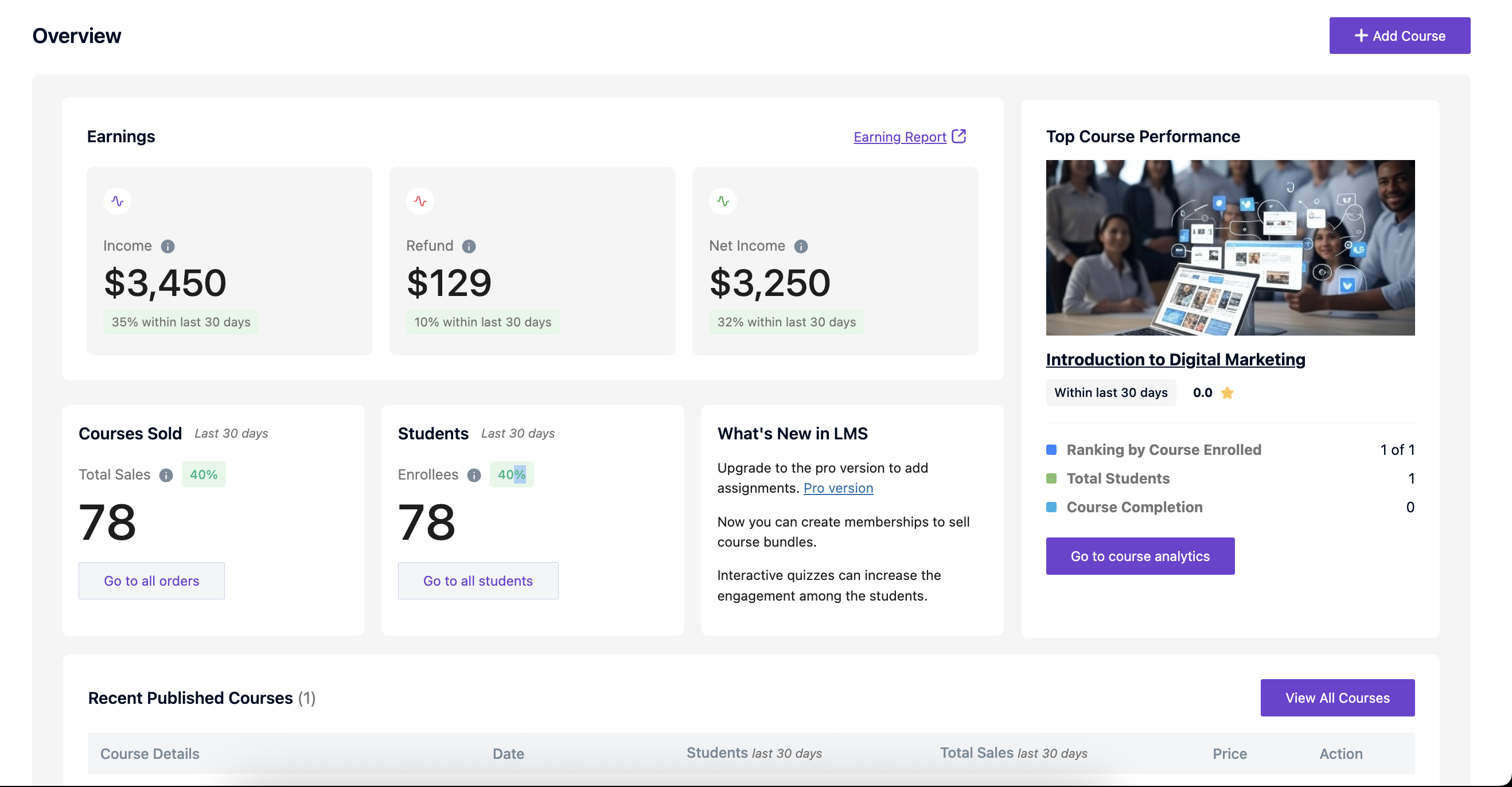
– ✅ Student progress tracking and analytics
– ✅ Course categories, tags, and prerequisites
– ✅ Custom video player (removes YouTube/Vimeo branding)
– ✅ Student dashboard and profile management
Creator LMS Pro unlocks:
– Cohort-based learning for group coaching programs (Business & Agency)
– Built-in community platform (Agency)
– AI course builder
– Gamification (badges, leaderboards, points)
– One-click upsells and down-sells
– Memberships and subscriptions
– Advanced email automation (Mail Mint)
– Content protection (screen recording prevention)
– Additional payment gateways (PayPal, Razorpay, Authorize.net)
– Advanced analytics and reporting
Creator LMS vs. Kajabi, Teachable, LearnDash & More
The best Kajabi and Teachable alternative for WordPress coaches and course creators.
Kajabi costs $149–$399/month and takes a revenue cut. Teachable charges per transaction. Creator LMS runs on your own WordPress site — flat annual Pro fee, zero revenue share, 100% data ownership.
Creator LMS vs. Kajabi
Kajabi charges $149–$399/month forever, plus revenue sharing on lower plans. Creator LMS Pro is a flat yearly subscription on your own WordPress site. You get AI course generation and one-click upsells on every Pro plan, cohort-based learning on Business & Agency, and a built-in community platform on Agency — everything Kajabi offers, without the monthly platform fee or data lock-in.
- Kajabi: $149–$399/month + revenue share
- Creator LMS Pro: flat yearly fee, no revenue share
- Your student data stays on your own server — not locked in a SaaS platform
Creator LMS vs. Teachable
Teachable charges per-transaction fees on lower plans and scales monthly costs as your revenue grows. Creator LMS has no transaction fees and no monthly platform fee. You keep full control of your checkout, branding, and student experience.
- Teachable: $65+/month + transaction fees on lower plans
- Creator LMS Pro: no monthly fee, no transaction cuts
- Native Stripe checkout built in — no third-party cart required
Creator LMS vs. LearnDash
LearnDash requires WooCommerce (or a paid add-on) for checkout. Community and cohort learning require separate paid add-ons. There is no built-in AI course generation. Creator LMS Pro bundles native checkout and AI course builder on every plan, with cohorts on Business & Agency and community on Agency — no separate add-ons to buy.
- LearnDash: $199/year base + WooCommerce + paid add-ons for community and cohorts
- Creator LMS Pro: native checkout and AI course builder included, no WooCommerce dependency; cohorts (Business & Agency) and community (Agency) built in, no add-ons
- Free one-click migration from LearnDash is built in
Creator LMS vs. Tutor LMS
Tutor LMS has a similar feature set at the base level, but requires WooCommerce for full checkout functionality. Creator LMS has fully native checkout built in — no WooCommerce needed.
- Tutor LMS: requires WooCommerce for checkout
- Creator LMS: native Stripe checkout, no WooCommerce dependency
- Free one-click migration from Tutor LMS is built in
Creator LMS vs. LearnPress
LearnPress is lightweight and free, but lacks cohort learning, community features, AI course generation, and a native checkout. Scaling up requires multiple paid add-ons. Creator LMS Pro covers all of this — cohorts on Business & Agency, community on Agency, everything else on every plan.
- Free one-click migration from LearnPress is built in
Creator LMS vs. MasterStudy LMS
MasterStudy LMS offers solid course creation features but requires WooCommerce for payments and lacks built-in cohort learning, community, and AI course generation. Creator LMS Pro bundles all of these natively.
- MasterStudy LMS: WooCommerce-dependent checkout, no built-in cohorts or community
- Creator LMS Pro: native checkout and AI course builder on every plan; cohort learning on Business & Agency, community platform on Agency
- Free one-click migration from MasterStudy LMS is built in
Free Migration from Your Current LMS
Already using another LMS? Switch to Creator LMS with free built-in one-click migration from:
- LearnDash
- Tutor LMS
- LearnPress
- MasterStudy LMS
Migration is non-destructive. Your original data stays intact until you confirm everything transferred correctly.
🏗️ Course Builder for Coaches
Create and sell coaching courses in minutes with Creator LMS’s drag-and-drop course builder — no technical skills required.
Lesson Types
– Video Lessons — Self-hosted, YouTube, or Vimeo. Custom branded player removes platform branding, recommendations, and watermarks.
– Audio Lessons — Podcast-style lessons or guided audio coaching
– Text Lessons — Rich text with formatting, images, and embeds
– Downloadable Resources — PDFs, worksheets, templates, swipe files
Course Organization
Unlimited chapters, drag-and-drop lesson ordering, course prerequisites, lesson preview for non-enrolled students, and multiple professionally designed course layout templates.
AI-Powered Course Creation
Describe your coaching niche and target student — AI generates a complete course outline with chapters, lessons, and learning objectives in minutes.
🎓 Cohort-Based Learning — Run Group Coaching Programs (Business & Agency)
Transform your coaching programs into cohort experiences where students start together, learn together, and complete together.
Perfect for:
– High-ticket group coaching programs
– Mastermind and accountability courses
– Bootcamp-style intensives
– Live workshop series
– Corporate training sessions
Cohort features:
– Set start and end dates per cohort
– Run multiple cohorts per course year-round
– Cohort-specific announcements and content schedules
– Live session scheduling inside cohort timelines
– Track progress across an entire cohort
– Manage waitlists for upcoming cohorts
Cohort-based programs see 3–5x higher completion rates compared to self-paced courses. Higher completion = better results for students = stronger testimonials and referrals for your coaching business.
🏘️ Built-In Community Platform for Coaches (Agency)
Keep students engaged between lessons with a fully integrated community — no BuddyPress, no Circle, no separate subscription.
Community features:
– Course-specific discussion forums
– Student Q&A sections with instructor responses
– Member profiles with achievements and course progress
– No third-party community plugins needed
Active communities drive 70%+ higher course completion rates. When students connect with peers, ask questions, and share wins, they stay engaged longer and get better results from your coaching.
🧩 Quiz & Assessment System
Test student knowledge with a flexible quiz builder supporting 6+ question types.
- Multiple Choice and Single Choice
- True / False
- Fill in the Blank
- Short Answer and Essay
- Matching and Reorder
- Quiz timers and attempt limits
- Automatic grading for objective questions
- Manual grading for essays and short answers
- Detailed quiz result reports with explanations
- Retake options and controls
📜 Certificates & Credentials
Issue branded completion certificates that students can download, share on LinkedIn, and use as credentials.
- Custom certificate templates with your branding and logo
- Automatic generation when students meet completion requirements
- Unique verification code per certificate
- PDF download for students
- Set custom completion criteria (lessons + quiz pass rates)
💳 Native eCommerce — Sell Coaching Programs Without WooCommerce
Creator LMS includes a complete native checkout system built for selling coaching courses and programs — no WooCommerce required.
Free: Stripe, Mollie, offline payments
Pro: PayPal, Razorpay, Authorize.net
Pricing models:
– One-time course purchases
– Subscription and membership pricing
– Installment payment plans (Pro)
– Free courses with upsell offers
– Coupon codes and discounts
– Course bundles and packages
Order management, refunds, and revenue reports live inside Creator LMS. No WooCommerce orders, no plugin conflicts.
💸 One-Click Upsells & Down-sells (Pro)
Increase average order value by 30–50% with native one-click offers — no funnel builder plugins needed.
After a student purchases a course, present a one-click upsell offer. They accept with one click (no re-entering payment details) or decline. If they decline, present a down-sell at a lower price point.
Upsell strategies for coaches:
– Beginner course Advanced coaching program
– Self-paced course Cohort group coaching access
– Single course Full coaching membership
– Free course Paid program
Track offer acceptance rates and total upsell revenue from your dashboard.
💎 Memberships & Subscriptions (Pro)
Create recurring revenue with coaching memberships — monthly, yearly, or custom billing cycles.
- Member-only course access
- Automatic renewal and cancellation handling
- Subscription analytics
- Tiered membership levels (coming soon)
🎮 Gamification — Keep Students Engaged
Boost course completion rates by making learning rewarding.
- Achievement badges for course milestones
- Leaderboards ranked by points or completion
- Points for lessons, quizzes, and community posts
- Learning levels (Beginner Expert)
- Milestone rewards (discount codes, bonus access)
🤖 AI Course Builder (Pro)
Generate complete coaching courses in hours, not weeks.
- AI-powered course outline generation (OpenAI GPT-4 or Anthropic Claude)
- Course thumbnail and graphic generation
- AI-assisted curriculum design for your coaching niche
Describe your coaching topic, target audience, and expertise level. AI creates a structured course plan with chapters, lessons, and learning objectives — you add your unique methodology and expertise.
📧 Email Automation
Free — Transactional emails included:
– Course enrollment confirmation
– Course completion congratulations
– Certificate delivery
– Quiz completion notification
– Purchase confirmation and receipt
– Password reset
Pro — Behavior-based automation:
– Started course but didn’t finish lesson 1
– Passed or failed a quiz
– Reached course milestones
– Inactive for 7, 14, or 30 days (re-engagement)
– Progress-triggered drip campaigns
– Mail Mint integration for advanced segmentation and automation
📊 Analytics & Reporting
- Student progress and completion tracking
- Course completion rates
- Quiz performance by question
- Revenue and sales trends
- Enrollment statistics
- Student engagement metrics
- Instructor earnings reports
🔌 Integrations & Compatibility
Page Builders: Gutenberg, Elementor, Bricks Builder, WPBakery
Payment Gateways: Stripe (free), Mollie (free), Offline (free), PayPal (Pro), Razorpay (Pro), Authorize.net (Pro)
Email & CRM: Mail Mint (Pro), WP Fusion (Pro), Webhooks for Zapier and Make
Other: SCORM import, WordPress Multisite, WPML, Loco Translate, Weglot, 30+ WordPress themes
🔄 Migrate to Creator LMS — Free
Already using another LMS? Switch to Creator LMS in minutes with built-in free migration tools.
Migrate from:
– LearnDash — Course structure, quizzes, student enrollments and progress
– Tutor LMS — Courses, lessons, quizzes, student data
– LearnPress — Full data import including enrollments and progress
– Any SCORM LMS — Import SCORM-compliant course packages
What migrates: From other LMS plugins — course structure, lesson content, quiz questions and answers, student enrollments, progress data and course settings. SCORM packages import the course structure and supported content (text, images, audio, video and quizzes); they do not carry student enrollments or progress.
Migration is non-destructive. Your old LMS data stays intact until you’re confident everything transferred correctly. Free migration support from our team if you run into issues.
🌐 Multilingual & RTL Support
- Fully translatable (.pot files included)
- Spanish language included
- RTL support (Arabic, Hebrew, Persian)
- WPML compatible
- Works with Loco Translate, Weglot, TranslatePress
⭐ What Coaches Are Saying
Creator LMS has a 100% five-star rating on WordPress.org.
«Best LMS for coaches» — Simple enough for beginners, powerful enough to scale a real coaching business.
«Everything in one plugin» — No need to buy 5 add-ons to get features Creator LMS includes out of the box.
«Native checkout is a game-changer» — No WooCommerce, no complexity — just sell my coaching programs.
👉 Read all reviews | Leave a review
If Creator LMS has helped your coaching business, please take 2 minutes to leave a review. It helps other coaches find the plugin and helps us keep improving it. 🙏
Privacy Policy
Creator LMS uses OpenPanel to collect anonymous usage data — only with your explicit permission during plugin setup.
What we collect (if you opt-in): WordPress version, PHP version, plugin version, active plugin count, anonymized feature usage.
We never collect: personal information, student data, course content, or payment data. We never sell data to third parties. Collection is 100% optional — opt-out anytime.
Capturas


Bloques
Este plugin proporciona 8 bloques.
- Buy Now Button
- Offer Button
- CreatorLMS Course List
- CreatorLMS My Courses
- CreatorLMS Profile
- CreatorLMS Membership List
- CreatorLMS Dashboard
- CreatorLMS Checkout
Instalación
- Log in to your WordPress dashboard
- Navigate to Plugins Add New
- Search for «Creator LMS»
- Click «Install Now»
- Click «Activate»
- Follow the setup wizard to configure your coaching LMS
FAQ
-
What is the best WordPress LMS plugin for coaches?
-
Creator LMS is built specifically for coaches, consultants, and course creators. It includes cohort-based learning for group coaching programs (Business & Agency), a built-in community platform (Agency), AI course builder, coaching memberships and subscriptions, and one-click upsells — all the features coaching businesses need. The free version includes unlimited courses, native Stripe checkout, quizzes, and certificates.
-
Is Creator LMS free?
-
Yes. The core Creator LMS plugin is 100% free and includes unlimited courses, lessons, students, native Stripe and Mollie checkout, quiz builder, certificate builder, and basic analytics. No credit card. No time limit. Pro adds AI, gamification, memberships, and advanced monetization on every plan, cohorts on Business & Agency, and community on Agency.
-
Is Creator LMS a good Kajabi alternative?
-
Yes. Creator LMS is the best Kajabi alternative for WordPress coaches. Kajabi charges $149–$399/month plus revenue sharing. Creator LMS Pro is a flat yearly subscription on your own WordPress site — no monthly fees, no transaction cuts, and your student data stays 100% yours. You get AI course generation and one-click upsells on every Pro plan, cohort-based learning on Business & Agency, and a community platform on Agency — the same features Kajabi charges hundreds per month for.
-
Is Creator LMS a good Teachable alternative?
-
Yes. Teachable charges per-transaction fees on lower plans and monthly fees as you scale. Creator LMS is a Teachable alternative that runs on your WordPress site with no platform fees and no transaction cuts. More control over your checkout, branding, and student experience — at a fraction of the long-term cost.
-
How does Creator LMS compare to LearnDash?
-
Creator LMS vs LearnDash: Creator LMS includes native Stripe checkout without WooCommerce — LearnDash requires WooCommerce or a paid add-on for checkout. Creator LMS Pro bundles AI course generation and gamification on every plan, cohort-based learning on Business & Agency, and community on Agency — LearnDash requires separate paid add-ons for each. Creator LMS also includes free one-click migration from LearnDash.
-
Can I run group coaching programs with Creator LMS?
-
Yes, on the Business and Agency plans. Creator LMS Pro includes cohort-based learning designed specifically for group coaching programs. Create a cohort with a start date, enroll students, and they progress through your coaching curriculum together on a shared schedule. Run multiple cohorts per course throughout the year. Schedule live sessions, set content release dates, and send cohort-specific announcements. Cohort-based programs see 3–5x higher completion rates than self-paced courses.
-
Do I need WooCommerce to sell coaching programs?
-
No. Creator LMS includes a fully native checkout powered by Stripe and Mollie — WooCommerce is never needed. Students purchase your coaching programs in a streamlined two-step checkout. Manage all orders, refunds, and revenue reports entirely inside Creator LMS.
-
Can I sell coaching memberships and subscriptions?
-
Yes, with Creator LMS Pro. Create monthly or yearly subscription plans that give access to your full coaching course library and new content drops — add community access with the Agency plan. Subscription renewal, cancellation, and access control are all automatic.
-
Can I build a coaching community without BuddyPress?
-
Yes, on the Agency plan. Creator LMS Pro includes a fully built-in community platform — discussion forums, Q&A sections, student profiles, direct messaging, and moderation tools. No BuddyPress, no Circle, no extra plugins needed.
-
Can I use AI to build my coaching courses?
-
Yes. Creator LMS Pro includes an AI course builder that generates complete course outlines from your coaching topic description. Supports OpenAI (GPT-4) and Anthropic (Claude) models. Generate course plans, lesson outlines, and quiz questions in minutes — then add your unique coaching methodology and expertise.
-
Can I migrate from LearnDash to Creator LMS?
-
Yes. Creator LMS includes free one-click migration from LearnDash. Course structure, quiz data, and student enrollments all transfer automatically. Migration is non-destructive — your LearnDash data stays intact until you’re confident everything migrated correctly. Free migration support from our team is available if needed.
-
Can I migrate from Tutor LMS to Creator LMS?
-
Yes. Creator LMS includes free one-click migration from Tutor LMS. Import courses, lessons, quizzes, student progress, and enrollments with a single click.
-
Can I migrate from Teachable or Kajabi to Creator LMS?
-
Creator LMS doesn’t have a direct one-click import from SaaS platforms like Teachable or Kajabi, since those platforms don’t export in a standard format. However, our support team can help you plan and execute a migration to Creator LMS. Courses, content, and student data can typically be rebuilt and re-imported. Contact us for migration assistance.
-
Can I offer free coaching courses as lead magnets?
-
Yes. Create free introductory courses to build your audience and email list, then use one-click upsell offers to convert free students into paid coaching clients. This lead-magnet-to-upsell funnel is a proven strategy for coaching businesses and is fully supported natively in Creator LMS.
-
Does Creator LMS work for corporate coaching and team training?
-
Yes. Creator LMS supports multiple instructors, bulk student enrollment, progress tracking per student, and completion certificates. You can create internal training programs, track team learning, and generate reports — everything needed for corporate coaching delivery.
-
What payment methods can I use to sell coaching programs?
-
Free: Stripe (credit/debit cards), Mollie (European payment methods), offline/manual payments. Pro adds PayPal, Authorize.net, and Razorpay for global payment flexibility.
-
Can I create quizzes and assessments for my coaching courses?
-
Yes. Creator LMS supports 6+ question types: multiple choice, true/false, fill in the blank, short answer, essay, and matching. Set time limits, attempt limits, and pass/fail thresholds. Objective questions grade automatically; essays grade manually.
-
Does Creator LMS support video lessons for coaches?
-
Yes. Upload self-hosted videos or use YouTube and Vimeo URLs. All videos play through Creator LMS’s custom branded player — YouTube recommendations, Vimeo watermarks, and platform branding are removed. Students see only your content.
-
Is Creator LMS mobile-friendly for students?
-
Yes. Creator LMS is fully responsive on mobile browsers. Students can access coaching courses, complete lessons, take quizzes, and engage in community on any device. A dedicated iOS and Android app is on the development roadmap for Q2 2026.
-
How do I get support?
-
Free users get community forum support at WordPress.org. Pro users get priority email support with faster response times. Visit documentation or the support forum.
-
Why does the free version show a «Powered by Creator LMS» badge?
-
Since 1.2.12, a small credit link appears on your Creator LMS pages (course dashboard, checkout, my courses, profile) in the free version only — never on the rest of your site. It disappears automatically as soon as a Pro license is activated, and developers can disable it entirely with the
creator_lms_show_powered_by_badgefilter. -
Where do I report security bugs?
-
Report security bugs through the Patchstack Vulnerability Disclosure Program. The Patchstack team handles verification, CVE assignment, and developer notification.
-
Is my students’ data secure?
-
Yes. All student data is stored in your own WordPress database on your hosting account. No student data is sent to third-party servers (except payment data processed by your chosen payment gateway). Regular security updates ship with every release. Creator LMS participates in the Patchstack Vulnerability Disclosure Program.
Reseñas


Colaboradores y desarrolladores
«Creator LMS – WordPress LMS Plugin for Coaches, Cohorts & Course Creators» es un software de código abierto. Las siguientes personas han colaborado con este plugin.
Colaboradores


«Creator LMS – WordPress LMS Plugin for Coaches, Cohorts & Course Creators» está traducido en 2 idiomas. Gracias a los traductores por sus contribuciones.
Traduce «Creator LMS – WordPress LMS Plugin for Coaches, Cohorts & Course Creators» a tu idioma.
¿Interesado en el desarrollo?
Revisa el código , echa un vistazo al repositorio SVN o suscríbete al registro de desarrollo por RSS.
Registro de cambios
1.2.22 (2026-10-07)
✨ Improvements
– Improved security and validation for Stripe payment processing.
– Improved security and validation for SCORM package imports.
1.2.21 (2026-09-28)
🚀 New Features
- Added: A completely redesigned admin experience — the dashboard, courses, students, memberships, subscriptions, orders, coupons, certificates, categories, tags, quizzes, assignments, add-ons and settings screens have all been rebuilt with a cleaner, faster and more consistent interface.
- Added: A new setup wizard that starts by asking what you want to do (sell courses, offer free courses, migrate from another LMS, or just explore) and shows only the steps that matter for that goal — site basics, store pages, payments, your first course and a certificate.
- Added: The setup wizard now remembers your progress. Leave at any step and pick up where you left off from the dashboard, instead of starting over every time the plugin is activated.
- Added: Start your first course from the setup wizard by building one, importing a sample course, importing your own, or moving over from another LMS.
- Added: New course, earnings, quiz and assignment reports with filtering, sorting and an earnings chart.
- Added: A course students page to see and manage everyone enrolled in a course, including enrolling students by email.
- Added: A step-by-step «Add course» flow that lets you choose between a self-paced and a cohort-based course, plus a new course import window.
- Added: A subscription details screen with a status panel for each subscription.
- Added: Google Meet, Google Sign-In and Zoom setup screens, a license panel in Settings, and Gemini API key support.
✨ Improvements
- Improved: Deleting anything now asks for confirmation first, and success and error messages look and behave the same on every screen.
- Improved: Empty screens (categories, tags, memberships, subscriptions, quizzes) now explain what goes there and how to get started.
🐞 Bug Fixes
- Fixed: The earnings report did not load the right data when a custom date range was selected.
- Fixed: A PHP 7.4 compatibility issue in the membership REST controller.
1.2.20 (2026-09-23)
✨ Improvements
- Improved: Hardened permission checks across the REST API — course, chapter, lesson, quiz, question, membership, certificate, category and tag requests now verify access to the specific item being read, edited or deleted, instead of relying on a general capability check. Bulk actions apply the same per-item check.
- Improved: Student listings now require the dedicated user-listing capability rather than a generic posting capability.
🐞 Bug Fixes
– Fixed: Courses could be checked out with points even when point purchasing was not permitted for that course — eligibility is now confirmed against the course and the learner’s balance instead of being taken from the request.
✨ Improvements
- Improved: Assignment submissions now explain exactly what went wrong — separate messages for a missing submission, a failed upload, an oversized file, and too many files.
🐞 Bug Fixes
- Fixed: An assignment could be submitted with neither text nor a file attached; submissions now require at least one of the two.
1.2.19 (2026-09-15)
🚀 New Features
- Added: Phone number field control in checkout settings — set the phone field on your course checkout to optional, required, or hidden to match your enrollment flow.
✨ Improvements
- Improved: Added a loading spinner state to action buttons — prevents accidental double-submissions and gives students clear feedback while a request is processing.
- Improved: Assignment submission notice now correctly states that only the instructor can see a student’s submission, not other members.
🐞 Bug Fixes
- Fixed: Guest access restriction was not applied to live cohort session content — enrolled-only session pages are now properly gated like lessons, assignments, and quizzes.
- Fixed: Session cookie was not initialized immediately after login, causing an inconsistent logged-in state on some setups.
1.2.18 (2026-09-01)
🚀 New Features
- Added: Open link in new tab or same tab option for hyperlinks in the course and lesson content editor — control exactly how linked resources open for your students.
1.2.17 (2026-08-28)
🐞 Bug Fixes
- Fixed: Course video lesson fullscreen button not working on iPhone/iOS Safari and Firefox — students can now watch lesson videos in fullscreen on mobile devices.
1.2.16 (2026-08-24)
🐞 Bug Fixes
- Fixed: Membership Page title was showing a static text instead of showing the page title.
1.2.15 (2026-08-24)
🚀 New Features
- Added: Membership List Gutenberg block — display your Creator LMS membership plans anywhere on your WordPress site with native Gutenberg block support, no shortcode needed.
✨ Improvements
- Improved: Astra theme compatibility — smoother header and layout rendering for coaches and course creators using the Astra theme.
- Improved: Button styling now falls back to a default primary color, keeping checkout and course buttons looking sharp even on setups with a custom theme color variable missing.
- Improved: Added developer hooks for the membership content wrapper and breadcrumb, giving theme and plugin developers more flexibility to customize the membership page layout.
🐞 Bug Fixes
- Fixed: Broken block layout in the WordPress block editor (Gutenberg) for course list, checkout, dashboard, my courses, and profile blocks.
1.2.14 (2026-08-19)
🚀 New Features
- Added: Custom heading option for the Membership shortcode — set your own plan-selection title in seconds.
✨ Improvements
- Improved: Membership shortcode now matches the default Membership page design for consistent branding anywhere it’s placed.
- Improved: Astra theme compatibility for the transparent header.
🐞 Bug Fixes
- Fixed: Browser tab title not updating on the default Course and Membership pages.
- Fixed: «(no title)» placeholder appearing on Creator LMS pages.
1.2.13 (2026-08-04)
🐞 Bug Fixes
- Fixed: Email verification email not triggering during user registration.
- Fixed: Sequential Lesson Access toggle resetting to OFF after saving.
1.2.12 (2026-07-14)
🚀 New Features
-
Added: Google One-Click Sign-In — Students can now sign up and log in instantly using their Google account, making course access faster and reducing registration friction. Simply configure your Google Client ID and Client Secret from the Integrations settings to enable Google authentication.
-
Added: Automatic Lesson Recording Attachment – Save time after every live class by attaching Zoom or Google Meet session recordings directly to course lessons. Students can easily access replays without manual sharing.
-
Added: Free Version «Powered by Creator LMS» Badge – A small, unobtrusive credit link now appears only on your Creator LMS pages (course dashboard, checkout, my courses, etc.) in the free version. It never appears on the rest of your site, disappears automatically the moment a Pro license is active, and can be turned off with the
creator_lms_show_powered_by_badgefilter. -
Added: Dedicated crlms_student Role with Automatic Migration for Existing Students – Introduced a dedicated crlms_student user role to better separate student permissions, with automatic migration of existing learners during update.
✨ Improvements
- Improved: Live Session Management – Refined the live session experience with a cleaner interface, improved scheduling workflow, enhanced meeting templates, and better recording management for coaches.
Improved: Backend Styling Compatibility – Updated default admin styling to minimize conflicts with WordPress themes and create a more consistent dashboard experience.
🐞 Bug Fixes
- Fixed: Quiz popup icon spacing and sizing issues for a cleaner assessment interface.
- Fixed: Zoom meeting agenda not saving correctly during session creation.
1.2.11 (2026-06-24)
🚀 New Features
- Added: Sequential Lesson Access — Coaches and instructors can now enable sequential lesson progression, requiring students to complete lessons in order before unlocking the next lesson. Quiz attempts and assignment submissions are fully respected, making it easier to create structured online courses and guided learning paths.
- Added: Email Verification — Site owners can now require students to verify their email address before accessing course content. Includes a resend verification option with built-in rate limiting to help prevent spam and abuse.
- Added: Logo Overlay for Custom Video Player — Add a branded logo or watermark to the custom video player, with configurable background color options for a more professional learning experience.
- Added: Extended Student Contact Information — Student profiles now support phone number, WhatsApp number, and country fields, giving coaches and instructors richer learner information for communication and management.
✨ Improvements
- Improved: Signup Form — The registration form now collects first name, last name, phone number, and country fields to provide a more complete student onboarding experience.
- Improved: Checkout Redirect Flow — Guest checkout and post-purchase redirect handling is now more consistent, with standardized redirect parameters across login and signup flows for a smoother enrollment process.
🐞 Bug Fixes
- Fixed: Student contact information not saving correctly on the profile page.
1.2.10 (2026-06-15)
🚀 New Features
– Added: Manual Student Enrollment — Site admins can now enroll students directly from the Course Students tab, with automatic enrollment email notifications sent to learners.
– Added: Assignment & Quiz Submission Notifications — Admins and instructors now receive email notifications when students submit assignments or quizzes for review.
– Added: License Management Menu — Pro users can now access and manage their license information directly from a dedicated License menu in the WordPress admin area.
– Added: SCORM Support in Free Version — SCORM course import is now available to all users, converting a SCORM 1.2 or 2004 package’s structure and supported content (text, images, audio, video and quizzes) into a Creator LMS course without upgrading to Pro.
✨ Improvements
– Improved: Student Management Experience — The Course Students page now includes pagination for better performance and easier navigation in large courses.
– Improved: Enrollment Workflow — Manual enrollment now supports first name and last name fields, and enrollment emails include a direct link to the student’s profile for quicker access.
🐞 Bug Fixes
– Fixed: Resolved issues in the SCORM upload migration process to ensure a smoother and more reliable course import experience.
1.2.9 (2026-06-04)
- Bugfix: Fixed custom video player loading issues on course content pages.
- Bugfix: Fixed missing nonces for lesson progress and assignment actions.
1.2.8 (2026-06-01)
- Added MasterStudy LMS migration support (courses, lessons, quizzes, metadata, source question IDs)
- Added external URL support for audio lessons (Spotify, SoundCloud embeds)
- Improved frontend performance — conditionally load scripts, styles, and blocks only where needed
- Improved refund processing — automatically cancels student enrollment on refund
- Improved enrollment status updates with per-student event triggers
- Improved order transactions sorting in Analytics
- Improved assignment file upload validation
- Improved localized script data handling on frontend
- Fixed React key prop issues across Routes, Chapter content, Quiz edit/reorder, and Preview screens
- Fixed CourseThumb outside-click dependency bug
- Fixed new order confirmation email subject line
- Security: sanitized recipe icon output to prevent XSS
- Security: parameterized IN() clause in StudentStore (SQL injection hardening)
- Security: stronger HTML sanitization in TextPreviewCard
1.2.7 (2026-05-19)
- Added Elementor widgets for My Courses, Dashboard, and Student Profile pages
- Added Bricks Builder elements for My Courses, Dashboard, and Student Profile pages
- Compatible with upcoming WordPress 7.1
- Fixed cohort based course creation issue
- Fixed duplicate course creation issue
- Fixed auto publish issue with migrated courses
- Fixed WP admin menu scroll issue in settings page
- Fixed community integration check logic for Pro users
- Improved community link visibility in course template
1.2.6 (2026-05-12)
- Enhanced community platform features including post interactions and discussion channels
- Improved compatibility between Creator LMS free and Creator LMS Pro plugin
1.2.5 (2026-05-04)
- Implemented Gutenberg blocks for the Student Dashboard, Student My Courses, and Student Profile pages
- Added functionality to restore deleted pages in Creator LMS
- Fixed design issues on the Students page
- Updated the tracking package
1.2.4 (2026-04-06)
- Removed duplicate query form CreatorLMS pages
1.2.3 (2026-04-02)
- Updated tracking package
1.2.2 (2026-03-12)
- Fixed caching issue on the checkout page
- Updated tracking package
1.2.1 (2026-03-04)
- Added custom video player for video lessons
- Improved resume course logic to navigate to the last visited lesson
- Fixed duplicate orders being created in the backend with Mollie payment
1.2.0 (2026-02-24)
- Improved and reorganized the Settings page user interface for better usability.
1.1.20 (2026-02-19)
- Fixed Bricks Builder content and style not updating on the frontend
- Fixed Google Meet lesson showing “Meeting has ended” when WordPress timezone is UTC+0
- Fixed refund action updating order status incorrectly
- Fixed Start button being enabled for expired live classes
1.1.19 (2026-02-17)
- Added new option in the Checkout block to set layout type
- Updated thankyou page content for failed payment
- Enhanced “No seat available” button UX
- Enhanced error message positioning for Razorpay
- Fixed filtering issue on the course listing page
- Fixed coupon, category, and tag deletion issue
- Fixed filter issue on the order listing page
- Fixed security vulnerability issue in the setup wizard
1.1.18 (2026-02-15)
- Fixed Zoom meeting update action failure after re-enabling settings
- Fixed UI issue on the checkout page
1.1.17 (2026-02-10)
- Enhanced onboarding process
- Updated Thank You page text based on order status
- Restricted multiple clicks on category and tag creation buttons
- Added filter option for all supported payment gateways on the order listing page
- Fixed Mollie payment issue
- Fixed course name issue with special characters
- Fixed category migration issue
- Fixed student logged-in time issue
- Restricted new order email for failed payments
- Fixed filter issue on the course listing page
1.1.16 (2026-01-27)
- Fixed checkout completion issue when Creator LMS Pro is not activated
- Fixed JavaScript error in the Mollie payment gateway
1.1.15 (2026-01-22)
- Added option to block and unblock students from the site
- Fixed course completion event trigger issue
- Fixed external video migration issue
- Fixed payment description application issue on the checkout page
1.1.14 (2026-01-14)
- Added a new settings to clear CreatorLMS caches
- Added “See More” toggle for long membership descriptions
- Fixed HTML content cropping and navigation issues in Creator LMS
- Fixed default country and missing translation issues in Creator LMS
1.1.13 (2026-01-06)
- Fixed vulnerability issue
1.1.12 (2026-01-02)
- Added Categories and Tags management
- Added niche selection section in the setup wizard to import a sample course
- Updated guest checkout email to include the frontend profile URL instead of the backend login URL
1.1.11 (2025-12-31)
- Fixed a security vulnerability issue
- Fixed timezone issue in cohort-based courses
1.1.10 (2025-12-24)
- Fixed pagination and total certificate count display issues on the Certificate Listing page
1.1.9 (2025-12-22)
- Fixed a critical issue when deleting a course
1.1.8 (2025-12-19)
- Added integration with WPBakery Page Builder
- Added a new migration option from LearnPress
- Added Spanish language support
1.1.7 (2025-12-11)
- Added compatibility with WP Fusion integration in Creator LMS Pro
- Fixed PHP error
1.1.6 (2025-11-26)
- Updated pricing on the Free vs Pro page
1.1.5 (2025-11-21)
- Added compatibility with WordPress plain permalink structure
1.1.4 (2025-11-19)
- Added custom HTML support in the course builder
- Added compatibility with Creator LMS Pro
- Resolved conflict with the Woostify theme
- Resolved coupon application issue
- Resolved conflict with the Bricks theme
- Resolved course builder navigation issue
1.1.3 (2025-11-06)
- Added compatibility with Creator LMS Pro
- Fixed UI issue with the Bricks theme
1.1.2 (2025-10-28)
- Added Stripe link payment
- Fixed email builder design issue
1.1.1 (2025-10-23)
- Added compatibility with Webhook
- Added compatibility with Authorize.net
1.1.0 (2025-10-16)
- Added Bricks Builder integration
- Added Mollie payment gateway integration
- Added compatibility with enhanced Community feature
- Added compatibility with one-time Membership
1.0.5 (2025-09-24)
- Fixed Stripe payment setup issue
- Fixed style issue on the dashboard caused by Creator LMS
- Fixed order list loading issue
1.0.4 (2025-09-23)
- Added RTL (Right-to-Left) language support
- Made the entire plugin fully translatable
- Fixed conflict with WooCommerce Thank You page
- Fixed filter issue on the course listing page
1.0.3 (2025-09-17)
- Added video controls for video-type lessons
- Added compatibility with WooCommerce Action Scheduler
- Fixed PHP error when checking Creator LMS page conditions
1.0.2 (2025-09-04)
- Added compatibility with uiXpress
- Resolved permalink issue on course archive page
1.0.1 (2025-09-02)
- Added compatibility with Creator LMS Pro
- Introduced lesson preview for unenrolled students
- Enhanced sorting and filtering across all listing pages
1.0.0 (2025-07-25)
- Initial release of Creator LMS
- Course and lesson builder
- Quiz creation
- Payment integration