

Descripción
Double Youpï Refined Media Library (RML) is a free WordPress plugin that adds folders and collections to the media library. It is also included in Double Youpï Refined Admin Dashboard, so install one, not both.
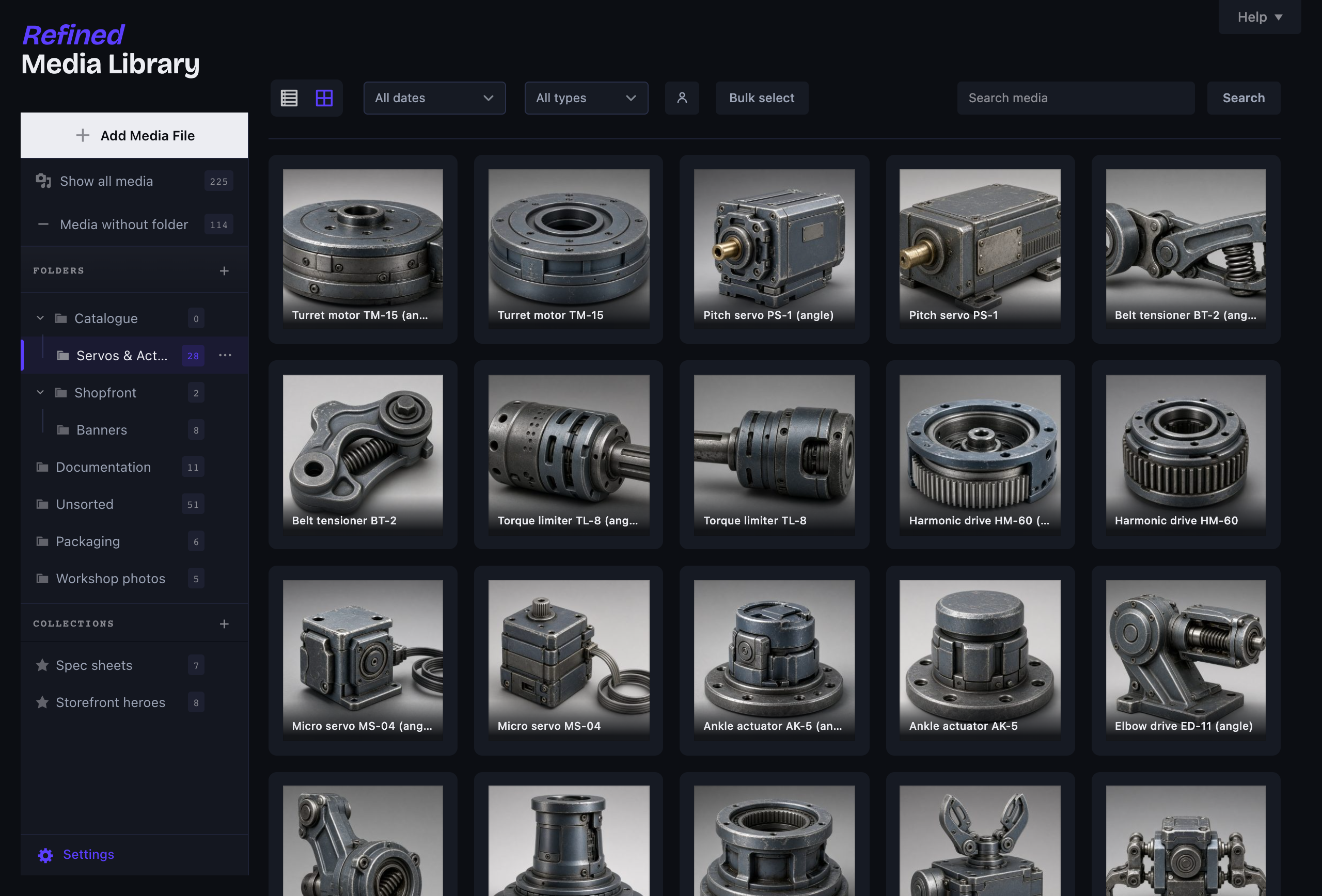
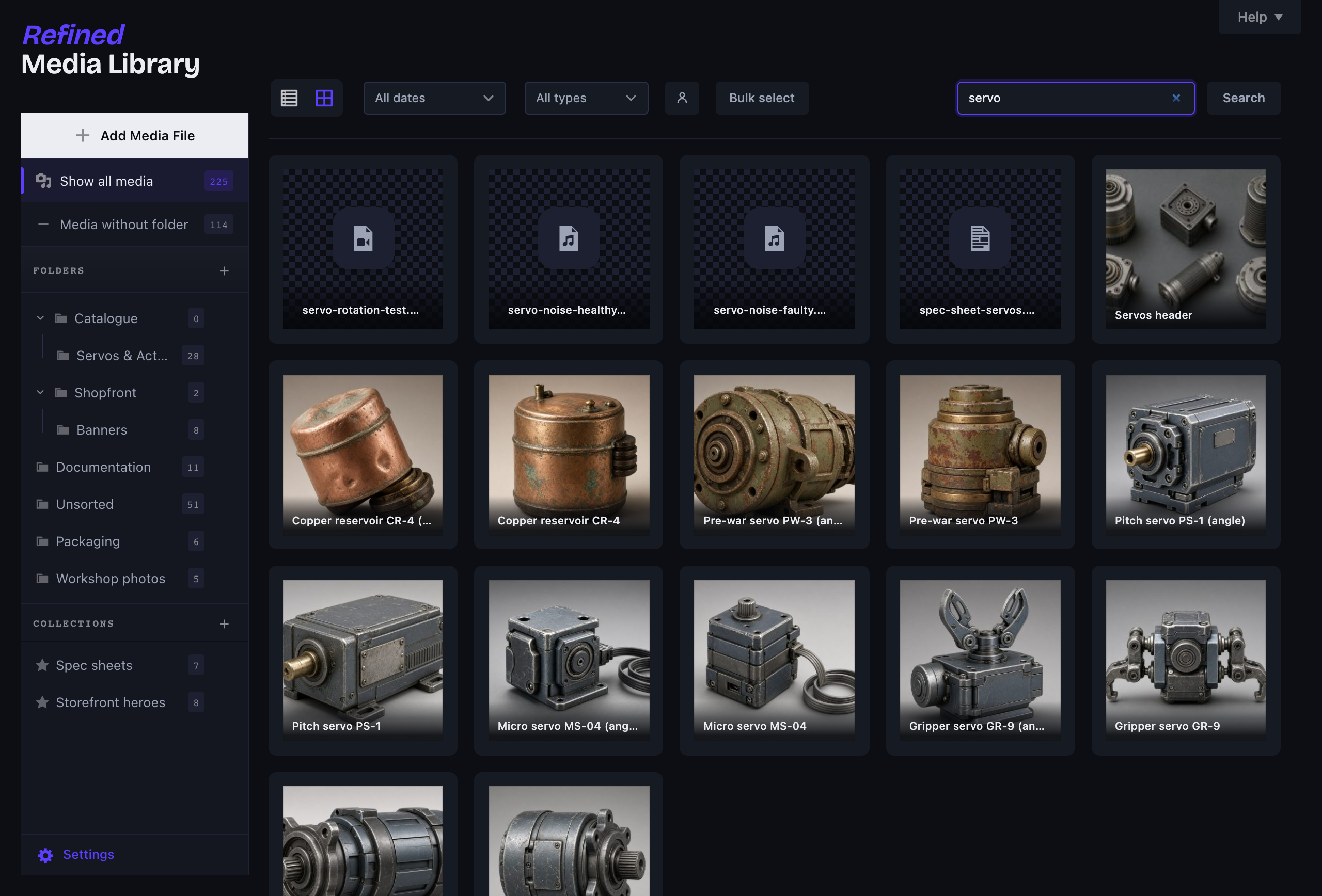
La biblioteca de medios de WordPress no ha cambiado mucho en años. Con unos cientos de archivos subidos, pasas más tiempo desplazándote que trabajando. Refined Media Library la convierte en un verdadero gestor de recursos, sin añadir ni un solo ajuste por imagen que tengas que vigilar.
Carpetas que de verdad se comportan como carpetas
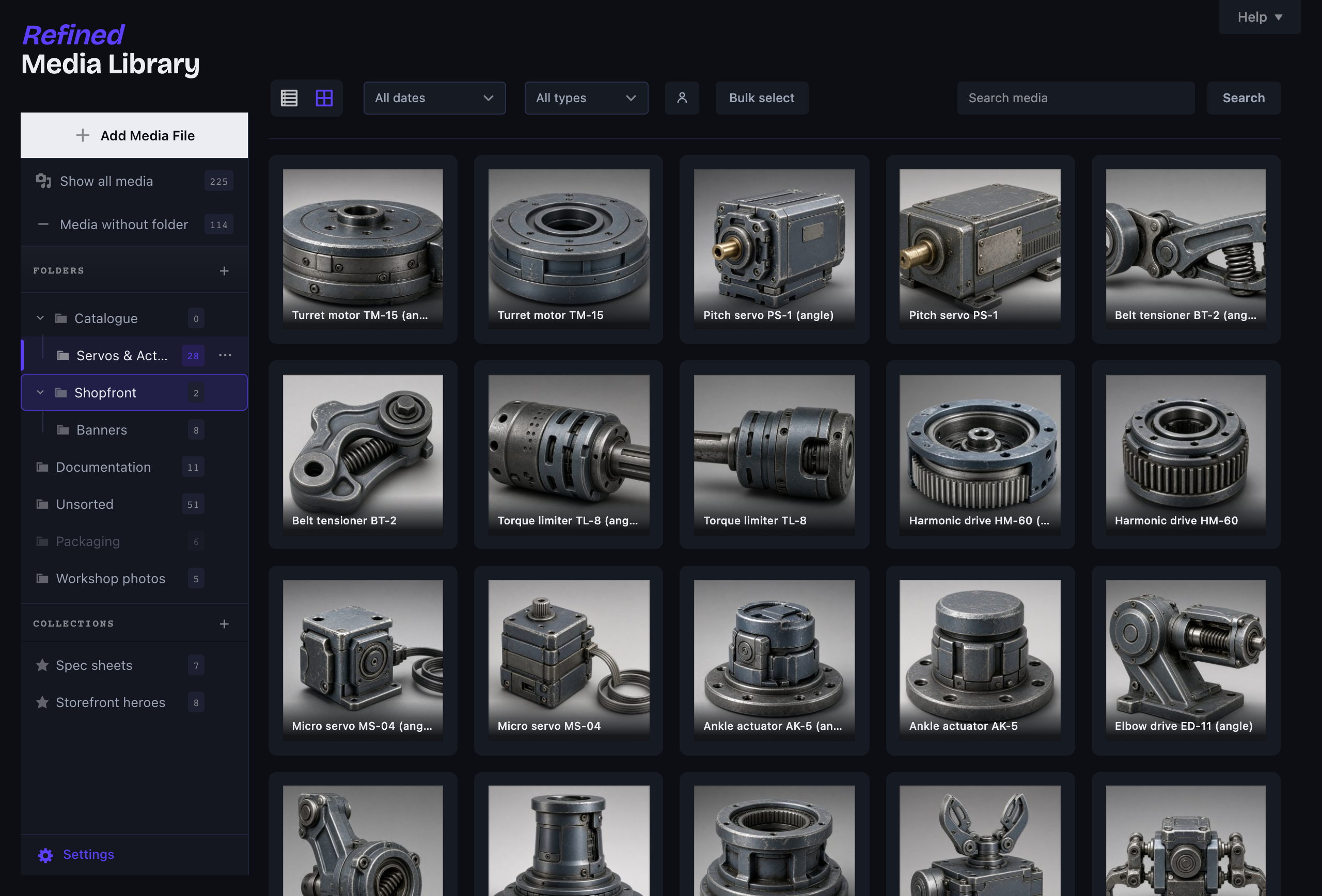
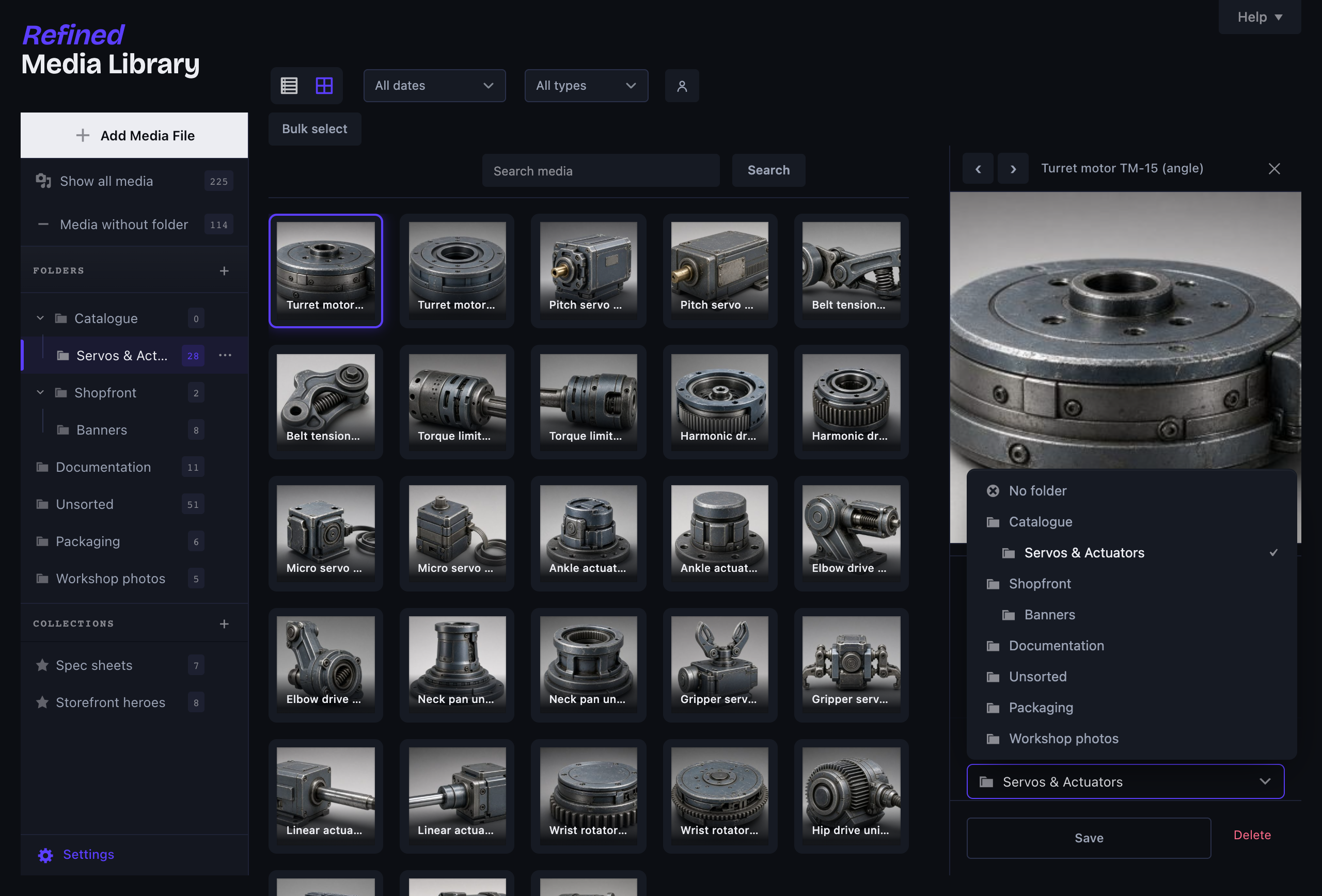
- Carpetas anidadas de verdad: crea subcarpetas, arrastra una carpeta dentro de otra para cambiar su carpeta superior, o suéltala entre dos para reordenarla, con indicadores de destino en directo para que no tengas que adivinar nada.
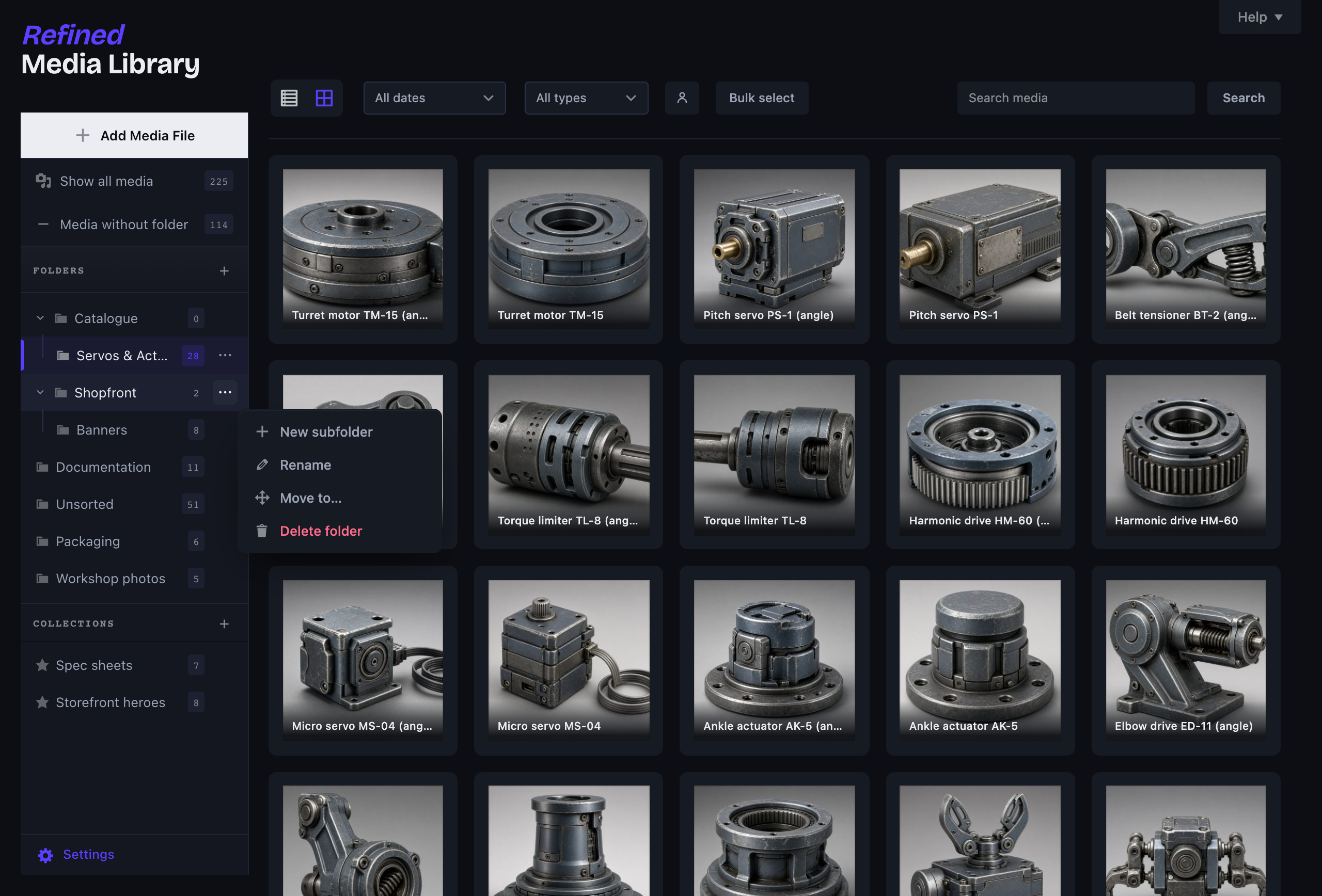
- Haz clic derecho en cualquier carpeta (o en el botón ⋯) para crear una subcarpeta, renombrar, mover y borrar, en diálogos con un diseño cuidado en vez de las ventanas grises del navegador.
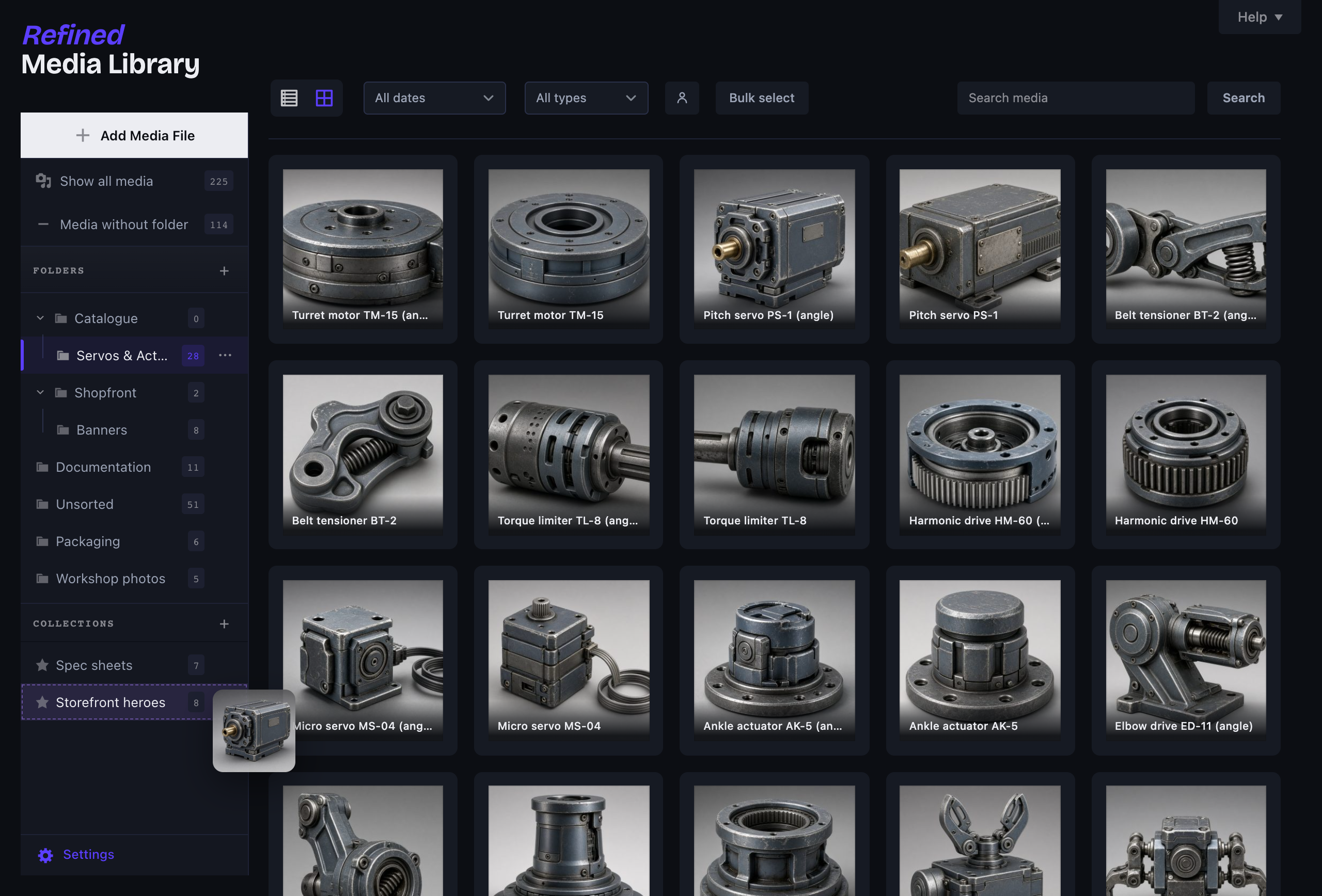
- Colecciones que ignoran los límites de las carpetas, así que la misma imagen puede estar en varias a la vez.
- Arrastra los medios directamente sobre una carpeta o una colección, desde la cuadrícula o la lista, y sube los archivos directamente a la carpeta que estás viendo.
- Funciona sobre la biblioteca de medios nativa, así que se comporta igual tanto si construyes con Bricks, Elementor, Gutenberg o Divi.
Un verdadero panel de detalles
Haz clic en cualquier archivo y un panel se despliega desde la derecha, se acabaron las ventanas modales a pantalla completa. Edita el texto alternativo y el título, muévelo a una carpeta, añádelo a colecciones, copia su URL y mira exactamente qué entradas y páginas lo usan (galerías de WooCommerce incluidas). La vista previa es redimensionable: se escala de forma proporcional a medida que ensanchas el panel, y puedes arrastrar el tirador de debajo para fijar su altura. Haz clic en la imagen para abrirla a pantalla completa en un lightbox y recorrer toda la biblioteca con las teclas de flecha.
Menos desorden, de forma automática
- Texto alternativo y títulos automáticos, rellenados a partir del nombre del archivo al subirlo, pero solo cuando los has dejado en blanco. Se ejecuta en tu servidor y no habla con nadie.
- Detección de duplicados: vuelve a subir el mismo archivo y se marca, con un enlace al original.
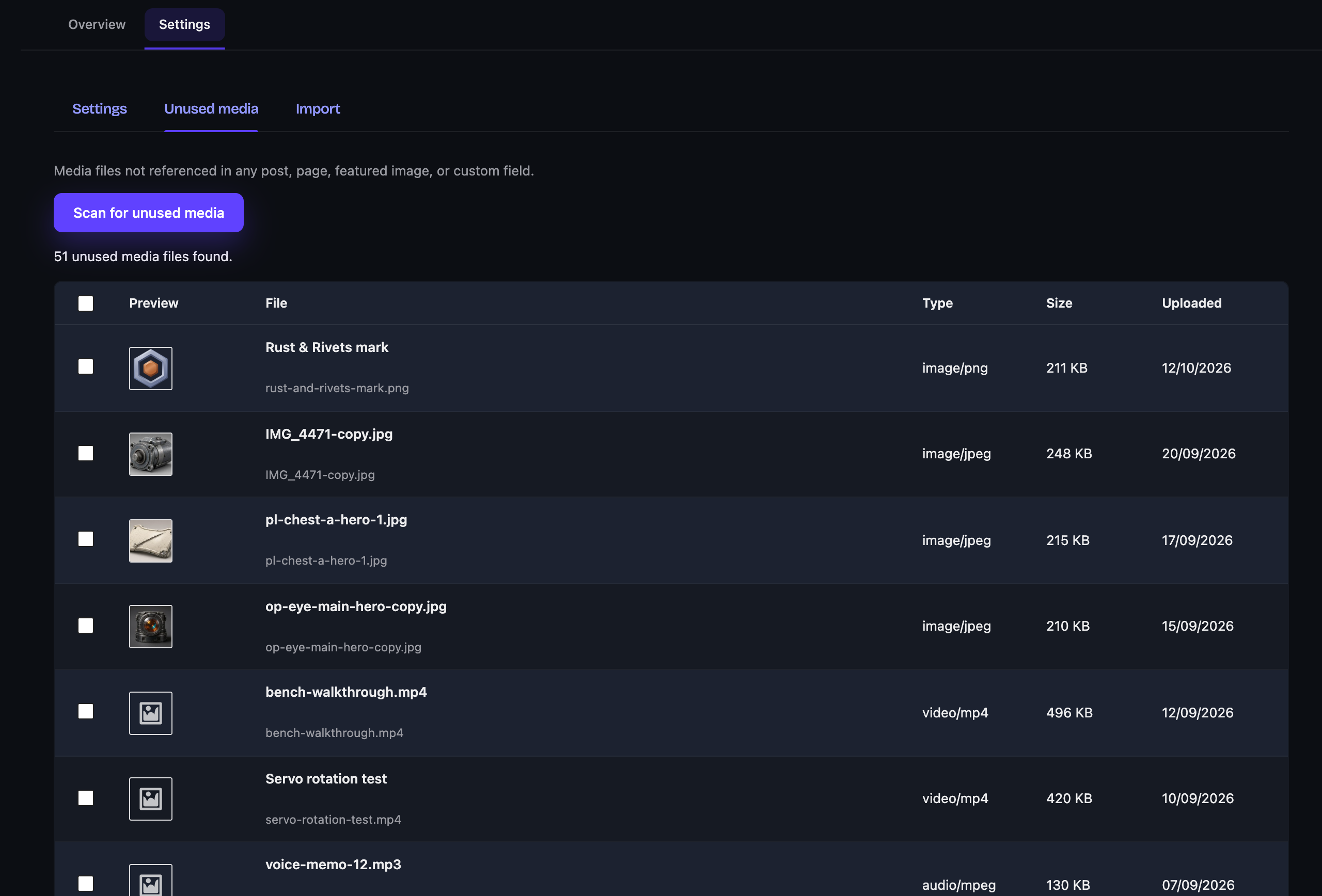
- Un escáner de medios sin usar que encuentra los archivos que ninguna entrada referencia de verdad (imágenes destacadas, contenido, campos personalizados, galerías de WooCommerce) y te deja borrarlos por lotes tras una doble confirmación deliberada. Peca de prudente: si no puede estar seguro, deja el archivo en paz.
WebP y AVIF al subir
Convierte las imágenes a WebP o AVIF en el momento en que llegan, tras una comprobación rápida de que tu servidor puede hacerlo de verdad. La calidad es un solo control deslizante, no un asistente. Si otro plugin ya se encarga de la conversión de imágenes, Refined Media Library se aparta.
¿Vienes de otro plugin?
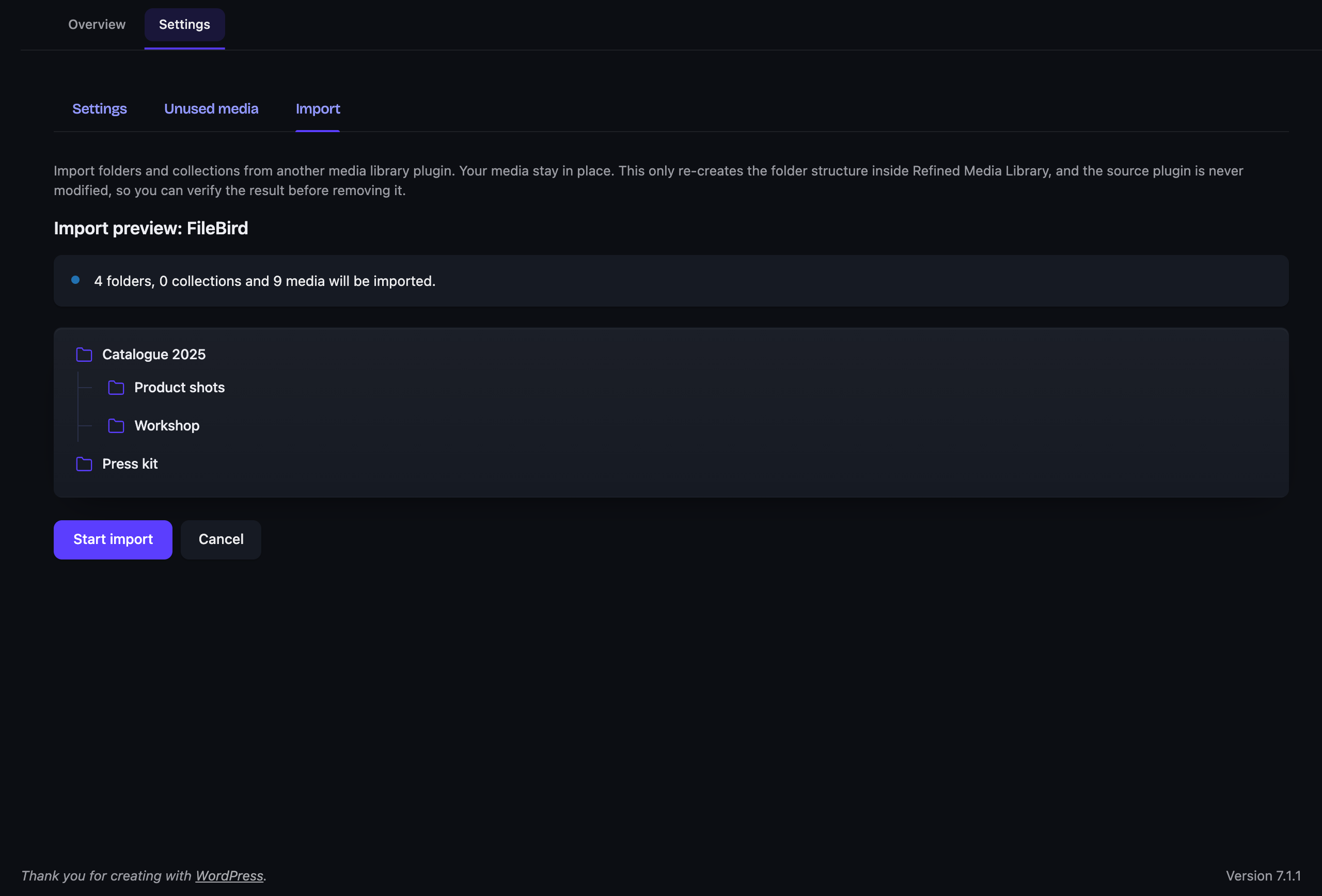
Importación con un clic desde FileBird, Real Media Library, HappyFiles, Folders (Premio) y Enhanced Media Library. Lee sus datos directamente, incluso si el plugin ya está desactivado, nunca lo toca, y la importación es reversible. Previsualiza antes y deshaz cuando quieras.
Sin ajustes por imagen
De eso se trata. Unos pocos interruptores en un solo sitio y valores por defecto sensatos en todo lo demás.
For teams and client sites
- Editors and administrators manage folders and collections; anyone who can upload files their media.
- Keep the settings to yourself, and hide the Feedback button and the review link in one click.
- Folders, collections and WebP/AVIF copies are available to headless fronts through WPGraphQL and the REST API.
Gratis, y hecho para seguir siéndolo
No locked features, no «upgrade to unlock folders», no nag screens. It’s not a trial or a lite version: the whole plugin, free for good and actively maintained.
The whole admin, redrawn the same way
This media library is also part of Double Youpï Refined Admin Dashboard, which redraws the rest of the WordPress admin in the same style: navigation, lists, editor, notices and dashboard, in dark or light. It is free too. If you install it, this plugin steps aside and the dashboard keeps your folders and collections. If you use it, you don’t need this plugin as well.
Learn more
Documentation and news: doubleyoupi.com/plugins/refined-media-library.
Contributing
The code of every release is on GitHub: github.com/double-youpi/refined-media-library. Found a bug? Open an issue there. Questions and help requests stay on the support forum here.
External services
This plugin sends a report to doubleyoupi.com when you use the «Send feedback» tab, and only then. Nothing is sent while you simply use the media library, and nothing is sent in the background.
When it happens. Only when you open the feedback tab, write a message and tick the consent box. The dialog shows you the exact report before you send it, and you can read every field.
What is sent. Your message and, if you attached one, your screenshot. The title and address of the admin screen you were on, with any token removed. The plugin or theme the screen belongs to. Version numbers for WordPress, PHP, your theme and this plugin. Your browser’s user agent string and window size. A site identifier that is a truncated one-way hash of your site address, so reports from one install can be grouped without knowing which site it is. If, and only if, you ask for a reply, your email address and your site address.
What is never sent. No posts, pages, media files, users, passwords or database content. Nothing from your site’s contents, ever.
Reports are kept for 24 months, then deleted, screenshot included. You can ask for access, correction or deletion at any time.
Service provider: Double Youpï, https://doubleyoupi.com
Terms of use: https://doubleyoupi.com/terms
Privacy policy: https://doubleyoupi.com/privacy
Capturas
Instalación
- Instálalo desde la pantalla de Plugins, o súbelo a mano a
/wp-content/plugins/doubleyoupi-refined-media-librarysi es lo tuyo. - Actívalo.
- Abre Double Youpï Refined Media Library > Ajustes y activa lo que quieras. No hay mucho que activar, que es justamente la idea.
FAQ
-
¿Cómo organizo la biblioteca de medios de WordPress en carpetas?
-
Crea una carpeta en la barra lateral de la biblioteca de medios y luego arrastra archivos sobre ella para archivarlos. Las carpetas se pueden anidar tan profundo como quieras, y las reorganizas arrastrando una dentro de otra o entre otras dos. Un archivo también puede pertenecer a una o varias colecciones, que funcionan entre carpetas, así que la misma imagen puede estar en varios sitios a la vez.
-
¿Cómo convierto imágenes a WebP o AVIF al subirlas en WordPress?
-
Activa la conversión en los ajustes y cada imagen que subas se convierte a WebP o AVIF de forma automática, tras una comprobación rápida de que tu servidor (Imagick o GD) lo admite. La calidad es un único control deslizante. Si otro plugin ya gestiona la conversión de imágenes, Refined Media Library lo detecta y se aparta.
-
¿Cómo encuentro y borro imágenes sin usar en WordPress?
-
Ejecuta el escáner de medios sin usar. Lista los archivos que ninguna entrada, página, imagen destacada, campo personalizado ni galería de WooCommerce referencia, y te deja borrarlos por lotes tras una doble confirmación deliberada. Cuando no puede estar seguro de que un archivo está sin usar, lo deja en paz.
-
¿Crea carpetas de verdad, o solo categorías y filtros?
-
Carpetas de verdad. Las gestionas con arrastrar y soltar y un menú de clic derecho, y se anidan tan profundo como necesites. Por dentro son taxonomías estándar de WordPress, así que no se mueve nada en el disco y tus archivos siguen siendo portables. Desactiva el plugin y simplemente vuelves a la biblioteca de serie, sin perder nada.
-
¿Puedo importar mis carpetas desde FileBird, Real Media Library o HappyFiles?
-
Sí. La importación con un clic es compatible con FileBird, Real Media Library, HappyFiles, Folders (Premio) y Enhanced Media Library. Lee el origen directamente (incluso si ese plugin está desactivado), nunca lo modifica, y toda la importación se puede deshacer.
-
¿Funcionará con mi maquetador?
-
Sí. Mejora la biblioteca de medios nativa en vez de reemplazarla, así que Bricks, Elementor, Gutenberg, Divi y todo lo demás ven lo mismo.
-
¿Envía mis imágenes a algún sitio?
-
No. El texto alternativo se construye a partir del nombre del archivo, ahí mismo en tu servidor. La conversión usa Imagick o GD, también en local. Nada relacionado con tus medios sale de tu sitio.
-
¿Cuál es la trampa con lo de «gratis»?
-
No hay ninguna. Esta es la versión independiente, sin compromisos. Si te ahorra una tarde y te apetece, hay un botón para invitar a un café en algún sitio. Totalmente opcional.
-
Is the code open source?
-
Yes. It is released under the GPL (version 2 or later), and the code of every release is published on GitHub: github.com/double-youpi/refined-media-library. Bug reports are welcome there as issues; for help, use the support forum here.
Reseñas

Colaboradores y desarrolladores
«Double Youpï Refined Media Library – Media Folders, Collections & WebP» es un software de código abierto. Las siguientes personas han colaborado con este plugin.
Colaboradores
«Double Youpï Refined Media Library – Media Folders, Collections & WebP» está traducido en 4 idiomas. Gracias a los traductores por sus contribuciones.
Traduce «Double Youpï Refined Media Library – Media Folders, Collections & WebP» a tu idioma.
¿Interesado en el desarrollo?
Revisa el código , echa un vistazo al repositorio SVN o suscríbete al registro de desarrollo por RSS.
Registro de cambios
0.3.26
- Fix: when Refined Admin Dashboard is also active, the note saying this copy stepped aside is shown only to those who can manage plugins, no longer to editors.
- Change: folder and collection messages quote names with curly quotes in English.
0.3.25
- Fix: WebP and AVIF conversion on upload keeps working when another plugin hands back an unexpected value for the image metadata.
- Fix: in the settings, a setting the server cannot use (AVIF) no longer shows a stray checkbox next to its switch.
0.3.24
- Fix: a theme’s or plugin’s welcome notice no longer lands in the folder column (Hello Elementor).
- Fix: in the media list, the «Attach» link reads as a link when Refined Admin Dashboard is also active.
0.3.23
- Fix: right-to-left languages (Arabic, Hebrew, Persian): the folder panel runs along the menu on the right, the detail panel opens on the left, and both resize in the right direction.
- Fix: keyboard focus is visible on the settings cards and in the media library’s search and filters; the hidden «Add Media File» button no longer takes the focus.
0.3.22
- Faster: the plugin’s settings are read with WordPress’s own settings in one database query, instead of separate queries on every page, the public site included.
0.3.21
- Fix: in the media list, every file shows its own thumbnail again (WordPress 7.1 changed the table’s markup and they piled up in one place).
- Fix: the «Attach» and «Detach» links of the media list look like links.
0.3.20
- Fix: when Refined Media Library is in charge of the media library and HappyFiles is also active, HappyFiles’ folder column is hidden properly and the list takes the full width.
0.3.19
- Change, for sites already in use: creating, renaming, moving and deleting folders and collections is now for editors and administrators. Authors and contributors can no longer change the folder tree; anyone who can upload still files media into folders and collections. The doubleyoupi_filter_manage_folders_cap filter sets another capability.
- New: keep the media library settings to yourself (Settings, Team). Other administrators keep the media library and its folders, without these settings, the Feedback button or the review link. Locked out? Add define( ‘DOUBLEYOUPI_UNLOCK_SETTINGS’, true ); to wp-config.php.
- The settings group «Feedback» is now called «Team».
0.3.18
- New: hide the Feedback button and the review link in one click (Settings, Feedback). Handy on sites you hand over to clients.
0.3.17
- New: folders, collections and the WebP/AVIF copies are available to headless fronts through WPGraphQL and the REST API. Folder names can be kept private with the doubleyoupi_filter_media_folders_public filter.
0.3.16
- New: Russian translation. It follows WordPress’s own Russian vocabulary but has not yet been reviewed by a native speaker: corrections are welcome on translate.wordpress.org.
0.3.15
- Fixed: secondary text in the media library (empty folder and collection messages, detail panel labels, counts) now meets WCAG AA contrast, in the dark and light themes.
- Fixed: text in the accent colour (sorted column, collection tags) stays readable whatever the accent.
- Fixed: on the Settings and Unused media pages, tabs, descriptions and the note about Refined Admin Dashboard are readable in the dark theme, and the accent stays readable in the light theme.
- Fixed: the quality slider in Settings and the type filter of the media screen are now named for screen readers.
0.3.14
- New: a «Leave a review» link beside the Feedback button.
0.3.13
- New: a light theme for the media library, in Settings > Appearance. Dark stays the default.
- Tweak: in the light theme, the «Add Media File» button takes the accent colour.
- Fixed: the warning and danger colours of the Overview buttons show again.
- Translations: the bundled language files no longer carry strings the plugin does not use, and plurals follow the rule of each language (in French and Portuguese, zero is now singular).
0.3.12
- Fixed: the list view pagination buttons no longer show a dropdown arrow.
0.3.11
- New: your folders and collections now appear in the Bricks 2.4 media browser. Open a folder or a collection to filter, create, rename, move and delete folders, and move files, all from the builder.
- New: a file uploaded from the Bricks media browser lands in the folder you have open.
- New: in the builder’s «WordPress: Media library» window, the folder panel is there too.
0.3.10
- Fixed: the duplicate badge now shows on duplicate files, in the media grid and in media windows. It did not appear before.
- Fixed: the duplicate badge and its column are translated, and read as a noun in German, Spanish, Italian and Portuguese.
- The Duplicate column is back in the list view when the duplicate badge is on, with a link to the original file.
- Translations: a few Hindi lines were tidied.
0.3.9
- New: Double Youpï Refined Admin Dashboard is now on WordPress.org, free like this plugin. The Overview shows it with an install button, and Settings mentions it.
- New: a Settings link in the plugin’s row on the Plugins screen.
- Fixed: in media windows (such as «Add Media» or «Set featured image»), with infinite scrolling turned off («Load more»), the thumbnails no longer slide under the folder column.
- The close button of the file details panel in media windows now sits at the same place as in Double Youpï Refined Admin Dashboard.
- French: the bundled translation now matches the one validated on translate.wordpress.org.
- Under the hood: the feedback form reads the admin address from WordPress instead of assuming /wp-admin/.
0.3.8
- Security: the Unused Media actions (move to the trash, restore, delete for good) are now reserved to administrators, and checked file by file.
- Filing an upload into a folder or a collection now requires the right to edit that file.
- Under the hood: inline styles and scripts go through the WordPress APIs, and admin output is escaped where it is printed.
0.3.7
- New: a switch for the duplicate badge, in Settings. The badge reads every uploaded file to recognise one already in the library, so a new install now starts with it off. Sites that already use the plugin keep it on, including after a reinstall.
- When Double Youpï Refined Admin Dashboard is active, this plugin now steps aside as soon as it loads, and says so. Your folders, collections and settings stay where they are, and the dashboard uses them.
- Fixed: PHP 8.5 logged a deprecation notice each time an image was converted to WebP or AVIF.
- The Overview no longer lists modules that are not released yet, and says what turning the media library off would change.
- The brand is spelled Double Youpï everywhere, menu included.
- The Preview column of Unused Media no longer cuts its heading short.
0.3.6
- Counted messages read properly when there is only one file. «1 files moved to the trash» is gone, in every language, and a count of zero is simply left unsaid rather than announced.
0.3.5
- Unused Media no longer erases anything. What you remove goes to the trash: it leaves the media library, but the file stays on the server, so a page still showing it keeps working, and one click puts it back with its folders. Erasing for good is now a separate, deliberate act on that trash, and WordPress clears what is left after 30 days.
- Fixed: the screen reported files that are in fact in use. Nine ways of using a file were invisible to it: a file used by another site of a network, a URL kept in a custom field by a page builder, a file whose resized copy alone appears on a page, the site logo, an image set in a widget or a theme option, a [gallery] shortcode, a gallery field holding a list of IDs, a builder storing only the ID, and an image carrying nothing but the class WordPress writes on it.
- Removing now re-checks each file at that moment instead of trusting the list on screen, and leaves alone anything that has been put to use since the scan.
- On a network, «Used by» looks at every site and says which one holds the page. It used to answer «used nowhere» for a file another site was displaying.
0.3.4
- Fixed: the folder panel appeared on post lists and on taxonomy term lists, where it covered the page title and swallowed the «Add New» button. It happens on sites where another plugin loads the media library across the whole admin, which many page builders and custom field plugins do. The panel now shows on the Media screen and inside the media picker, and nowhere else.
- Fixed: on those same screens, the plugin also claimed the area where WordPress prints admin notices, so notices from other plugins could land inside it.
- Fixed: the plugin restyled the search field of the plugin and theme installation screens, and the drop overlay of the content editor.
- French translation: formal address throughout, and wording aligned with the official WordPress French glossary.
0.3.3
- Your folders are now in the media picker, wherever it opens: inserting an image into a post, setting a featured image, choosing a file in a page builder. They were meant to be there and were not.
- The picker now looks like the rest of the plugin, instead of a stock white dialog with a dark panel bolted to its side. Thumbnails, filters and buttons all match the Media screen.
- «All media» and «Media without folder» now show how many files they hold, like every folder already did.
- Fixed: after closing the media picker, the folder panel stayed on top of the post editor until the page was reloaded.
- Fixed: long file names were cut off mid-word under each thumbnail in the picker. They now end in an ellipsis, as on the Media screen.
- Fixed: with a file selected in the picker, bulk buttons appeared two and three times over and landed on top of the date filter.
- Fixed: in the picker, the date filter, the type filter and the search field each sat at a different height.
0.3.2
- Fixed: installing this plugin next to Double Youpï Refined Admin Dashboard brought the whole site down, front end included. The two run side by side now.
- Fixed: with both plugins active, the folder panel sat on top of the page title and the thumbnails covered the file names.
- Feedback sent from a media screen is now filed under this plugin instead of WordPress, so a report about folders or collections lands in the right place.
- The Unused Media screen now carries the same accent colour as every other screen of the plugin. It had kept an older blue.
- French translation: apostrophes are typographic throughout, as most of the interface already was.
0.3.1
- Fixed: on sites where another plugin or some custom CSS changes the width of the WordPress admin sidebar, the folder panel sat behind it. The panel now measures the sidebar instead of assuming its width, and follows it when it is collapsed or resized.
- Fixed: a notice about translations being loaded too early could appear at the top of the Media screen, on the first page load after an update.
- Fixed: on a site that forces one text colour across the whole admin, the folder panel turned unreadable. It now restores its own colours on those screens.
- Fixed: with a long list of folders, the Add Media button and the section headers were squeezed to a fraction of their height. They keep their size now, and the lists scroll instead.
- Fixed: a folder or a collection whose name contains an ampersand displayed it as «&».
0.3.0
- New: a feedback tab on every admin screen, to report a bug or ask for something without leaving the page. It shows you the exact report before it leaves, and sends nothing until you agree. See «External services» above.
- A file you are not allowed to edit now opens read-only, with its information and a line explaining why, instead of an error code.
- The folder panel no longer shows a Settings link to people who cannot open that page.
- When a competing media library plugin is active and holds folders, the notice offers to import them rather than only to switch.
- Fixed: competing plugins were only recognised by their free edition’s folder name, so a paid edition went unnoticed and its interface overlapped ours.
- Fixed: menu labels stayed in English on WordPress 6.5 and 6.6.
- Fixed: three strings had lost their translations in every language, including the text of the Import tab.
0.2.0
- Caption and description are now editable straight from the detail panel, next to the title and alt text. Everything a file carries is in one place.
- The four text fields sit in one section, in the order you actually write them: title, alternative text, caption, description. Their labels are clickable.
- Moving to the next file saves what you typed, and drops the cursor back in the same field, so a long captioning run never needs the mouse. Cmd/Ctrl + arrow moves on from inside a field.
- The Save button now tells you something: quiet when there is nothing to save, lit when there is. Each edited field is marked next to its label.
- Folders and Collections sit side by side once you drag the panel wider.
- Fixed: on a site left on Plain permalinks, opening a file from the grid answered 404 and the panel stayed empty.
- Fixed: admin notices printed over the page title instead of lining up with the grid.
- Fixed: pressing Escape in the folder picker closed the whole detail panel.
- Fixed: in list view, the switch between list and grid did not show which view you were on.
- Tidier surfaces: lighter borders in the library, fields that rest on the panel instead of being boxed in, redrawn file-type icons.
- Confirmed with WordPress 7.1.
- French translation aligned with the official WordPress.org glossary and typography.
0.1.3
- Nuevo filtro «Míos» en la barra de herramientas de la biblioteca de medios (se muestra solo cuando suben archivos varias personas) para acotar rápidamente a tus propios archivos.
- Se ha quitado un desplegable de tipo de medio redundante para que la barra de filtros quede más limpia.
- Se ha corregido una barra de desplazamiento horizontal perdida encima de la cuadrícula de medios.
- Las flechas de navegación del lightbox ahora son iconos SVG nítidos.
0.1.2
- Repaso del readme y de los textos, con descripciones de funciones más claras y unas FAQ ampliadas. Sin cambios funcionales.
0.1.1
- Panel de detalles: la vista previa de la imagen ahora se escala de forma proporcional a medida que ensanchas el panel, un tirador debajo redimensiona la imagen, y al hacer clic se abre una galería lightbox a pantalla completa con navegación por teclado.
- Los botones que otros plugins (como Elementor) añaden a la pantalla de medios ahora se trasladan con orden al panel de carpetas en vez de amontonarse junto al título de la página.
0.1.0
- Primera versión pública. Carpetas anidadas con arrastrar para reorganizar y un menú de clic derecho, colecciones, un panel de detalles estilo Finder, limpieza de duplicados y huérfanos, texto alternativo y títulos automáticos, conversión WebP/AVIF al subir, e importación con un clic desde FileBird, Real Media Library, HappyFiles, Folders y Enhanced Media Library.