

Descripción
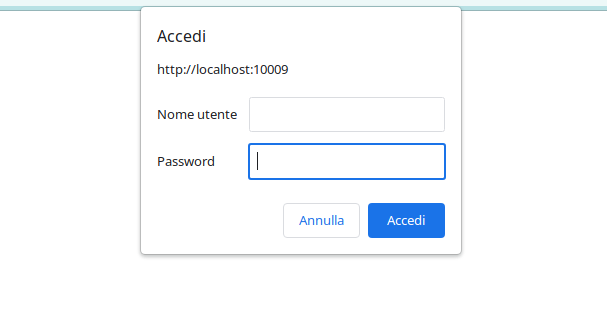
El plugin Easy Basic Authentication proporciona un método sencillo para añadir identificación básica a tu sitio WordPress. Puedes activar la identificación básica para todo el sitio o sólo para el área de administración estableciendo un nombre de usuario y una contraseña personalizados. Protege tu sitio restringiendo el acceso sólo a los usuarios autorizados.
Try it on a free mock site: click here
Características principales
-
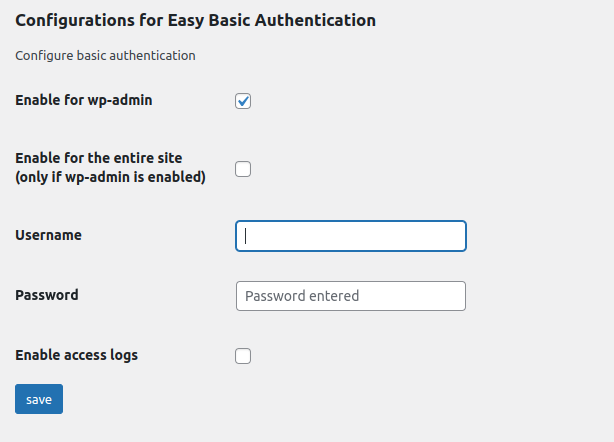
Configuración Sencilla: Con Easy Basic Authentication, puedes configurar fácilmente la identificación básica para todo tu sitio web o específicamente para el área de administración. Establece un nombre de usuario y contraseña personalizados para garantizar un acceso seguro.
-
Protección del Área de Administración: Si deseas restringir el acceso a tu área de administración de WordPress, Easy Basic Authentication te permite hacerlo de manera rápida y efectiva. Solo los usuarios con las credenciales correctas podrán acceder a esta parte crítica de tu sitio.
-
Entire site protection: If you wish, there is an option to extend the access limitation to the entire site and not just for your WordPress admin area, Easy Basic authentication allows you to do this quickly and effectively. Only users with the correct credentials will be able to access this critical part of your site.
-
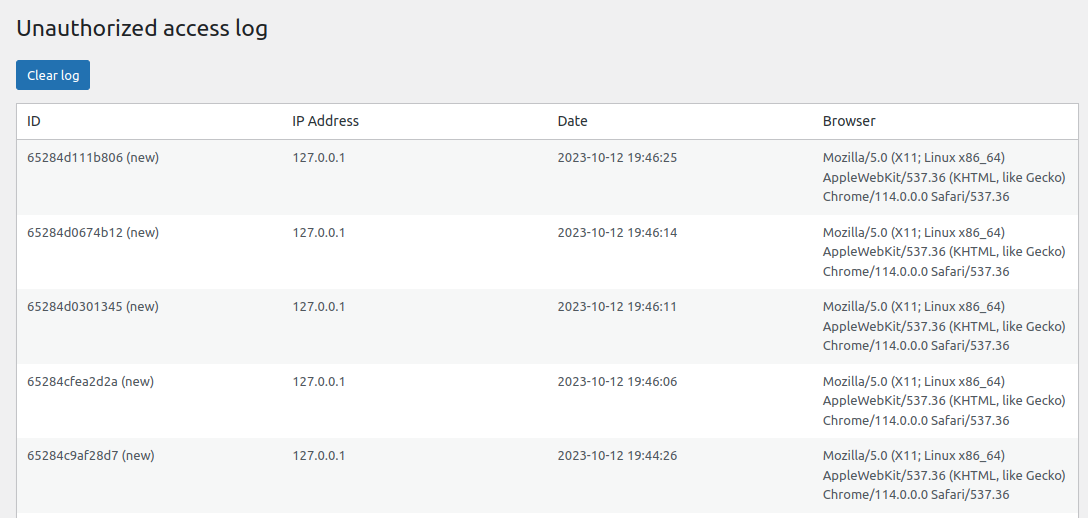
Registro de Accesos Fallidos: El plugin registra intentos de inicio de sesión fallidos, ayudándote a identificar intentos de acceso no autorizados. Esto es especialmente útil para supervisar la seguridad de tu sitio.
-
Registro de Acceso: Si eliges activar esta función, Easy Basic Authentication te permite registrar inicios de sesión exitosos, proporcionando una visión general exhaustiva de las actividades de inicio de sesión en tu sitio.
-
Gestión Sencilla: La interfaz intuitiva del plugin facilita la gestión de los ajustes de identificación básica. Puedes habilitar o deshabilitar fácilmente la identificación básica y ajustar las credenciales según tus necesidades.
-
Funcionalidad de Alerta por Correo Electrónico: Easy Basic Authentication incluye una función de alerta por correo electrónico para notificarte de intentos de acceso no autorizados. Puedes recibir alertas por correo electrónico cuando alguien intente acceder a tu sitio sin las credenciales adecuadas.
-
Funcionalidad de Lista Blanca: Ahora, Easy Basic Authentication incluye una función de Lista Blanca, que te permite especificar direcciones IP de confianza exentas de la identificación básica. Configura esta lista para otorgar acceso inmediato a usuarios o sistemas conocidos sin necesidad de credenciales, mejorando la conveniencia y manteniendo la seguridad.
-
Access Token for Crawlers: Some visitors cannot type a username and password: a search engine crawler, an uptime check, a headless front end. Generate an access token in the settings and let them through with an
X-Basic-Auth-Tokenheader, or anAuthorization: Bearerone. The token opens the site only, never the admin area or the login page, and it exists only if you generate it.
Protege tu sitio WordPress con identificación básica de manera rápida y fiable. Easy Basic Authentication te brinda control para asegurarte de que solo usuarios autorizados puedan acceder a tus recursos en línea. Mantén la seguridad de tu sitio y previene el acceso no deseado hoy mismo con Easy Basic Authentication.
Uso
- Visita la página de configuración del plugin para configurar las opciones de identificación básica que desees.
- Elige si quieres activar la identificación básica para todo el sitio o sólo para el área de administración.
- Establece un nombre de usuario y contraseña personalizados para un acceso seguro.
- Supervisa intentos de acceso fallidos y registros de acceso para una mayor seguridad.
Letting a crawler in with a token
Go to the plugin settings, tick Generate a token when saving next to Access token for crawlers, and save. The token appears in the field; copy it and give it to the service that needs to reach the site.
That service must send it as a header, one of these two:
X-Basic-Auth-Token: your-token-here
Authorization: Bearer your-token-here
A request carrying the right token is served normally. The admin area and the login page stay behind the username and password, so the token cannot be used to reach the dashboard. A wrong token is refused like wrong credentials, and it is recorded among the failed attempts.
The token is a password: anyone holding it can read the whole site. Send it over HTTPS, and tick Delete the token and close this door when it is no longer needed. Tick Replace this token with a new one when saving to rotate it; the old one stops working immediately.
The basic_auth_token_access_granted action fires whenever a request comes in on the token, if you want to log or count those separately.
Troubleshooting: Resetting Basic Authentication
If you’re having trouble logging in due to the basic authentication, you can reset it and regain access by following these steps:
1 Connect to your website via FTP.
2 Navigate to the plugin directory:
wp-content/plugins/easy-basic-authentication/class/
3 Locate the file:
easy-basic-authentication-class.php
4 Find the following line:
add_action( 'init', array($this,'basic_auth_admin') );
5 Comment out that line by adding a # at the beginning:
#add_action( 'init', array($this,'basic_auth_admin') );
6 Save the file and re-upload it to your server.
This will disable the basic authentication temporarily, allowing you to log in. Once logged in, you can adjust the plugin settings as needed.
If you need further assistance, feel free to reach out.
GitHub Repository
You can find the source code and contribute to the project on GitHub: Easy Basic Authentication on GitHub
Capturas
Instalación
- Sube el plugin de Easy Basic Authentication a tu sitio de WordPress.
- Activa el plugin.
- Configura los ajustes de identificación básica desde el panel de administración de WordPress.
Reseñas


Colaboradores y desarrolladores
«Easy Basic Authentication – Add basic auth to site or admin area» es un software de código abierto. Las siguientes personas han colaborado con este plugin.
Colaboradores

«Easy Basic Authentication – Add basic auth to site or admin area» está traducido en 6 idiomas. Gracias a los traductores por sus contribuciones.
Traduce «Easy Basic Authentication – Add basic auth to site or admin area» a tu idioma.
¿Interesado en el desarrollo?
Revisa el código , echa un vistazo al repositorio SVN o suscríbete al registro de desarrollo por RSS.
Registro de cambios
4.2.0
- New: an access token that lets a crawler or an external service reach the site without a username and password. Generate it in the settings and send it as an
X-Basic-Auth-Tokenheader, or asAuthorization: Bearer. It opens the site only: the admin area and the login page stay protected. No token is generated until you ask for one, so nothing changes for sites that do not need it. - Fixed: on a site protected in full, scheduled tasks stopped running. WordPress closes the response of
wp-cron.phpbefore loading the plugins, so the 401 challenge reached nobody, left a «headers already sent» warning in the error log on every run, and the exit that followed cancelled every scheduled task of the site. Cron requests are no longer challenged. - Fixed: on WordPress 6.7 and later the plugin triggered the «Translation loading was triggered too early» notice. The settings fields are now built on
admin_initinstead ofplugins_loaded.
4.1.0
- Fixed: an access attempt was logged, and an alert email sent, for every visitor. Basic Authentication always makes a first request without credentials, and that request was being counted as a failed attempt. Only requests that send wrong credentials are recorded now.
- Fixed: the access log was stored in an autoloaded option, so up to 500 entries (around 144 KB) were loaded on every request to the site. It is now loaded only where it is used, and existing logs are migrated on update.
- Fixed: on a site protected in full, WP-CLI and any command line script stopped silently. HTTP authentication is no longer applied outside HTTP requests.
- The 401 status is now sent through WordPress instead of a hardcoded HTTP/1.0 header.
- The authentication realm can be changed with the new
basic_auth_realmfilter. - Tested up to WordPress 7.1.