

Descripción
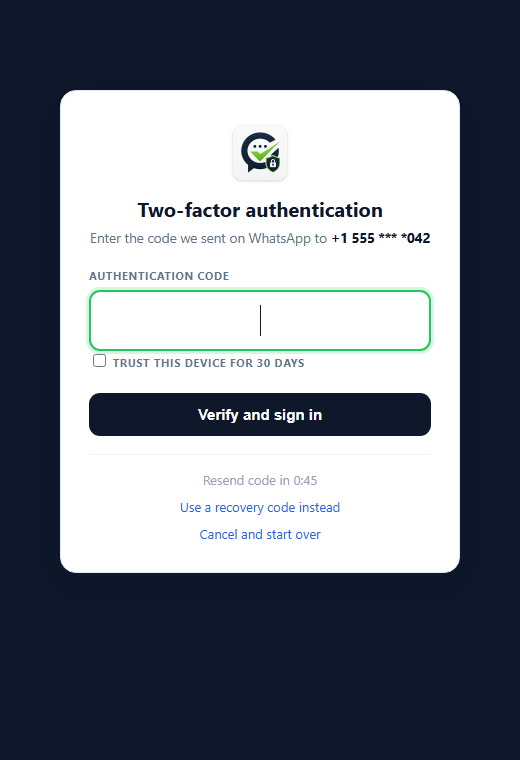
GoUltra Auth adds a WhatsApp one-time code as a second factor at login. After the password is
accepted, the user enters a short code delivered to their WhatsApp, so a leaked password alone
is no longer enough to get into the admin.
It connects to the GoUltra service, which delivers the code through a WhatsApp
Authentication-category message approved by Meta.
Why WhatsApp (an honest comparison)
WhatsApp authentication codes are not delivered through the SMS network, which reduces exposure
to common SMS delivery and interception risks (such as message interception, poor reception,
and certain SIM-swap scenarios). No authentication method is unbreakable, so GoUltra Auth also
includes rate limits, recovery controls and an audit log. It usually costs less than SMS in
most markets and arrives over Wi-Fi without a cellular signal.
What you get in this version
- Admin / role-based login 2FA over WhatsApp.
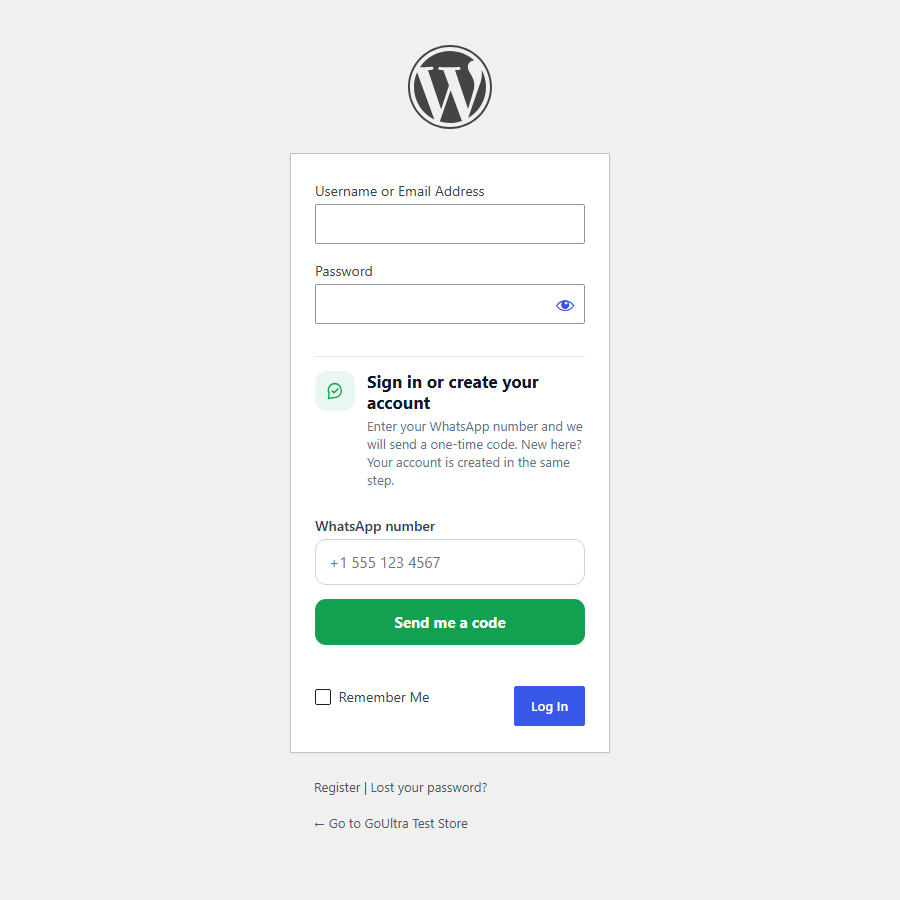
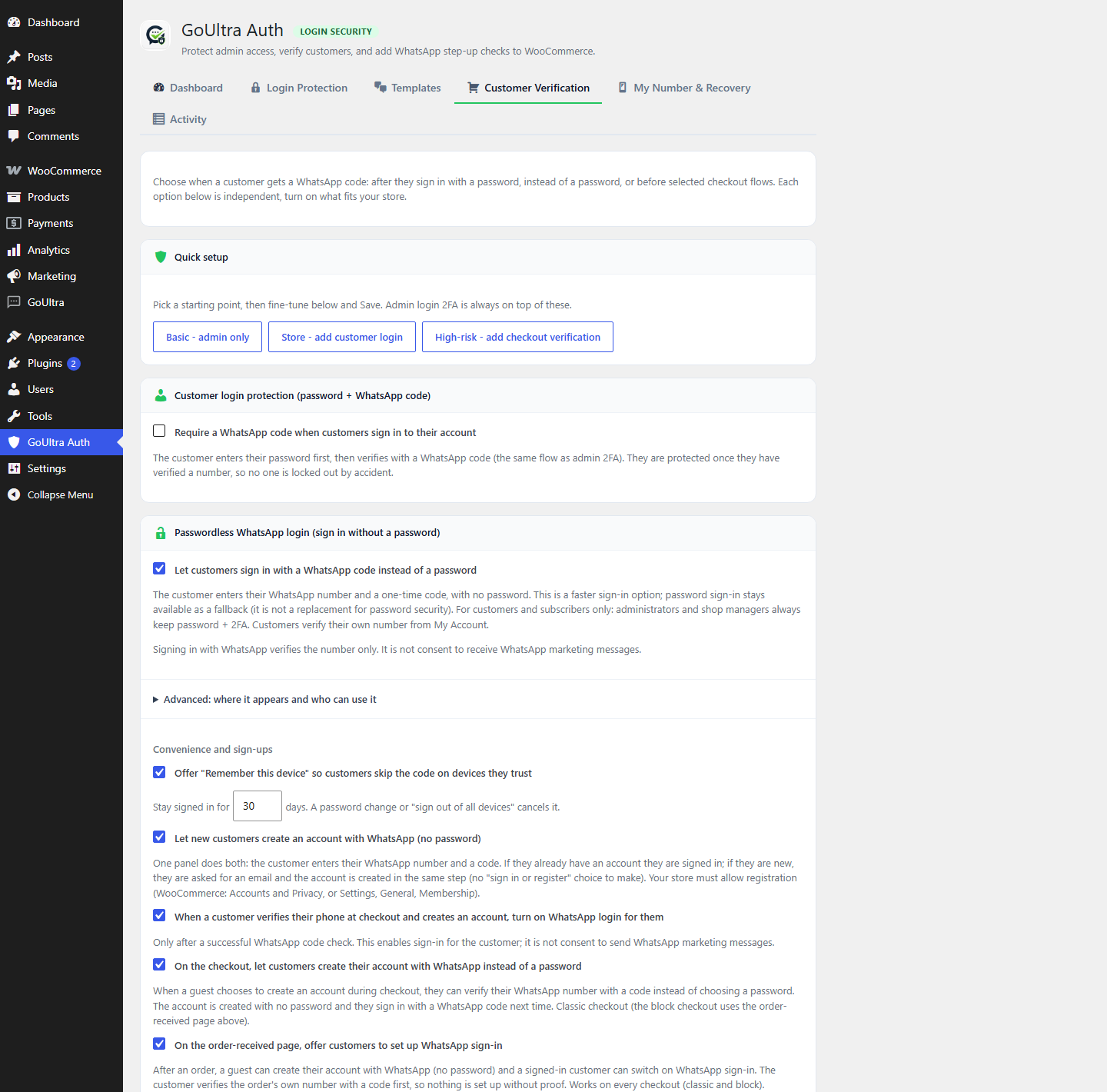
- Passwordless login for customers: sign in (or register) with a WhatsApp code instead of a
password, with an optional «remember this device» (off by default, customers and subscribers
only, password sign-in always kept). - Self-service enrollment: each user verifies their own WhatsApp number.
- Recovery codes (single-use) so you are never locked out.
- Emergency disable via wp-config.php and WP-CLI.
- Rate limits per user, per IP and per site, plus daily and monthly cost caps.
- A security score and an audit log.
Recovery and lockout protection
You can always get back in without WhatsApp: enter a recovery code, add
define( ‘GOULTRA_AUTH_DISABLE’, true ); to wp-config.php, or run wp goultra-auth disable.
Third-Party Service
This plugin sends the WhatsApp phone number you provide, and a one-time code, to the GoUltra
service so the code can be delivered over WhatsApp. No message is sent until you connect the
plugin with a GoUltra API key and a user enrolls a number.
- Service: GoUltra – https://goultra.ai
- API endpoint: https://go.goultra.ai/api
- Terms: https://goultra.ai/terms
- Privacy: https://goultra.ai/privacy
Capturas
Bloques
Este plugin proporciona 1 bloque.
- GoUltra WhatsApp Login
Instalación
- Upload the plugin to
wp-content/plugins/goultra-auth/and activate it. - Go to GoUltra Auth and paste your GoUltra API key to connect.
- Verify your own WhatsApp number (you will receive a test code).
- Save your recovery codes somewhere safe.
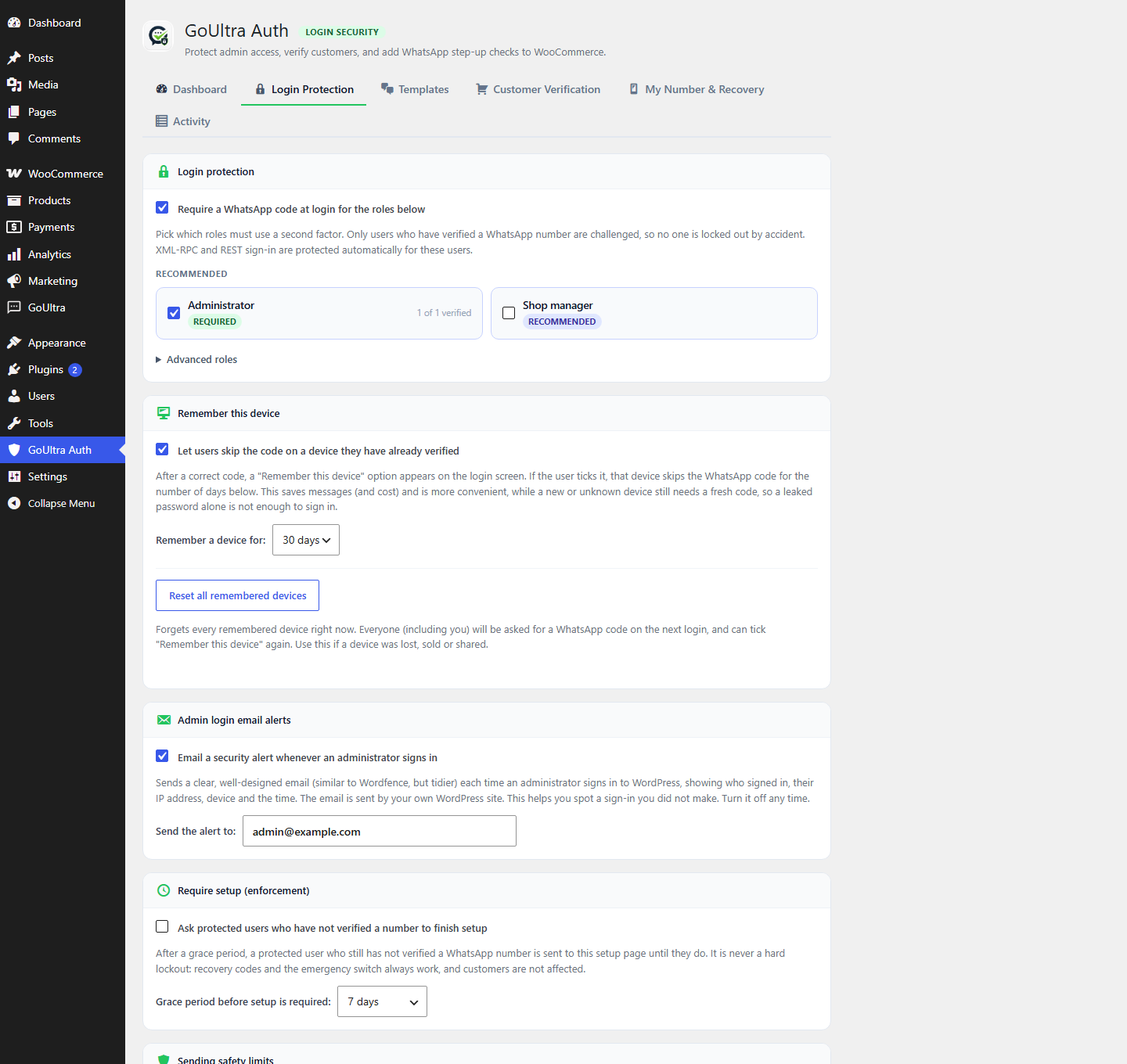
- Turn on Admin login 2FA for the roles you choose.
FAQ
-
What if I cannot receive a WhatsApp code?
-
Use a recovery code on the login screen. If you have none, add
define( ‘GOULTRA_AUTH_DISABLE’, true ); to wp-config.php, or runwp goultra-auth disable. -
Does it make my site impossible to hack?
-
No. No authentication method is unbreakable. It is a strong additional layer that, combined with
rate limits, recovery controls and an audit log, makes account takeover significantly harder than
a password alone. -
Does it cost money?
-
WhatsApp authentication messages are billed by Meta per delivered message, and pricing varies by
country. The built-in cost caps let you bound the spend.
Reseñas
No hay valoraciones para este plugin.
Colaboradores y desarrolladores
«GoUltra Auth» es un software de código abierto. Las siguientes personas han colaborado con este plugin.
Colaboradores
«GoUltra Auth» está traducido en 1 idioma. Gracias a los traductores por sus contribuciones.
Traduce «GoUltra Auth» a tu idioma.
¿Interesado en el desarrollo?
Revisa el código , echa un vistazo al repositorio SVN o suscríbete al registro de desarrollo por RSS.
Registro de cambios
0.33.0
- Moved all inline CSS and JavaScript on the two-factor login screen, the step-up screen and the
WooCommerce checkout verification field into properly enqueued asset files. - Hardened the step-up (protected action) screen with a nonce and a capability check before it processes
a request or sends a code. - Setting or resetting another user’s WhatsApp number now also requires permission to edit that user.
- Small code-quality and internationalization cleanups for the plugin directory guidelines.
0.32.3
- The «authentication service is turned off for this number» message now matches the exact signal the
GoUltra service sends, so it always shows the right guidance. - Translations: the new plan-limit, cooldown and plan-usage messages are now translated to Hebrew,
Arabic, Spanish and French.
0.32.2
- Plan usage: the settings screen now shows how many authentication messages your GoUltra plan has
used this cycle («X of Y»), and if the plan allowance is reached the login screen says so clearly.
If the WhatsApp authentication service is turned off for a number, that is now explained too.
0.32.1
- Clearer messages: when a code cannot be sent, the login and sign-in screens now show the specific
reason (for example, the plan’s message allowance was reached, or a short cooldown between sends)
instead of a generic notice, and always point to the recovery-code fallback.
0.32.0
- Cost protection: fresh installs now ship with safe sending limits ON by default (per destination
number per hour, a minimum interval between sends to the same number, and a site-wide daily cap), so
the WhatsApp send volume cannot be run up before an admin tunes anything. - Reliability: a recovery (backup) code can now always be entered at the login challenge, even during the
«too many attempts» cooldown or when another user shares the same IP, so a locked-out admin is never
stopped from using a backup code. - Robustness: the setup-enforcement redirect no longer runs on REST, cron or CLI requests; uninstall now
clears the daily cleanup schedule; a checkout-verified number is never auto-attached to an admin account.
0.31.0
- Pre-submission hardening from a full four-angle audit (wp.org compliance, security, correctness, i18n).
No behavior changes for store owners or customers; the plugin is now cleaner and stricter. - Security: added a cross-attempt rate limit (per number and per IP) to the guest one-time-code checks
used by new-customer signup, order-received setup and checkout verification, so codes cannot be guessed
across many requests. Rotating a user’s devices now also clears their admin two-factor «remembered
device». The account-created email path sanitizes any unexpected upstream text. - wp.org / Plugin Check: sanitized a server value, annotated the one-time uninstall/deactivate database
cleanup and the CSV export stream, and hardened the activity CSV export against spreadsheet formula
injection. Removed one unused internal option and a stale code comment.
0.30.0
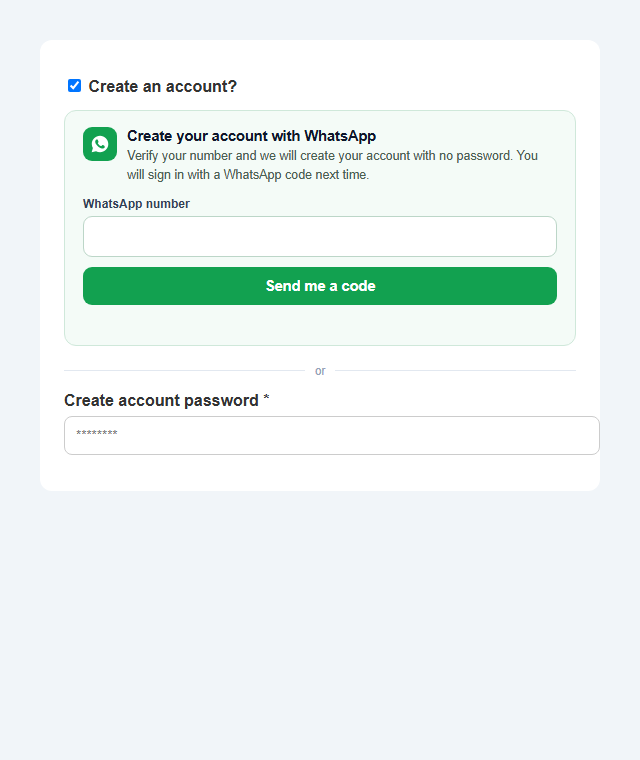
- New: create your account with WhatsApp on the checkout (no password). On the classic checkout, when a
guest chooses to create an account, they can verify their WhatsApp number with a code instead of
choosing a password. The account is created with no password and they sign in with a WhatsApp code
next time. Fully additive: the normal password option is untouched, and if the number is not verified
nothing changes. New setting under Customer sign-in (on by default). Translated to all five languages. - Improved: the admin-login alert email was redesigned to be cleaner and to nest correctly inside sites
that wrap outgoing emails in their own branded template (no more double header). It now uses a light
card with a green accent instead of a dark banner.
0.29.0
- New: «Remember this device» for admin two-factor login. After a correct code, the login screen
offers to trust that device for 30 days (7/14/30, configurable), so admins are not asked for a code
every time. This saves WhatsApp messages and cost while a new or unknown device still needs a fresh
code, so a leaked password alone is not enough to sign in. - New: «Reset all remembered devices» button in Login Protection. It forgets every trusted device at
once (admin and customer), so everyone is asked for a fresh code on the next login. Use it if a
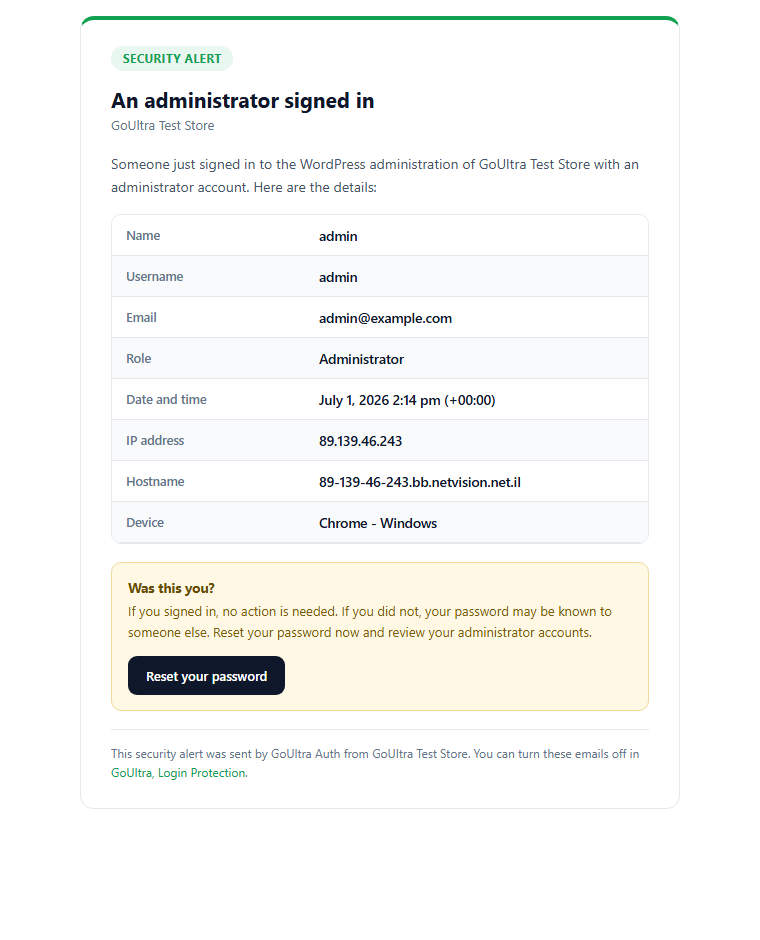
device was lost, sold or shared. - New: admin-login email alerts. A clean, well-designed security email (like Wordfence, but tidier) is
sent by your own WordPress site whenever an administrator signs in, showing the username, IP address,
hostname, device and time, with a «was this you?» prompt. Toggle it and set the recipient in settings. - All new screens and the alert email are translated to English, Hebrew, Arabic, Spanish and French,
with right-to-left support and phone/IP shown left-to-right.
0.28.0
- New: on the order-received page after checkout, customers can set up WhatsApp sign-in. A guest who
ordered without an account can create one with WhatsApp (no password), and a signed-in customer who
has no WhatsApp number can switch it on. This closes the gap where customers who registered the normal
way at checkout never got WhatsApp sign-in. - The customer verifies the order’s own number with a one-time code first, so nothing is set up without
proof, and the guest’s order is linked to the new account automatically. - Works on every checkout (classic and the block-based order confirmation). New setting under Customer
sign-in: «On the order-received page, offer customers to set up WhatsApp sign-in» (on by default). - Phone numbers in the new card always display left-to-right, even on right-to-left (Hebrew, Arabic)
stores. Card text is translated to all five supported languages.
0.27.0
- The plugin description and admin texts now appear in your store’s language: when WordPress is set to
Hebrew, Arabic, Spanish or French, the plugins-list description and the settings show that language. - Customer Verification: the «Checkout phone verification» option moved to the bottom of the tab, and it
now honestly shows it runs on the classic checkout (not the block checkout). - «Login protection is off» no longer shows when only passwordless WhatsApp login is turned on.
- Removed the «Change number» button from the customer WhatsApp-login area for a cleaner verified state.
- Hardening from a full code review: closed a timing side-channel on the sign-in endpoint, tightened
output escaping in two places, standardized «WhatsApp number» wording at checkout, and added a tip for
placing the sign-in panel in a theme’s header/popup login.
0.26.1
- Fixed (Hebrew/Arabic): the verified WhatsApp number shown in the admin «Your verification number»
card and in the My Account «WhatsApp login is on for …» line could read right-to-left. Numbers are
now bidi-isolated so a phone number always reads left-to-right wherever it is displayed. - «Use WhatsApp instead» is now «Sign in or sign up fast with WhatsApp», so customers understand the
WhatsApp option is for both signing in and creating an account. - The «Change number» action is now a quiet link (instead of a prominent button) once a number is
verified, so the verified state stays clean.
0.26.0
- New customers can now sign up with WhatsApp in one simple flow. There is no longer a «I have an
account / I am new» choice to make: the customer enters their WhatsApp number and a code. If they
already have an account they are signed in; if they are new, they are asked for an email and the
account is created in the same step. This matches how modern stores (and Shopify, Clerk, Stytch)
handle passwordless sign-up, and it is account-enumeration safe (whether the number already has an
account is only revealed after the code is verified, never before). - The email is requested only after the number is verified, and only for brand-new customers, so
returning customers sign in with just their number and a code. - New-customer sign-up is now on by default (it still respects your store’s own «allow customers to
create an account» setting, so nothing changes unless your store already allows registration). - At account creation the panel shows a clear line that signing in with WhatsApp is not consent to
receive marketing messages, with a link to your Privacy Policy.
0.25.1
- Fixed: on Hebrew and Arabic (right-to-left) stores, phone numbers and codes could display
reversed in several places (your verification number in Settings, the 2FA login code field, the
My Account «verify my number» fields, the step-up code, and the checkout code). All phone, code
and key fields are now forced left-to-right everywhere, so a number always reads correctly.
0.25.0
- Block-based checkout: returning customers can now sign in with WhatsApp right from the new
WooCommerce block checkout. Turn on «Show the WhatsApp sign-in panel on the block-based checkout»
and the panel appears above the checkout form for logged-out customers, with no setup. It signs
them in without leaving the page, then disappears once they are logged in. - The panel is rendered outside the checkout app and bound by the same reliable script used on the
My Account page, so it works across themes and is not affected by checkout updates.
0.24.0
- Per-user control: every WordPress user-edit screen now shows the user’s WhatsApp sign-in status
(verified number and the date it was last verified). An administrator can revoke it with one click,
which clears the verified number and signs the user out of all remembered devices. The password
login is never affected, so this can never lock anyone out. - Clear consent wording: in the admin, on the user profile and in the suggested privacy-policy text we
state that signing in with WhatsApp verifies the number only and is not consent to receive WhatsApp
marketing messages. The number is not used for marketing through this plugin. - The block-based checkout button stays clearly marked «Coming soon» / experimental: this release does
not claim full block-checkout support. - A WooCommerce billing phone is never used to sign anyone in. Only a number the user has verified
through WhatsApp can be used for passwordless login.
0.23.0
- Appearance options for the WhatsApp sign-in panel: choose Modern panel (the full card), Compact
(smaller, good for popups and sidebars), or Button first (shows a single «Continue with WhatsApp»
button that opens the panel when clicked). Set it under WhatsApp sign-in – Advanced. - Accessibility: each field is now linked to its label, the status line is announced to screen
readers, and keyboard focus is clearly visible on every button and link. With JavaScript turned
off the panel stays open so nothing is lost.
0.22.0
- Manual placement for any theme or page builder. Put the WhatsApp sign-in panel exactly where you
want with the shortcode [goultra_auth_customer_login], the new «GoUltra WhatsApp Login» block, or
the template tag goultra_auth_customer_login() – so it works even on custom login pages where
automatic placement is not perfect. - New «Placement on the My Account page» setting: Automatic (above the forms), Inside the login
form, or Manual only (use the shortcode or block).
0.21.0
- Reliability (from a professional review): the WhatsApp sign-in now talks to the server over a
dedicated, never-cached endpoint and no longer depends on a security token baked into the page.
On heavily cached sites (WP Rocket, LiteSpeed, Cloudflare) this removes a cause of the button
occasionally not responding. - Added a small developer API for custom themes and page builders:
GoUltraAuth.mount(), GoUltraAuth.refresh() and GoUltraAuth.reset(), so a custom login popup can
initialize or reset the panel reliably. - Login popups that reopen now reset to the WhatsApp view automatically, unless you are in the
middle of entering a code (then it is preserved).
0.20.1
- Phone, code and email fields are now always left-to-right, even on Hebrew and Arabic stores (a
phone number should never read right-to-left). - «Sign in with a password instead» is now a clean, reversible switch: it shows only the password
form (never both panels at once) and a «Use WhatsApp instead» link to switch back, with no page
refresh needed. This fixes the stuck state where reopening the login could show only the password
screen.
0.20.0
- Fixed: the «Continue with WhatsApp» button could do nothing on some live sites. The widget no
longer depends on a script that themes/caching could delay or strip; it now loads reliably
everywhere the login or register form appears (account page, header login popup, and under
optimization plugins such as WP Rocket and LiteSpeed). - Redesigned the customer sign-in as one clean, branded WhatsApp panel: enter your number, get a
code, done. New customers can sign up the same way. The password login/registration is tucked
behind a «Sign in with a password instead» link, and always stays available. - The panel adapts to the page direction, so it looks right in right-to-left languages (Hebrew,
Arabic) as well as left-to-right. - Simpler settings: the where-it-appears and allowed-roles options moved under an «Advanced»
section, so the common setup is just one switch. - Verified end to end in a real browser: enter number, receive code, verify, and you are signed in.
0.19.0
- Clearer customer area. The «Continue with WhatsApp» option now appears above both the sign-in and
the create-account columns on My Account, so new customers can also sign up with WhatsApp (it is no
longer hidden inside the sign-in box). Your password forms stay exactly as they were. - Renamed the two customer options so the difference is obvious:
«Customer login protection (password + WhatsApp code)» = password first, then a code; and
«Passwordless WhatsApp login (sign in without a password)» = a code instead of a password. - Added a short intro at the top of Customer Verification explaining the three modes.
- Made it explicit that WhatsApp login is a sign-in method, not consent to WhatsApp marketing, and
that administrators and shop managers always use password + 2FA even on the WordPress login screen.
0.18.1
- Setting the default code language is more reliable: if a save does not reach the server (a slow
host or a cache or optimization layer can drop an admin request), it now retries automatically. - Admin actions now show a clear «Your session expired. Refresh the page and try again.» message
when a security token has gone stale, instead of a generic «That did not work.»
0.18.0
- Passwordless customer login is now a complete flow. Four additions, all admin-controlled:
- Remember this device: customers can choose to stay signed in on a device they trust and skip the
code next time. A password change or a «sign out of all devices» button (on My Account) cancels it. - New-customer registration: a new visitor can open an account with just an email and a WhatsApp
code (no password). Requires user registration to be enabled for your site. - Checkout account creation: when a customer verifies their phone at checkout and an account is
created, WhatsApp login is turned on for them automatically. - Block checkout (experimental): optionally show «Continue with WhatsApp» on the block-based
checkout. Confirm the button placement on your live store. - Account protection: registration can never take over an existing account whose WhatsApp number
you do not control, and remembered devices are bound to the password so a reset clears them. - All new screens and messages are translated to English, Hebrew, Arabic, Spanish and French (RTL).
0.17.0
- New: Passwordless customer login with WhatsApp. Customers can sign in with a one-time WhatsApp
code instead of a password they keep forgetting. Off by default; the store owner turns it on and
chooses where it appears (the WooCommerce account page and/or the WordPress login form). - Customers and subscribers only. Administrators and shop managers can never sign in passwordless;
they always keep their password and second factor. Sign-in with a password is always kept too. - Customers add and confirm their own WhatsApp number from My Account before they can use it.
- Privacy by design: no way to tell from the screen whether a number has an account, single-use
codes, the same rate limits and audit log as the rest of the plugin. - Available in English, Hebrew, Arabic, Spanish and French, with full right-to-left support.
0.16.0
- Team numbers moved to My Number & Recovery (one logical place for all number management), right
under your own number. - The team list now shows all staff / privileged users (administrators, shop managers, editors and
so on), not just protected-role users and never regular customers, and flags any whose role is
not protected at login.
0.15.0
- Team: an admin can now set a WhatsApp number directly for any user (e.g. a shop manager) from
the «Your team» panel, in addition to each user verifying their own. Setting a number is recorded
in the activity log; Reset and Send-reminder remain available.
0.14.1
- Fix: after saving Login Protection (or Customer Verification), the page now refreshes so the
banners and status update immediately – the «Login protection is off» notice clears as soon as
you turn it on, without a manual refresh.
0.14.0
- Protected actions (step-up): optionally require a fresh WhatsApp code before sensitive admin
screens – Plugins, Users and roles, Themes, General settings, Permalinks, and WooCommerce
Payments / Advanced (REST API, webhooks). It protects both viewing the screen and saving on it,
so a hijacked session cannot change a sensitive setting without a new code. Configurable code
lifetime (5 / 15 / 30 / 60 minutes). Opt-in; recovery codes and the emergency switch always work,
and a user without a verified number is never blocked. - Fix: on connect, existing templates (for example a previously-approved Arabic one) now appear
immediately, without needing a manual refresh. - New «Login protection is off» notice when you are connected and ready but have not turned on a
code at login yet, so it is clear the plugin is not protecting anyone. - New text translated to English, Spanish, French, Arabic and Hebrew.
0.13.0
- Header badge changed to «Login security» (clearer, and avoids implying a WhatsApp-branded product).
- Slightly smaller, more refined header logo.
- Templates: a short summary line (how many languages are approved, which is the default).
- Customer Verification: quick-setup presets (Basic, Store, High-risk) to configure protection fast.
- New text translated to English, Spanish, French, Arabic and Hebrew.
0.12.0
- New «Your team» panel (Login Protection): see every user in a protected role, whether each has
verified a WhatsApp number, send a setup reminder to anyone who has not, or reset a user’s setup. - Each user still verifies their own number from their own account, which keeps it secure.
- Team panel fully translated (English, Spanish, French, Arabic, Hebrew) and RTL-aware.
0.11.0
- Clear «GoUltra Auth is not active yet» banner until you connect GoUltra and approve a template,
with one-click next steps and a plain note about what is included in your plan. - Honest billing wording: AUTH verification sends are included in your GoUltra plan; the monthly
number is a safety limit (not a billing cap), and any Meta / WhatsApp fees are noted separately. - Faster verification: the code box now appears instantly while the code is sent.
- New «Change number» button to update your own verification number after it is set.
- Screens that need a connection are locked until you connect, with a hint.
- Checklist split into Required setup vs Recommended security (fewer alarming warnings during setup).
- Login screen polish: cleaner card and a «Use a recovery code instead» toggle.
- Translations updated for all the new text (English, Spanish, French, Arabic, Hebrew).
0.10.0
- Full translations: the whole admin and the login screen are now available in English, Spanish,
French, Arabic and Hebrew, following your WordPress language automatically. - Right-to-left layout for Arabic and Hebrew (the screens flip correctly).
0.9.2
- Brand logo in the admin header and on the login screen.
- Security hardening (from a full audit): guest checkout no longer shares one global rate-limit
bucket (each phone is limited on its own); trusted-device cookies are now tied to your password,
so changing your password ends them everywhere; pending login codes are cleared on a password
change. No issues affected existing logins.
0.9.1
- Much simpler Templates screen: one «Code language» card. Pick the default with a radio button
next to each language – it saves instantly, no separate Save button. - Removed the confusing «Language coverage» section.
- Enrollment button now says «Verify my number» (instead of «Send code»).
- Fixed: recovery codes shown after verifying your number are no longer wiped by an auto-refresh;
they stay on screen with Download/Print until you click Done. - The plugin logo is used in the header automatically if present in assets/images.
0.9.0
- Premium redesign pass across every screen (from the public-readiness review).
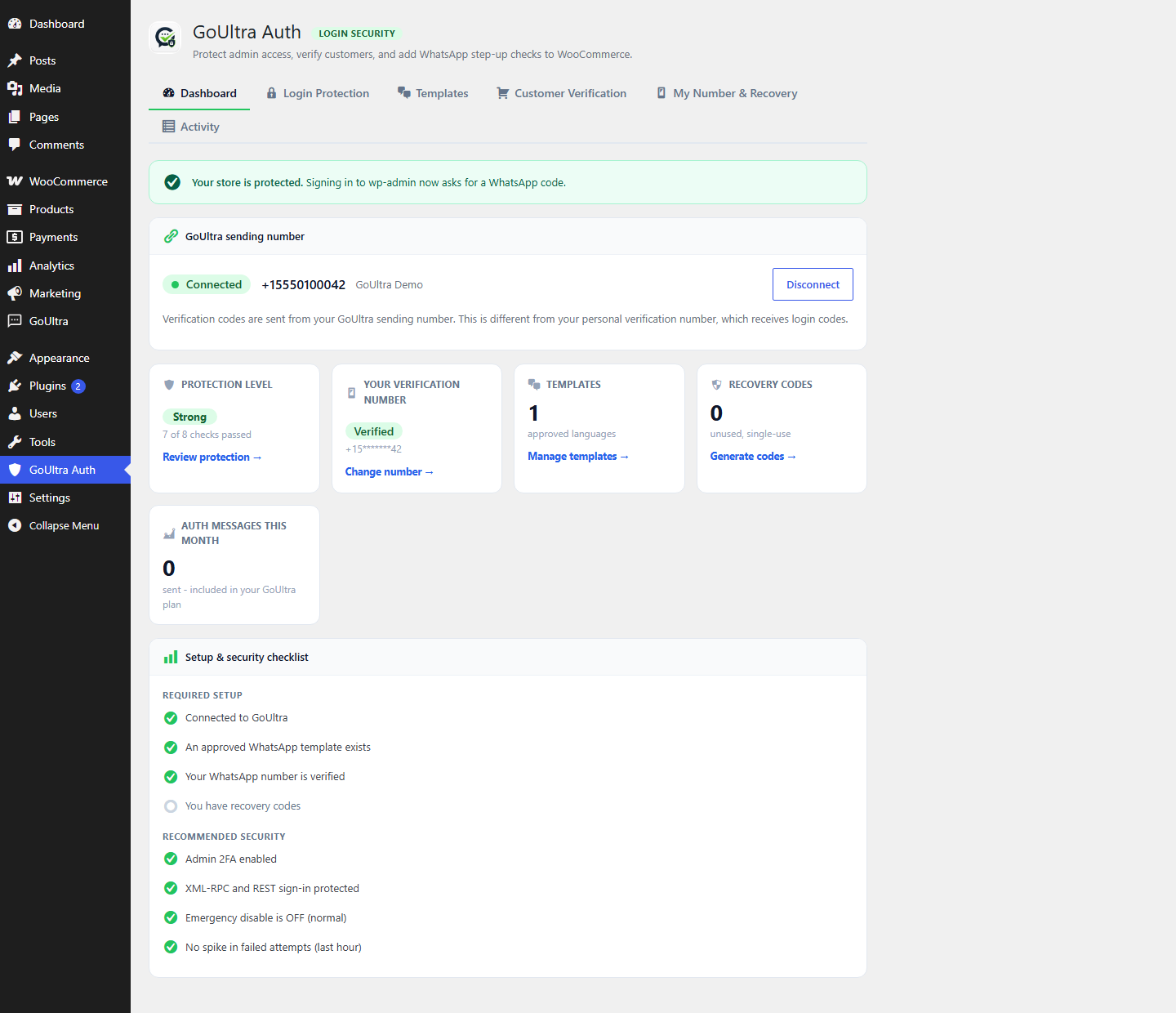
- Dashboard: each status card is now actionable (Verify now, Manage templates, Generate codes),
and the GoUltra sending number is clearly separated from your own verification number. - Setup wizard with a progress bar and a Continue button that takes you to the next step.
- Login Protection: recommended/advanced role policy cards, and a live «1 of 2 verified» count
per role so you can see who is actually protected. - Optional enforcement: ask protected users who have not verified a number to finish setup after
a grace period (never a hard lockout; recovery and the emergency switch always work). - Templates: a Language coverage view showing which of your site languages are Approved, Active,
the Default, or Missing, with one-click Create for the missing ones. - Customer Verification: clearer wording, Classic/Block/HPOS compatibility badges, and a direct
«Customer account login» toggle (no more jumping to another tab). - Cost control: daily and per-phone limits in addition to monthly, plus a sent today / this month
usage meter. - Recovery kit: status, unused-code count, last-generated date, and an emergency-access warning.
- Activity log: a Where (context) column and quick filters (Successful, Failed, Rate limited).
0.8.1
- The «Default template» language selector now appears reliably once you have two or more approved
templates, so you can switch the default (for example from English to Arabic) in one click. - After you create a template, or one is approved, the page refreshes itself so the language list and
the default selector stay correct – a language you already added is never offered again. - More robust template-status matching (case-insensitive) so an approved template is always recognized.
0.8.0
- Templates: around 50 world languages to choose from.
- The create list now hides languages you have already added, so you cannot create a duplicate.
- A clear «Default template» selector (the language used when a customer has no template of their own).
- Enrollment wording is now «verify your number» / «Send code» (no more «test code»).
0.7.0
- Trusted devices: optionally skip 2FA on a device you trust for 7, 14 or 30 days
(signed, expiring cookie). A «Trust this device» option appears on the login screen. - Recovery codes: Download and Print buttons.
- Templates: show the WordPress locale (e.g. en_US) next to the language.
- Activity log: Export to CSV, plus automatic 30-day retention cleanup.
- Cost control: email the site admin at 80% and 100% of the monthly message cap.
0.6.0
- Phase 2 – WooCommerce: risk-based checkout phone verification (first order, Cash on Delivery,
order over an amount, guest checkout). Opt-in and fail-open – it never blocks an order if
GoUltra is unavailable. Classic checkout. New «Customer Verification» tab. - Phase 3 – Sudo mode: optionally require a fresh WhatsApp code before opening the GoUltra Auth
settings, so a hijacked admin session cannot weaken or disable 2FA without a code.
0.5.0
- Rebuilt the admin into a professional tabbed product: Dashboard, Login Protection,
Templates, My Number & Recovery, and Activity. - New Dashboard with a protection banner and status cards (protection level, your number,
templates, recovery codes, monthly usage) plus a clear protection checklist.
0.4.0
- Redesigned the login challenge into a branded, mobile-friendly, RTL-aware card with a
shield, a clean code input, a resend countdown and clear recovery/cancel actions. - Security score is now an honest «Protection level (N of M checks passed)» instead of a
bare percentage, and includes an XML-RPC / REST protection check. - Wording: «approved by Meta» instead of «official»; clearer «Fallback language».
0.3.0
- Fixed codes not arriving: the send language is now matched to an actually approved template
(e.g. en_US), instead of a bare «en» that the backend could not match. - Template language labels display correctly (en_US shows as English).
- Added a Default language choice when more than one template is approved, and clarified that
each user gets the code in their own language when available. - Enrollment: a «wrong number?» link to go back and change the number.
- Added a full mocked-backend flow test (connect, template, enrollment, login, fallback).
0.2.0
- Setup wizard: a guided «Getting started» panel that shows the exact steps in order.
- Connection now shows the WhatsApp display name (matches the GoUltra dashboard).
- Loading states on every action button; live template status (auto-refresh, no page reload).
- Longer network timeout for template creation (fixes a cURL timeout on slower approvals).
- Clearer enrollment (Step 1 / Step 2) and admin notice wording.
0.1.0
- Initial development version: admin/role login 2FA over WhatsApp (local verification),
self-enrollment, recovery codes, emergency disable (wp-config + WP-CLI), rate limits and cost
caps, security score, audit log, and GDPR export/erase.