

Descripción
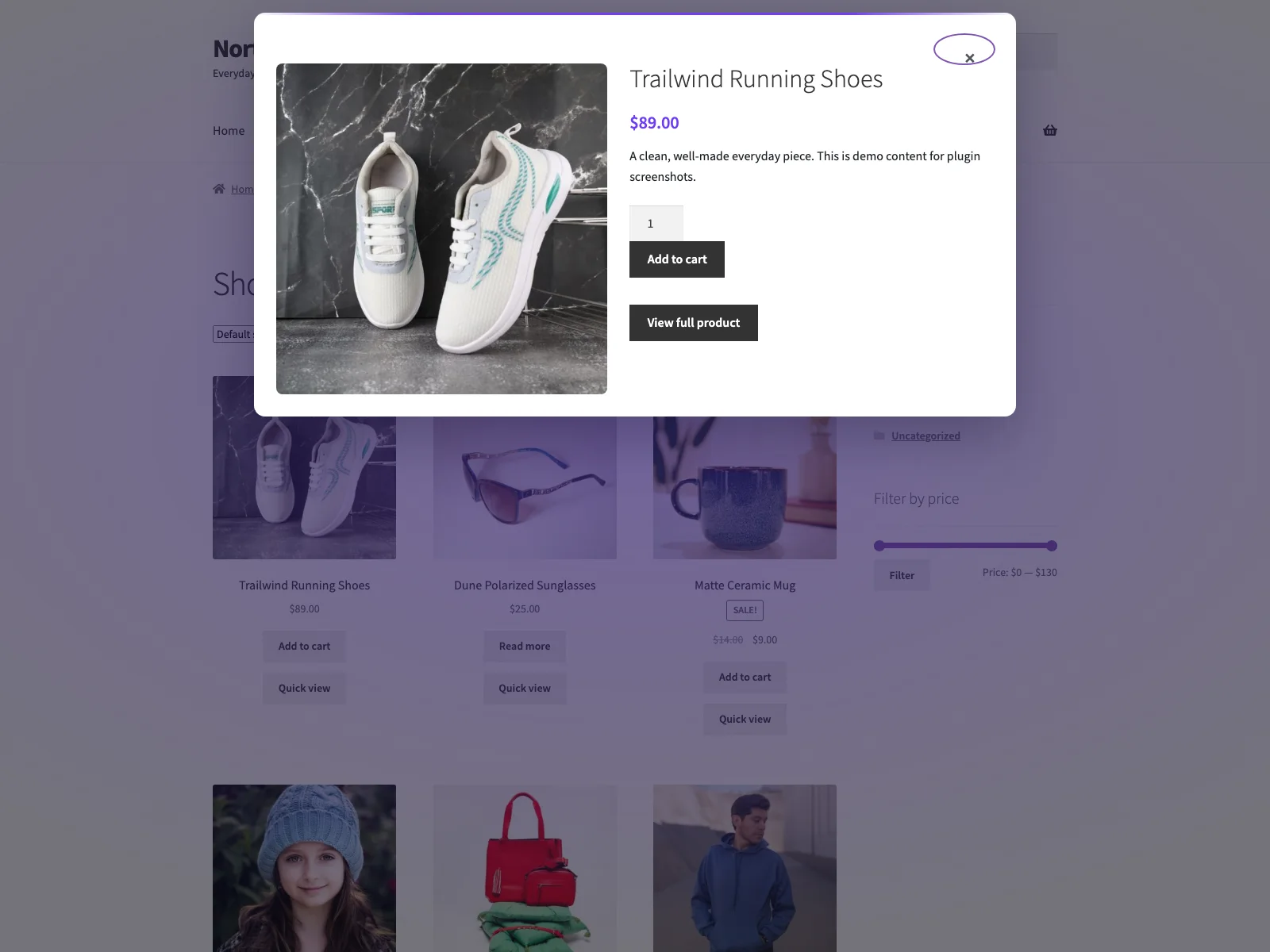
Peek adds a product quick view button to your WooCommerce shop and archive product loops. Clicking it opens an accessible AJAX product modal, so shoppers can preview products, choose options and add to cart without leaving the listing.
The modal shows the featured image and gallery thumbnails, title, SKU, price, stock status, short description, the native add-to-cart form (including variable products), and a link to the full product page. Each part can be toggled from the settings screen.
Documentación y enlaces
- Documentation – plogins.com/plogins-peek/docs
- Plugin page – plogins.com/plogins-peek
- Source code – github.com/wppoland/plogins-peek
- Bug reports and feature requests – GitHub issues
Diseñado para la velocidad y la accesibilidad
- No jQuery in the plugin’s own front-end code, the script is vanilla JS, deferred, and loaded in the footer.
- No layout shift (CLS). The modal is fully hidden until opened and scrolls internally, so it never reflows the page.
- Retiene el foco y es fácil de usar con el teclado. El foco se desplaza al cuadro de diálogo al abrirlo, se mantiene ahí mientras esté abierto, se cierra al pulsar Escape o al hacer clic en el fondo, y vuelve al botón que lo ha activado al cerrarlo. El cuadro de diálogo utiliza
role="dialog"conaria-modal. - Consciente de las variaciones. El formulario de añadir al carrito es compatible con productos variables a través del propio script de variaciones de WooCommerce.
Ajustes
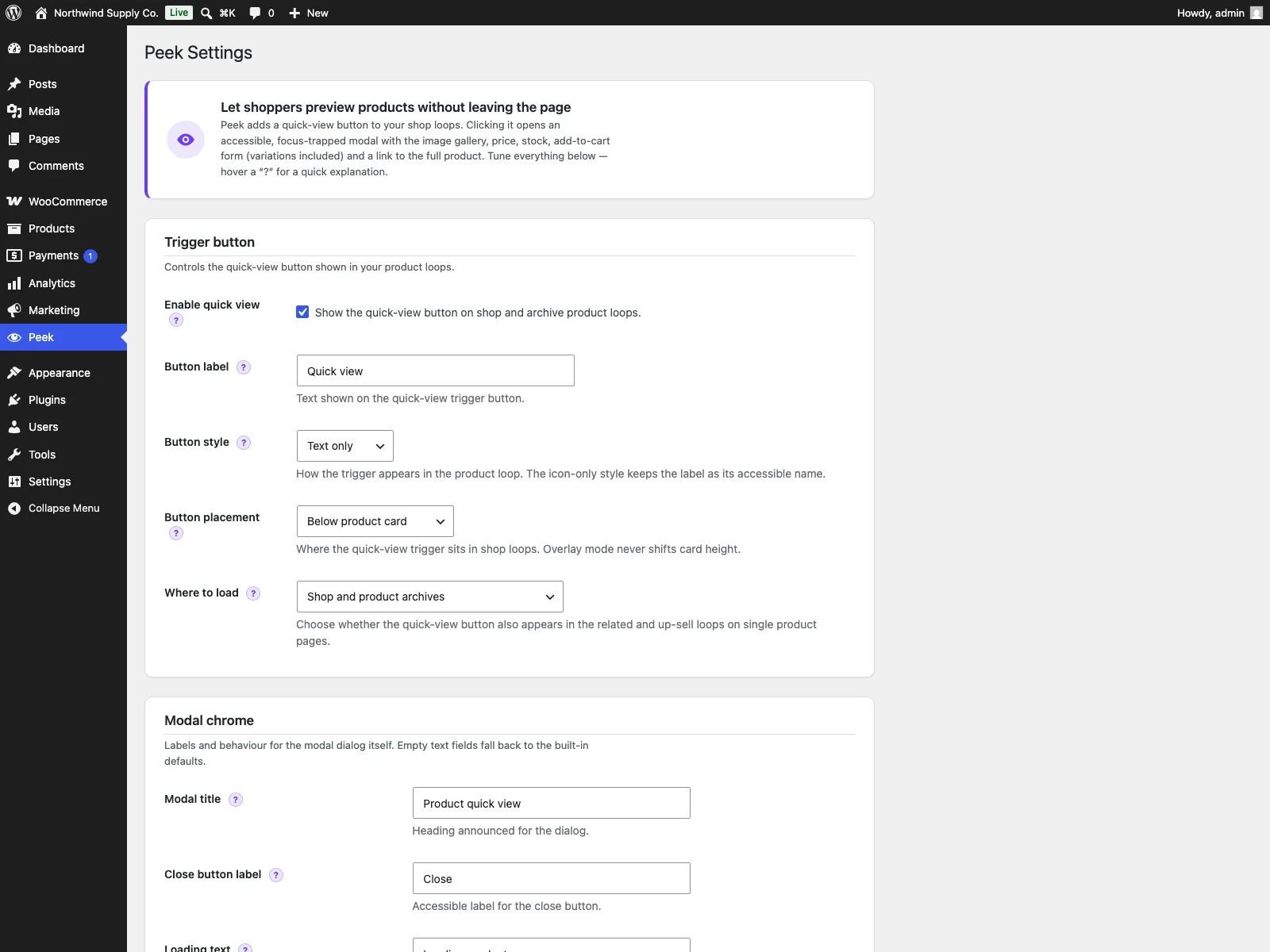
A WooCommerce-capability settings page (Peek menu) lets you:
- Activar o desactivar la vista rápida.
- Establece la etiqueta y el estilo del botón de activación (texto, icono o icono + texto).
- Elige dónde se carga: solo en la tienda y archivos de productos, o también en los bucles de productos relacionados/venta adicional en páginas de producto individuales.
- Configure the modal chrome: title, close-button label, loading and error text, the «view product» link text and the SKU label, plus toggles for the modal heading, close button and backdrop-click close.
- Choose which parts render in the modal (image, gallery with a configurable thumbnail count, title, SKU, price, stock status, short description, add-to-cart, full-product link).
Shortcode
Place a quick-view trigger anywhere with [peek_quick_view id="123"], or the shorter [peek id="123"] alias. Optional attributes: text (custom label) and style (text, icon, or icon_text). The modal and its assets load automatically wherever the shortcode appears.
Peek se desarrolla de forma abierta. El código, los problemas abiertos y el historial de lanzamientos se encuentran en https://github.com/wppoland/plogins-peek, los informes de errores y los parches son bienvenidos allí.
Actualizar a Peek PRO
Peek PRO amplía la vista rápida gratuita con:
- Productos vistos recientemente.
- Un carrusel de productos relacionados dentro del modal.
- Muestras de variación de color y etiqueta.
- Secciones de modal personalizadas.
- Navegación anterior / siguiente entre productos sin cerrar el modal.
- Controles de estilo adicionales.
- Análisis de vista rápida.
Learn more at plogins.com/plogins-peek-pro
Más plugins de WooCommerce de Plogins
- Reel – hover zoom, an accessible lightbox and product video for WooCommerce galleries: plogins.com/plogins-reel
- Sizer – accessible size guides and tables in a modal: plogins.com/plogins-sizer
- Marks – automatic and manual product badges, CSS-only: plogins.com/plogins-marks
- Swatch – accessible colour and label variation swatches, no jQuery: plogins.com/plogins-swatch
Browse the full family at plogins.com
Reporting a security issue: email hello@wppoland.com, and under our coordinated disclosure policy we confirm within two business days, assess within five, and patch a critical issue within seven days of confirming it.
Servicios externos
Peek does not connect to any external services. The quick-view modal fetches its product fragment from your own site over WordPress’ admin-ajax.php (the peek_quick_view action), so no shopper or product data ever leaves your server. Peek’s only stored data is two WordPress options it creates, peek_settings (your modal and button configuration) and peek_db_version, both removed when the plugin is deleted. Peek sends no email and loads no third-party scripts, fonts or analytics.
Traducciones
Plogins Peek is fully translatable and ships the plogins-peek.pot template. Translations are delivered by WordPress.org language packs from translate.wordpress.org, which is where Polish, German and Spanish are being contributed; the package itself carries no compiled translation files.
Capturas
Instalación
- Sube el plugin a
/wp-content/plugins/plogins-peek, o instálalo a través de Plugins Añadir nuevo. - Actívalo. WooCommerce debe estar activo.
- Visit the Peek menu in wp-admin to configure the button label and modal contents.
FAQ
-
Does it require WooCommerce?
-
Sí. Peek necesita que tengas una instalación activa de WooCommerce.
-
¿Usa jQuery?
-
El script de la interfaz de usuario del plugin es JavaScript puro, sin depender de jQuery. Cuando un producto tiene variaciones, se añade a la cola el script de variaciones integrado en WooCommerce (que sí usa jQuery) para que el formulario de variaciones funcione como se espera.
-
En la página de la tienda y en los bucles de archivo de productos (categorías, etiquetas, taxonomías), después de cada producto. No cambia las páginas de productos individuales.
-
¿La ventana emergente permite añadir el producto al carrito?
-
Yes. Peek renders WooCommerce’s native add-to-cart form inside the quick shop modal, including quantity and variable-product choices.
-
¿Funciona con productos variables?
-
Sí. Los productos variables usan el formulario de variaciones propio de WooCommerce dentro de la ventana modal del producto, así que los compradores pueden elegir una variación antes de añadirlo al carrito.
-
¿Causará un cambio de diseño?
-
No. The modal is hidden until opened and overlays the page, so opening it never reflows existing content.
-
Sí. Usa
[peek_quick_view id="123"]o[peek id="123"]para añadir un disparador de vista rápida de producto en diseños personalizados. -
Does this plugin work on WordPress Multisite?
-
Yes. This plugin is compatible with WordPress Multisite. Network activate it or activate it on individual sites; each site keeps its own settings and data.
Reseñas

Colaboradores y desarrolladores
«Peek – Product Preview for WooCommerce» es un software de código abierto. Las siguientes personas han colaborado con este plugin.
Colaboradores
«Peek – Product Preview for WooCommerce» está traducido en 1 idioma. Gracias a los traductores por sus contribuciones.
Traduce «Peek – Product Preview for WooCommerce» a tu idioma.
¿Interesado en el desarrollo?
Revisa el código , echa un vistazo al repositorio SVN o suscríbete al registro de desarrollo por RSS.
Registro de cambios
1.0.18
- Fixed: the plugin reported an older version number internally than the one it was released under. That number versions the stylesheets and scripts the admin screen loads, so a browser holding the previous files kept them after an update instead of fetching the corrected ones.
- Fixed: the package no longer ships its own translation files. WordPress.org builds language packs from translate.wordpress.org, and a bundled catalogue shadows that pack, so a translation corrected upstream could not reach you until the next release. Your language now comes from the language pack, which is the copy that stays current.
1.0.17
- Declared compatibility with WooCommerce 11.0.
1.0.16
- Fixed the PRO promo on the settings screen quoting a price in PLN. PRO is priced and charged in EUR, so an admin on a Polish site was shown a zloty amount and then billed in euro, and the zloty figure was a fixed conversion that drifted from the real charge as the rate moved. The promo now shows the euro price that is actually taken.
1.0.15
- The «Modal heading» setting now works: the modal title appears above the product instead of being wiped the moment the product loaded.
- Turning off «Product image» now really hides it. Products with no gallery no longer showed the featured photo (or the placeholder) anyway, and the summary now uses the full width when there is no image to show.
1.0.14
- The PRO notice no longer calls the custom modal sections plain HTML. They are stored as post-safe HTML, so scripts and iframes are stripped, and the notice now says so.
1.0.13
- Fix: the quick-view button no longer prints in the related and up-sell loops on single product pages, where the modal it opens is not loaded. It obeys the same «where to load» setting as the modal itself.
- The modal now announces when it has finished loading a product, which is what Peek Pro’s quick-view analytics counts. Without it that screen could only ever show zeros.
1.0.11
- Translations: completed Polish, German and Spanish for the PRO upgrade panel.
1.0.10
- Declared compatibility with WooCommerce 10.9.
1.0.9
- Description: converted the links in the readme to proper anchors (documentation, plugin page, source, related plugins).
1.0.8
- Se añadió una venta adicional de Peek PRO dentro del plugin (banner descartable + tarjetas de características) en la pantalla de ajustes.
1.0.7
- Nombre de visualización acortado (se eliminó el prefijo Plogins; el slug no ha cambiado).
1.0.6
- Se revirtió el encabezado del autor a WPPoland.com para que coincida con la familia de plugins (el crédito del autor es el colaborador motylanogha).
1.0.5
- El encabezado del autor ahora atribuye a Mariusz Szatkowski (motylanogha).
1.0.4
- Readme: se añadieron enlaces a Peek PRO y a los plugins relacionados de Plogins.
1.0.3
- Nombre más claro: Plogins Peek – Product Preview for WooCommerce.
1.0.2
- Se han añadido traducciones incluidas en polaco, alemán y español para la interfaz del plugin.
1.0.1
- Primera versión estable.
0.3.1
- Renombrado a Plogins Peek para WooCommerce para un nombre de plugin más distintivo.
0.3.0
- Nuevo: ubicación del botón de bucle, debajo de la tarjeta o superpuesto en la miniatura (al pasar el ratón/enfocar).
- Nuevo: shortcode
[peek]como alias de[peek_quick_view].
0.2.0
- Nuevo: shortcode
[peek_quick_view]para colocar un activador de vista rápida en cualquier lugar, con atributos opcionalesid,textystyle. - Nuevo: fila de estado de stock en el modal, con un conmutador.
- Nuevo: número configurable de miniaturas de la galería (0–12).
- Nuevo: estilo del botón de activación, texto, icono, o icono + texto (solo icono mantiene un nombre accesible).
- Nuevo: ámbito de visualización, cargar solo en la tienda/archivos, o también en bucles de productos relacionados/venta adicional de productos individuales.
- New: modal chrome controls in the settings page (title, close-button label, loading/error text, view-product link text, SKU label, and toggles for the modal heading, close button and backdrop-click close).
- Nuevo:
uninstall.phpelimina las opciones del plugin al desinstalar. - Se añadió la ruta de dominio para las traducciones.
0.1.0
- Initial release: accessible AJAX quick-view modal for WooCommerce shop and archive loops, with a settings page for the button label and modal contents.