

Descripción
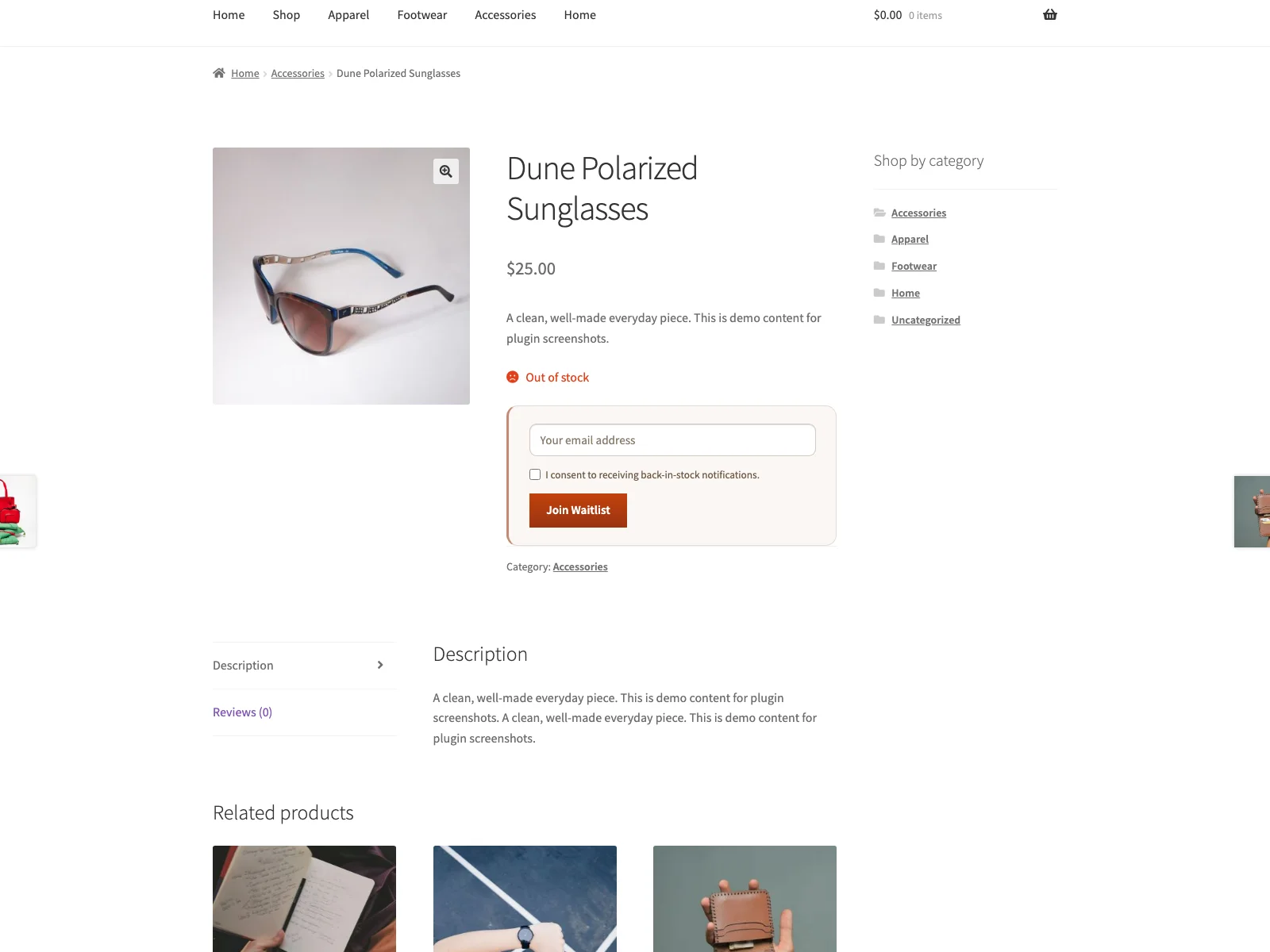
Plogins Waitlist añade un formulario de lista de espera a los productos de WooCommerce agotados. Un comprador introduce su correo electrónico, y cuando vuelves a poner el producto en «En stock», Plogins Waitlist envía un correo electrónico a todos los que esperan a través del sistema de correo de WordPress de tu propio sitio. No hay ningún servicio externo, ninguna cuenta para registrarse, y nada sale de tu base de datos.
El formulario se renderiza en PHP en el resumen del producto individual, donde se ubica en el flujo normal de la página en lugar de ser inyectado después de la carga, por lo que no desplaza el contenido circundante. Al enviarlo, se ejecuta una pequeña solicitud fetch de JavaScript puro cargada con defer en el pie de página; el plugin no añade su propio jQuery. En productos variables, se engancha al script de variación existente de WooCommerce para que el formulario solo aparezca una vez que se selecciona una variación no disponible.
La accesibilidad fue una preocupación de primera clase en lugar de una ocurrencia tardía. El campo de correo electrónico lleva una etiqueta visualmente oculta, el consentimiento es una casilla de verificación requerida real, y el mensaje de éxito/error se anuncia a través de una región aria-live mientras el formulario informa aria-busy durante el envío.
Subscriber data lives in a single {prefix}_restock_waitlist table that the plugin creates and version-tracks. A restock queues the mailing and sends it in batches on WordPress’s own cron, so the request that changed the stock is not held open while the emails go out. Uninstalling drops the table, removes the plugin’s options and unschedules any batch still waiting, leaving nothing behind.
Source and issues: github.com/wppoland/plogins-waitlist . Patches and bug reports are welcome there.
Características
- Formulario de lista de espera mostrado automáticamente en páginas de productos sin existencias y en pedidos pendientes («en espera»)
- Productos variables: el formulario aparece después de que el comprador selecciona una variación no disponible
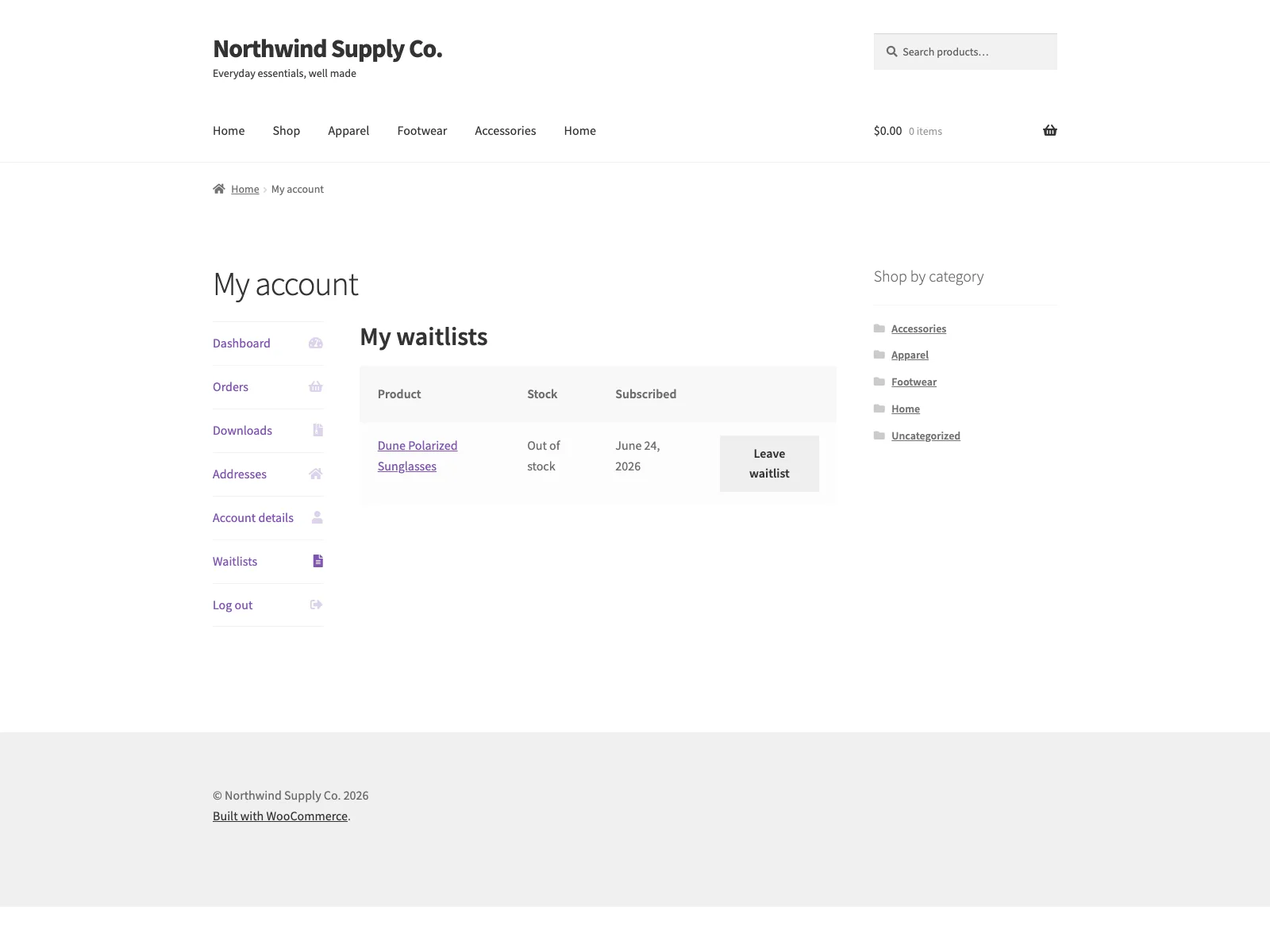
- Pestaña de WooCommerce Mi cuenta Listas de espera para clientes con sesión iniciada (revisar listas, salir de la lista de espera)
- Envío asíncrono con una llamada fetch de vanilla-JavaScript, para que la página no se recargue
- Campo de correo electrónico precargado para clientes con sesión iniciada
- Casilla de verificación de consentimiento obligatoria para cada registro
- Notificación automática por correo electrónico de texto plano al reponer existencias, enviada a través de
wp_mail - Encabezado y texto de introducción opcionales que se muestran encima del formulario
- Etiquetas de formulario, texto de botón, mensajes de envío en pantalla y texto de asunto/introducción/cierre de correo electrónico de notificación personalizables
- Coloca el formulario con el shortcode
[restock_waitlist]o el widget de Elementor «Lista de espera para la reposición de existencias» - Activar o desactivar las suscripciones de invitados (no conectados)
- Línea de prueba social «N compradores ya están esperando» encima del formulario (opcional, personalizable, sensible al singular/plural)
- Lista de suscriptores del administrador con filtro por producto, exportación CSV y eliminación con un clic
- Plantilla de formulario anulable por el tema (
yourtheme/restock/single-product/waitlist-form.php) - Compatible con WooCommerce HPOS (Tablas de Pedidos Personalizadas) y Bloques de Carrito/Finalizar Compra
También te pueden gustar estos plugins
Más plugins gratuitos de WooCommerce de WPPoland:
- Plogins Tiers – niveles de precios por cantidad y volumen con una tabla de precios renderizada en el servidor.
- Sieve – Búsqueda & Filtro – búsqueda y filtrado rápido de productos AJAX para WooCommerce, sin jQuery.
- Polski para WooCommerce – Cumplimiento para el mercado polaco: GPSR, Omnibus, GDPR, módulos de facturas y escaparate.
Browse the full catalogue at plogins.com/ .
Reporting a security issue: email hello@wppoland.com, and under our coordinated disclosure policy we confirm within two business days, assess within five, and patch a critical issue within seven days of confirming it.
Plogins Waitlist PRO
La edición gratuita es la lista de espera completa para productos de nuevo en stock. Plogins Waitlist PRO añade información sobre la demanda y automatización:
- Análisis de la demanda – vea qué esperan los compradores y priorice las reposiciones
- Doble opt-in – registros confirmados y respetuosos con el consentimiento
- Envíos programados y por lotes – escalona las notificaciones por tamaño de lote e intervalo
- Segmentación por categoría – reglas de inclusión y exclusión por categoría de producto
Todo en la edición gratuita permanece gratuito y abierto. Plogins Waitlist PRO cuesta a partir de 29 EUR al año.
Compare editions and pricing: plogins.com/plogins-waitlist-pro/pricing/
Servicios externos
Plogins Waitlist no se conecta a ningún servicio externo. Los correos electrónicos de notificación de reposición de stock se envían a través del sistema de correo de WordPress de tu propio sitio (wp_mail); los datos de los suscriptores permanecen en tu base de datos de WordPress.
Traducciones
Plogins Waitlist is fully translatable and ships the plogins-waitlist.pot template. Translations are delivered by WordPress.org language packs from translate.wordpress.org, which is where Polish, German and Spanish are being contributed; the package itself carries no compiled translation files.
Capturas

Instalación
- Instala y activa WooCommerce (8.0 o posterior).
- Instala Plogins Waitlist desde el directorio de plugins de WordPress, o sube la carpeta
plogins-waitlista/wp-content/plugins/. - Activa el plugin a través de la pantalla de Plugins.
- Opcionalmente, visita WooCommerce Plogins Waitlist para personalizar las etiquetas y el texto de notificación; los valores predeterminados funcionan sin configuración adicional.
- El formulario de lista de espera aparece automáticamente en cualquier página de producto agotado o en pedido pendiente.
FAQ
-
Documentación y enlaces
-
- Documentation – plogins.com/plogins-waitlist/docs/
- Plugin page – plogins.com/plogins-waitlist/
- Source code – github.com/wppoland/plogins-waitlist
- Bug reports and feature requests – github.com/wppoland/plogins-waitlist/issues
-
¿Plogins Waitlist requiere WooCommerce?
-
Sí. Plogins Waitlist es una extensión de WooCommerce y requiere WooCommerce 8.0 o posterior. Mostrará un aviso de administración y permanecerá inactivo si WooCommerce falta o está desactualizado.
-
¿Cómo se envían las notificaciones?
-
When WooCommerce sets a product’s stock status to
instock, Plogins Waitlist queues the mailing rather than sending it inside that request. WordPress cron then walks the pending subscribers for that product (and its parent, for variations) in batches of 50, oldest signup first, emailing each one with your site’s own WordPress mailer (wp_mail). Subscribers who are emailed successfully are marked as notified so they are not contacted twice. Filterplogins_waitlist_notify_batch_sizeto change the batch size. -
¿Funciona con productos variables?
-
Sí. Primero, elige las opciones en el formulario de variación estándar de WooCommerce. Cuando la variación seleccionada está agotada o en pedido pendiente, aparece el formulario de lista de espera y la suscripción se guarda para esa variación específica.
-
¿Pueden los invitados unirse a la lista de espera?
-
Sí, por defecto. Puedes restringir los registros a clientes con sesión iniciada desmarcando Permitir suscripciones de invitados en WooCommerce Plogins Waitlist.
-
¿Pueden los clientes gestionar las listas de espera en Mi cuenta?
-
Sí. Los clientes con sesión iniciada ven una pestaña Listas de espera en Mi cuenta con suscripciones activas, estado actual del stock y un botón para salir de cada lista.
-
¿Cumple esto con los requisitos de GDPR / consentimiento?
-
Cada registro requiere que el comprador marque una casilla de consentimiento explícito antes de poder unirse a la lista de espera; el formulario no se enviará sin ella. Los correos electrónicos de los suscriptores se almacenan únicamente en una tabla personalizada en tu propia base de datos de WordPress y nunca se envían a ningún servicio externo. Eres responsable de la redacción de tu etiqueta de consentimiento y de la política de privacidad de tu sitio.
-
¿Puedo exportar la lista de suscriptores?
-
Sí. Desde WooCommerce Plogins Waitlist Suscriptores puedes ver suscriptores, filtrar por producto y exportar la lista como CSV.
-
¿El formulario recarga la página al enviarse?
-
No. El formulario se envía con una llamada
fetchde JavaScript puro y el resultado se anuncia en una regiónaria-live, por lo que la página permanece en su lugar. Plogins Waitlist no carga jQuery para esto; en productos variables, sí depende del propio script de variaciones de WooCommerce para saber qué variación está seleccionada. -
¿Funciona este plugin en WordPress Multisite?
-
Sí. Este plugin es compatible con WordPress Multisite. Actívalo en la red o actívalo en sitios individuales; cada sitio mantiene su propia configuración y datos.
Reseñas


Colaboradores y desarrolladores
«Waitlist – Back in Stock for WooCommerce» es un software de código abierto. Las siguientes personas han colaborado con este plugin.
Colaboradores
«Waitlist – Back in Stock for WooCommerce» está traducido en 3 idiomas. Gracias a los traductores por sus contribuciones.
Traduce «Waitlist – Back in Stock for WooCommerce» a tu idioma.
¿Interesado en el desarrollo?
Revisa el código , echa un vistazo al repositorio SVN o suscríbete al registro de desarrollo por RSS.
Registro de cambios
1.0.31
- Security (low): My Account > Waitlists matched signups by the account email as well as the account itself. WooCommerce does not verify an account email, so any logged-in customer could change theirs to a guest’s address and then see and remove that guest’s pending waitlist signups. Only signups made while logged in to that account show there now. A signup made as a guest before registering no longer appears in My Account; it still gets its restock email.
1.0.30
- Fixed: the «Leave waitlist» button in My Account did nothing. Its script was never loaded on that tab, and the request it would have sent was refused because the handler read the security token from a field the script does not send.
- Fixed: on variable products in a store not running in English, the form never appeared for an out-of-stock variation, because the check looked for the English words «out of stock». A variation on backorder never showed the form in any language. The plugin now tells the page which variations take signups, using the same rule as the signup itself.
- Fixed: the
[restock_waitlist]shortcode and the Elementor widget, placed anywhere except a product page, printed a form without its script. Submitting it reloaded the page, signed nobody up and put the email address in the URL.
1.0.29
- The sidebar upgrade promo now follows the same dismissal as the banner. Dismissing the banner used to leave a full-height advert on the settings screen for good, which is not what the WordPress.org guideline on upgrade prompts means by used with moderation.
1.0.28
- Fixed: the plugin logged
Warning: Class "Waitlist\Plugin" not foundon every request on any site with WP_DEBUG on. A compatibility alias kept for Plogins Waitlist PRO 1.0.2 and older was declared before the plugin’s autoloader was registered, so PHP could not find the class it was aliasing. The alias now sits below the autoloader, which also means it is finally declared: for the whole time it was above, it failed and gave those old PRO versions nothing. - Copy: the «How are notifications sent?» answer still described the email leaving the moment WooCommerce sets the stock status. It has been queued and sent in batches on WP-Cron since 1.0.25, which is what the rest of the readme says; the answer now says it too.
1.0.27
- Fixed: deactivating the plugin could throw a fatal error, and leave it impossible to switch off, on a site also running Plogins Waitlist PRO 1.0.12 or older. The deactivation routine read the name of its scheduled job off a class those PRO versions also supply, in a copy that does not carry that name. The name is now written out in full and the routine loads nothing.
- Fixed: deleting the plugin without deactivating it first left its queued mailing scheduled.
wp plugin deleteremoves an active plugin without deactivating it, so uninstall now unschedules the job in the same way deactivation does. - Added:
plogins_waitlist_should_notify, a filter deciding whether a restock mails the people waiting for that product. Returning false skips the mailing and leaves those subscribers pending. Plogins Waitlist PRO applies its category segmentation through it instead of taking the mailing over. - Note: if you run Plogins Waitlist PRO, update it to 1.0.14 or later at the same time. Older PRO versions remove this plugin’s mailing callback on every restock and send the emails themselves, one at a time, inside the request that changed the stock. PRO 1.0.14 hands that work back to the queue here, and requires this version.
1.0.26
- Fixed: the CSV export could leave subscribers out of the file without saying so. It read the list in chunks by offset, over the same rows a queued restock mailing marks as notified while it runs, so every row that left the set took another row with it. The export now walks by a cursor on a stable key, which cannot skip or repeat. Rows come out oldest first; the list on screen is unchanged.
- Fixed: a queued batch that could not run ended the mailing for good. If the product could not be loaded on that cron tick, or the waitlist had just been switched off, the front of the list was mailed and the rest was left neither mailed nor cleared. The same batch is now retried up to three times, five minutes apart, before the mailing is abandoned.
- Fixed: queued mailings survived deactivating the plugin. They are now unscheduled with the plugin, whichever batch they were up to.
- Fixed: «Remove» on the subscriber list threw you back to page one of an unfiltered list. It now returns to the page, product filter and search you removed from.
- Fixed: a personal-data export request (Tools > Export Personal Data) hit a fatal error on the «Subscribed At» row, which tried to print a date object as a string. Static analysis had been reporting it; the analysis now runs over the shared engine directory too, which had been outside both it and the coding-standards check.
- Changed: a pending-subscriber query that names no limit of its own now reads at most 5000 rows (filter
plogins_waitlist_pending_query_limit), and the waitlist list on a customer’s account page at most 200. Neither had a ceiling before.
1.0.25
- Fixed: restocking a product no longer sends the waitlist emails inside the request that changed the stock. A product save, a REST update or an order going through used to wait for one email per waiting shopper. The mailing is now queued and sent in batches of 50 (filter
plogins_waitlist_notify_batch_size), in the same order, to the same people. - Fixed: the Subscribers screen read the whole table on every load. It is now paged at 50 rows (filter
plogins_waitlist_subscribers_per_page), the summary counts come from the database so they describe the whole list, and the CSV export streams in chunks instead of loading every row first.
1.0.24
- Fixed: the PRO upgrade promo kept selling to people who had already bought the paid edition. Only the banner could be dismissed, so the sidebar promo and the locked feature cards followed a paying customer around for good. The promo now checks whether the paid edition is active and steps aside when it is.
- Fixed: arrow glyphs in the admin menu paths, and in the strings handed to translators. An arrow inside a translatable string makes the glyph every translator’s problem and changes the layout in any locale that drops it.
1.0.23
- Changed: the PRO feature cards printed an arrow glyph in menu paths where the rest of the plugin and the documentation use a plain «>». Same navigation, one character that renders everywhere.
1.0.22
- Fixed: deleting the plugin left the per-user «dismiss» flag from the PRO notice in the database. Uninstall now removes it for every user, not just the one who dismissed it.
1.0.21
- Eleven strings in the privacy exporter and eraser (the data a shop hands over or deletes on a GDPR request) were tagged with the plugin’s old text domain, left over from the rename away from Restock. WordPress looked them up under a name no translation file uses, so they could never appear in any language but English. They now use the plugin’s own text domain.
- The placeholder in «Product #%d» had no note for translators explaining what the number is.
- «Tested up to» was declared in the plugin header as well as the readme. Only the readme is read by WordPress.org, and declaring it twice is a way to publish a compatibility claim nobody intended.
1.0.20
- The translation template was regenerated. 16 strings added to the plugin since the template was last built were missing from it, so no translator could reach them in any language, and 2 strings the plugin no longer uses have been dropped. Nothing you see changes; what a translator can see does.
1.0.19
- Fixed: the plugin reported an older version number internally than the one it was released under. That number versions the stylesheets and scripts the admin screen loads, so a browser holding the previous files kept them after an update instead of fetching the corrected ones.
- Fixed: the package no longer ships its own translation files. WordPress.org builds language packs from translate.wordpress.org, and a bundled catalogue shadows that pack, so a translation corrected upstream could not reach you until the next release. Your language now comes from the language pack, which is the copy that stays current.
1.0.18
- Declared compatibility with WooCommerce 11.0.
1.0.17
- Fixed the PRO promo on the settings screen quoting a price in PLN. PRO is priced and charged in EUR, so an admin on a Polish site was shown a zloty amount and then billed in euro, and the zloty figure was a fixed conversion that drifted from the real charge as the rate moved. The promo now shows the euro price that is actually taken.
1.0.16
- Fix: corrected the PRO pricing line. Subscriptions are priced and charged in EUR. An earlier wording claimed a different currency was offered at the payment step.
1.0.15
- Fix: turning off «Show form on product page» now only stops the automatic placement. The [restock_waitlist] shortcode and the Elementor widget keep working, and signups made through them are accepted instead of failing with «Waitlist is unavailable for this product».
- Fix: ticking «Show heading» or «Show intro text» while leaving the text field blank now shows the wording from the greyed placeholder, as the field help promises, instead of showing nothing.
1.0.14
- Fix: a variation coming back in stock now notifies the people waiting for it. WooCommerce fires a separate action for variations, and only the product-level one was listened to, so a signup made on one size or colour never triggered an email.
1.0.12
- Translations: completed Polish, German and Spanish for the PRO upgrade panel.
1.0.11
- Declared compatibility with WooCommerce 10.9.
1.0.10
- Security: prevent CSV formula injection in the subscriber export; a crafted signup email can no longer execute as a spreadsheet formula when the file is opened.
1.0.9
- Translation quality pass: corrected Polish, German and Spanish (product names kept in English, legal withdrawal terminology, WooCommerce glossary and grammar fixes).
1.0.8
- Documentation: readme links are now labelled links.
1.0.7
- Nombre de visualización acortado (se eliminó el prefijo Plogins; el slug no ha cambiado).
1.0.6
- Se corrigieron los encabezados de bajo contraste en la pantalla de configuración de administración bajo una preferencia de modo oscuro del sistema operativo.
1.0.5
- Se añadió una descripción general de Free vs PRO al readme.
1.0.4
- Se añadieron traducciones empaquetadas al polaco, alemán y español para la interfaz del plugin.
1.0.3
- Limpieza interna: se unificó la identidad del código interno a Waitlist (era Restock). No hay cambios en su configuración o datos; los alias heredados mantienen las versiones PRO anteriores funcionando durante la actualización.
1.0.2
- Se añadió una descripción general en la pantalla de configuración de las próximas características PRO.
1.0.1
- Primera versión estable.
0.4.1
- Documentación: se añadió una sección «También te puede interesar» que enlaza a otros plugins gratuitos de WPPoland WooCommerce. Sin cambios funcionales.
0.4.0
- Nuevo: línea opcional de prueba social encima del formulario que muestra cuántos compradores ya están esperando un producto («12 compradores ya están esperando este artículo.»). Consciente de singular/plural, texto totalmente personalizable con un marcador de posición {count} y oculto cuando nadie está esperando.
- Nuevo: eliminar un suscriptor directamente de la lista de suscriptores del administrador (protegido con nonce, con confirmación).
0.3.3
- Nuevo: widget de Elementor para el formulario de lista de espera de reposición de stock, para que pueda colocarse con el editor de Elementor. Autoprotegido: se carga solo cuando Elementor está activo.
0.3.2
- Corregido el dominio de texto en tres cadenas de ayuda de administración para que coincida con el slug del plugin.
0.3.1
- Renombrado a Plogins Waitlist for WooCommerce para un nombre de directorio distinto y no genérico. Sin cambios funcionales.
0.3.0
- Nuevo: pestaña Listas de espera de Mi cuenta de WooCommerce con estado de stock y acción para salir de la lista de espera.
- Nuevo: registros en la lista de espera conscientes de la variación en productos variables (el formulario se muestra después de seleccionar una variación sin stock).
- Nuevo: configuración para la etiqueta del menú Mi cuenta, mensaje de variación y mensaje de confirmación de baja.
0.2.0
- Nuevo: shortcode
[restock_waitlist]para colocar el formulario de lista de espera manualmente (atributoidopcional para apuntar a un producto específico). - Nuevo: encabezado de formulario y texto de introducción opcionales, configurables desde la página de configuración.
- Nuevo: mensajes de formulario editables en pantalla (éxito, correo electrónico no válido, consentimiento faltante, inicio de sesión requerido).
- Mejorado: la página de configuración ahora expone cada etiqueta de formulario, mensaje y texto de correo electrónico que el motor admite, en lugar de depender de valores predeterminados codificados.
- Mejorado: la configuración opcional vacía ahora recurre correctamente a los valores predeterminados incorporados.
0.1.0
- Versión inicial.