

Descripción
Plogins Withdraw adds an easy withdrawal function to WooCommerce, aligned with EU Directive 2023/2673 (the «withdrawal button», Art. 11a): a clear way for customers to declare that they withdraw from a distance contract, in full or per item, within the statutory withdrawal period.
It is a request-and-log plugin: it records the customer’s withdrawal declaration, emails a confirmation to the customer and a notification to the shop, and tracks the request status in the admin. It never moves money on its own, you process any refund in the normal WooCommerce order screen, matching the legal model where the customer declares and the trader acts.
Qué hace
- Withdrawal form: the
[withdraw_form]shortcode renders the whole flow: look up an order by number and billing email (works for guests too), select items and quantities, then confirm on a step of its own, because Art. 11a(3) wants the confirmation to be a separate control labelled only «confirm withdrawal». - Full or partial withdrawal: the customer chooses how many of each item to withdraw from, and can come back for the rest of the order later: each line offers only what earlier declarations do not already cover.
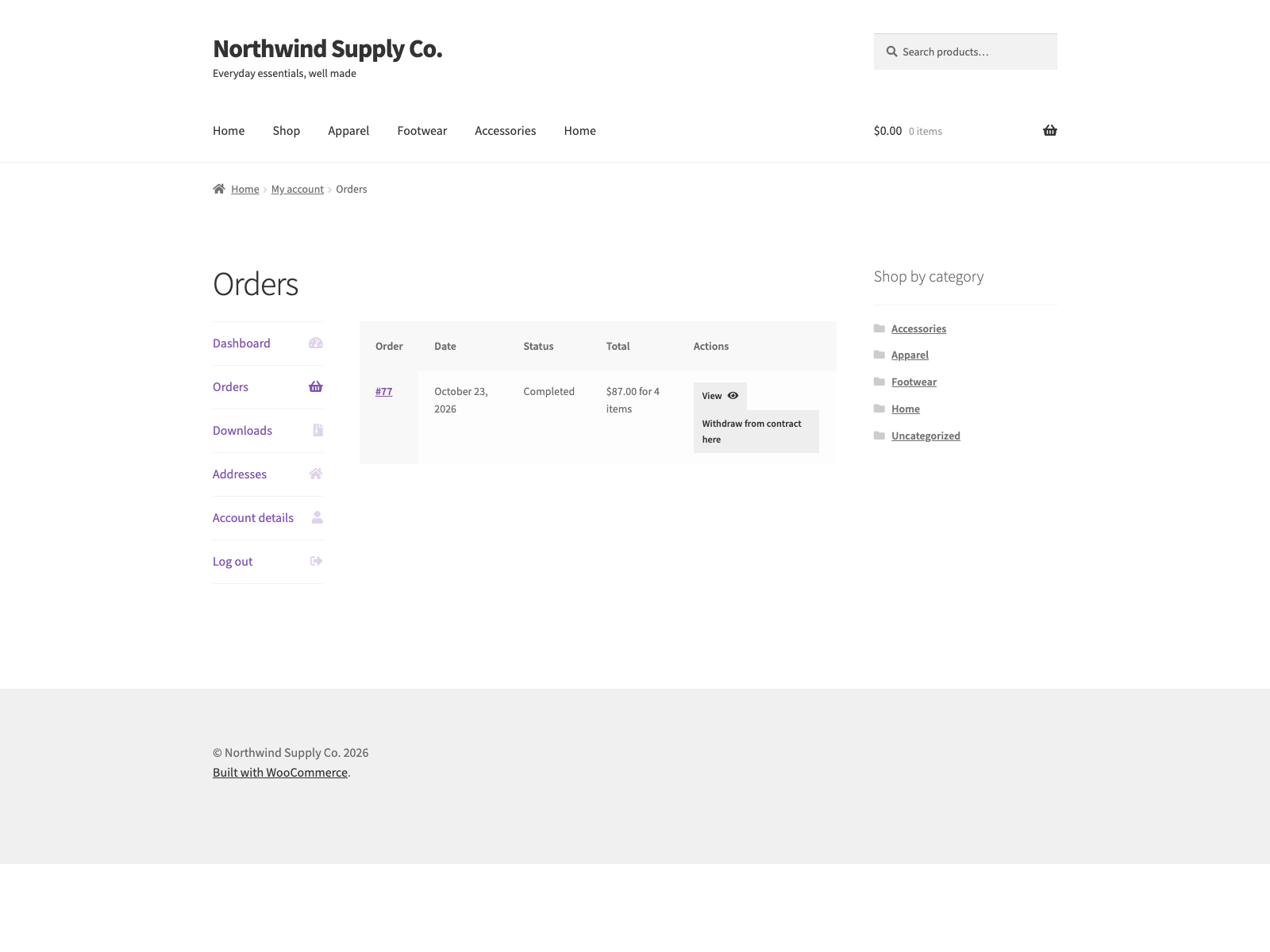
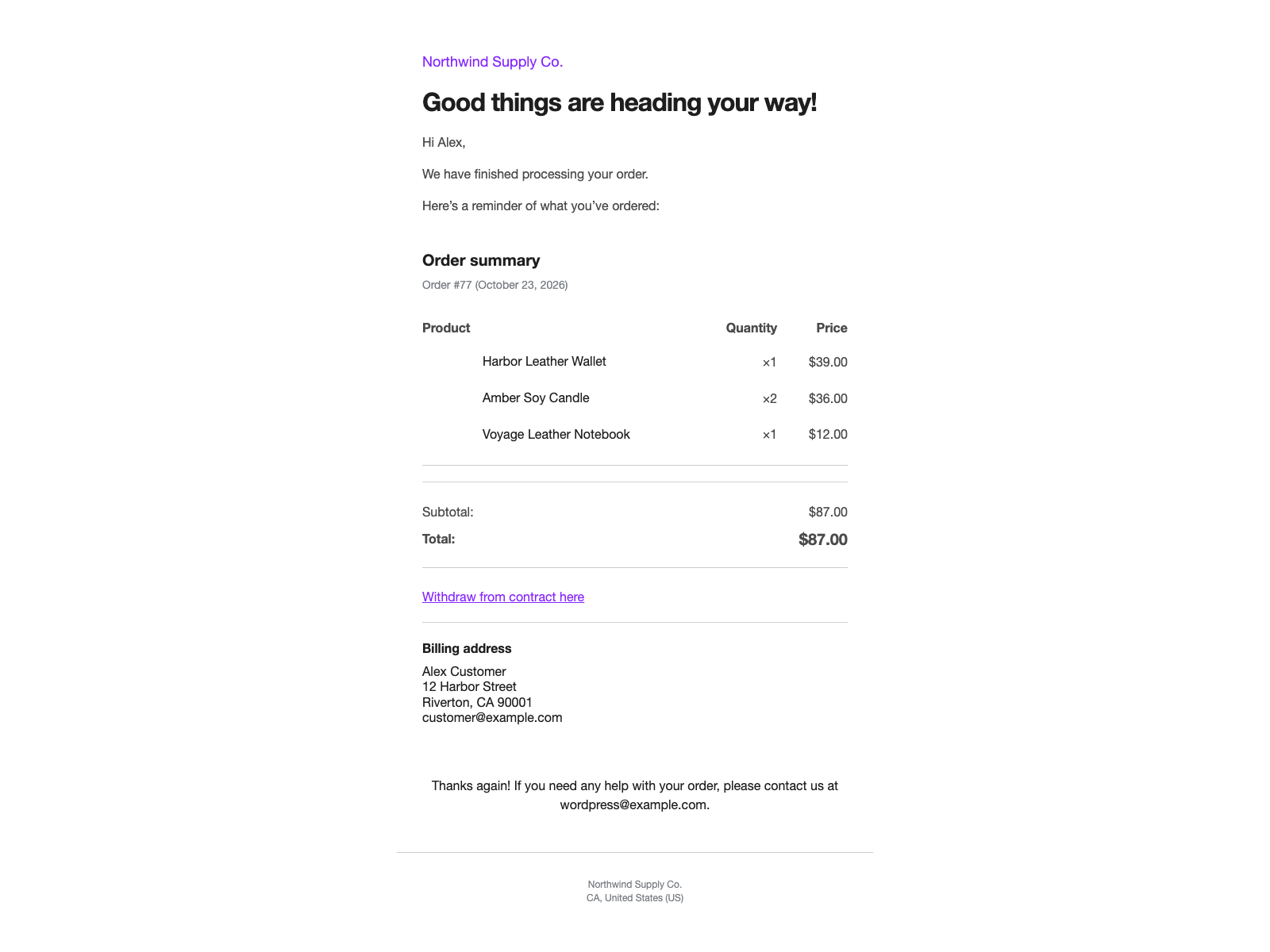
- Withdrawal button in My Account: a «Withdraw from contract here» button under the order details and the same action on the orders list, both linking to your withdrawal page with the order pre-filled, while the order is within the withdrawal period. The link also goes into the processing and completed order emails.
- Withdrawal-period check: configurable period (statutory minimum 14 days), measured from delivery (order completion, or a real delivery date from the
withdraw/delivery_datefilter) or, if never completed, from the order date. Counted under Regulation 1182/71 Art. 3: the start day does not count, the period ends at midnight of its last day, and a last day on a Saturday or Sunday moves to the Monday. Optional grace days, and an advisory mode that accepts a late declaration and flags it instead of refusing it. - Products the right does not cover (Art. 16(c) to (e)): mark a product or a whole category as made to specification, perishable or sealed for hygiene reasons. The product page says so before purchase (Art. 6(1)(k)); made-to-specification and perishable items drop out of the withdrawal form, sealed items stay in it with a notice, because the right is only lost once the seal is broken after delivery.
- Declarations that match no order (optional): off by default. With it on, a customer whose order number or email does not match can still send the declaration with a description of the goods. It is logged as not matched, the shop is emailed, and you match it by hand.
- Admin log: a WooCommerce > Withdrawal Requests screen lists every request with its items, customer and status (pending, accepted, rejected, processed), filterable by status, searchable by email or order number and paged, with a detail screen per request showing the stored declaration and the reason the customer gave.
- A rejection has to say why: the reason is required before a request can be rejected, is kept with the request, and is printed in the email the customer receives.
- WooCommerce emails: seven of them, each with its own entry under WooCommerce > Settings > Emails, using your store template, logo and footer. The declaration acknowledgement, the shop notification, one per request status, and the guest access link. Any of them can be reworded, restyled or switched off on its own.
- The acknowledgement is a record: it repeats the declaration back in the exact words the customer confirmed, stored at the time, with the date and time of submission, which is what Art. 11a(4) asks for.
- Return information (Art. 14(1)): the acceptance message states where to send the goods, taken from a return address field or your store address, the deadline counted from the day the customer declared, and who bears the direct cost of the return. That last one says nothing until you choose it, because you may only charge the customer if you told them before the sale.
- Your own refund deadline (Art. 13(1)): the request log shows the date you owe the refund by, 14 days from the declaration, and marks it once it has passed.
- Digital content consent (Art. 16(m)): optional. One unticked checkbox at checkout, on both the classic and the block checkout, asking the customer to start supply immediately and acknowledging that the right of withdrawal is lost once it has. What was agreed, when, in which exact words and for which products is stored with the order and confirmed back on the order screen and in the order email. Once WooCommerce has actually served a download, that item drops out of the withdrawal form, server side.
- Emailed one-time link (optional): off by default. With it on, step one asks for the order number and billing email and emails a single-use link to the address on the order instead of opening the form, so knowing an order number is not enough to read what somebody bought. The answer is the same whether the order exists or not, requests are rate limited, and signed-in customers arriving from My Account skip the link entirely.
- The statutory texts, generated: the model withdrawal form (Annex I.B) is built from your seller details and printed on the form, and
[withdraw_instructions]renders the model instructions on withdrawal (Annex I.A) for your terms page, both translatable and both in step with your configured withdrawal period. Type your own wording and it wins. - Compatible con invitados: no se necesita cuenta; la búsqueda por número de pedido + correo electrónico de facturación funciona para pedidos de invitados.
- HPOS + compatible con bloques: lee los pedidos a través de la API de pedidos de WooCommerce.
Requisitos
- WordPress 6.5 o posterior
- PHP 8.1 o posterior
- WooCommerce 8.0 o posterior
Traducciones
Plogins Withdraw es totalmente traducible y envía la plantilla plogins-withdraw.pot. Las traducciones son entregadas por los paquetes de idioma de WordPress.org desde translate.wordpress.org, que es donde se están contribuyendo el polaco, el alemán y el español; el paquete en sí no contiene archivos de traducción compilados.
Capturas


Instalación
- Install and activate WooCommerce.
- Install and activate Plogins Withdraw.
- On a fresh install the plugin creates a draft page called «Withdrawal» with the
[withdraw_form]shortcode, selects it as the withdrawal form page and turns the footer link on. Review that page and publish it: until it is published no withdrawal link is shown anywhere. On an existing install nothing changes; create a page with the[withdraw_form]shortcode yourself if you have none. - Go to WooCommerce > Withdrawal, check the withdrawal form page, set the withdrawal period and eligible order statuses, and adjust the notification email and legal texts.
- Still on that screen, fill in the return address and say who pays to send goods back, so the acceptance message can carry the Art. 14(1) information.
- Optionally reword or restyle any of the messages under WooCommerce > Settings > Emails.
FAQ
-
¿Emite reembolsos automáticamente?
-
No. This records the withdrawal request and tracks its status. Process any refund in the normal WooCommerce order screen; the request status is managed on the Withdrawal Requests screen.
-
¿Funciona para pedidos de invitados?
-
Sí. Los clientes buscan su pedido con el número de pedido y el correo electrónico de facturación utilizado al finalizar la compra, para que los invitados puedan enviar un desistimiento sin una cuenta.
-
Should I turn the emailed one-time link on?
-
Only if your outgoing email is reliable, which is why it ships off. With it off, anyone holding an order number and the billing address can open the form, which is the same pair WooCommerce itself accepts for guest order tracking. With it on, the form emails a single-use link valid for one hour instead, so the address has to actually be reachable by the person asking. That makes the withdrawal function depend on your shop being able to send mail: if SMTP breaks, a guest cannot withdraw at all.
-
¿Es esto asesoramiento legal?
-
No. The plugin provides the technical withdrawal function and editable legal texts. Configure the period and wording to match your jurisdiction and the statutory model withdrawal form.
-
What does the digital content consent do, and does it block anything?
-
It is off until you turn it on, and even then it never blocks a purchase. The checkbox is optional and never pre-ticked, because consent that is a condition of buying is not freely given and would not hold up as an exclusion. A customer who leaves it unticked still receives the download and still keeps the right of withdrawal. The exclusion only applies to items the customer consented to AND that WooCommerce has recorded as downloaded.
-
My files are delivered by email or by an external portal. Will the exclusion work?
-
No, not on its own. The plugin decides that supply has begun by reading WooCommerce download logs, so a file WooCommerce never served reads as not downloaded and the item stays withdrawable. Erring towards the customer is deliberate. If you deliver outside WooCommerce, the
withdraw/digital_supply_begunfilter lets you supply the truth. -
Does the customer hear from me when I accept or reject a request?
-
Yes. Each of the four request statuses has its own WooCommerce email, sent when you change the status in the request log. The acceptance one also carries the return address, the return deadline and who pays for the return. Switch any of them off under WooCommerce > Settings > Emails if you would rather write yourself.
-
Who pays to send the goods back?
-
Whoever you say, and the plugin says nothing until you choose. Article 14(1) only lets you put the direct cost of the return on the customer if you told them so before the contract, in your withdrawal information. If you did not, it is yours, so a plugin that assumed the customer pays would be making a claim on your behalf that might not hold.
-
¿Es compatible con HPOS?
-
Sí. Los pedidos se leen a través de la API de pedidos de WooCommerce, que es compatible con HPOS.
Reseñas

Colaboradores y desarrolladores
«Plogins Withdraw – Right of Withdrawal Button for WooCommerce» es un software de código abierto. Las siguientes personas han colaborado con este plugin.
Colaboradores
«Plogins Withdraw – Right of Withdrawal Button for WooCommerce» está traducido en 5 idiomas. Gracias a los traductores por sus contribuciones.
Traduce «Plogins Withdraw – Right of Withdrawal Button for WooCommerce» a tu idioma.
¿Interesado en el desarrollo?
Revisa el código , echa un vistazo al repositorio SVN o suscríbete al registro de desarrollo por RSS.
Registro de cambios
1.8.2
- Security (low): the default recipient address in the New request email settings is escaped for HTML text instead of an attribute.
1.8.1
- New: SHA-256 receipt verification hash (Directive 2011/83/EU Art. 11a(4)) shown on the confirmation screen, included in the customer acknowledgement email, and displayed in the admin detail view.
- New: CSV export of the withdrawal requests log with status/date filters and CSV formula injection protection.
- New: WooCommerce Orders list column displaying the withdrawal request status with a direct link to the request log and a late submission warning indicator.
1.8.0
- New: the withdrawal deadline is counted under Regulation 1182/71 Art. 3: the start day is not counted, the period ends at midnight of its last day, and a last day on a Saturday or Sunday moves to the following Monday. Deadlines only get longer, never shorter.
- New:
withdraw/delivery_datefilter for a real delivery date, a grace days setting, and an advisory mode that accepts a late declaration and flags it in the log and the order note. - New: after a partial withdrawal the rest of the order stays withdrawable. Quantities already covered by a pending, accepted or processed declaration are no longer offered; a rejected one frees its quantities.
- New: per-product and per-category marking for Art. 16(c), (d) and (e), with a notice on the product page.
- New: the Art. 16 mark is saved on each order line at checkout, so changing a product or category later does not change the right of withdrawal for orders already placed.
- New: optional recording of declarations that match no order, for the shop to match by hand.
1.7.5
- Fixed: deleting the plugin on a multisite network now removes its requests table, settings and access-link data from every site, not only the main one.
1.7.4
- Security (low): with emailed links off, the order number and email lookup on the withdrawal form is limited to 15 attempts per address and 30 per visitor each hour.
1.7.3
- The Redono line under Ecosystem integrations links to the plugin search on the Add Plugins screen when Redono is not installed.
1.7.2
- Changed: the settings screen names the Redono returns plugin correctly and no longer credits its free version with store credit, which is a Redono PRO feature.
1.7.1
- Changed: the plugin is now called Plogins Withdraw – Right of Withdrawal Button for WooCommerce, so shops searching for a withdrawal button find it. Nothing else changes: same slug, settings and data.
1.7.0
- New: a fresh install creates a draft «Withdrawal» page holding the form, selects it as the form page and turns the footer link on. The page is not published; an admin notice links to it until it is. Existing installs are not touched.
- New: the withdrawal action on the My Account orders list, shown only while the order is within the withdrawal period.
- New: the withdrawal link in the customer processing and completed order emails, HTML and plain text, while the order is within the withdrawal period and a form page is published.
- Changed: the order-view button now also disappears once the withdrawal period has ended, and no longer shows on the order-received page.
- Changed: no withdrawal link is printed while the form page is not published, because its address leads customers nowhere.
1.6.6
- Fixed: an order number that is not a plain number, such as «INV-1001» from a renumbering plugin, was turned into 0 before the lookup ran, so the form and the emailed-link step refused it and the
withdraw/resolve_order_numberfilter never saw it. The number is now read as typed. - Fixed: the privacy eraser cleared the email and reason columns but left the customer’s name and email inside the stored declaration text, while reporting the email as cleared. It now removes both from the declaration too and clears the name. The exporter now includes the name and the declaration.
- Fixed: uninstalling left three kinds of option behind: the schema revision, the text sweep flag and the per-email WooCommerce settings. All are removed now.
1.6.5
- Hardening: the item quantities posted by the withdrawal form are now sanitised as integers at the moment they are read, instead of being read raw and cast later.
1.6.4
- Display name drops the «Plogins » prefix. The slug, the text domain and every option key are unchanged, so nothing on an existing install moves.
1.6.3
- Fixed: arrow glyphs in the admin menu paths, and in the strings handed to translators. An arrow inside a translatable string makes the glyph every translator’s problem and changes the layout in any locale that drops it.
1.6.2
- Fixed: the Link text setting did not reach the button on the My Account order view. That button printed the statutory English sentence directly, so a shop that reworded the link saw its own wording on the shortcode and the footer link and the untouched default on the order. All three now resolve the label the same way.
1.6.1
- Renamed to «Plogins Withdraw – Right of Withdrawal Button for WooCommerce». The old name led on the word «button», which four other withdrawal plugins in the directory also use, and it undersold a plugin that carries the form, the request log, seven emails and the Annex I texts. The slug, the text domain and every setting are unchanged; nothing needs reconfiguring.
1.6.0
- Fixed: the form intro and the model withdrawal text shipped as English sentences in a config file and were printed to the customer word for word. A config default cannot be translated, so every non-English shop showed its customers English until an admin noticed and rewrote it by hand. Both are now generated and translatable.
- New: the model withdrawal form (Annex I.B) is built from your own details, the seller name, the WooCommerce store address, the email and the phone, in the language of the site. Leave the setting empty to use it; anything you type still wins.
- New: seller name, email and phone settings for those texts. Empty falls back to the site title and the admin email, so the form always names somebody. The screen warns when the WooCommerce store address is empty, because without it there is no geographical address to state.
- New: a
[withdraw_instructions]shortcode rendering the model instructions on withdrawal (Annex I.A) for your terms or returns page, generated from the same details and from your withdrawal period, so it cannot drift out of step with what the form enforces. Attributesheading="no"andform="no"trim it. Thewithdraw/model_instructionsfilter is there for the service-contract and digital-content paragraphs a particular catalogue needs. - The return-cost sentence appears in those instructions only once you have set the rule. It is the very notice Article 6(1)(i) requires before the contract, so generating it by default would create the notice a shop then relies on.
- On update, an intro or model text left exactly as it shipped is cleared so the generated wording takes over. Anything you edited, including a hand translation, is matched exactly and kept.
1.5.0
- Fixed: the request log stopped at the newest 100 rows with no way past them, so on a busy shop older declarations were unreachable from wp-admin. It now pages 25 at a time, and a bookmarked page that no longer exists lands on the last one instead of an empty table.
- Fixed: the log accepted a search argument that nothing ever passed to it. There is now a search box, matching on customer email or order number, and it works together with the status filter.
- New: a detail screen per request, reached from the ID column. It shows what the list could not: the reason the customer gave, the declaration they confirmed, both timestamps and your own refund deadline. The access token stays off the page, because it is a credential rather than a record.
- New: a note field next to the status control, and a rejection now requires one. «Your withdrawal request could not be accepted» with no reason gives the customer nothing to act on and leaves you no record of why you refused. The note is printed in the email, for every status, so it also works as «your parcel arrived, the refund goes out on Tuesday».
- Fixed: re-saving a status without retyping the note no longer wipes it, and editing the note alone no longer sends the customer a second identical message.
- The status counts on the filter links are now real numbers rather than plain labels.
1.4.0
- New: every message the plugin sends is now a WooCommerce email. They use your store template, logo and footer, and each one has its own entry under WooCommerce, Settings, Emails where it can be reworded, restyled or switched off on its own. Seven of them: the declaration acknowledgement, the shop notification, one per request status, and the guest access link.
- New: the shop notification keeps its own recipient field. Left empty it uses the notification address already set under WooCommerce, Withdrawal, so nothing moves for a shop that never opens the emails screen.
- New: the acknowledgement stores the declaration as the customer confirmed it and repeats back those exact words, rather than rebuilding the sentence when the mail is sent. A later translation, a renamed product or a reworded template can no longer change what a past customer is told they declared.
- New: the acceptance message carries the Article 14(1) information. Where to send the goods back, taken from a new return address field or from your WooCommerce store address, the deadline counted from the day the customer declared rather than from the day you accepted, and who bears the direct cost of the return.
- New: a setting for who pays to send the goods back. It says nothing until you choose, because Article 14(1) only lets you charge the customer if you told them so before the sale, and a default that assumed otherwise would have the plugin make a claim on your behalf that may not hold.
- New: the request log shows your own Article 13(1) deadline, 14 days from the day the customer told you they were withdrawing, and marks it in red once it has passed. It counts from the declaration, not from your acceptance, which is the clock the law actually puts you on.
- Changed: the acceptance message no longer says the 14 days run from that message. They run from the declaration, so a shop that took a week to accept was quietly giving the customer a week too long.
1.3.0
- Fixed: saving a request’s status twice sent the customer a second identical email, and a status outside the allowed list still mailed them the generic «being reviewed» message for a write the database had refused. Both introduced with the status emails in 1.0.8.
- New: Article 16(m) consent for digital content, off by default. When switched on, a cart holding a downloadable product gets one optional, unticked checkbox at checkout carrying both halves of the statement: the request to begin supply immediately and the acknowledgement that the right of withdrawal is lost once supply has begun. It renders on the classic checkout and on the block checkout, and the block version hides itself on carts with no downloadable item.
- New: the consent is recorded on the order with the moment it was given, the exact wording shown at the time, and the products that were downloadable when the order was placed, so editing the wording later cannot rewrite what an earlier customer agreed to. Nothing is written unless the order really holds a downloadable item, whatever the checkout posted.
- New: the consent is confirmed back to the customer on the order screen and in the order email. Article 16(m) only excludes the right if the trader also gave that confirmation, so it is part of the feature rather than an option.
- New: an order screen panel showing whether consent was given, declined or never offered, in which words, and whether each covered product has actually been downloaded, which is what decides whether the exclusion applies at all.
-
New: once supply has begun for a consented item, that item is dropped from the withdrawal form and refused on the server, not merely hidden. If every item in the order is covered, the order is refused with its own reason. WooCommerce cannot see downloads it did not serve, so files delivered by email or an external portal always read as not begun and stay withdrawable; the
withdraw/digital_supply_begunfilter is there for those shops. -
New: an optional emailed one-time link for guest access, off by default. Turned on, the lookup step mails a single-use token to the billing address on the order rather than opening the form, answers identically whether the order exists or not, and rate limits requests per address and per IP. Only the hash of a token is stored, tokens expire after an hour, and one is spent when a declaration is actually submitted. Leave it off and the form behaves exactly as it did.
- New: on the keyed flow the form no longer emits an order or address field the customer could edit, so whoever holds a link cannot redirect the acknowledgement email somewhere else, and a link stops working if the shop changes the order’s billing address after sending it.
- Fixed: the panel shown after requesting a link printed a nonce that nothing ever verified, on a button that did not send a second link. The nonce is gone and the button says what it does.
- Fixed: the rate limiter restarted its window on every attempt, so it never drained while attempts kept coming. Anyone who knew a customer’s billing address could have kept that address over the cap indefinitely, silently, because the flow answers the same either way. The window is now fixed.
1.2.0
- Corregido: el formulario pedía el número de pedido y luego buscaba el pedido por su ID de base de datos. En una instalación estándar de WooCommerce, esos valores son los mismos, por lo que nada parecía incorrecto, pero cualquier plugin que renumerara los pedidos rompía la pareja: la tienda imprimía un número en sus propios correos electrónicos que su propio formulario de desistimiento luego rechazaba. La búsqueda ahora resuelve el número mostrado, recurriendo al ID, con un filtro
withdraw/resolve_order_numberpara otros esquemas de numeración. - Corregido: el correo electrónico de estado se dirigía al pedido por su ID de base de datos en lugar del número que ve el cliente, por la misma razón.
- Nuevo: los desistimientos se escriben en las propias notas del pedido, tanto cuando llega la declaración como cuando cambia su estado. El registro de solicitudes es una pantalla separada que nadie tiene abierta; quien abra el pedido a continuación ahora ve lo que sucedió sin saber que este plugin existe.
1.1.0
- Nuevo: un paso de confirmación separado. Elegir artículos y declarar el desistimiento solía ser un solo clic. El Artículo 11a(3) requiere un control de confirmación que no contenga otra frase que «confirmar desistimiento», lo que solo tiene sentido si el cliente puede leer la declaración primero, por lo que la declaración se muestra ahora de nuevo en su totalidad en un paso propio antes de que se almacene nada.
- Nuevo: la declaración incluye el nombre del cliente, el contrato al que se refiere y sus datos de contacto electrónicos, que es lo que el Artículo 11a(2) exige que contenga una declaración de desistimiento. El nombre se rellena previamente desde el pedido y se almacena con la solicitud.
- Nuevo: el correo electrónico de acuse de recibo es ahora un registro duradero según el Artículo 11a(4). Repite la declaración completa e indica la fecha y hora de su envío, en lugar de solo decir que la solicitud llegó.
- Nuevo:
[withdraw_link]shortcode y un enlace opcional en el pie de página. El Artículo 11a(1) exige que la función sea fácilmente accesible durante todo el periodo de desistimiento, y el control de Mi cuenta solo llega a un cliente con sesión iniciada que ya está viendo ese pedido, por lo que un invitado no tenía forma de acceder. - Changed: the control now reads «Withdraw from contract here», the wording Article 11a(1) prescribes, instead of «Withdraw from this order».
1.0.8
- Corregido: se podía registrar un desistimiento sin que el cliente marcara la declaración. La casilla de verificación solo tenía el atributo
requireddel navegador y el servidor nunca lo comprobaba, por lo que una solicitud enviada sin él se almacenaba como una declaración válida. Ese registro es el objetivo principal del plugin, por lo que ahora se rechaza en el lado del servidor y no se escribe nada. - Corregido: el enlace del pedido en el registro de solicitudes utilizaba la URL del editor clásico de entradas, que no abre un pedido una vez que HPOS está activado, mientras que el plugin declara compatibilidad con HPOS. Ahora selecciona la URL correcta para cualquier almacenamiento de pedidos que utilice la tienda.
- Fixed: the confirmation sent to the customer ended with «We will confirm the next steps by email» and no code ever sent that email. Changing a request’s status now writes to the customer, and the accepted message carries the 14-day return deadline and the refund method, which is information the trader owes anyway.
1.0.7
- Renombrado a Plogins Withdraw para que el nombre comience con la marca en lugar de una palabra genérica, como solicitó la reseña del plugin.
- Removed the «Tested up to» header from the main PHP file. It belongs in readme.txt only, where it is already declared; in both places the header can override the readme and show a compatibility version that was never intended.
1.0.6
- Traducciones: actualizado el
plogins-withdraw.potincluido, que se había quedado atrás con respecto al código. Faltaban cinco cadenas de la pantalla de administrador de declaraciones de desistimiento y del borrador de privacidad, y todavía conservaba el nombre del plugin anterior al cambio. Esa plantilla es la base para los traductores. - Translations: corrected the Spanish catalogue, which called the right of withdrawal «retiro» throughout. Spanish consumer law calls it desistimiento, and the plugin’s own description already used that term while its interface did not.
1.0.5
- Probado con WordPress 7.1. Verificado activando esta compilación en una instalación limpia de 7.1 con WooCommerce 11.1, no editando la cabecera.
1.0.4
- Nuevo: las declaraciones de desistimiento ahora están cubiertas por las herramientas de datos personales de WordPress. Una exportación de privacidad incluye las declaraciones de un comprador, y una solicitud de borrado las elimina, por lo que una solicitud de acceso o eliminación de datos puede responderse desde la pantalla estándar en lugar de manualmente.
- Compatibilidad declarada con WooCommerce 10.9.
- Texto: se reemplazaron los guiones largos por puntuación simple en toda la interfaz.
- Mantenimiento: el paquete de la versión ya no incluye los catálogos de traducción, que provienen de los paquetes de idioma de WordPress.org.
1.0.3
- Corrected the German and Polish translations: «withdrawal» was rendered as «Auszahlung» (payout) in German and «wypłata» (payout) in Polish; both now use the correct right-of-withdrawal terms (Widerruf / odstąpienie od umowy). Also fixed a German grammar slip and standardised the Polish wording.
1.0.2
- Se han añadido traducciones incluidas en el paquete para polaco, alemán y español para la interfaz del plugin.
1.0.1
- Primera versión estable.
0.1.1
- Verificación del plugin: correcciones de escape/sanitización/i18n/higiene (los identificadores de nombres de tabla ahora se pasan a través de marcadores de posición %i en sentencias preparadas).
0.1.0
- Versión inicial: shortcode
[withdraw_form](búsqueda de pedidos + selección de artículos completa/parcial), botón de desistimiento en Mi cuenta, periodo de desistimiento configurable y estados elegibles, registro de solicitudes del administrador con estados, correos electrónicos del cliente y de la tienda, texto de modelo de desistimiento editable. Compatible con HPOS + Bloques.