

Descripción
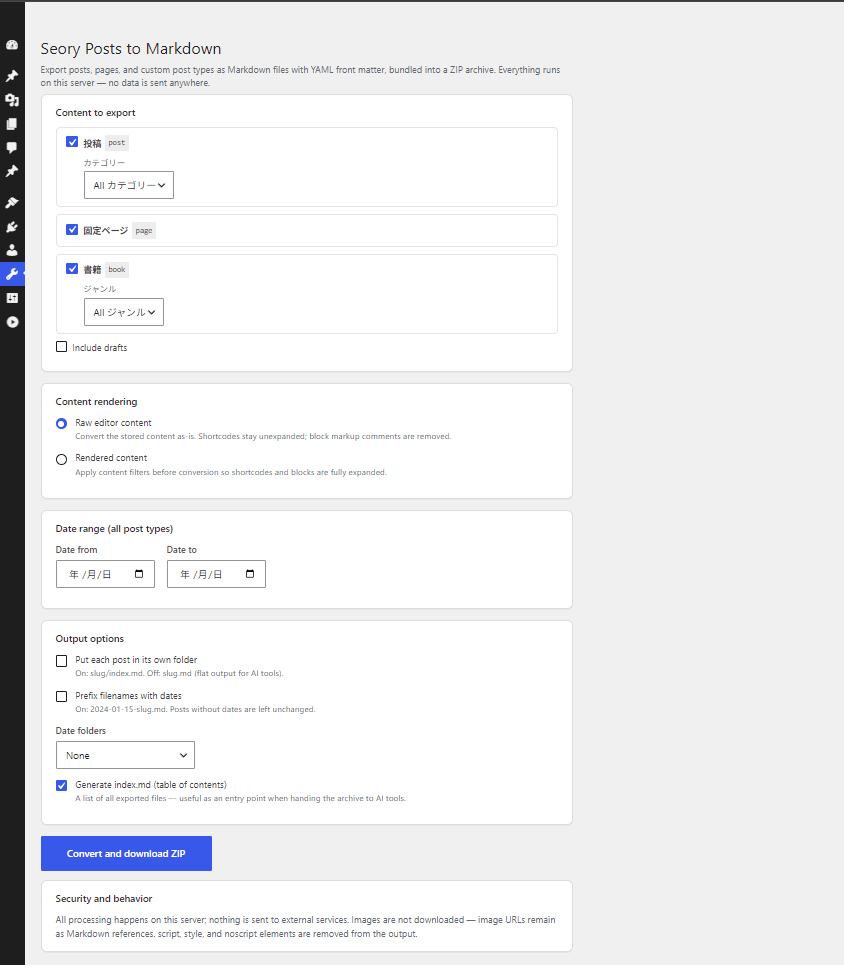
Seory Posts to Markdown converts your site content into clean Markdown files and bundles them into a single ZIP archive — ready to hand to AI tools, static site generators, or any Markdown-based workflow.
Everything runs on your server. No data is sent to external services, no API keys, no accounts.
Features
- Export posts, pages, and public custom post types in one click
- YAML front matter: title, date, type, status, slug, link, author, featured image, categories, tags, custom taxonomy terms, draft flag
- Two content modes: raw editor content, or fully rendered content with shortcodes and blocks expanded (
the_contentfilters applied) - Per-post-type taxonomy filters (categories, custom taxonomies) plus a global date range; optionally include drafts
- Flexible output layout: flat files (
slug.md), per-post folders (slug/index.md), date prefixes (2024-01-15-slug.md), and year / year-month folders - Optional
index.mdtable of contents — a convenient entry point when handing the archive to AI tools - GFM tables, fenced code blocks, ATX headings
- Batch processing keeps large sites within PHP time limits
What it does not do
- Images are not downloaded; image URLs remain as Markdown references
script,style, andnoscriptelements are removed from the output
Related
A browser-based version (convert a WordPress export XML without installing anything) is available at tools.seory.co.jp/wp-to-markdown.
Capturas
Instalación
- Install and activate the plugin.
- Go to Tools Seory Posts to Markdown.
- Choose post types and output options, then click Convert and download ZIP.
FAQ
-
Is my content sent anywhere?
-
No. Conversion runs entirely on your own server, and the generated ZIP is deleted right after download.
-
What is the difference between the two content modes?
-
Raw editor content converts the stored post content as-is: shortcodes stay unexpanded and block markup comments are removed. Rendered content applies the
the_contentfilters first, so shortcodes and blocks are expanded to their final HTML before conversion. -
Which user roles can use it?
-
Users with the
exportcapability (administrators by default). -
Are custom post types supported?
-
Yes — all public custom post types appear in the post type list.
-
Can I customize the front matter?
-
Yes. Developers can add, remove, or reorder keys with the
seoryco_wpmd_frontmatterfilter:add_filter( 'seoryco_wpmd_frontmatter', function ( $pairs, $post ) { $pairs['subtitle'] = '"' . get_post_meta( $post->ID, 'subtitle', true ) . '"'; return $pairs; }, 10, 2 );Values must be YAML-formatted; keys with an empty-string value are omitted.
Reseñas
No hay valoraciones para este plugin.
Colaboradores y desarrolladores
«Seory Posts to Markdown» es un software de código abierto. Las siguientes personas han colaborado con este plugin.
Colaboradores
«Seory Posts to Markdown» está traducido en 1 idioma. Gracias a los traductores por sus contribuciones.
Traduce «Seory Posts to Markdown» a tu idioma.
¿Interesado en el desarrollo?
Revisa el código , echa un vistazo al repositorio SVN o suscríbete al registro de desarrollo por RSS.
Registro de cambios
0.1
- Initial release.