

Descripción
SiteGuard WP Plugin ayuda a proteger los sitios WordPress reforzando la seguridad del acceso y del área de administración. Ayuda a reducir los ataques de fuerza bruta, los ataques con listas de contraseñas, el spam en los comentarios y el acceso no autorizado a /wp-admin/.
Características principales
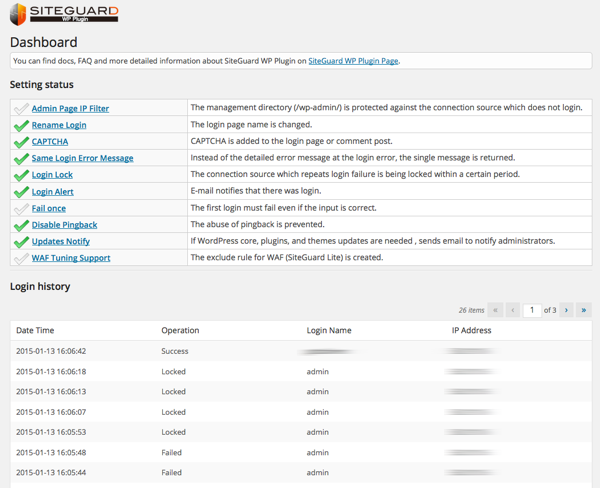
- Filtro de IP para la página de administración: restringe el acceso a wp-admin a las direcciones IP que han accedido correctamente.
- Renombrar acceso: cambia la URL de la página de acceso de
wp-login.phpa una ruta personalizada. - CAPTCHA: añade CAPTCHA a los formularios de acceso, comentarios, restablecimiento de contraseña y registro de usuarios.
- Bloqueo de acceso: bloquea temporalmente las direcciones IP después de repetidos intentos de acceso fallidos.
- Alerta de acceso: envía avisos por correo electrónico cuando los usuarios acceden.
- Fallar una vez: rechaza intencionadamente el primer intento de acceso válido y requiere que el usuario vuelva a intentarlo poco después.
- Protección de XML-RPC: desactiva los pingbacks o todo el acceso a XML-RPC para ayudar a prevenir abusos.
- Bloqueo de consultas de autor: ayuda a prevenir la filtración de nombres de usuario a través de solicitudes
/?author=<número>. - Avisos de actualización: envía avisos por correo electrónico cuando hay actualizaciones disponibles para el núcleo de WordPress, plugins o temas.
- Soporte de ajuste del WAF: crea reglas de exclusión para ayudar a prevenir falsos positivos cuando el WAF de SiteGuard Server Edition está instalado.
Requisitos y compatibilidad
- No se admite WordPress multisitio.
- Se admiten Apache 1.3, Apache 2.x y Nginx.
- Rename Login no se puede combinar con una función de cambio de URL de la página de acceso en otro plugin. Actívalo solo en uno; usar ambos puede dejar dos URL de acceso disponibles o impedir que se cargue la página de acceso.
- CAPTCHA requiere las extensiones de PHP
mbstringygd. - El soporte de ajuste del WAF requiere SiteGuard Server Edition en Apache.
Documentación
La documentación, las preguntas frecuentes y más detalles están disponibles en inglés y en japonés.
Traducciones
Este plugin está traducido por la comunidad. Agradecemos tu ayuda con las traducciones en la plataforma de traducción de WordPress.
Capturas
Instalación
Desde el Escritorio de WordPress
- En el Escritorio de WordPress, ve a Plugins > Añadir nuevo.
- Busca «SiteGuard WP Plugin».
- Instala y activa el plugin.
Instalación manual
- Busca y descarga «SiteGuard WP Plugin».
- En el Escritorio de WordPress, ve a Plugins > Añadir nuevo > Subir plugin.
- Sube el archivo ZIP descargado.
- Instala y activa el plugin.
Reseñas


Colaboradores y desarrolladores
«SiteGuard WP Plugin» es un software de código abierto. Las siguientes personas han colaborado con este plugin.
Colaboradores

«SiteGuard WP Plugin» está traducido en 13 idiomas. Gracias a los traductores por sus contribuciones.
Traduce «SiteGuard WP Plugin» a tu idioma.
¿Interesado en el desarrollo?
Revisa el código , echa un vistazo al repositorio SVN o suscríbete al registro de desarrollo por RSS.
Registro de cambios
1.8.9
- Update Notifications: fixed notification emails still being sent while the feature was set to OFF.
- CAPTCHA: fixed a fatal error on the login page on servers that cannot render the CAPTCHA image. CAPTCHA is now skipped so that login remains available, and the reason is shown on the settings screen.
- CAPTCHA: fixed login becoming impossible when the CAPTCHA working directory could not be written to by the web server. This is now detected and reported instead of failing silently.
- Confirmed compatibility with WordPress 7.1.
Special thanks to miruko for the update notification report.
1.8.8
- Rename Login: shows a warning when another active plugin is also changing the login page URL.
- Rename Login: fixed an issue where a fresh install could leave the login page inaccessible (the login URL returned 404).
Special thanks to niflex for the plugin conflict report, and to kitadahi for the login URL report.
1.8.7
- Fixed a cross-site scripting (XSS) vulnerability in the logout URL that could occur when the login page URL is changed.
Special thanks to daroo (Patchstack) for the report.
1.8.6
- Rename Login: when the login URL falls back to the .php (stub) form, the settings screen now explains why .htaccess could not be used.
- Rename Login: fixed the .htaccess self-test so it works when WordPress has been given its own directory (the WordPress Address differs from the Site Address).
- Block Author Query: the «Disable REST API» exclusion list now uses REST API namespaces instead of plugin names.
Special thanks to abcdrew and miwarock777 for their contributions to this release.
1.8.5
- Fixed a security issue affecting the login URL protection on some server configurations.
Special thanks to goto5656 for the report.
1.8.4
- Fixed a security issue affecting the login URL protection on some server configurations.
Special thanks to goto5656 for the report.
1.8.3
- Fixed an issue where the cleanup of legacy .htaccess rules (which could lock administrators out of /wp-admin/) did not run on sites that had already updated to 1.8.0 or 1.8.1.
1.8.2
- Fixed an issue where upgrading from 1.7.x to 1.8.x could leave legacy .htaccess rules in place, locking administrators out of /wp-admin/.
Special thanks to t.inoue for the report.
1.8.1
- Fixed a security issue affecting the login URL protection.
1.8.0
- Added support for Nginx and Apache environments that do not use an .htaccess file.
- Improved Login Lock to apply to authentication attempts via XML-RPC.
- Fixed several security issues affecting login URL protection.
- Reviewed and updated the English strings. Special thanks to abcdrew.
Special thanks to Daiki Honda and Daishi Kuroki for their contributions to this release.
Special thanks to Helena Media Research Corporation for the report.
1.7.12
- Fixed an authorization vulnerability in the login history. Special thanks to Ficus Inc.
- Mitigated CAPTCHA authentication failures in some environments.
1.7.11
- Fixed an issue where a syntax error occurred in PHP 5.6 or earlier.
1.7.10
- Fixed a Guessable CAPTCHA vulnerability (CVE-2026-27411). Special thanks to Patchstack.
1.7.9
- Fixed a deprecated notice for the get_currentuserinfo() function.
1.7.8
- Fixed a warning that occurred in version 1.7.7.
1.7.7
- Fixed a bug where the renamed login URL was leaked when wp-register.php was accessed.
1.7.6
- Fixed an issue where a warning occurred on the login screen in PHP 8.x environments.
1.7.5
- Fixed an issue where a fatal error occurred on the Update Notifications screen in PHP 8.x environments.
1.7.4
- Changed the directory for storing CAPTCHA image files to wp-content/siteguard/.
- Fixed some bugs.
1.7.3
- Fixed an issue where password reset emails could not be sent from the admin page when CAPTCHA was enabled.
1.7.2
- Reviewed and modified source code related to security.
1.7.1
- Fixed an issue where a syntax error occurred in PHP 5.6 or earlier.
1.7.0
- Removed the ability to get the client IP address from X-Forwarded-For due to IP spoofing risk.