

Descripción
TideReply answers your customers in seconds, from your own website, files and FAQs, in the language they write in. When a question needs a person, it says so and brings your team into the same chat. Every customer answered. Only the hard ones reach you.
What your customers get
- Answers from your store, not guesses – shipping, returns, sizing, payments: TideReply reads your site and the files you add, and answers from that. When it does not know, it does not make something up.
- Real order status – with WooCommerce, a shopper asks «where is my order?» and gets its fulfillment status and tracking. The order number and checkout email are checked on your own server first.
- Their own language – it detects the language a visitor writes in and answers in it. No translation setup.
- A person when it matters – the hard questions go to your team in the same conversation, with the summary already written.
What you get
- One inbox in TideReply for website chat, email, Messenger and Instagram.
- Fewer repeat questions, and more time for the ones that need you.
- Setup in a few minutes: install, connect, approve. No code, no theme editing.
How it works
- Install and activate this plugin.
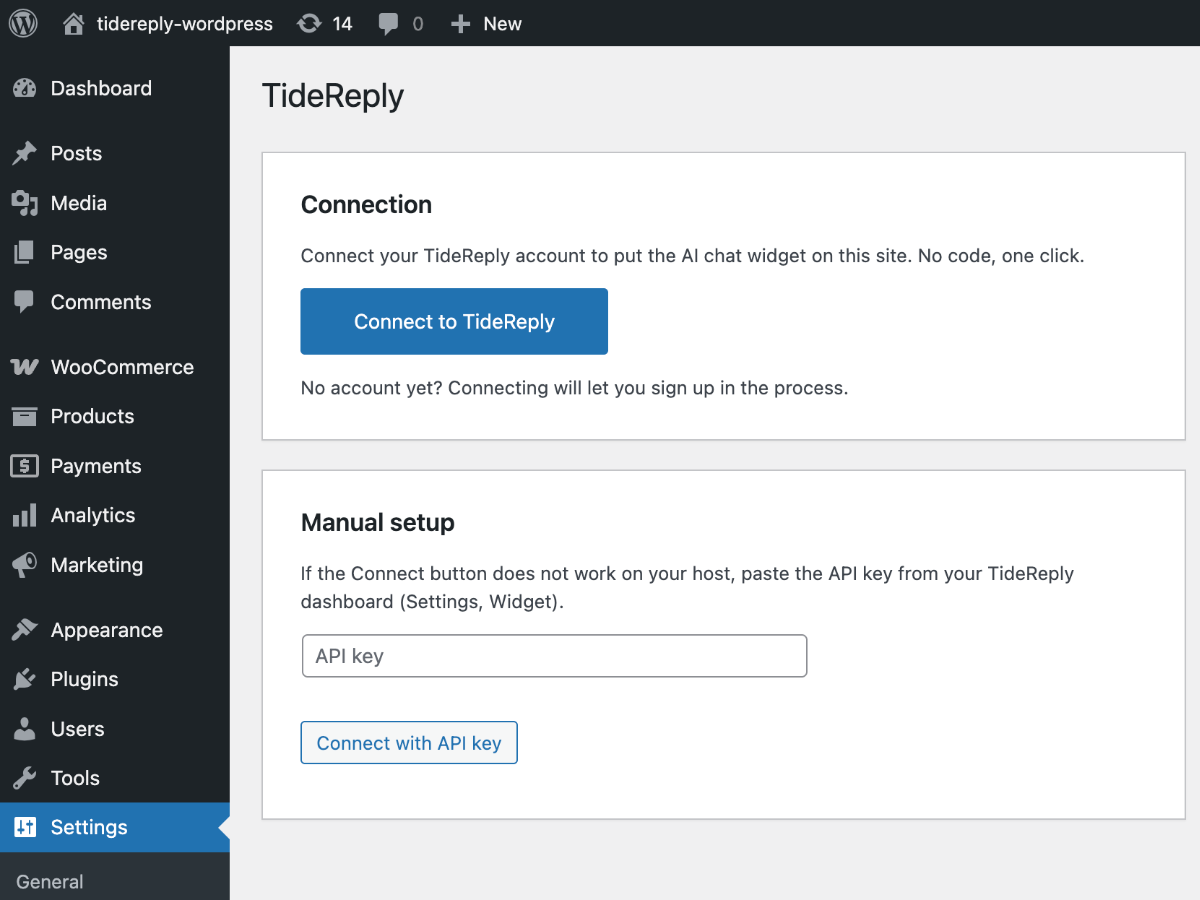
- Click «Connect TideReply» in the notice, or go to Settings, TideReply and click «Connect to TideReply».
- Sign in to TideReply, or get started and choose your plan.
- Approve this site. The chat is live, and with WooCommerce active, order-status answers switch on automatically.
Pricing
The plugin is free. TideReply is a paid service: one plan with every feature and unlimited teammates, with a 14-day money-back guarantee. See current prices at tidereply.com/pricing.
Requirements
- WordPress 6.3 or higher
- PHP 7.4 or higher
- A TideReply account and plan (tidereply.com)
- WooCommerce is optional – only needed for order-status answers
External services
This plugin connects to TideReply (app.tidereply.com), a third-party service operated by Evorbi:
- It loads the chat widget script
https://app.tidereply.com/widget.json your site’s front end. When visitors use the chat, their messages and the page URL are sent to TideReply to generate answers. - During setup, the plugin exchanges a one-time connection code at
https://app.tidereply.com/api/wordpress/connect/exchange(or/manual), sending your site URL, REST API base URL, WordPress and plugin versions, and whether WooCommerce is active. - If WooCommerce is active, TideReply’s servers call back into your site (
/wp-json/tidereply/v1/order-status, HMAC-authenticated) when a visitor asks about their own order. The request carries the order number and email the visitor typed; the response contains order status, tracking and total only – never names or addresses. - On disconnect or deactivation, the plugin notifies
https://app.tidereply.com/api/wordpress/connect/disconnect.
Terms of service: https://tidereply.com/terms
Privacy policy: https://tidereply.com/privacy
Capturas

Instalación
From WordPress Dashboard
- Go to Plugins > Add New
- Search for «TideReply»
- Click «Install Now» and then «Activate»
- Click «Connect TideReply» in the notice (or go to Settings > TideReply and click «Connect to TideReply»)
- Sign in to TideReply, or get started and choose your plan, then approve this site. The chat is now live.
Manual Installation
- Download the plugin zip file
- Go to Plugins > Add New > Upload Plugin
- Upload the zip file and click «Install Now»
- Activate the plugin
- Go to Settings > TideReply, click «Connect to TideReply», then approve
If the Connect button does not work on your host
Use the manual setup on the same settings screen: paste the API key from your TideReply dashboard (Settings, Widget) and click «Connect with API key».
FAQ
-
Do I need a paid plan?
-
Yes. The plugin is free, and the chat runs on TideReply, which is a paid service with a 14-day money-back guarantee. If your TideReply workspace has no plan yet, connecting asks you to choose one first, so the chat never goes on your site without working.
-
Does it work without WooCommerce?
-
Yes. The chat widget works on any WordPress site. WooCommerce only adds the order-status answers.
-
What data is sent to TideReply?
-
Visitor chat messages and the page URL (to answer questions), plus the connection metadata listed under External services. Order-status requests are answered by your own site; only status, tracking and total are returned.
-
How do I remove it?
-
Click Disconnect on the settings page (or deactivate the plugin). Uninstalling deletes every option the plugin created.
-
Is the order lookup secure?
-
Yes. Requests are authenticated with a per-site secret (HMAC over the exact request bytes, 5-minute replay window), the order-to-email match happens on your server, and mismatches are indistinguishable from not-found to the person asking.
Reseñas
No hay valoraciones para este plugin.
Colaboradores y desarrolladores
«TideReply – AI Customer Chat for WooCommerce» es un software de código abierto. Las siguientes personas han colaborado con este plugin.
Colaboradores
Traduce «TideReply – AI Customer Chat for WooCommerce» a tu idioma.
¿Interesado en el desarrollo?
Revisa el código , echa un vistazo al repositorio SVN o suscríbete al registro de desarrollo por RSS.
Registro de cambios
1.0.1
- After activation, a notice on the Dashboard and Plugins screens says how to connect (dismissible).
- The settings screen says what connecting involves and that TideReply is a paid service.
- Clear messages when a workspace has no plan yet, or the site is connected to another workspace.
- A connect request now stays valid for an hour, so signing up in between no longer expires it.
1.0.0
- Initial release: one-click connect, widget injection, WooCommerce order-status endpoint.