Saltar al contenido
WordPress.org

España

  • Temas
  • Plugins
  • Noticias
    • Documentación
    • Foros
  • Acerca de
  • Patrones
  • Eventos
    • Equipo
    • Manuales
  • Consigue WordPress
Consigue WordPress
WordPress.org

Plugin Directory

Webknit Site Toolkit

  • Envía un plugin
  • Mis favoritos
  • Acceder
  • Envía un plugin
  • Mis favoritos
  • Acceder

Webknit Site Toolkit

Por Webknit Digital
Descargar
  • Detalles
  • Valoraciones
  • Instalación
  • Desarrollo
Soporte

Descripción

Webknit Site Toolkit lets a site administrator:

  • Recolor the wp-admin sidebar, links, buttons, and form inputs, entered as hex codes or picked visually.
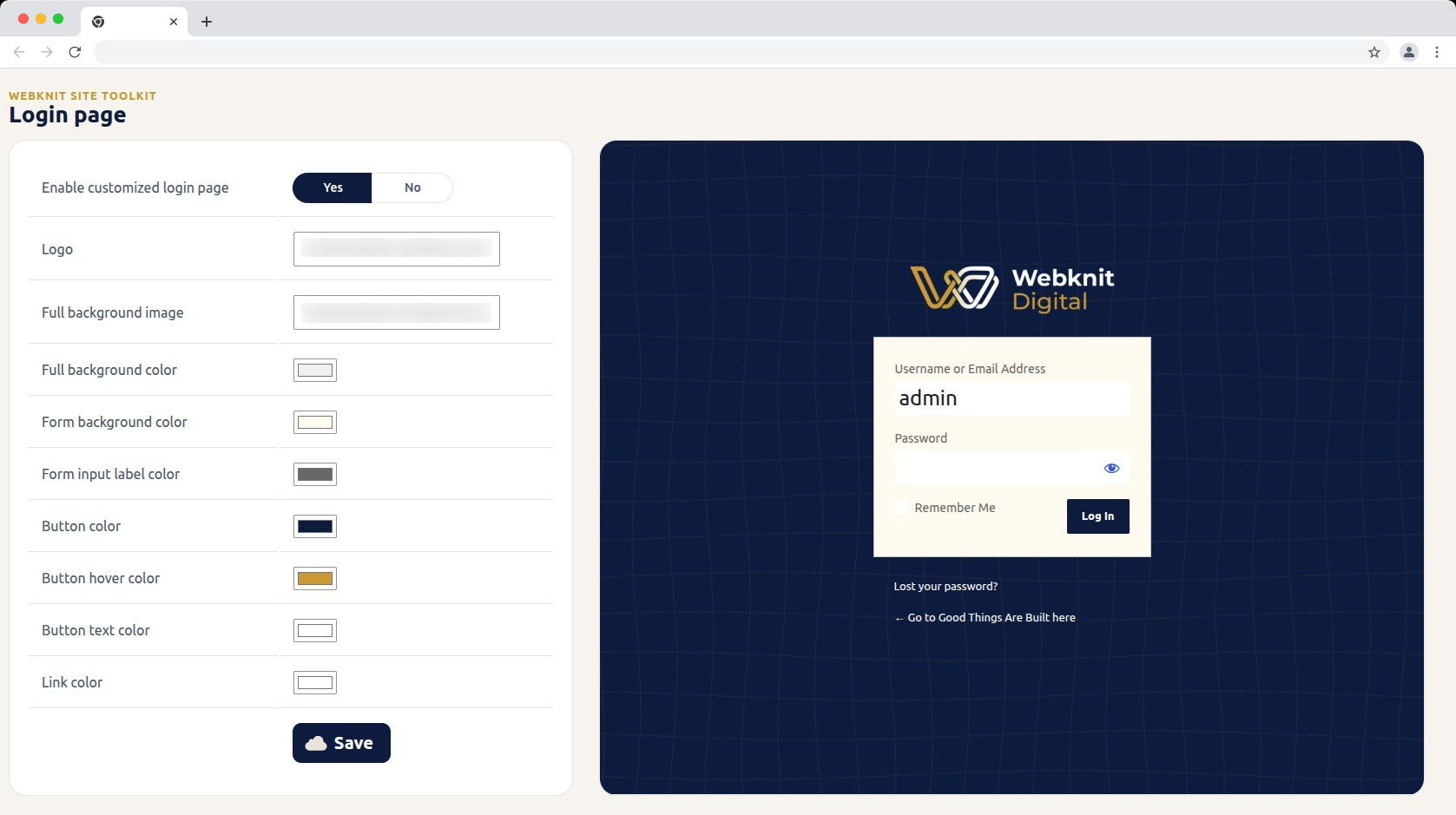
  • Customize the login screen: logo, full-page background image/color, form background/label colors, and button colors/text.
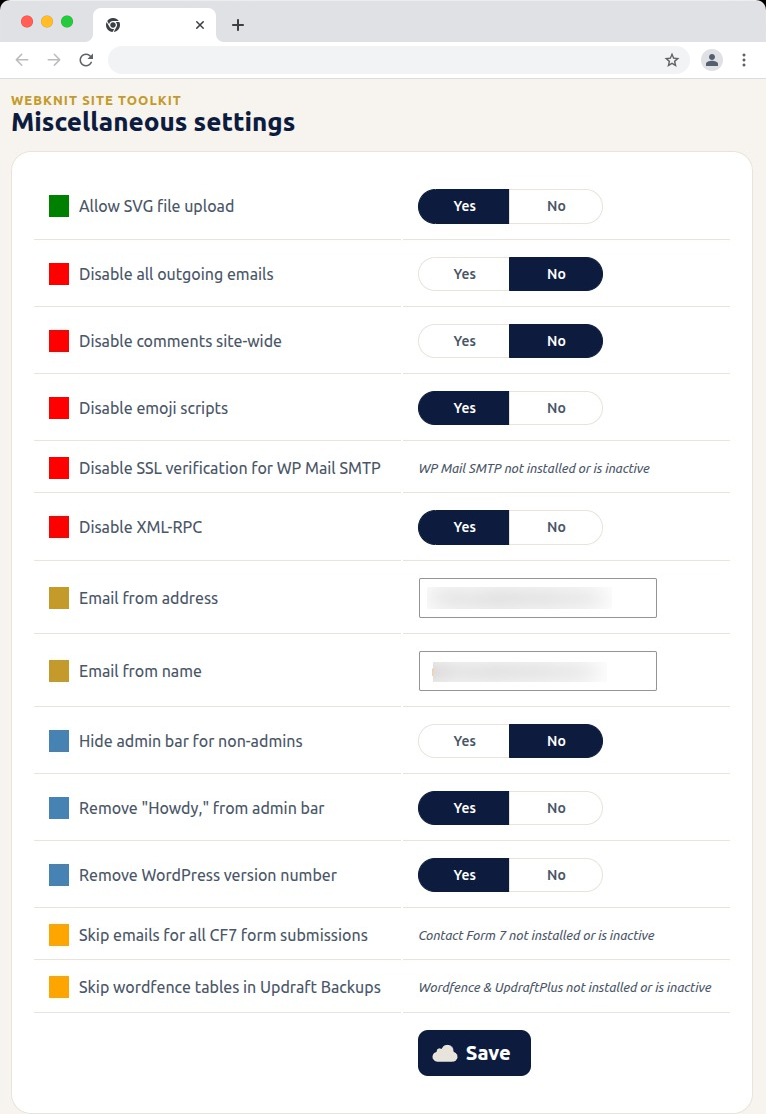
  • Toggle a set of miscellaneous settings: allow SVG uploads, disable SSL verification for WP Mail SMTP, disable outgoing emails, skip Wordfence tables during UpdraftPlus backups, skip Contact Form 7 submission emails, disable XML-RPC, remove the WordPress version number, disable emojis, hide the admin bar for non-admins, disable comments sitewide, remove «Howdy,» from the admin bar, and override the outgoing mail «from» name/address.

Capturas
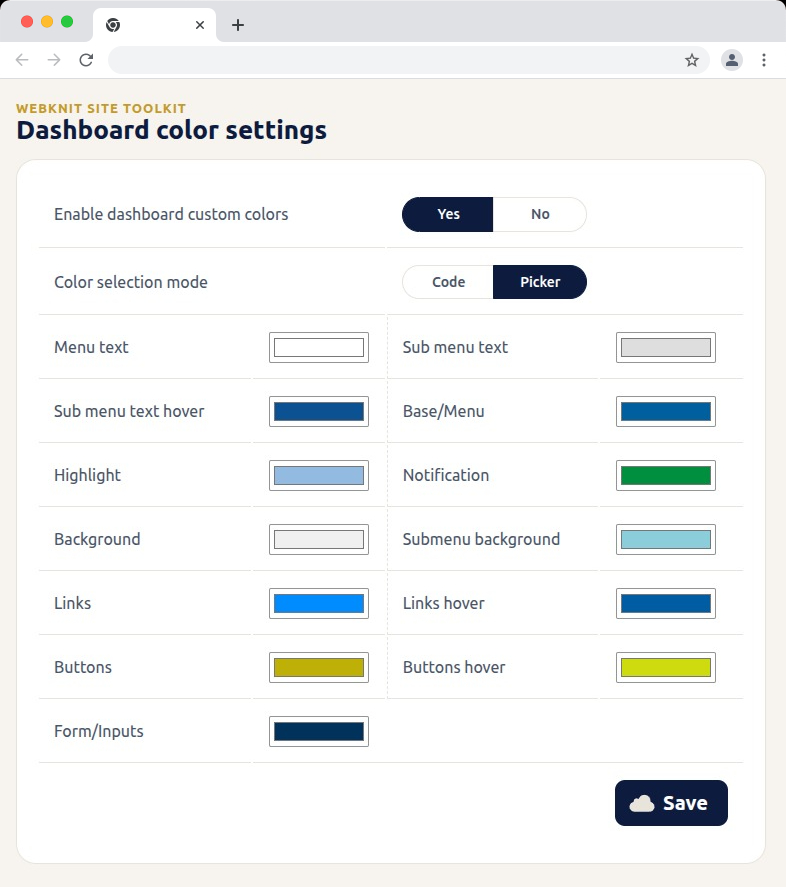
Dashboard color settings — recolor the wp-admin sidebar, links, buttons, and form inputs with hex codes or a visual picker.
Login page — customize the logo, background, form colors, and button styling, with a live preview alongside the settings.
Miscellaneous settings — toggle SVG uploads, outgoing email, comments, XML-RPC, and more; toggles for a plugin that isn't installed or active show a status message instead of a Yes/No choice.
Miscellaneous settings — toggle SVG uploads, outgoing email, comments, XML-RPC, and more; toggles for a plugin that isn’t installed or active show a status message instead of a Yes/No choice.

Instalación

  1. Upload the plugin files to /wp-content/plugins/webknit-site-toolkit, or install through the WordPress plugins screen directly.
  2. Activate the plugin through the «Plugins» screen in WordPress.
  3. Use the «Site Toolkit» menu in wp-admin to configure dashboard colors, the login page, and miscellaneous settings.

FAQ

Why does one of the Misc. settings toggles show a message instead of Yes/No?

That setting acts on another plugin (WP Mail SMTP, Contact Form 7, or Wordfence + UpdraftPlus) that isn’t currently installed or active, so the toggle would have no effect. The message replaces the toggle until that plugin is active; your previously saved choice is kept and reappears once it is.

I don’t see the «Site Toolkit» menu in wp-admin.

Access requires the manage_options capability, which by default only Administrators have.

I changed a color or setting and saved, but the site still looks the same.

Generated CSS is served with a cache-busting version, but browsers can still hold an old copy. Hard-refresh the page (Ctrl+Shift+R / Cmd+Shift+R) and confirm the save actually completed.

Where are the generated CSS files stored?

In wp-content/uploads/webknit-site-toolkit/. That directory must be writable by the web server, or dashboard/login color changes won’t apply.

Reseñas

No hay valoraciones para este plugin.

Colaboradores y desarrolladores

«Webknit Site Toolkit» es un software de código abierto. Las siguientes personas han colaborado con este plugin.

Colaboradores
  • Webknit Digital

Traduce «Webknit Site Toolkit» a tu idioma.

¿Interesado en el desarrollo?

Revisa el código , echa un vistazo al repositorio SVN o suscríbete al registro de desarrollo por RSS.

Registro de cambios

1.0.0

  • Initial release.

Meta

  • Versión 1.0.0
  • Última actualización hace 4 días
  • Instalaciones activas Menos de 10
  • Versión de WordPress 6.0 o superior
  • Probado hasta 7.1
  • Versión de PHP 7.4 o superior
  • Idioma
    English (US)
  • Etiquetas:
    admincolorsdashboardloginsettings
  • Vista avanzada

Valoraciones

Aún no se han enviado valoraciones.

Tu valoración

Ver todas las reseñas

Colaboradores

  • Webknit Digital

Soporte

¿Tienes algo que decir? ¿Necesitas ayuda?

Ver el foro de soporte

  • Acerca de
  • Noticias
  • Alojamiento
  • Privacidad
  • Escaparate
  • Temas
  • Plugins
  • Patrones
  • Aprender
  • Soporte
  • Desarrolladores
  • WordPress.tv ↗
  • Involúcrate
  • Eventos
  • Donar ↗
  • Regalos ↗
  • WordPress.com ↗
  • Matt ↗
  • bbPress ↗
  • BuddyPress ↗
WordPress.org
WordPress.org

España

  • Visita nuestra cuenta de X (anteriormente Twitter)
  • Visita nuestra cuenta de Bluesky
  • Visita nuestra cuenta de Mastodon
  • Visita nuestra cuenta de Threads
  • Visita nuestra página de Facebook
  • Visita nuestra cuenta de Instagram
  • Visita nuestra cuenta de LinkedIn
  • Visita nuestra cuenta de TikTok
  • Visita nuestro canal de YouTube
  • Visita nuestra cuenta de Tumblr
El código es poesía.
The WordPress® trademark is the intellectual property of the WordPress Foundation.